This post is basically a continuation of this post. I didn’t want to make another post so soon after the original one, but I can’t figure it out.
I’ve been trying to figure out to spin up a LXC container, app, or vm to use yatm for my LTO drive. Docker app has been the most promising, since I can specify the drive specifically to use within the container. Someone also made a docker image for yatm. The problem is, I don’t know how to save any config changes I make in the container so I don’t lose them if I restart the app. Could anyone help me out?
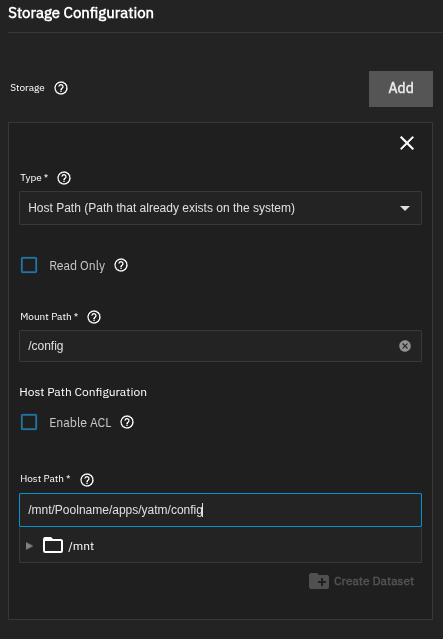
You have to specify a hostpath for the config so that it persists between updates and app restart. Ideally you would create dataset for the config and map it to the config folder in side the docker container.
Did you use the custom app wizard or the custom app yaml option to deploy the docker container?
That sounds right. The problem is, how do I “tell” the docker container to put the config data in the config folder?
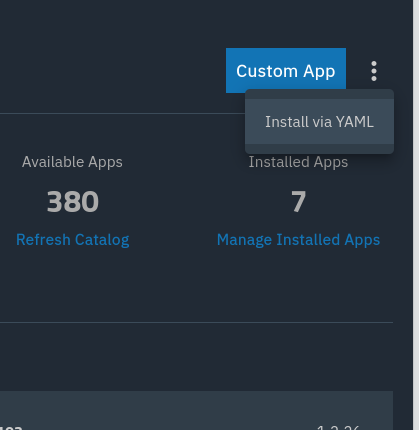
Also, I used the app wizard because I only now discovered that you have to click on the 3 dots next to the “Custom App” button to get the yaml option lol.
First you have to know where inside the containers filesystem the config is stored. If its just in /config or /opt/config or whatever
Then you have to create a Dataset on your storage pool e.g. /mnt/Poolname/apps/yatm
Inside the yatm Child dataset you can then create a folder called config via shell
When you edit the app there’s a storage section and your config should look similar to this
I was going to remark that the docker image you linked to was over a year old, but the last release of yatm was over two years ago, so…
You don’t; it expects its config data to be wherever (in the container) it’s supposed to be. For many Docker containers, that’s at /config, but some differ. The yatm README indicates its config file should be at /opt/yatm/config.yaml, so if that hasn’t been changed in the container, you’d use /opt/yatm in the “Mount Path” section of the form Lars showed, and whatever directory on your NAS you want to store the config in in the “Host Path” field.