Importing disks with exported pools and corrupted metadata

I’m relatively new to TrueNAS but I’ve been using Linux for twenty years, so this is more about the specifics of TrueNAS and whether I’m misunderstanding something fundamental.

Context:
I put together a test rig to see whether ProxMox would work for my family’s needs using an old laptop. It mostly seemed to work but then I irreparably damaged the ethernet port. Not a problem, pulled the SSD, bought an HP Prodesk 400, dropped the SSD in, reconnected the USB to SATA adapter for the two hard disks (said adapter is essentially a USB to NVME board).

The way I setup my pool (“main”) was to have two identical 2TB disks with the data mirrored between them - RAID 1. Seemed fairly sensible to me. I figured that losing a hard disk would be a nuisance but only a minor inconvenience.

Firing up the new server I noticed that the device names had changed. Ah well, no big deal, let’s just find out their names on the host system:

# lsblk -o +MODEL,SERIAL,WWN
NAME         MAJ:MIN RM   SIZE RO TYPE MOUNTPOINTS MODEL                      SERIAL             WWN
sda            8:0    0 119.2G  0 disk             Lexar SSD NS100 128GB      NLV514R0098990S301 0x53a5a275141c94af
├─sda1         8:1    0  1007K  0 part                                                           0x53a5a275141c94af
├─sda2         8:2    0     1G  0 part /boot/efi                                                 0x53a5a275141c94af
└─sda3         8:3    0 118.2G  0 part                                                           0x53a5a275141c94af
  ├─pve-swap 252:0    0   7.6G  0 lvm  [SWAP]                                                    
  └─pve-root 252:1    0 110.6G  0 lvm  /                                                         
sdb            8:16   0 115.5P  0 disk             USB Mass Storage           0000000000F3       
└─sdb1         8:17   0   1.8T  0 part                                                           
sdc            8:32   0 115.5P  0 disk             USB Mass Storage           0000000000F3       
└─sdc1         8:33   0   1.8T  0 part                                                           

Cool, okay, update the ProxMox configuration for my TrueNAS system. Comment out the old, whack in the new:

boot: order=scsi0;ide2;net0
cores: 2
cpu: x86-64-v2-AES
ide2: local:iso/TrueNAS-SCALE-25.04.1.iso,media=cdrom,size=1925208K
memory: 8192
meta: creation-qemu=9.0.2,ctime=1750803531
name: TrueNAS
net0: virtio=BC:24:11:88:86:1F,bridge=vmbr0,firewall=1
numa: 0
ostype: l26
scsi0: local:102/vm-102-disk-0.qcow2,iothread=1,size=12G
#scsi1: /dev/disk/by-id/usb-ST2000DM_008-2FR102_0000000000F3-0:0,size=1953514584K
#scsi2: /dev/disk/by-id/usb-ST2000DM_008-2UB102_0000000000F3-0:1,size=1953514584K
scsi1: /dev/disk/by-id/usb-JMicron_USB_Mass_Storage_0000000000F3-0:1-part1,size=1953514584K
scsi2: /dev/disk/by-id/usb-JMicron_USB_Mass_Storage_0000000000F3-0:0-part1,size=1953514584K
scsihw: virtio-scsi-single
smbios1: uuid=2d013e50-8478-4726-ba2b-4efba6b9389c
sockets: 1
vmgenid: 06bc7ac5-2069-4a77-86c7-28f2ebf33895

System boots right up. Let’s see what the state of play is:

truenas_admin@truenas[~]$ sudo fdisk -l
Disk /dev/sda: 12 GiB, 12884901888 bytes, 25165824 sectors
Disk model: QEMU HARDDISK   
Units: sectors of 1 * 512 = 512 bytes
Sector size (logical/physical): 512 bytes / 512 bytes
I/O size (minimum/optimal): 512 bytes / 512 bytes
Disklabel type: gpt
Disk identifier: 4F61102A-0CE4-4E4F-99E5-CCA35E2C3CED

Device       Start      End  Sectors  Size Type
/dev/sda1     4096     6143     2048    1M BIOS boot
/dev/sda2     6144  1054719  1048576  512M EFI System
/dev/sda3  1054720 25165790 24111071 11.5G Solaris /usr & Apple ZFS


Disk /dev/sdc: 1.82 TiB, 1998251360256 bytes, 3902834688 sectors
Disk model: QEMU HARDDISK   
Units: sectors of 1 * 512 = 512 bytes
Sector size (logical/physical): 512 bytes / 512 bytes
I/O size (minimum/optimal): 512 bytes / 512 bytes


Disk /dev/sdb: 1.82 TiB, 1998251360256 bytes, 3902834688 sectors
Disk model: QEMU HARDDISK   
Units: sectors of 1 * 512 = 512 bytes
Sector size (logical/physical): 512 bytes / 512 bytes
I/O size (minimum/optimal): 512 bytes / 512 bytes

In the dashboard we see a list of disks:

That looks promising!
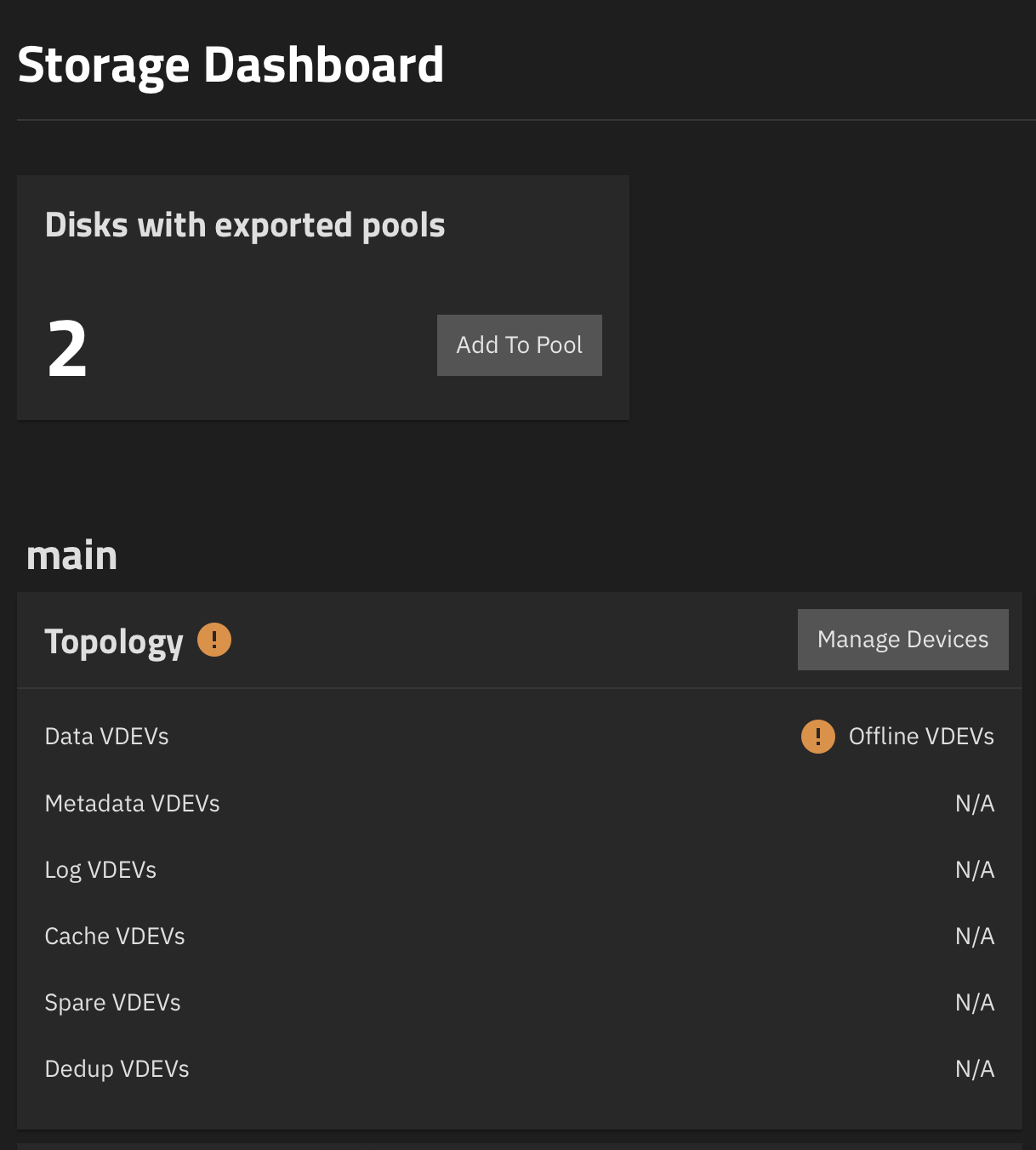
Let’s add those, I guess?
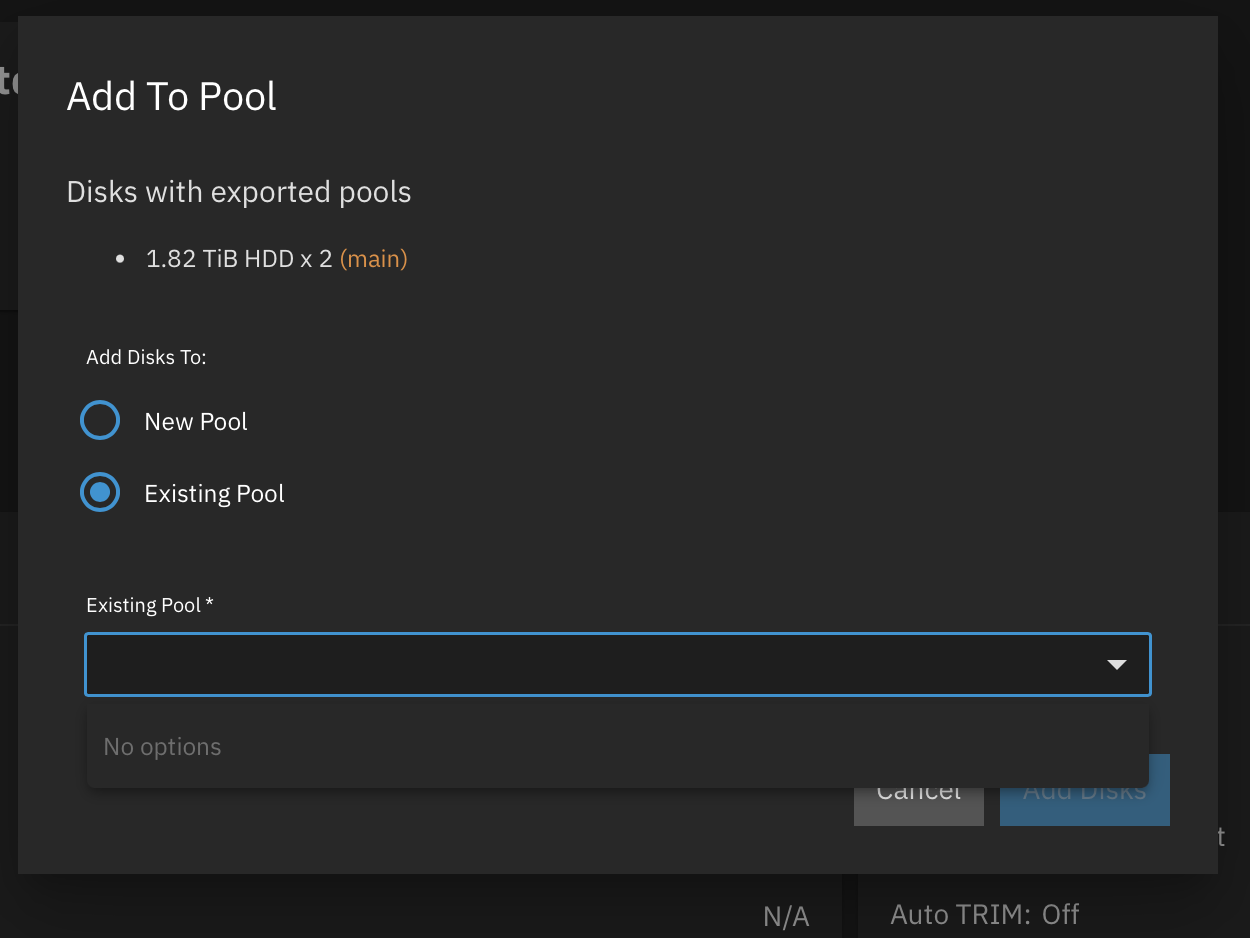
…It can see that they’re for “main” and lists “main” as existing but won’t add them?!

truenas_admin@truenas[~]$ sudo zpool status
  pool: boot-pool
 state: ONLINE
  scan: scrub repaired 0B in 00:00:20 with 0 errors on Mon Jul 14 03:45:22 2025
config:

        NAME        STATE     READ WRITE CKSUM
        boot-pool   ONLINE       0     0     0
          sda3      ONLINE       0     0     0

errors: No known data errors

Ooookay…

truenas_admin@truenas[~]$ sudo zpool import   
  pool: main
    id: 12412500989446671739
 state: FAULTED
status: The pool metadata is corrupted.
action: The pool cannot be imported due to damaged devices or data.
        The pool may be active on another system, but can be imported using
        the '-f' flag.
   see: https://openzfs.github.io/openzfs-docs/msg/ZFS-8000-72
config:

        main        FAULTED  corrupted data
          mirror-0  ONLINE
            sdb     ONLINE
            sdc     ONLINE
truenas_admin@truenas[~]$ sudo zpool import -fF main
cannot import 'main': I/O error
        Destroy and re-create the pool from
        a backup source.

So I disconnected the hard disks after shutting down the system and somehow ALL my data is toast?

How is that even possible?

What was the point of the mirroring if TrueNAS can do nothing about it?

What am I missing here? Can my data be recovered at all?

It isn’t the end of the world if it can’t but it does make me wonder what on Earth I’m doing wrong here. All it needs to do is mirror the data and try to keep it available. I’m not striping data, I’m not doing any wacky configurations, what the hell am I doing wrong?

My plan had been to move these disks to an NVME riser on the new machine but given that TrueNAS seems to struggle with anything I ask of it I’m wondering whether it’s worth the trouble. I feel like I’d have more reliable backups with an Alpine Linux VM and an rsync cron job - and that sounds nuts!

Please help me, folks, I’m clearly missing something obvious here.

Proxmox need to be like it’s production
VIRTUAL

Don’t use USB disks. You data shows it reporting the same serial numbers. TrueNAS / ZFS needs direct access to the disks. A single disk on USB can be okay but not what you have

My superficial understanding of the steps taken up until now:

  • You ran Proxmox and virtualised TrueNAS. The old laptop server had a hardware fault and you transplanted the drives over to new hardware.

  • On the new server you set up Proxmox again (?) and updated a few device names to get it to work.

  • You’re passing the drives through to the TrueNAS VM (version 25.04.1).
    TrueNAS sees the drives and recognises that there is something ZFS:y about them, but complains that the drives appear to have been in use by a different system and that the metadata is corrupt.

In short I suspect the way you virtualised caused the issue.

In basically every recommendation in the community you will see people say that:

  1. You should pass the entire drive controller through to the VM, where the controller typically is an HBA.
  2. You need to blacklist that controller so Proxmox won’t use it. There is a reason for this nagging, and that is that Proxmox understands ZFS.

What I suspect has happened here is that sometime during your move to the new hardware Proxmox decided to auto-import your ZFS pool while it was being accessed by TrueNAS. This will quickly corrupt the pool.

Perhaps someone can figure out a way out of this mess but at this point you should prepare your backup, you will probably need to use it.

So in essence “don’t use TrueNAS”?

If you want to stick to the hardware setup you have, No, don’t pick TrueNAS. There are warning in the Hardware Guide in the documents. Other warnings are SMR type hard drives, port multiplier warnings, hardware RAID controllers instead of a plain, HBA, etc.

2 Likes

Clarification on the steps taken - I didn’t setup ProxMox again.

The laptop’s system drive was moved directly to the new server, specifically to avoid any issues of the kind you mention.

Perhaps someone can figure out a way out of this mess but at this point you should prepare your backup, you will probably need to use it.

This is the thing I don’t understand - I mirrored the drives. What was the point in that if ZFS chews them up as soon as the slightest thing happens?

I don’t have a backup beyond that because I didn’t think I’d need one imminently. As in, I’m going to set one up but that’s my next step after getting a stable basic setup. The data can thankfully be recreated - it’s mostly Immich data imported from Google Photos at this stage.

However if this is how frail TrueNAS is then it’s not really fit for my purposes. That seems like an inaccurate assessment of its capabilities which is partly what I’m asking - what am I missing here? What should I be doing so that if my home loses power or I need to unplug some devices it doesn’t fall over.

Why are USB disks an issue? Surely the data is either on the disks or it’s not, assuming the drives are healthy (they’re brand new!). Shouldn’t it simply be a case of bringing the disks online and grabbing whatever header data is necessary?

Also what was the point in mirroring the disks when it seems to be incapable of reading any data from them?

Genuinely, that’s really helpful. I have a friend that swears by TrueNAS and so that’s why I decided to give it a chance rather than building my own solution.

If it’s that finicky about hardware then it’s really not a good fit for me.

Here is another link on the USB issue, besides the warning in the Hardware Guide

Mirroring helps when one drive experiences some form of hardware failure. Since the mirrors are redundant you can easily swap out the faulting drive and be back up and running as before.

If my theory on the cause for the failure is correct, this isn’t a hardware fault. This is software issue. You had two operating systems (Proxmox and TrueNAS) both access the same drives at the same time, corrupting the metadata. Each OS thought they were the only user when this wasn’t really the case. ANY file system will be liable to fail in that scenario.

In other words, it’s not a TrueNAS fault. TrueNAS had no way of knowing that you had Proxmox uncaged in the background accessing the same devices.

Mirroring isn’t magic. If something tells a mirrored pair to write/remove/change values in the mirrored pair, they will do so. Even if the resulting actions are removing an important file or changing metadata to an inconsistent state.

1 Like

Thanks. I assumed that TrueNAS, being such a mature bit of software, would be happy to deal with whatever disks I threw at it - that way I could start with USB and once things were more pinned down move them away from it. Instead I’m finding that even when it recognises disks it can’t read data from them for reasons that I cannot comprehend.

I still don’t understand why it can see that these disks are part of an existing pool but refuses to mount them.

It’s as good a theory as any!

As far as I can tell ProxMox hasn’t touched the disks but regardless it sounds like my data is unrecoverable. I think I’ll just bin TrueNAS in that case as I’ve spent several months fiddling with various setups and just ended up feeling like an idiot.

I’m finding it darkly amusing that by trying to do things “properly” I’ve made my life significantly more stressful than if I’d just hacked something together :joy:

Good luck in your next NAS build!

In someways, TrueNAS & ZFS are not the end all for small office, home NAS use. ZFS in particular was originally designed for Enterprise Data Center servers, but now will happily work on many computers. Yet, ZFS, (and by extension TrueNAS), is not perfect.

Neither TrueNAS nor ZFS were designed to be virtualized in the way that x86 does the work. So, things need to be setup in a way that prevents corruption.


In regards to USB storage, I wrote that USB Resource because we kept getting, (even to this day), issues with USB attached data storage devices when used with TrueNAS. To be clear, in some cases like with cheap USB flash drives, they are not designed for active file systems. Thus, ANY file system would wear them out.

In other cases, TrueNAS was programmed to recognize disk serial numbers. However, many USB enclosures for SATA disks, or USB flash drives, don’t have unique serial numbers. That causes problems identifying disks.

One last comment about USB. People say that they have used USB attached disks, (either with another RAID, with ZFS or as plain disks), without problems for years. That might be the case, good for them. The issue is that OTHERS have trouble and it has been proven repeatedly over time, in the forum and elsewhere, that some USB attached storage is not as reliable as direct SATA or SAS. Hopefully that will improve.


All in all, neither TrueNAS nor ZFS are perfect. Nor suitable for every use. Lots of Enterprise customers use another brand of NAS.
3 Likes

That’s fair enough. I wasn’t sure if it was me trying to square peg a round hole or whether there was just something I was misunderstanding.

Thanks, everyone. Whilst I’m frustrated it’s mostly due to lack of familiarity with how TrueNAS and ZFS “does things”.

That said, better I run into the issues now rather than after a year of running this stuff!

1 Like

That is frankly the best attitude about finding out a product doesn’t actually match your use case.

Hope you get something that actually does what you want with the hardware you want to use.

If you do, I think we’d actually appreciate if you share the solution; there are a lot of cases where TrueNAS and/or zfs are actually not the correct option & sometimes this causes friction. It’d be kinda nice to have something to recommend as you ain’t the first to run into TrueNAS not being the right fit for you, but you’ve been very level headed about it.

(Since this is over text, I want to outright state and this post is meant to be positive in nature)

2 Likes