
Solved: Resilio Sync Container on TrueNAS SCALE with working permissions
After two full days of tinkering and testing, I finally figured out how to get Resilio Sync to work on TrueNAS Scale without using a second server with Resilio Sync on it!
and no @Sesos, using this docker container is not great because as stated here
Resilio has deprecated the official docker image in v3.
Environment:
- Dataset: “foo” on TrueNAS SCALE
- Default ownership: user foo and group foo
- Users:
- resilio (ID 3001) is the user running the container (with its PUID/PGID set in Docker) and is a member of group foo.
- SMB-connected computer uses the user foo.
Create Custom App / Docker Settings for Resilio Sync
Below are the critical settings (only changed or configured fields are mentioned):
- Application Name: resilio
- Image/Repository: lscr. io/linuxserver/resilio-sync – No space!.. I had to add a space because I can’t post a link
- Hostname: resilio
- Environment Variables:
- PUID: 3001
- PGID: 3001
- UMASK: 000 – I will later explain why!
- Restart Policy: Unless Stopped
- Network Configuration / Ports:
- Container Port1: 55555
- Host Port1: 55555
- Protocol1: TCP
- Container Port2: 8888
- Host Port2: 8888
- Protocol2: TCP
- Storage Configuration:
- Storage1 Type: ixVolume
- Mount Path: /config
- Dataset Name: resilio_config
- Storage2 Type: Host Path
- Mount Path: /sync/foo
- Enable ACL: checked
- Host Path: /mnt/vault/foo
- ACL Entries:
- ID Type: Entry is for a GROUP
- ID: 3001
- Access: Modify Access
- Force Flag: checked
- Storage1 Type: ixVolume
Scenario & Root Cause:
-
Scenario 1:
When configuring storage for the Resilio Sync container without setting special ACLs, the container (running as resilio) can’t access the “foo” dataset.
Workaround Attempt: You could change the dataset’s permissions so that the owner becomes resilio and group remains foo.
Problem: If you access the dataset via an SMB share (from a computer logged in as foo) and write new files, the new files get created with ownership foo:foo. In that case, Resilio no longer has access because the expected owner is not there. -
Scenario 2:
You might consider adjusting the SMB share configuration to force user and group using parameters like:force user = resilio force group = fooHowever, on TrueNAS SCALE the SMB share settings do not include an “Auxiliary Parameters” option. Moreover, direct modifications to
/etc/smb4.confwon’t persist — they reset on every reboot or SMB service restart.
The Only Realistic (Yet Imperfect) Option:
For this scenario, the only way to have file access work correctly both for Resilio Sync and SMB users would be to have the same user and group for:
- The Resilio container,
- The dataset, and
- The user accessing the SMB share.
This isn’t practical in multiuser environments and compromises security best practices.
How I Solved It:
-
Storage ACL Modification Issue:
Initially, I added ACL settings via the storage configuration as follows:-- Storage2 Type: Host Path -- Storage2 Mount Path: /sync/foo -- Storage2 Enable ACL checked -- Storage2 Host Path: /mnt/vault/foo -- Storage2 ACL Entries: - Storage2 ID Type: Entry is for a GROUP - Storage2 ID: 3001 - Storage2 Access: Modify Access - Storage2 Force Flag checkedHowever, doing this changed the ACL on the dataset, and even when Resilio created or modified files (for example, the
.syncfolder), the ACL was altered so that foo didn’t end up with modify permission. -
Fixing the ACL on the Dataset:
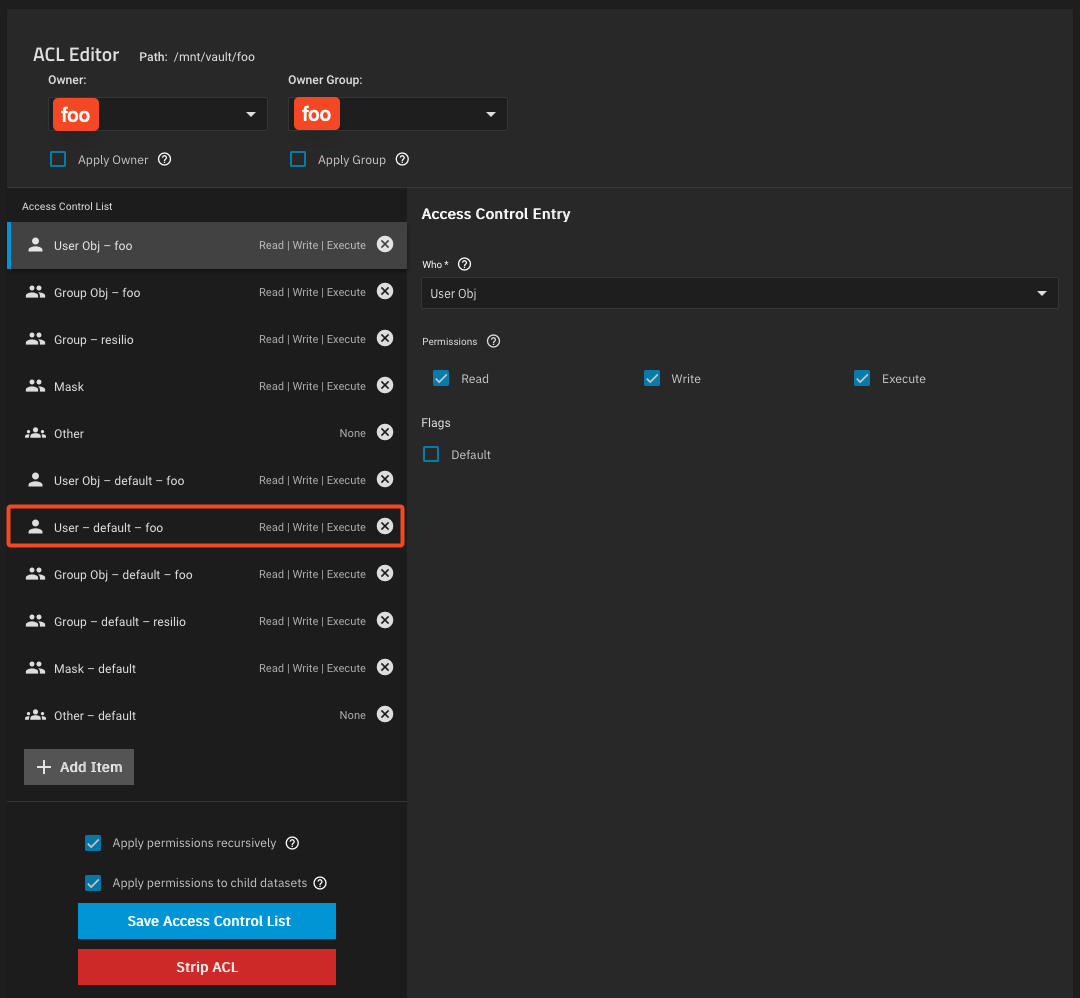
To solve this, I manually changed the ACL of the dataset “foo” to include an ACL entry for user foo with the default flag enabled. The steps were:- Edit the ACL on dataset foo.
- Add an item:
- Who: User
- User: foo
- Permissions: Check Read, Write, and Execute
- Enable Default Flag: checked
- Apply permissions recursively.
- When prompted, confirm the popup warning, then apply permissions to child datasets.
- Save the Access Control List.
Image of what the ACL look like after all the changes
This ensures that even when Resilio creates or modifies files, foo still gets an ACL entry (inherited with default flags) granting full access.
-
Changing the UMASK in the Docker Environment:
Without modifying the UMASK, Resilio uses the default UMASK of 022 which strips write permissions when files are created or modified. This means that even with proper ACL entries, files created by Resilio would have only read and execute permissions for users other than resilio.By setting:
UMASK: 000in the container’s environment variables, Resilio creates files and folders with full permissions (rwx) by default. That ensures the ACL we set up for foo is not overridden by a restrictive file creation mask.
Outcome:
After all these adjustments, new files and folders created or modified by Resilio have ACLs that let both resilio and foo access and modify the data as needed. This configuration allowed my multi-protocol environment - where files can be modified both via SMB (by user foo) and by Resilio Sync - to function without breaking access.
Hope this helps anyone struggling with similar permission challenges!
And please let me know if there is a better solution…!