iX Systems Mini-3.0-E Bios Update

I have recently updated to…
Dragonfish-24.04.2.5

I keep getting this error…
“Sensor: ‘Sensor #0’ had an ‘Assertion Event’ (Software NMI ; OEM Event Data2 code = 00h ; OEM Event Data3 code = 28h)”

Looks like I am running a very old BIOs - L1.11C
bios-release-date 09/18/2019
Motherboard ASRock C3338D2I-4L

And it sounds like a common problem, and if I updated to the latest BIOs then it will resolve. The problem is I can not find the latest bios.

Any suggestion on where I could get this?

Thank you for your time

I’d contact iXsystems directly. It’s likely the best computer-related tech support I have ever experienced. Let iXsystems help you!

Neither Asrock Rack nor SuperMicro typically post BIOS’ out in the open. However, I have found Supermicro to be generally responsive. End user support directly by AsRock Rack has been described here as pretty uneven - some folk got help with the AVR54 C2xxx Intel CPU bug for example, many did not.

That’s why buying the Mini was so great for me - when the bug struck my board, iXsystems went to the mat for me and three motherboards later, I finally had a correct revision that I could have confidence in. iXsystems has a lot more pull with Asrock Rack than most, if not all, of us do.

2 Likes

Apart from the error does the system run?

It maybe BIOS, but nothing has changed. It might be a sensor defect on an old board.

When I searched the topic it came back that the BIOs update would solve the problem. I did disable CPU C-States Support, which now the error has stopped showing, but I feel like all this did was allow me to ignore it.

Good to hear this works… we have had a few cases where Intel C-states have been problematic. (I think they have a buggy design).

If you have any references to this being the fix, please post. It not a BIOS update that we have been recommending.

Funnily enough… my own mini started doing it as well.

I think its likely a device wearing out on the motherboard. Nothing changed on my system to trigger the alerts.

1 Like

Let’s pretend you did it on purpose to provide first-hand help with the issue.
Outstanding customer support!

2 Likes

Supermicro does:

E.g.

Etc.

1 Like

So does AsRock Rack…
https://www.asrockrack.com/general/productdetail.asp?Model=C3758D4I-4L#Download

1 Like

Public Safety Announcement

Its good that its available, but TrueNAS doesn’t take responsibility for BIOS issues we don’t recommend.

1 Like

Hello!

Thanks for posting this. I have a TRUENAS-MINI-3.0-XL+ from a 2021. At one point I had opened a case with IXSystems asking for the exact motherboard the system used as I wanted to look at the NIC chipset to see if it could support 2.5/5 along with the 10G-BaseT. After much back and forth they refused to give me the exact board model. Needless to say it was quite frustrating. From your post here you seem to have identified a specify boards to specific systems. Can you let me know which models these go to, if you know?

Thanks!

For TrueNAS CORE (as root):

/bin/kenv smbios.planar.product
/bin/kenv smbios.planar.maker
/bin/kenv smbios.planar.serial

If that does not give you a model number try replacing planar with system.

For TrueNAS CE (as root):

/bin/cat /sys/devices/virtual/dmi/id/product_name
/bin/cat /sys/devices/virtual/dmi/id/sys_vendor
/bin/cat /sys/devices/virtual/dmi/id/product_serial

HTH,
Patrick

1 Like

Running on Scale 25.10.1. Unfortunately I just get:

root@barrel[~]# cat /sys/devices/virtual/dmi/id/product_name
TRUENAS-MINI-3.0-XL+
root@barrel[~]# cat /sys/devices/virtual/dmi/id/sys_vendor
iXsystems
root@barrel[~]# cat /sys/devices/virtual/dmi/id/product_serial
A1-xxxxx

I might try to boot the install for CORE on a USB stick and see what I get at some point.

root@barrel[/sys/devices/virtual/dmi/id]# cat board_name
A2SDi-H-TF

Poked around some more and found this. Thanks for pointing me in the right direction!

Looks like I can upgrade the RAM beyond the shipped 64GB to 256GB if I switch to ECC RDIMM, DDR4-2400MHz. Nice…hum, those seem to cost a ton!

You could boot a generic FreeBSD ISO - that would be more convenient since it allows you to just drop into a shell easily.

But seems like you found out already. Yes, that is a Supermicro Atom based board.

According to the Intel documentation the SoC can support 2.5 Gbit/s operation if the internal PHY is used.

The motherboard manual does not mention supported speeds explicitly, but page 49 explaining the status LEDs hints at only 1G and 10G to be supported.

HTH,
Patrick

1 Like

There is a PHY chip on the board, a X557-AT2 Base-T, so specs say 100MB/1G/10G only. The block diagram looks like they are using the AST2400 for the IPMI.

1 Like

Apologies and thanks for the correction, @etorix and @pmh! I’m pretty sure that getting a BIOS for the Asrock C2750D4I EEEPROM / BIOS issue wasn’t straightforward and we had to rely on folk in the forum to get a link set up.

I will note that Wolfgang on Youtube has been given access to specific BIOS’ that enabled the use of SATA daughterboards on the industrial lines of motherboards that mere mortals were told would not be enabled for them.

1 Like

Hey, Wolfgang’s my coworker :slight_smile:

1 Like

This is what Gemini suggested and did some googling to confirm, but seemed to work so…

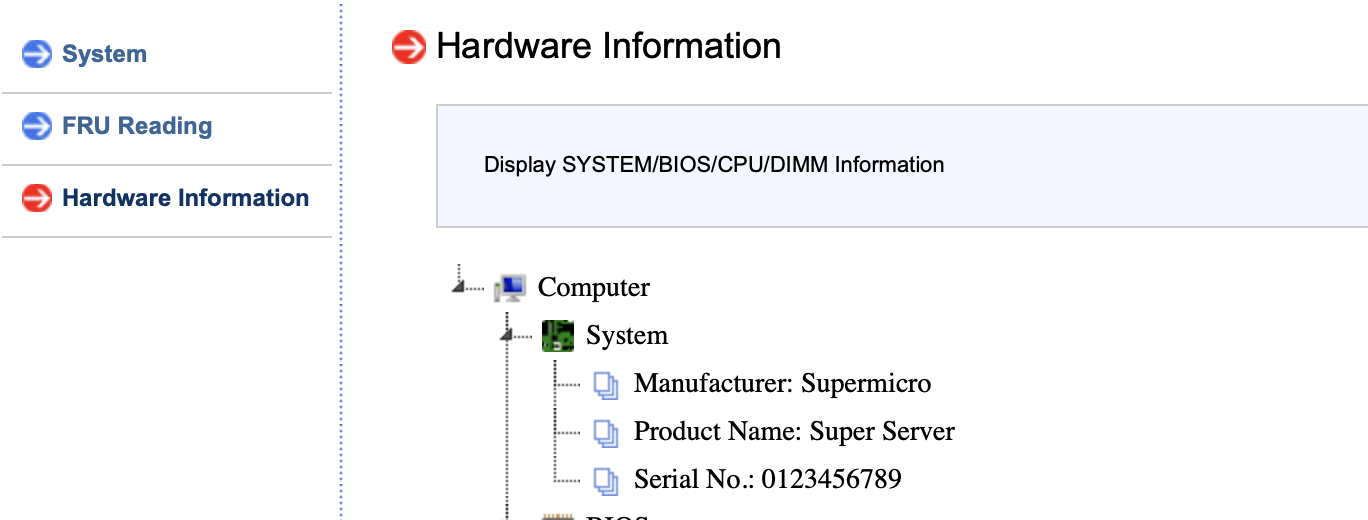
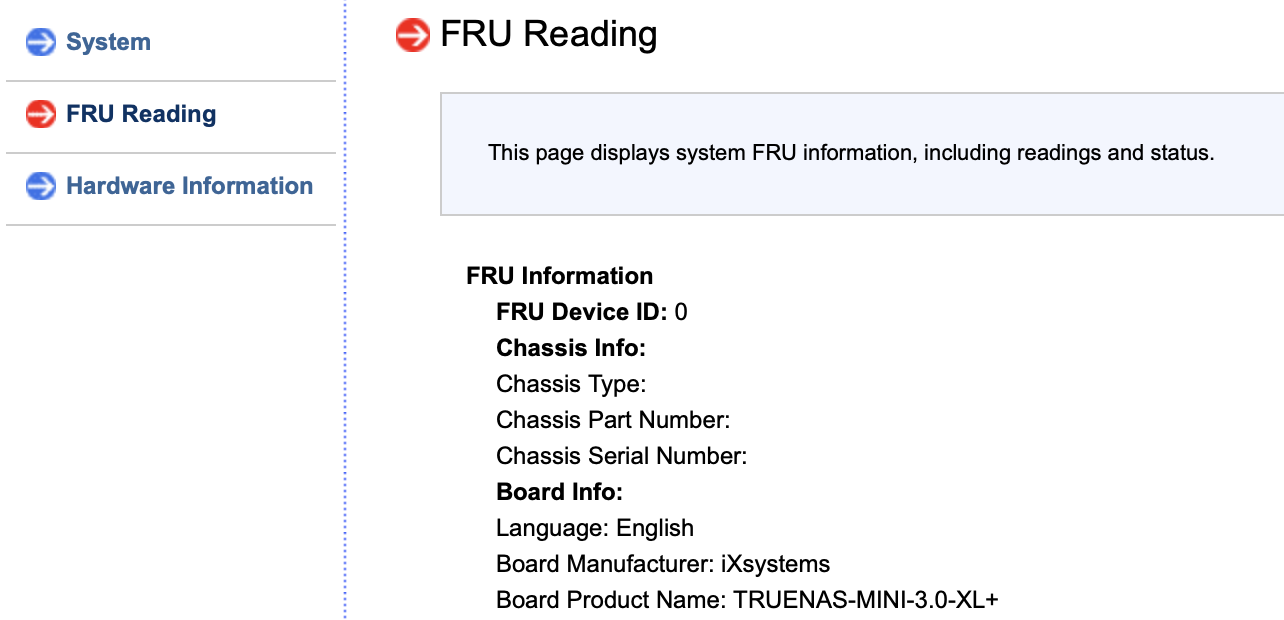
So was successful in upgrading both the BMC and the BIOS on the system. One word of warning - in doing so it wiped the information that iXsystems baked into the board that IDs it and its serial number. So for example in the default screen of the GUI it no longer reports what it is correctly and the serial number. I have downloaded the Supermicro IPMICFG tool which says it allows you to rewrite these items and the command looks like it works, but there is something I am missing. In the IPMI console the FRU is correct now but the Hardware information item is not.