Linux Jails (containers/vms) with Incus

Yes, I read that thread. I guess my point was why have the option available at all if it’s not going to be supported properly.

I’ve tried without recursive set and it doesn’t mount correctly and no sub datasets are available unless that is set.

Kind of mess there right now.

That’s why i reported the above ticket as a bug. But Caleb/iX don’t seem to agree…

2 Likes

On top of that, middlewared won’t let you mount a custom zvol down a custom dataset like say /mnt/pool/incus/disks/docker-data. It has to be down /mnt/.ix-virt.

I agree, the mounting seems like something that a lot of users will get confused about.

Their jira comment on how they expect users to mount fresh datasets to the incus container instead of already existing ones is pretty stupid. Why would you create a new dataset, when there’s already an existing one with data you want to use in the container.

2 Likes

I’m going to comment on that thread and point to this thread to show it doesn’t work without recursive: true set.

Edit: commented

1 Like

It kinda does work if you chown the dataset you want to passthrough.

I tried it last weekend, but it fucked up my permissions pretty bad so a aborted my test to sort out the permissions.

I don’t know what kind of magic jip-hop did with his jailmaker script to get it to work without that mumbojumbo

Try setting systemd-resolved to disable the stub listener on the incus container that will be running your DNS server. You will need to configure your /etc/resolv.conf manually and point to 127.0.01 or upstream if you have one for your DNS server. This is a common problem as it listens on udp/53.

/etc/systemd/resolved.conf
---
DNSStubListener=no

Then restart the service or container:

systemctl restart systemd-resolved

I posted some info about this in my compose.yaml for pihole awhile back: docker-compose-configs/pihole/compose.yaml at main · dasunsrule32/docker-compose-configs · GitHub

Snapshots work well. Another reason to setup the Incus Web UI. I’m still working on that.

Create ZFS snapshot:

incus snapshot create docker1 test-snap

List ZFS snapshot (They are visible under TrueNAS UI):

incus snapshot list docker1
+-----------+----------------------+------------+----------+
|   NAME    |       TAKEN AT       | EXPIRES AT | STATEFUL |
+-----------+----------------------+------------+----------+
| test-snap | 2025/02/26 12:16 EST |            | NO       |
+-----------+----------------------+------------+----------+

Delete ZFS snapshot:

incus snapshot delete docker1 test-snap

These could be used in conjuntion with cron to create scheduled snapshots.

Incus has snapshot tasks built in

1 Like

Yep, that’s right. I remember looking at that when this journey first started…

Pretty easy to get an instance with incus-ui-canonical up and running, however, it depends on incus. It’s making it difficult to install as a standalone install. Checking for options…

apt-cache depends incus-ui-canonical
incus-ui-canonical
  Depends: incus

That is how user’s are mapped from an instance to Truenas.
2147000001 user’s ID on Truenas , maps to the root user inside instance.

If you are running for example docker container with GUID 1000, then you will need to chown 2147001001.
Jailmaker was not doing any uid mapping by default, that is why you never had to deal with that.
What realy confuses me is the range 2147000001:2147000001, it is not even working right with new datasets, access rights without CHOWN are wrong anyway.

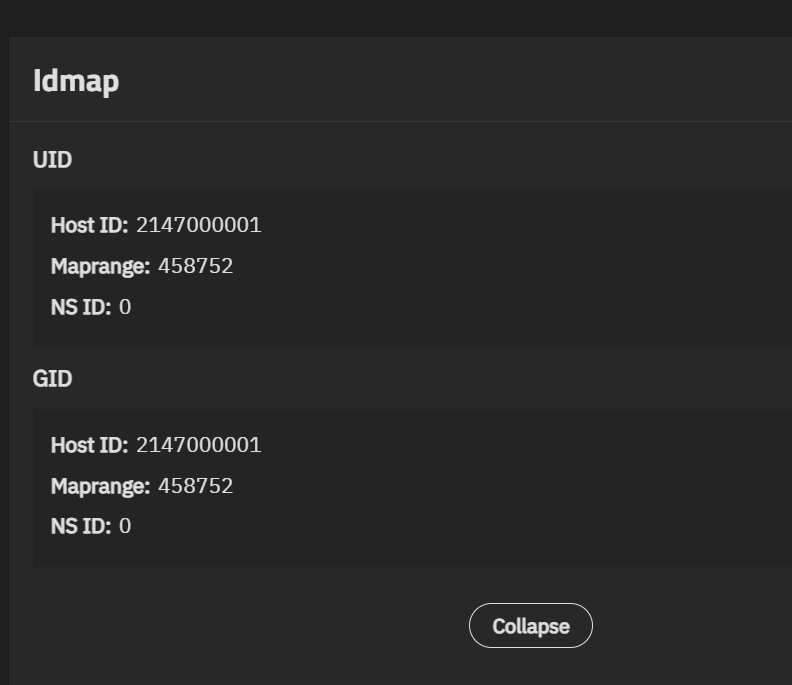
Where is that at in the UI? I’ve looked all over.

and

Remember this stuff is still early / WIP (in 25.04 the feature is labelled “experimental”). You’re the beta testing red-shirts.

3 Likes

It is in nightly. Not in beta.

1 Like

Cool, I’m AFK. I’ll take a look. Thank you.

It is in nightly.

And you’re wearing the reddest shirt of all. See commit message on second linked PR.

If for some reason you want to present a dataset dozer/MEDIA to a container then you can (for example):

  1. create a group in NAS “media” and set userns_idmap to DIRECT.
  2. grant group write access to dozer/MEDIA
  3. make any relevant local users members of “media” group
  4. make relevant accounts in container members of group with matching gid.
1 Like

Set where?
I guess that commit did not make to nightly yet maybe?

It currently does not have a UI implementation (there’s an open ticket). API / CLI / midclt only.