Linux Jails (containers/vms) with Incus

Ok, I have a “mostly” working GPU enabled cloud-init config file that starts with GPU enabled without the need of an external BASH script. I have a few things to work out still… but currently it does the following:

  1. Configures VM: hardware, mounts, autostart, kernel config/modules
  2. Grabs latest updates
  3. Installs apt repos: docker, nvidia-container-toolkit
  4. Installs all required packages for: docker, nvidia-container-toolkit
  5. Configures: nvidia docker runtime
  6. Restarts docker
  7. Installs dockge
  8. Voila!
1 Like

Seems I have found a really annoying bug… After I deploy a container to a bridged interface, proceed to delete it, then attempt to recreate it, it will never get a DHCP IP on the same bridge. I give up for today.

For some reason, this isn’t even working anymore… Ugh.

Major blockers right now are:

  1. NVIDIA in unprivileged LXC containers suck…
  2. Finicky bridged networking so far…

Moving over with non-GPU based and probably AMD and INTEL based containers should be really easy, but the rest is a mess as far as NVIDIA goes.

Installed the beta on my production NAS now and created a cloudsync task for the pool that also houses the .ix-virt dataset for incus. It seems like the incus dataset doesn’t get uploaded. Does backing it up require some additional configuration? The task is set to upload the entire pool.

What do you do when you’re bored on a saturday with bad weather? You install the fangtooth beta on your main machine and try to migrate your jailmaker jail to incus :sweat_smile:

1 Like

Ok i have 90% of my setup working in incus, there’s only 2 problems right now that i’m encountering and i seem to be stuck.

  1. I can’t get the nvidia-toolkit working for hw transcoding in jellyfin.
  2. I can’t get blocky to work on port 53.
    But it’s late, i kinda have a headache now and will propably take a fresh look tomorrow.

Incus runs a DNS server to serve the names of the containers back to the hosf

You may be able to bind that to a specific IP address.

Also, you can then teach the hosts resolved how to contact incus’ core dns

No. I haven’t tried this.

Read my previous 4 posts… Nvidia is not working quite yet and I haven’t had time to work on it since Friday. Might have to use privileged containers for now with Nvidia, that obviously is NOT ideal in anyway… Not sure yet.

If we had the ability to us OCI containers, this would be a lot easier, since the issue lies using Docker inside of LXC in regards to Nvidia working properly.

…and I think I just figured it out… will play with it more. Might be an old docker config that isn’t needed anymore in the docker compose file…

Testing…

Welp… it’s working now in an unprivileged incus container in docker… :slight_smile:

nvidia-smi 
Mon Feb 24 16:23:06 2025       
+-----------------------------------------------------------------------------------------+
| NVIDIA-SMI 550.142                Driver Version: 550.142        CUDA Version: 12.4     |
|-----------------------------------------+------------------------+----------------------+
| GPU  Name                 Persistence-M | Bus-Id          Disp.A | Volatile Uncorr. ECC |
| Fan  Temp   Perf          Pwr:Usage/Cap |           Memory-Usage | GPU-Util  Compute M. |
|                                         |                        |               MIG M. |
|=========================================+========================+======================|
|   0  NVIDIA GeForce GTX 1080 Ti     Off |   00000000:2B:00.0 Off |                  N/A |
|  0%   40C    P2             73W /  280W |     609MiB /  11264MiB |      0%      Default |
|                                         |                        |                  N/A |
+-----------------------------------------+------------------------+----------------------+
                                                                                         
+-----------------------------------------------------------------------------------------+
| Processes:                                                                              |
|  GPU   GI   CI        PID   Type   Process name                              GPU Memory |
|        ID   ID                                                               Usage      |
|=========================================================================================|
|    0   N/A  N/A   1210746      C   ...lib/plexmediaserver/Plex Transcoder        606MiB |
+-----------------------------------------------------------------------------------------+

Going to do some further testing and see if I can spin up from nothing to a live instance with HW acceleration working.

This is the config that I nixed in my docker compose under the runtime: nvidia:

 count: 1

How did you get the 550.142 driver installed? my jail would only install 535.xx

Give me a few and I’ll post my working docker-init.yaml config with Nvidia support. I’m just testing it right now by spinning another container up.

I updated the OP with a new docker-init-nvidia.yaml now. You’ll need to add your PCI address under the gpu: hardware section. I’ll add a one liner later to get that automatically. You can follow the directions in the OP to get going.

I updated the following in the OP:

  1. docker init cloud init configs. One for standard Docker and one for Nvidia based Docker containers.
  2. Updated the docker-init.yaml and docker-init-nvidia.yaml with the latest fixes I ran into.
  3. Removed the separate jails dataset and moved the root disk into the default storage pool so now all machines will be located in: /mnt/pool/.ix-virt.
  4. Abandoned Incus Profiles for now since they don’t currently survive updates.

Added how to get your GPU PCI address to the OP in the GPU FAQ.


incus info --resources | grep "GPUs:" -A 20                        
GPUs:
  Card 0:
    NUMA node: 0
    Vendor: ASPEED Technology, Inc. (1a03)
    Product: ASPEED Graphics Family (2000)
    PCI address: 0000:22:00.0
    Driver: ast (6.12.9-production+truenas)
    DRM:
      ID: 0
      Card: card0 (226:0)
      Control: controlD64 (226:0)
  Card 1:
    NUMA node: 0
    Vendor: NVIDIA Corporation (10de)
    Product: GP102 [GeForce GTX 1080 Ti] (1b06)
    PCI address: 0000:2b:00.0
    Driver: nvidia (550.142)
    DRM:
      ID: 1
      Card: card1 (226:1)
      Render: renderD128 (226:128)

Grab the PCI address and substitute it in the docker-init-nvidia.yaml config file.

PCI address: 0000:2b:00.0

Config snippet:

  gpu0:
    gputype: physical
    pci: 0000:2b:00.0
    type: gpu

Here is a one-liner that “should” work. I got some help on this one :joy:

incus info --resources | awk '/^[^[:space:]]/ { g = (/GPUs?:/) } /Vendor:/ { v = (tolower($0) ~ /amd|intel|nvidia/) } g && v && sub(/.*PCI address: /,"")'

I will move on to investigating using block storage vs direct host mounts… :slight_smile:

2 Likes

I think storage volumes will work fine for shared data for your Docker applications. There are drawbacks, like not being able to drill down the tree to access it easily. Once it’s imported into Incus, it goes dark in the UI and you can’t cd down the path to the files. Since you can’t see the volumes, you can’t mount them in the Web UI either. It should essentially work similarly to host mount points.

On the other hand, it’s managed within Incus, so permissions should work, if we get an image running with the Incus Web UI, it would probably be easy to manage the storage and volumes within Incus easily since it’s using the ZFS driver to handle datasets, volumes, snapshots, etc.

This was just a quick setup and test and there are probably some best practices I’m likely missing as well. This should persist as it’s being created in the default profile. Thoughts, suggestions?


Create volume:

incus storage volume create default docker size=50GiB zfs.block_mode=true block.filesystem=ext4

Default storage info:

incus storage show default
config:
  source: sol/.ix-virt
  zfs.pool_name: sol/.ix-virt
description: ""
name: default
driver: zfs
used_by:
- /1.0/images/d500c0445c2514fc514add9df99e433e208e3d4102fed497c807f24ab5a09146
- /1.0/instances/docker1
- /1.0/instances/docker2
- /1.0/profiles/default
- /1.0/storage-pools/default/volumes/custom/docker
status: Created
locations:
- none

Volume info:

incus storage volume show default docker
config:
  block.filesystem: ext4
  block.mount_options: discard
  size: 50GiB
  volatile.idmap.last: '[{"Isuid":true,"Isgid":false,"Hostid":2147000001,"Nsid":0,"Maprange":458752},{"Isuid":false,"Isgid":true,"Hostid":2147000001,"Nsid":0,"Maprange":458752}]'
  volatile.idmap.next: '[{"Isuid":true,"Isgid":false,"Hostid":2147000001,"Nsid":0,"Maprange":458752},{"Isuid":false,"Isgid":true,"Hostid":2147000001,"Nsid":0,"Maprange":458752}]'
  zfs.block_mode: "true"
description: ""
name: docker
type: custom
used_by:
- /1.0/instances/docker1
- /1.0/instances/docker2
location: none
content_type: filesystem
project: default
created_at: 2025-02-25T20:18:29.231566987Z

ZFS datasets:

zfs list|grep ^sol/.ix-virt                                                         
sol/.ix-virt                                                                                  1.88G  1.02T    96K  legacy
sol/.ix-virt/buckets                                                                            96K  1.02T    96K  legacy
sol/.ix-virt/containers                                                                       1.38G  1.02T    96K  legacy
sol/.ix-virt/containers/docker1                                                                708M  1.02T   960M  legacy
sol/.ix-virt/containers/docker2                                                                708M  1.02T   960M  legacy
sol/.ix-virt/custom                                                                           1.84M  1.02T    96K  legacy
sol/.ix-virt/custom/default_docker                                                            1.75M  1.02T  1.75M  -
sol/.ix-virt/deleted                                                                           255M  1.02T    96K  legacy
sol/.ix-virt/deleted/buckets                                                                    96K  1.02T    96K  legacy
sol/.ix-virt/deleted/containers                                                                 96K  1.02T    96K  legacy
sol/.ix-virt/deleted/custom                                                                     96K  1.02T    96K  legacy
sol/.ix-virt/deleted/images                                                                    254M  1.02T    96K  legacy
sol/.ix-virt/deleted/images/d3d195e18e3f6ad0ec8b8c69adfa46e46074410e10a214173536f37c18c33e92   254M  1.02T   254M  legacy
sol/.ix-virt/deleted/virtual-machines                                                           96K  1.02T    96K  legacy
sol/.ix-virt/images                                                                            254M  1.02T    96K  legacy
sol/.ix-virt/images/d500c0445c2514fc514add9df99e433e208e3d4102fed497c807f24ab5a09146           254M  1.02T   254M  legacy
sol/.ix-virt/virtual-machines

Attach to instances:

incus config device add docker1 docker disk source=docker pool=default path=/mnt/foo
incus config device add docker2 docker disk source=docker pool=default path=/mnt/foo

Instance configuration:

  volatile.idmap.base: "0"
  volatile.idmap.current: '[{"Isuid":true,"Isgid":false,"Hostid":2147000001,"Nsid":0,"Maprange":458752},{"Isuid":false,"Isgid":true,"Hostid":2147000001,"Nsid":0,"Maprange":458752}]'
  volatile.idmap.next: '[{"Isuid":true,"Isgid":false,"Hostid":2147000001,"Nsid":0,"Maprange":458752},{"Isuid":false,"Isgid":true,"Hostid":2147000001,"Nsid":0,"Maprange":458752}]'

  docker:
    path: /mnt/foo
    pool: default
    source: docker
    type: disk

Touch files:

root@docker1:~# cd /mnt/foo && touch docker1
root@docker2:~# cd /mnt/foo && touch docker2

List files in volume:

ls -l /mnt/foo/
total 16
-rw-r--r-- 1 root root     0 Feb 25 15:52 docker1
-rw-r--r-- 1 root root     0 Feb 25 15:52 docker2
drwx------ 2 root root 16384 Feb 25 15:18 lost+found

Disk usage:

df -h /mnt/foo
Filesystem                                    Size  Used Avail Use% Mounted on
/dev/zvol/sol/.ix-virt/custom/default_docker   49G   24K   47G   1% /mnt/foo

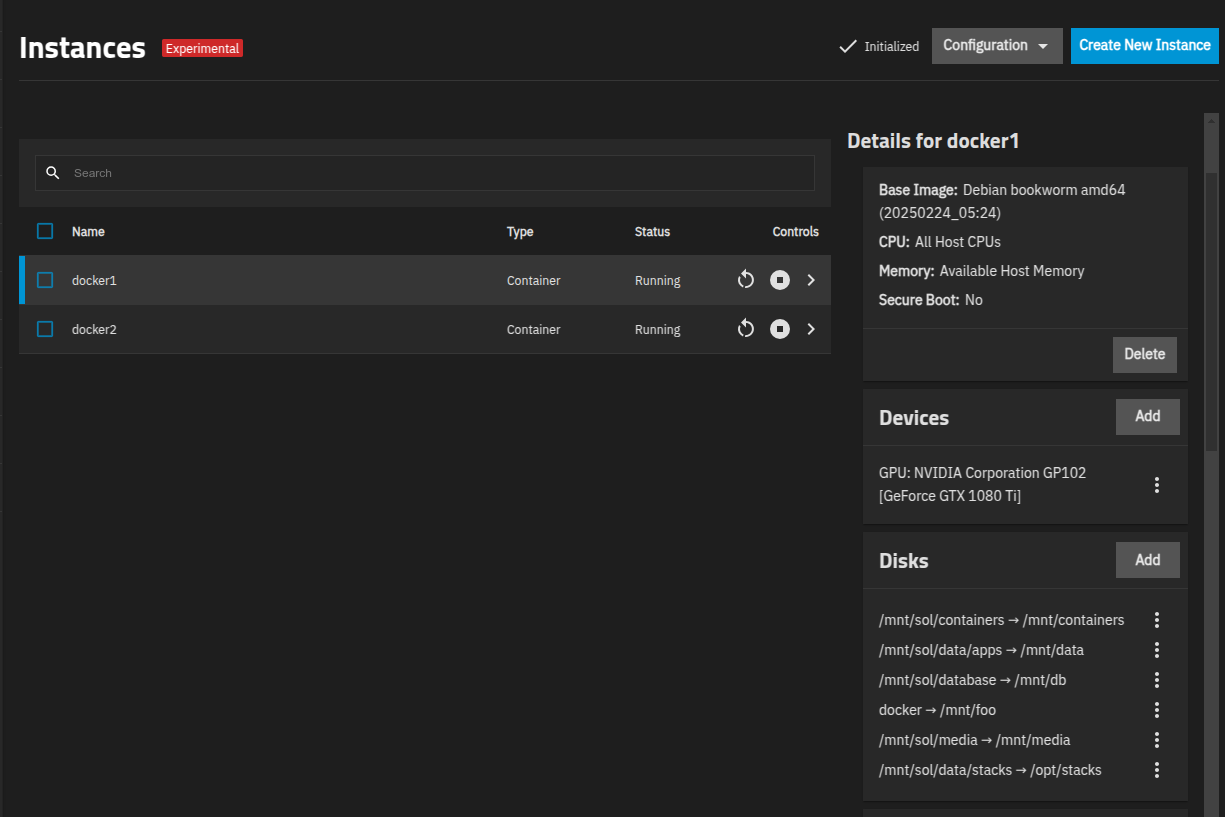
Screenshot of volume added in UI:

Also, when adding a volume this way, it breaks the Web UI when attempting to upload images.

On to a different topic…

I wonder if I were to set the default storage profile to a different dataset if it would persist upgrades?

incus storage show default
config:
  source: sol/.ix-virt
  zfs.pool_name: sol/.ix-virt
description: ""
name: default
driver: zfs
used_by:
- /1.0/images/d500c0445c2514fc514add9df99e433e208e3d4102fed497c807f24ab5a09146
- /1.0/instances/docker1
- /1.0/instances/docker2
- /1.0/profiles/default
- /1.0/storage-pools/default/volumes/custom/docker
status: Created
locations:
- none

It might work because the default profile is using the default storage.

incus profile show default
description: Default TrueNAS profile
devices:
  eth0:
    name: eth0
    nictype: bridged
    parent: br5
    type: nic
  root:
    path: /
    pool: default
    type: disk
name: default
used_by:
- /1.0/instances/docker1
- /1.0/instances/docker2
project: default

Moving onto a custom image with the Incus LTS Web UI installed…

If you create a machine through the UI and point to a local dataset or have it automatically create a new one, you’ll get permission denied because it’s not doing shift or recursive. Seems like an odd choice to allow mounting host mounts when they will be read-only. I can see a use case for read-only for sure.

I read some more info about that choice here Jira