In theory you can replicate the jails dataset. And replicate it back to the jails dataset.
@Jip-Hop can correct me if I’m wrong, but I believe jailmaker just iterates that dataset to find jails and their config.
Re:renaming. I’ve renamed a jail before, rename the dataset, then edit any reference in the dataset config, and whatever the other file is. Do it with the jail stopped!
It took a few attempts for me to get it right
This will change the jails MAC address. Which will mean it’s IP may change if it’s DHCP.
I try to keep my fairly jails fairly disposable, and mount in all the non-ephemeral data, much like a container.
I created the bridge in TrueNAS and followed your video to edit the docker jail. I couldn’t figure out what you did when you edited mv-dhcp.network. I didn’t have a file there nor did I understand what we were trying to accomplish. It is still unclear to me if a bridge is better than macvlan and if going to bridge will allow me to run multiple instances of a docker on different ports.
When using macvlan or bridge each jail will get its own IP address. So you can run multiple instances of docker each running a docker container, e.g. a webserver, using the same port: 443. I don’t know what you mean by “multiple instances of a docker on different ports”. I think running multiple instances of ‘a docker’ on different ports is always possible even with just one jail.
Dockge is great, but two issues I have with it are:
You have to have multiple instances running if you have multiple jails running docker. This just wastes resources.
You have to have ports open on one/both of the jails being connected by dockge.
One option is to use GitHub - productiveops/dokemon: Docker Container Management GUI instead. The UI I don’t like as much, and it can certainly do a bit more than dockge, but it does have a few advantages. For one, you can use the UI to configure lightweight ‘agent’ apps that you just run on the secondary jails instead - and they contact the ‘main’ server instead of the other way around. So if you use ingress on the main server that hosts dokemon than you don’t need to open up any extra ports to connect them together - which is great.
I have run into some issues I’m trying to figure a workaround for.
I run nginx Proxy Manager and it hits static IP’s on the backend for various containers. This works fine. However, let’s say I restart the agent host that a backend is running on. Dockge will automatically start the running containers on one of the other agent hosts. While this is great, I’d either need to setup a load balancer with all the agent hosts set as the backend and then it will only send traffic to the host that is active. That could work.
I was also thinking I could create a bridge out the bridge on the jail and assign the container its own IP, then it wouldn’t matter which agent host it runs on. So basically a bridge out the jail bridge to the truenas bridge with static IP’s set for each container.
I’m thinking the latter would be best, but I’m not 100% sure how to accomplish this or if it’s even possible.
Another option would be locking the container to the agent host of choice, but I didn’t see how to accomplish that in dockge.
What are your thoughts on these approaches? I’m also open to any suggestions that I may be missing as well. Thank you!
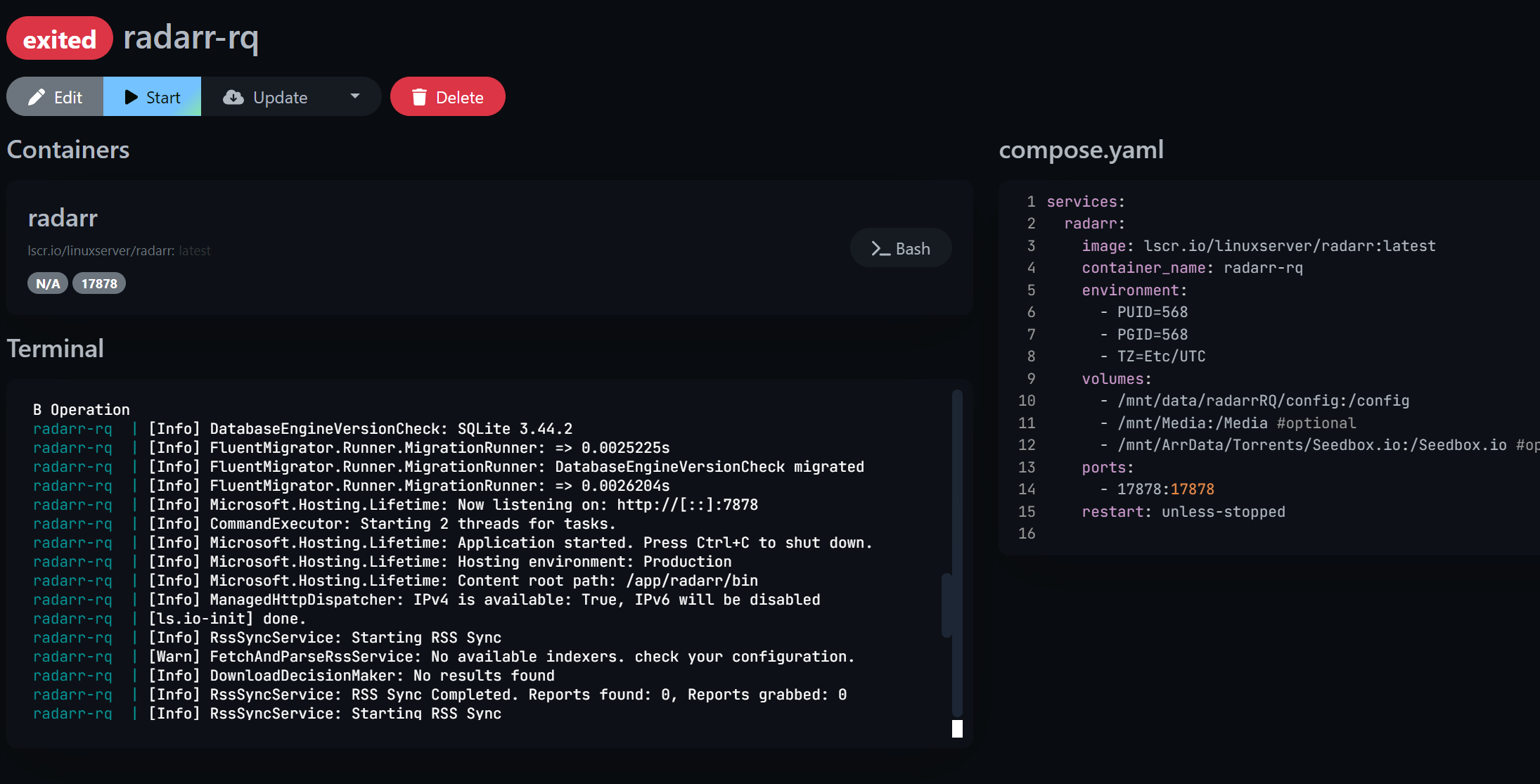
So I run 2 instances of Radarr, the first is on standard port 7878, so I want to access the second Radarr on 17878, I changed the port to 17878 in compose.yaml but on the Terminal it is still listening on 7878. If switching to bridge modes fixes that I will move to that otherwise I will do more research on dockers. With Charts I just assigned the app a different port and it worked fine.
Got it, yes I assigned a static IP on my router, so I guess I didn’t need that step. I probably had a typo in my bridge syntax. The good news is TrueCharts was actually very helpful in getting most of my migrated apps working. That should make the migration to jailmaker apps both easier and less urgent.
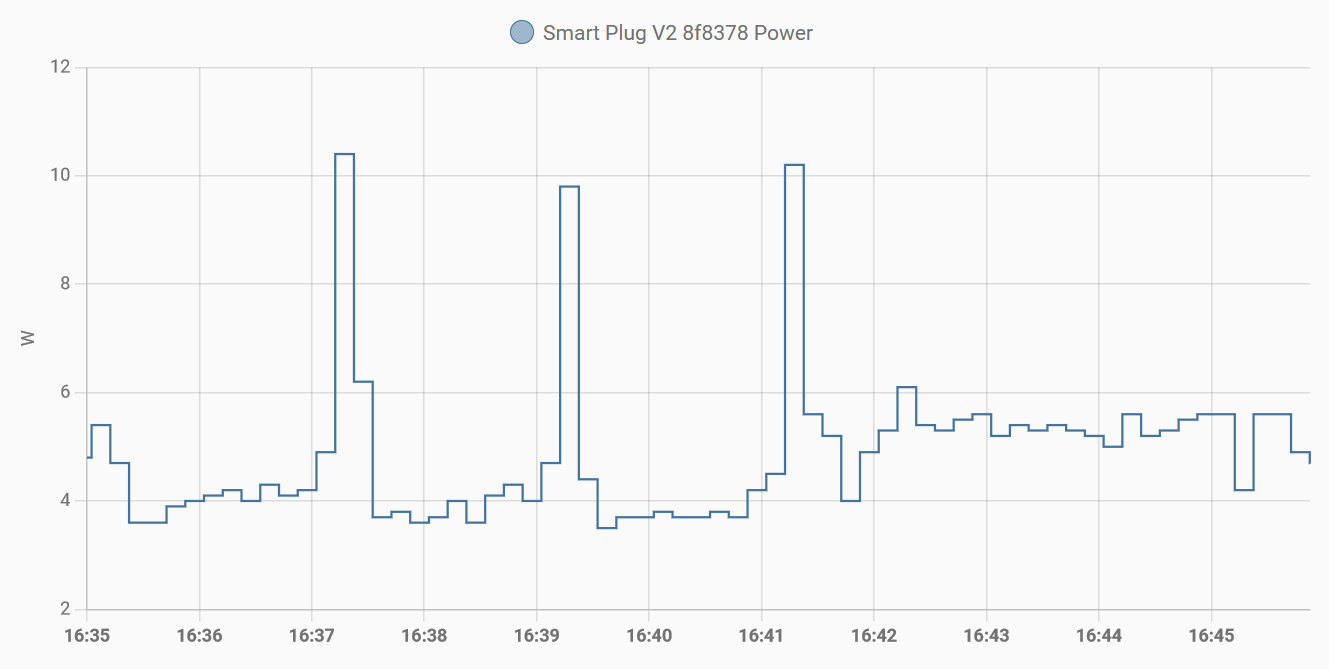
Running a new clean TrueNAS Scale 24.04.0 installation on a i3-10100T system (HP ProDesk 400 G6) uses about 4.4W Average in Idle… bestcase would be 3.5W!
Just setting up App Pool and installing Jellyfin (from 15:15 to 15:20) increases the idle usage to AVG 6.6W
Shutting down jellyfin App (15:26) does NOT help, simply having Kubernetes Running uses energy!
Only unsetting App Pool (15:31) gets the energy usage back to normal.
Using Jailmaker with Docker, installing Portainer and then Jellyfin uses AVG 4.8W
systemd[1]: Started jlmkr-dockge-plex.service - My nspawn jail dockge-plex [created with jailmaker].
systemd-nspawn[1003037]: systemd 252.22-1~deb12u1 running in system mode (+PAM +AUDIT +SELINUX +APPARMOR +IMA +SMAC>
systemd-nspawn[1003037]: Detected virtualization systemd-nspawn.
systemd-nspawn[1003037]: Detected architecture x86-64.
systemd-nspawn[1003037]: Detected first boot.
systemd-nspawn[1003037]:
systemd-nspawn[1003037]: Welcome to Debian GNU/Linux 12 (bookworm)!
systemd-nspawn[1003037]:
systemd-nspawn[1003037]: Initializing machine ID from container UUID.
systemd-nspawn[1003037]: Failed to create control group inotify object: Too many open files
systemd-nspawn[1003037]: Failed to allocate manager object: Too many open files
systemd-nspawn[1003037]: [!!!!!!] Failed to allocate manager object.
systemd-nspawn[1003037]: Exiting PID 1...
systemd-machined[3216051]: Machine dockge-plex terminated.
I checked for values of file-max and max_user for inotify and user instances is low by default:
The solution is to modify fs.inotify.max_user_instances from the default of 128 to something higher, in my case I set it to 500. I will probably need to up that at some point the future. At least I know what the problem is now.
You can do a quick and dirty hack by creating a file called /etc/sysctl.d/99-custom.conf and putting the following content in the file:
# Resolves issue with systemd-nspawn:
#
# systemd-nspawn[1003037]: Failed to create control group inotify object: Too many open files
# systemd-nspawn[1003037]: Failed to allocate manager object: Too many open files
#
# https://forums.truenas.com/t/linux-jails-sandboxes-containers-with-jailmaker/417/143?u=dasunsrule32
fs.inotify.max_user_instances = 16777216
You can also set it in the GUI for your TrueNAS by going to: Settings > Advanced > Sysctl > Clicking add. Add the var above and the value and a description so you’ll remember what it’s for. This will create a file called: /etc/sysctl.d/tunables.conf.