I recently saw a few posts inquiring about what kind of hardware you can run TrueNAS on. The short answer is: anything you can boot with 4GB of RAM should work. You just have to know your hardware and set realistic expectations. (4GB isn’t going to get you very far when it comes to cache, containers, VM’s, etc.)
This pool of four 10GB SATA disks originally lived in one of my 2009 Mac Pro’s. But in an effort to reduce 24/7 power consumption and heat generation (and to use the Pro’s 128GB of RAM elsewhere), I put a 6-port SATA adapter in the NVMe slot of this Nucbox N150 PC that I had sitting around and hooked it up to a 5-port drive enclosure I found on Amazon. The pool contains my original ESXi NFS store, as well as Time Machine target and large SMB share. The VM storage has moved to another host that is a bit more capable (8-core i9 with 2 enterprise SSD’s + 2 16TB HDD’s) while I sort out my migration away from VMware to Proxmox.
And honestly, the day-to-day performance is about the same, when all is said and done.
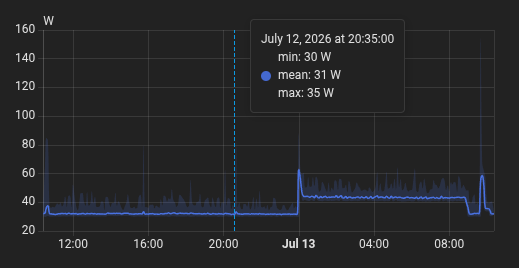
This newer stack probably averages about 30-50W, with specs saying it could peak at 110W for all four drives and the mini-PC. (I think I’m powering the whole thing with a single 7A 12V power supply.)
A quick search suggests this (and some weird things happening to the “dark green”)GMKtec NucBox G3 Plus Mini PC Intel® 12th Twin Lake N150 - GMKtec
I’m more curious (or wary…) about the “drive enclosure from Amazon”, the “6-port SATA adapter in NVMe slot”, and the suspected bundle of cables going through the opened top..
It only cost me $175. The link has changed and now points to an i3-based machine.
I took out the NVMe drive and put in a smaller 128G SATA drive (it has an M.2 SATA slot and an NVMe slot). The M.2 PCIe slot has an ASMedia ASM1166 SATA adapter supporting six drives.
The enclosure has 5 SATA ports and two power ports on the back. It’s 100% passthrough.
I’ve been using this setup (the M.2 card and SATA cables) with a MikroTik CCR2116 and a different external 2.5” SATA enclosure for over two years, without issue.
[This project was started after their ROSE storage package came out, and a year before the RDS2216 was released.
I cut a hole in the back of the enclosure, installed a 12V/5VDC converter, and passed out the SATA cables and power to the drives and enclosure. The 2116’s have 16 ARM64 cores and 16GB of RAM, and have 4 SFP+ ports for plenty of throughput.
The only downside is their solution doesn’t have ZFS support. Once I got my RDS2216, I got TrueNAS working inside a Qemu container on RouterOS, but drive passthrough is a bear and network throughput is poor. I can boot Proxmox natively on both routers (and get TrueNAS working well in that), but I haven’t figured out PCIe passthrough, so we have either these SATA drives and only 1Gbps network, or plenty of network (external NIC) but no drives. Oh, and with Proxmox, you lose access to the Prestera switch chip, so only the MGMT Ethernet port works.]
You can install/boot TrueNAS in 4GB of RAM. It won’t help ZFS much (if at all), but if all you’re doing is testing hardware compatibility, trying new features, and/or cutting your teeth on TrueNAS for the first time, you don’t need much to just play around with it.
Thx for details. A picture of the back would have shown all the wires and answer questions.
(would you post a pic of the back pls?).
For tidiness, I prefer a mini sas connector but right now I’m testing a 10G USB 3.2 enclosure.
Yeah, TN fans don’t like them, but if they do work and solve a need, I will try them and have long term testing, proof, for the ones that have never designed electronics, OS drivers or software, and can only regurgitate old opinions/experience.
4 GB will not let TN work properly for just file sharing?
Non sense. Pfsense uses ZFS and can run with 1 GB memory.
Most of the memory is used for ZFS ARC, for caching data, but most other filesystems used for NAS (ext4, XFS), do not have any caching and work just fine, right?
I would listen to good, researched, based arguments either way, so go ahead.
(Not for performance reasons! WE understand that!).
I just want to put this out there for the newbees who may read this and think “Wow, I only need 4GB of RAM!”
For a fully functional TrueNAS system, you need a minimum of 8GB of RAM. This is not a performance related statement but more of a stability statement. We have seen quite a few people over the years have problems ultimately identified as being short on RAM. So, while it may look good when booting it up, you are apt to have a flaky system.
But feel free to give it a try you you want.
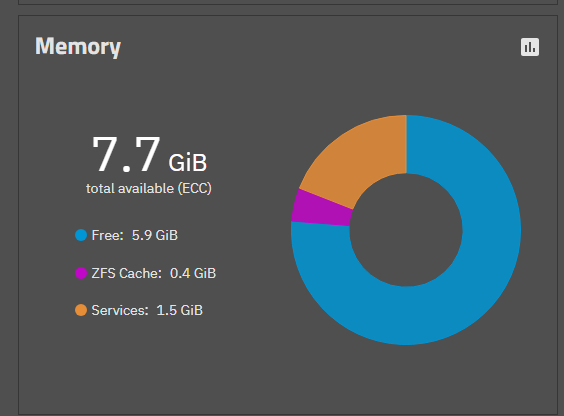
@sirbryan you posted this thread and you describe some of your system, somewhat misleading the readers, hence I asked for the data as I was curious how your system was running so well on 4GB of RAM. Yet you are running 16GB of RAM.
I only want to make sure other readers are not mislead.
But thanks for the posting anyway. I do like the setup you have.
The “4GB RAM” comment actually came from some other threads where people were asking if they could run something on older hardware. I’ve updated the OP to highlight that users should know their limitations and set realistic expectations.
I’ll grab some more pictures.
With this particular storage array, the drives are the bottleneck. Without some blazing NVMe drives and special metadata/small block VDEVs, there’s not much more performance I can squeeze out of this system. Hence my decision to relegate it to a little N150-based box.
I guess my thinking is that very few home-labbers are going to be running workloads that push their systems. Start small and simple, use what you’ve got, and work your way up until your system meets your needs.
LOL, you might think that but we get people here who expect to do everything that TrueNAS offers up in the GUI, and then when they find out they just don’t have the resources to run Windows 11, Ubuntu, or whatever in a VM, and run other “APPS” that are available, AND use it as a NAS, then they start to complain. This is why there is a hardware guide. It may not be completely all inclusive but it provide a lot of the basics. Stick around here long enough and you will see it year after year.
But if someone is only testing out TrueNAS, likely in Type 2 Hypervisor just to see what it might be able to do, then I would agree with your assessment. If that user likes what they see and wants to build a TrueNAS server, then the best foot forward is server hardware if they can afford it. And hardware prices are not going down anytime soon. I was glad to purchase six 4TB NVMe Gen 5 NVMe drives for $200 a few years ago. They are going strong, and have a 5 year warranty.
Its nice seeing another low power fellow here on the forums. I thought it would be a good opportunity to share my setup details here as well.
My setup went the reused hardware route.
CPU: i5-6500 (my old PC setup)
MOBO: Asus B150M-C (my old PC setup)
RAM: Mix of Kingston 4x8GB (so 32GB in total)
HDD: 5x4TB HC310, 1x6TB HC310 (all are used, with about 15kH)
SSD: 1x256GB Intel NVMe (boot drive, used) + 2TB WD RED SN700 (for VM’s/dockers, bought new)
PSU: 350W 80+Gold Fortron unit (also used)
Case: Avance C001 Terminator (also sold under AeroCool, its from the early 2000’s)
The only “heavy” VM that is running is a HomeAssistant instance, there are a couple of dockers (apps), namely jellyfin, ubiquiti-controller and a uptime-kuma instance. I have hosted some Minecraft servers, and I think I also had a Factorio server running at some point.
The server is primarily used as a Samba/NFS share, with some services being hosted along the way.
I’ve got some of those. Ampere 128-core server with Proxmox and TrueNAS works well (of course a bit of a beast). It has two of those SATA 2.5” SSD enclosures, along with a handful of NVMe drives, and 128GB of RAM.
I have a Honeycomb LX2 (16-core, 16GB RAM, similar to the MikroTik CCR2116) that I was initially going to use with some spinners and another one of those 5-drive 3.5” enclosures.
I could also try an RPi5 with 8GB of RAM and that same NVMe adapter I used on the 2116. Probably would use less juice than the N150.
(TrueNAS would have to run in Proxmox on the RPi5, unless I was able to get some kind of UEFI thing working on the Pi. @Geerlingguy has done a Pi NAS with some kind of SSD hat.)
I have several RPi’s, one with a two NVMe M.2 hat that I ran a StorJ node with, and an Orange Pi with an M.2 NVMe, which is actually a little better, and a 1Gbps NIC. It’s no speed demon but I’m certain that if there was a TrueNAS version for this platform, it would support basic NAS functions and probably a few other things.
But, my current TrueNAs machine is fine. It is fairly low power, I should measure it again to see what it uses now. I forget my initial results, that feels like a lifetime ago.
“Fully functional NAS System….for stability purposes”.
Wouldn’t you agree, that if other zfs based systems can be fully functional, and stable, with 1GB memory, that if some other system, cannot be, fully functional, and stable, with 4GB memory, that the issue could be with those systems that may not be dealing properly with other processes memory usage?
Yes, a file sharing server, can use a bit more memory than a firewall (which is running at least 5-7 extra packages), but how much then?
Now I am must test this.
Dictate the config (beyond 6GB RAM), and the ‘pass ‘ parameters for this experiment!
Actually I almost agree with that statement, if the NAS was very limited on what it could do. I also think it would run out of RAM resources quickly and crash if used normally. If you have a SWAP file (which pfsense relies upon), the drive would be swapping all day and night.
Stable? I don’t honestly know. Provide physical proof by making a 1GB RAM NAS and test it out using a typical pool we often see here, maybe four 12TB drives, toss 5TB of data on it, then run a SCRUB, and continue to use the NAS normally. ZFS is nothing if it cannot run a scrub and still operate as a NAS.
Providing pfsense as an example it not comparing apples to apples. pfsense does not have the same throughput as a NAS would be subjected to, and it relies on SWAP space.
While I do not wish to downplay the importance of adhering to the recommended minimum requirement for main systems, i just want to share that in some use case, 8gb don’t seems so mandatory
This is my secondary system, used only as backup target (power on weekly → replication → poweroff), obviously no app or vm, only SSH enabled and sometimes i enable the SMB share… it worked reliably also with only 4gb in this mode (some time ago i have had a problem with one of the stick, a cracked resistor, and it take me some time to figure out and repair it…).
Would it make sense in a 24/7 system? IMHO no. But if I may offer my two cents, and if anyone is feeling held back in any way by this requirement to achieve a side use case like that… rest assured, don’t seems nothing to worry about.