Unless you know what you are doing, you won’t accomplish this, and certainly not from the GUI. Can be done from CLI, but not sure it’s worth the risk circumventing the intended middleware approach of dedicating each device / drive / whatever to a specific, single task.
Hmm, fair enough I suppose. In that case…… just use the fairly cheap SSD’s I have on the way, one for each? Keep the third as spare? Feels fairly silly using an 800 GB SSD for SLOG, but, ¯_(ツ)_/¯.
You still have other options. You can use the SSDs for an exclusive SSD pool with specific roles. You can purchase a smaller but faster NVMe for the SLOG to speed up sync writes used by your VMs and NFS.
FWIW: I’m using a 512GB NVMe for a SLOG for my NFS share. Only because I had used it in a previous NVMe mirror, which had since been upgraded. Rather than buy a new NVMe, I went ahead and used this as a SLOG. If it dies, the worse thing that can happen is I might lose new writes if my SLOG dies at the same time as a power outage and UPS failure.
A large SSD/NVMe allows the writes to spread out across all cells over a longer period of time.
As far as I am aware - nowhere. I use special VDEVs in production to speed up directory lookups and related tasks in settings where I have many users accessing a large number of files over SMB concurrently.
I cannot provide hard measurements but the perceived “snappiness” indicates it is working as intended.
Can anyone help point me towards how to set l2arc_headroom=0?
It is apparenlty not zfs set l2arc_headroom=0 {poolname}. After a bunch more sigging, it looks like its echo 0 > /sys/module/zfs/parameters/l2arc_headroomI have been googling for a while, and I just can’t seem to find how to set this? I believe this is a tunable I want to set since I have an extremely large L2arc drive (800 GB) and I am only trying to force metadata into it as I have set sudo zfs set secondarycache=metadata {poolname} and am trying to get the L2 to quickly populate.
Also, what is the ideal way to read the entire array to get metadata to populate into L2? I am seeing ls -lR > /dev/null may be a solution, but I swear there was a post on this forum with instructions for this, but I am not seeing it…
Also of note, as of 24.04 I think it was, persistant L2 is on by default, so this all will persist a reboot without any modifications. FYI to anyone who hasn’t realized this.
You can remove > /dev/null from the command to confirm it indeed listed all files and folders with their permissions, ownership, and modification times.
It will run slower because it has to print everything on the screen.
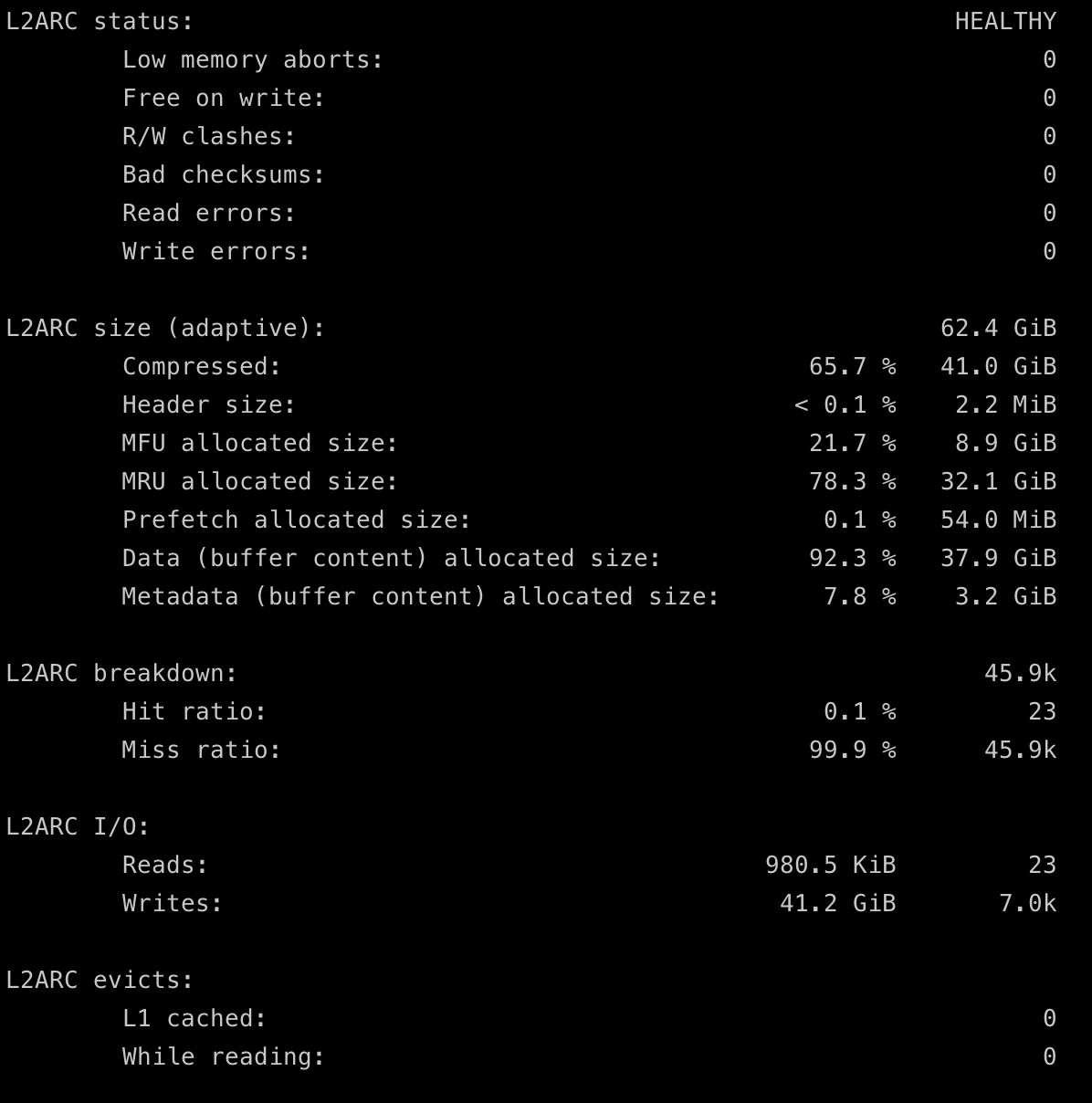
I am fairly sure that isn’t correct, since I don’t think all of my pools metadata has been shoved into L2arc yet. I could be missunderstanding this, though. This is my arc_summary output pertaining to L2:
I will be doing a scrub soon anyways as I will be swapping drives out for larger ones (I suppose this is not technically a scrub, its a resilver, but I would imagine effectively the same result would be had?). If so, might as well just wait for that…
I want it to persist reboots, and I want my entire metadata in L2. My RAM capacity is at the max I can provide it (50GB), and that isn’t enough to hold all metadata even if I could force ARC to be 100% metadata only (which I can’t, and wouldn’t).
The intent with this was to not do a special vdev for metadata but shove it all into a L2arc solution to gain snappy response of the system. Since I don’t access files often, they will not get into arc nor L2arc until the one time I am looking for that data. My goal is to make the system feel like it’s flash based from a navigating directory perspective.
Pre or post init? I already have a post init script to edit zfs peramaters, and it seems to work correctly. Maybe either would work fine? I am not sure why I chose post init for the other command I have, though.
Maybe another good question I should ask… what are tunables I should be setting besides this to really get the most out of the SSD as L2 Metadata only? Ideally, I just want to ensure all metadata is always populateed into L2, that way if its not already in RAM, it can go to L2 to grab it instead of spinning rust. I don’t access all of my data often, its mostly not accessed ever. But when I do go into a folder directory that hasn’t been opened in the history of my array, I want it to feel snappy.
Either works fine, but a pre-init script applies earlier, which is desired for setting module parameters.
I would have to defer to you, since I can’t speak on it. I never used an L2ARC or experimented with such settings. The only parameter I noticed benefit from was arc_meta_balance which I changed from the default of 500 to 2000, to favor metadata over data in RAM. This only affects the ARC, so I’m not sure how it would work with an L2ARC for metadata.
The inverse might work better for your setup. The L2ARC can be left to its default (secondarycache=all), with a high priority of metadata in the ARC. Then the metadata will stay in RAM, and any data that would otherwise pressure metadata eviction from the ARC will instead be evicted… to the L2ARC. This way, you get the best of both worlds and lower the reliance on spinning HDDs.
In ZFS, I’m not sure if the L2ARC will hold duplicated metadata that already exists in the ARC? I don’t believe it was designed like that. This means that rebooting with a persistent L2ARC would ironically favor evicted data?