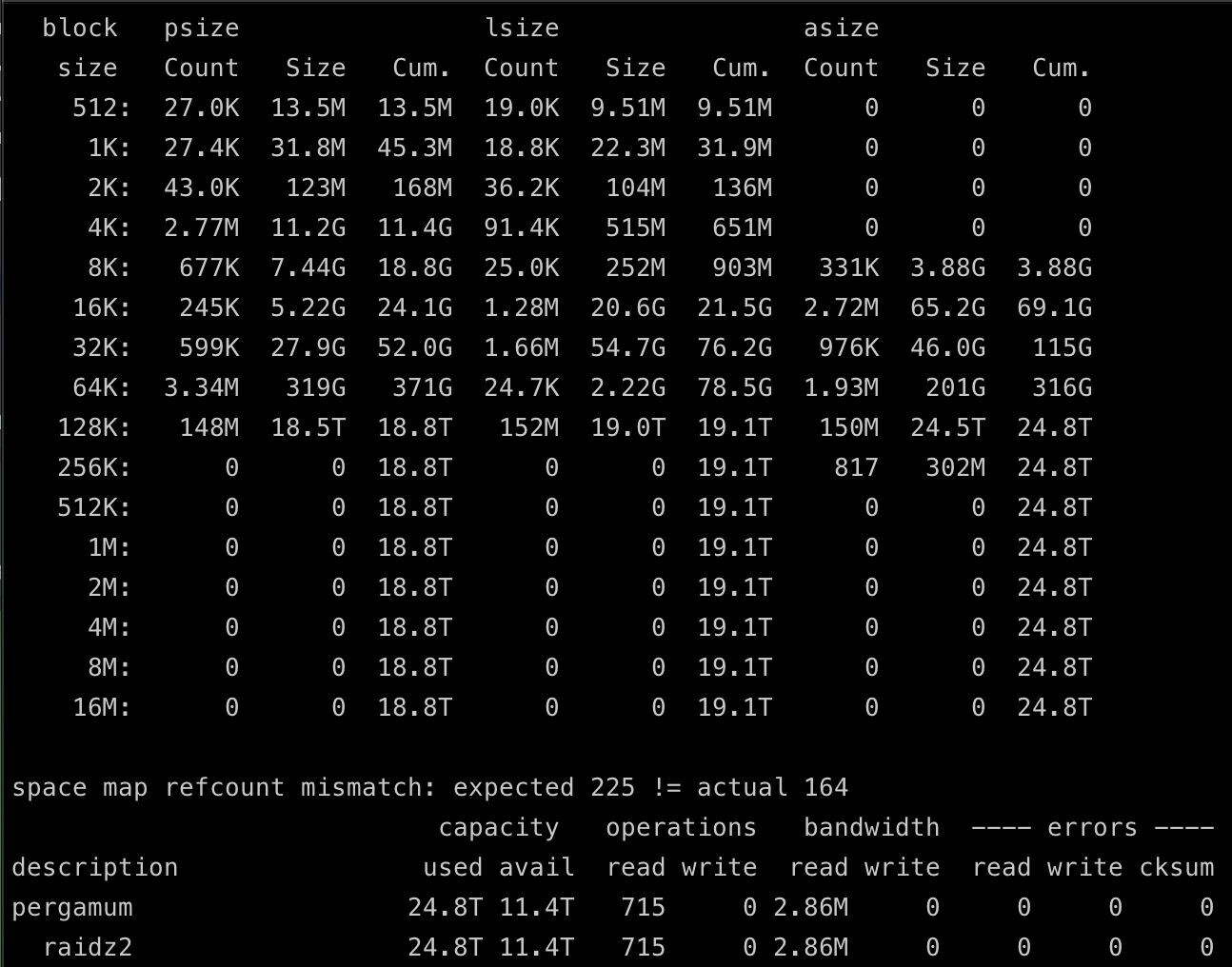
I am planing to rework my truenas deployment a bit and add a metadata vdev. I will be using 3x 800 GB SAS SSD’s to accompany my 10x4TB (soon to be 10x8TB) Z2 array.
This is a homelab, and realistically, I don’t “need” the metadata drives, but tinkering is part of the fun. I know once I add them I can’t unadd them… but realistically the next time this array gets any genuine upgrades I would be going all flash and likely having to cross quite an intersting and exciting bridge once that day comes.
My array is mostly large media files, so I plan to adjust my record size to 1M instead of the 128kb its currently set to which will help drive down my metadata size. I use my truenas store for all of my personal data (videos, pictures, docs, etc), NVR recordings, movies, tv shows, etc, but the majority of the storage is taken up with movies/tv files.
All of that said, my plan is to use a small block size of 32KB based on the results from my current pool, but I could be a little risky and push that up to 64KB. As shown below, currently I am using ~90GB for metadata, and 316GB for 64k blocks and below. Assuming I cut 30% out of my metadata (could be more, but I would rather be conservative), thats ~400GB of total usage of the 800GB vdev right off the bat.
The real question here is, is the performance advantage of going with 64KB vs 32KB small block value worth the “risk” of overflowing the vdev one day? I could always address that in the future with buying larger drives and replacing the old 800’s… Hmm. honeslty maybe that answers my question, one more bridge to cross in the future if I go that route.
I guess not. Especially considering that some of these files will be useless tails from your big files, so there is nothing gained by having them in svdev instead of your Z2.
The 160KB file will have its first 128K block stored on HDD, while its second block, compressed down to 32KB, will be stored on the NVMe.
Retrieving metadata from a faster device makes sense, as the results are felt by the user: Browsing directories, apps scanning through many files, rsync crawling entire roots, and other typical usages.
Retrieving small blocks from a faster device doesn’t really make much sense. What is it about your 32KB text file, comprised of a single “small” block that makes it more important than a 96KB text file, comprised of a single “not small” block? The same can be said for binary files.
Yea, I just read the other thread which was linked… That is a lot of new info, inconvineintly, about 14 hours after I already ordered my 800 GB SAS SSD’s, lol. Honestly, I got them for under 50 bucks each, so, the price of smaller drives wouldn’t be much different.
That said, I just read about the fact you could do a L2ARC with metadata only… which seems so much easier? Less risk? Hmm…
Also, wait. What settings do you have for small block size on your svdev? Maybe I am just to tired and can’t read anymore. I thought somewhere I read you used 1M for small block size and 2M for vdev record size, but I went down to many threads in the past hour, I think it’s probably time to get to sleep lol.
I’m just trying to figure out what settings you used which resulted in you using over 2x what I’d expect. Also, it’s hard to imagine no one else has reported this issue…?
Is a 3 way mirror really that risky?
I mean, it sure is if you get 3 times the same drive/controller.
But sure, it L2ARC is easier and you can always remove it. But it only works for reads not for writes.
I changed it multiple times, so I can’t really make a statement about that.
I think not many people use s vdev for anything else than metadata.
And after understanding about the whole tail stuff, I think I agree that anything else than 0 makes only sense for dRAID efficiency problems.
0 or 1M. To make the whole dataset reside on an SSD.
Also, TBH, I think there are use cases where you can trade some sVDEV space for IOPS. Perhaps a music lib with metadata files for one? I personally only use it for jellyfin (supposing subtitles go to SSD), but I don’t think it really makes much sense.
No, it’s not. But your point about the reads and writes answers my question, I would prefer it accelerate both.
I’m not sure about this. Wendell on level1techs definitely advocated for storing small blocks on the svdev, and folks followed his lead and did that. I didn’t read about this st all in that set of forum posts which was many many users. May be worth trying to get info from that set of people, hmm.
Those discussions appeared to conflate “metadata” and “small blocks”, which is a common misconception with home users who want to increase performance that is limited by their spinning HDDs.
You can achieve performance gains by increasing RAM, adjusting a ZFS metadata parameter, adding a persistent L2ARC, or adding a special vdev that stores metadata by default.
All of the above can be done too, with the caveat that a special vdev cannot fail, or else you risk losing your entire pool.
Hmm, I think I maybe either don’t agree, or my point wasn’t made quite right.
The fact many folks in that group did add svdev’s and I didn’t see reports of people suddenly having way more svdev usage than expected, suggests either they didn’t have issues, or none of them actually checked. I find it hard to believe none of them checked their svdev usage, but I s’pose anything is possible.
The discussion and feedback revolved around performance.
I might have missed it (and maybe I did), but where in those discussions were people claiming they want to add a special vdev to their pool because they want better overhead efficiency for storing small blocks on an otherwise less efficient wide RAIDZ or dRAID?
They’re trying out special vdevs for speed and performance, which is sufficient enough to leave it alone, as metadata will automatically populate it without the need to configure a per-dataset small blocks allocation.
This can be done more safely, without committing to any permanent special vdevs, by instead increasing RAM, adjusting a metadata parameter, or adding a persistent L2ARC for metadata.
I suppose it’s possible I am mistaken in assuming a good portion of those folks did add small blocks to that pool, especially since Wendell specifically suggested you could do that (I admit, I’m one of the sheeple as well).
The point about doing it safely, my TrueNAS VM has about as much RAM as I can give it (50 GB), I could adjust parameters, and I could do the L2arc option. But those wouldn’t help writes. To be fair to my array, most of the IO related to metadata likely is reads since I don’t have DB’s or anything doing lots of writes to the array. All I have constantly writing is my NVR video feed data, and nightly Proxmox backup server updates which is a few GB of writes at most, garbage collection and pruning… hmm. Maybe I should try the L2arc approach first.
That’s what I mean by conflating “metadata” with “small blocks”. The original purpose of storing small blocks on a special vdev was to deal with the inefficient overhead of very wide dRAID or RAIDZ pools. @swc-phil linked to this in his earlier post.
A special vdev can have multiple uses. It can store metadata, dedup tables, and small blocks. Home users likely don’t need to configure a special vdev to store small blocks, since it is storing metadata by default, which will yield the performance gains they’re hoping to achieve.
I still stand by the safer alternatives of increase RAM → adjust parameter → add persistent L2ARC (in that order) for home users who are looking to boost performance that is bottlenecked by spinning HDDs, without committing to an irreversible solution. Trying out the first 3 suggestions will still allow you to later decide to add a special vdev if you still “need” it.
FWIW: In the past I had considered adding an L2ARC, but doubling my RAM and adjusting a ZFS parameter made a huge difference on performance. To this day, I never added an L2ARC and I may never. One obvious use I can see from it is that they can be persistent, so the filesystem metadata can be retrieved quickly after a reboot, rather than being read from the spinning HDDs.
Since I already ordered the drives, I’ll likely end up trying to use them, but it probably makes sense to try the L2arc solution first since it is reversible, and like you said, very easy to test.
I can’t add more RAM (not enough to make any real difference), but I could tune params, and that plus the L2arc solution may be plenty sufficient to make me “happy”.
I don’t believe the “persistent” option is exposed in the GUI, unless the newer versions of TrueNAS show it? If not, you’ll have to add a custom tunable that makes the L2ARC persistent.
You can also consider another parameter called “arc_meta_balance”. I set mine to 2000 from the default of 500.
Hmm, the plot thickens as I do more and more research. I admit, I set up my ZFS array a decade ago, learned a lot since, grown my homelab 20x, and now I’m starting to realize some of my base knowledge is incorrect.
Originally, everything was SMB shares for my singular windows desktop to access. But I now have over a dozen Linux VM’s/containers and I have them mounted as NFS - I did not realize NFS is by default sync writes.
Maybe a SLOG is now actually a potentially helpful tool…
I’d argue that if you’re only after metadata for a largely dormant, WORM-like pool that a persistent, metadata-only L2Arc makes more sense for any system with more than 16GB RAM. The benefit of L2ARC is that you can lose it, detach it, whatever and the pool will be fine.
For me, the whole point of sVDEV is speeding up small files and metadata. Dealing with zillions of small files is comparatively much less efficient with a spinner than a SSD. Latency to find files, etc. will be significantly higher.
That in turn is also the appeal of fusion pools, ie the flexibility of being able to tailor recordsizes and small block cutoffs to allow certain datasets to reside mostly on HDDs while others reside mostly on SSD, all while sharing the same set of disks.
For pools with a lot of turnover / changes, a sVDEV will hold an advantage over a metadata L2ARC by always being 100% updated whereas a L2ARC has to “miss” relevant metadata at least once before it is added to the L2ARC.
This is actually a good exception. You can even set the specific dataset to store all files on the special vdev. I can see the benefit of this for libraries and quick access, or catalogs used by things like Jellyfin or XnView.
Question on L2arc and SLOG - the enterprise SSD’s I have showing up are HGST units, used, but 2.9 PB endurance (I’ll find out just how much has been written to them once I get them….).
If I go with my new plan, I’ll only need 1 of the three. I can either keep the 2 to play around with, or just return them.
Or, I can return all 3, and for similar money I can get a u.2 intel 900p and a PCIe to u.2 adapter.
Plan is use the same device for SLOG and L2 with metadata only. Would Optane be a way better choice, or is the SSD “probably fine”. The SSD’s write speed is 700, so it’s at least a fairly fast SAS SSD (obviously won’t have the same latency or endurance of Optane).
That’s precisely my intended use case - put all apps, jails, associated databases on the sVDEV, keep the big stuff (images, videos) on the HDD portion of the pool. If I start running VMs here, same thing. That gives you all the speed for browsing while economizing for large storage that is not as sensitive to read/write latency.