
One of the features that my new server motherboard has is three NVMe slots as well as eight SATA ports. One of the NVMes is already occupied with my TrueNAS boot drive, but I’m thinking about using the NVMe drive to host the apps. Is it possible to migrate the apps without losing the settings?
1 Like
If you’re on 24.10 or 25.04 you can follow this guide by stux
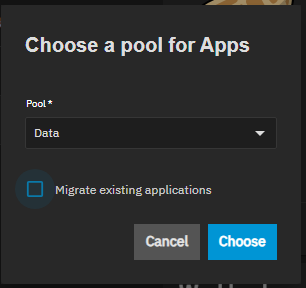
If you’re on 25.10 and you choose to switch the apps pool truenas asks if the apps should be migrated.
I’m on 25.10.0, so if it’s that easy, I’ll try it once 25.10.0.1 is posted for two very important fixes.
I have a 1TB NVMe drive on order which should arrive Saturday. So, I’ll install the drive Sunday after the Plex backup is complete at 7 AM. However, I won’t perform the migration until two issues are fixed for TrueNAS, one being SMB, the other being Docker Apps aren’t properly starting up.
Since I don’t like threads where the original poster asks a question, gets an answer, and then never follows up with their experience. This helps other searchers
I actually ordered two SABRENT Rocket 4 1TB NVMe drives and installed them this morning on my server. The dataset is set up as a mirror with the name nvme. I then went into Apps → Configuration → Choose pool and selected the NVme pool and checked off Migrate Existing Applications. As I have 31 apps installed on TrueNAS, this process took less than 45 minutes, and each app is migrated in alphabetical order. Thus, my proxy server, Zoraxy, was the last to come online.
I am noticing the speed improvement including the fact that it no longer takes three minutes for the Apps to start up after boot. I now have to migrate some of the configuration and data files, including ABS and Audiobookshelf, from the HDD pool to the NVMe pool to speed them up further partially because the DB files are located there. This is for the configurations such as this:
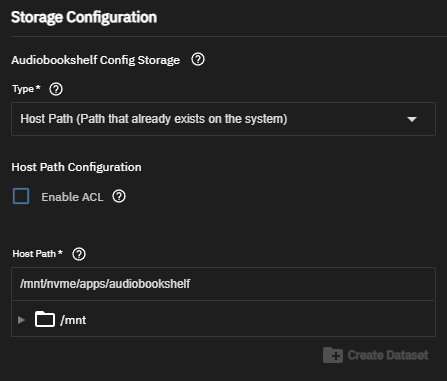
The process is as follows:
- Shut down the app in the apps menu
- Perform the copy operation using the command
rsync -avh --progress /mnt/pool/app-config/appname/mnt/nvme/apps/. In this case,/mnt/pool/app-config/is the location of the original config files on my original HDD pool, while/mnt/nvme/apps/is the location of my nvme pool. Don’t repeat the mistake of using/mnt/nvme/apps/appname. - Adjust the storage location of your configuration.
- Restart your app.
- Once you are comfortable with the migration, you can delete the original configuration.
UPDATE 1: The migration of data for Audiobookshelf from my HDD pool to NVMe mirror didn’t go smoothly. I ended up having to restore from a backup made this morning. Once the service was restarted, Audiobookshelf felt almost instantaneous. All of my media is still in my nice, spacious HDD pool.
UPDATE 2: Kavita and Tautulli data have also been migrated over. Found the cause of my error, and have documented it above.
UPDATE 3: AdGuard Home and Uptime Kuma data has also been migrated over. Also, I saw that I could migrate my System Dataset over to the NVMe drives… so I did that. I also created a backup_apps share and set up The big data migration will be Plex tomorrow morning and the modifying the weekly backup script.
2 Likes
UPDATE 4: I saved the biggest for last, and that was Plex. After the weekly backup was complete, I moved the config and databases over to the NVMe drive, then tested. Plex is also faster now. I also modified the backup script and tested accordingly. A test reboot should a slight mapping issue, but everything is OK.
Post-migration, I should note that the actual media files (Audiobooks, Movies, Music, TV Shows) still reside on the HDD pool which is configured as a RAIDZ2 configuration. Too many items there. However, the associated databases are on NVMes. Some of this is because of setup mistakes I made when first migrating from TrueNAS Core to TrueNAS Scale in April of last year. But, the speed up is worth the price and challenge.