sudo: process 1458350 unexpected status 0x57f
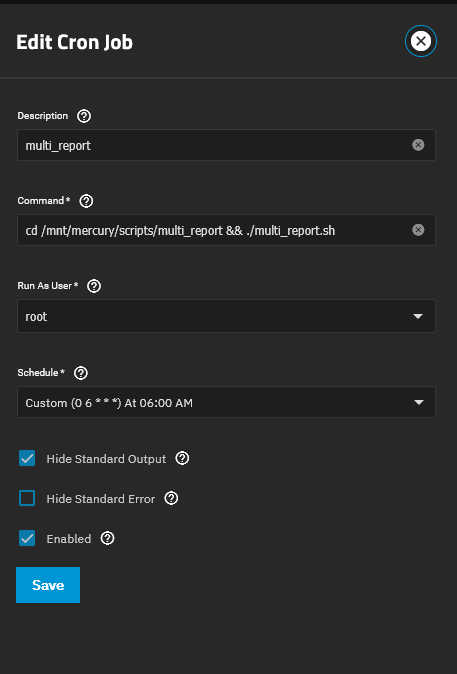
Executed CronTask - cd /mnt/mercury/scripts/multi_report && ./multi_report.sh > /dev/null: sudo: process 1458350 unexpected status 0x57f
The script runs successfully (having debugged the FARM problem with @joeschmuck) but I just get the extra email/error
If you uncheck the Hide Standard Output, it may help identify the problem, or not. Feel free to forward me the email this generates so I can take a look.
Joe,
this is under ElectricEel-24.10.2.2
Did you change the file name to run?
Starting around June 12th run the script broke (it ran the 10th) and I get the error from cron of
sh: 1: /mnt/Pool1/general/scripts/multi_report.sh: not found
That file (no longer exists (multi_report.sh), but apparently was removed? There are a number of files such as:
multi_report_v3.17_2025_06_07.txt
and the associated
multi_report_v3.17_2025_06_07_config.txt
Starting with v3.0.7 up to the current v3.17 There appeared to possibly be a MULTI-REPORT UPDATE UPDATED: V 3.18 → V 3.18 that said it successfully run that was done on June 10th as I got the email, but cron has been erroring out since then when trying to run the script and I don’t see the file cron is looking for in the directory anymore. Obviously scripts saved as .txt won’t run either as the system does not know it is a .sh script.
Maybe there is a typo in what the script looks for? Or maybe a typo in naming or possible a permissions issue where the file could be removed but the new one not written?
v3.17 update is broken. v3.18 must be installed manually, but the update is fixed there. Once v3.18 is installed, you may need to disable FARM checking. It too is causing issues.
I am working on v3.19 which rolls back FARM checking and disables it by default. I also added -disable_farm and -enable_farm switches to make it easy to perform.
The issue with sudo process errors, that is a new one and I have no idea where it is coming from but I am working it. Doing regression testing to isolate it, but the problem is I do not see the problem so asking others to help isolate the problem.
We can always revert back to v3.16 if needed but there are some good improvements in v3.18 that I’d like to retain if I can. Well I can of course, it works fine on my systems. But for the others out there, it would be nice to have.
Toss me a message if you would like to try the beta. It has just started and the FARM stuff was the only change so far.
I have uploaded an edited version of 3.18 to disable FARM checks completely, until I get this resolved for 3.19.
If you are running v3.16 or v3.18, run ./multi_report.sh -update and answer y to apply the new github file. Or if you have already disabled the FARM checks, you do not need to do anything.
Outstanding! Thank You for documenting that. I will update the User Guide so this information is captured.
It keeps me on my toes. But the credit should go to “The Unknown Proton Email Person” (they never let me know who they were), he/she discovered it was a permissions issue. I’m not a permissions expert, not even close. So whoever that was who helped the group solve this mystery, I sincerely appreciate your help.
That permissions problem is odd. I can understand not running a “root” crontab entry if the script / program is not owned by “root” AND has world write-ability.
But, adding group write, and removing world read & execute?
That does not make sense.
Interesting, my two servers that run the script fine are as shown even though they have different permissions setup and different users. I get the script run, emails, auto script updates etc. Both scripts are in a SMB data area so I can easily look at the scripts if needed.
System1
$ ls -all *.sh
-rwxrwxrwx 1 root apps 104786 Jun  9 00:00 drive_selftest.sh
-rwxrwxrwx 1 root apps 614863 Jun 19 13:04 multi_report.sh
-rwxrwxrwx 1 root apps  10128 May 13  2024 smr-check.sh
System2
$ ls -all *.sh
-rwxr-xr-x+ 1 root root 104786 Jun  9 00:00 drive_selftest.sh
-rwxr-xr-x+ 1 root root 614863 Jun 19 13:03 multi_report.sh
-rwxr-xr-x+ 1 root root  10128 May 13  2024 smr-check.sh
This fixes mostly FARM related issues. I wanted to compare as many values as possible however I found out the hard way, there is very little consistency with Seagate FARM data. It could be due to the different version of their spec sheet over the past few years but I pull back to just Serial Number and Power On Hours. I left a lot of the old code for other values just in case I find another one I can add. But then again, how much longer can the “FARM Catastrophe of 2024/2025” last?
As for those permission issues, I will start to track this down. I need to replicate the issue on my system. I can create virtual drives as pools for testing permissions since I’m on ESXi.
I hope to hear nothing bad about v3.19, but of course, if there is something wrong, please let me know.
Also, I have another script in my signature that is just for sending an email with a copy of the TrueNAS configuration files. It does nothing more. So anyone who only needs this capability, it is available. I feel this should already be built in TrueNAS.
I just logged into both servers via ssh and ran the script on 2 servers and both updated to v3.19 without issue. The email sent looked to be correct.
I did change the title for the text section to include the server name which was my preference to add the name. Multi-Report Text Section - MyServerName
Multi-Report v3.19 dtd:2025-06-27 (TrueNAS SCALE - Electric Eel 24.10.2.2)
Report Run 29-Jun-2025 Sunday @ 12:50:29
Total Memory: 125Gi, Used Memory: 69Gi, Free Memory: 48Gi, Swap Used: 0B
System Uptime: 42 days, 22:50:27.582098
Script Execution Time: 3 Minutes : 15 Seconds
and the other
Multi-Report v3.19 dtd:2025-06-27 (TrueNAS SCALE - Electric Eel 24.10.2.2)
Report Run 29-Jun-2025 Sunday @ 12:51:15
Total Memory: 62Gi, Used Memory: 29Gi, Free Memory: 23Gi, Swap Used: 0B
System Uptime: 46 days, 18:41:31.221412
Script Execution Time: 8 Minutes : 0 Seconds
I like it, someone taking the initiative. For the rest of you folks out there, the ${host} is also in the Email Subject Line. But when someone can just modify it to a personal preference, I appreciate it vice asking me to make yet another change.
Since BasilHendroff appears to have not visited his GitHub repository since 2021 (I hope nothing bad happened), I have forked the smr-check.sh script and updated it. Ten more SMR drives have been added.
To obtain the updated file, if Multi-Report has SMR checking enabled, all you need to do is delete the file in your script directory called smr-check.sh and when Multi-Report runs, it will download the updated file. You can always visit the GitHub repository and grab it.
This is only a simple verification of drive model numbers, nothing fancy. This script can be run on it’s own if desired.
If you find that an SMR drive is not being detected, please reach out to me so I can fix it.
Multi-Report Update News
I am working on version 3.20. Since I have no real drivers to push it out, I’m not in any rush.
And part of Multi-Report is Drive-Selftest script which I have updated to version 1.06 but not released it yet. It has a few good changes in it. It is currently being tested by an outside source to verify no unforeseen issues arise. It is not dependant on the next Multi-Report version so when testing is done, I will push it out the door.
@joeschmuck are there any logs files relating to emails? I’ve been running the script on my TrueNAS Core servers for a long time now. And updating to the latest versions when released.
One of the servers now often doesn’t send the email updates. Either via the cron job or if I trigger it manually. The other server still sends them every day. Both are running Core 13.3-U1.2 and both running Multi-Report v3.19.
Are there any logs that I can look at to see why it might be failing?
I reply to you instead of @joeschmuck.
At first, check if sendemail is at the latest version using the flag from the multi report, if not update it.
Then, i have to say that by default the sendemail not collecting logs anymore, but you can test it standalone triggering an email, explained here:
don’t forget the --debug_enabled flag.
(if you grab the pre release, there is also the test mode available to quick trigger an email
Ok, i jumped into conclusion that MR on Core use sendemail on newest version but watching your screenshot i’m totally wrong
Must be only for Core users using the other Joe script (only the backup config one).
So, @joeschmuck , we need you