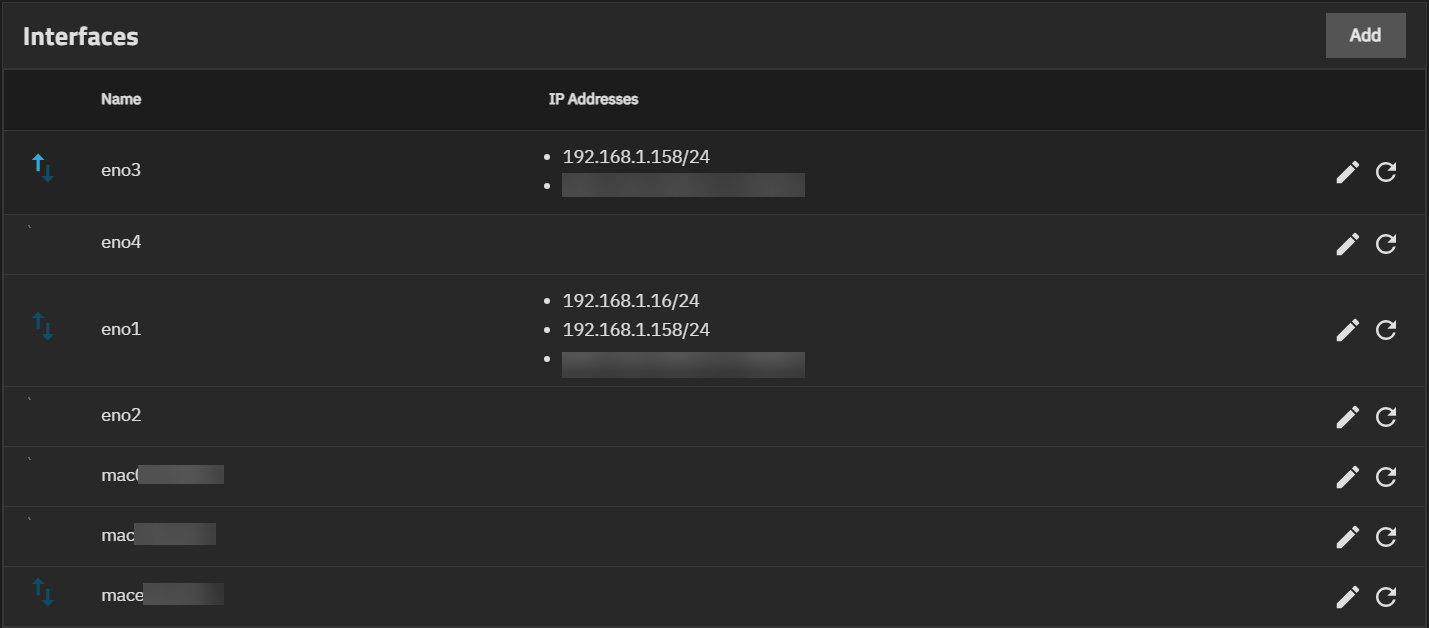
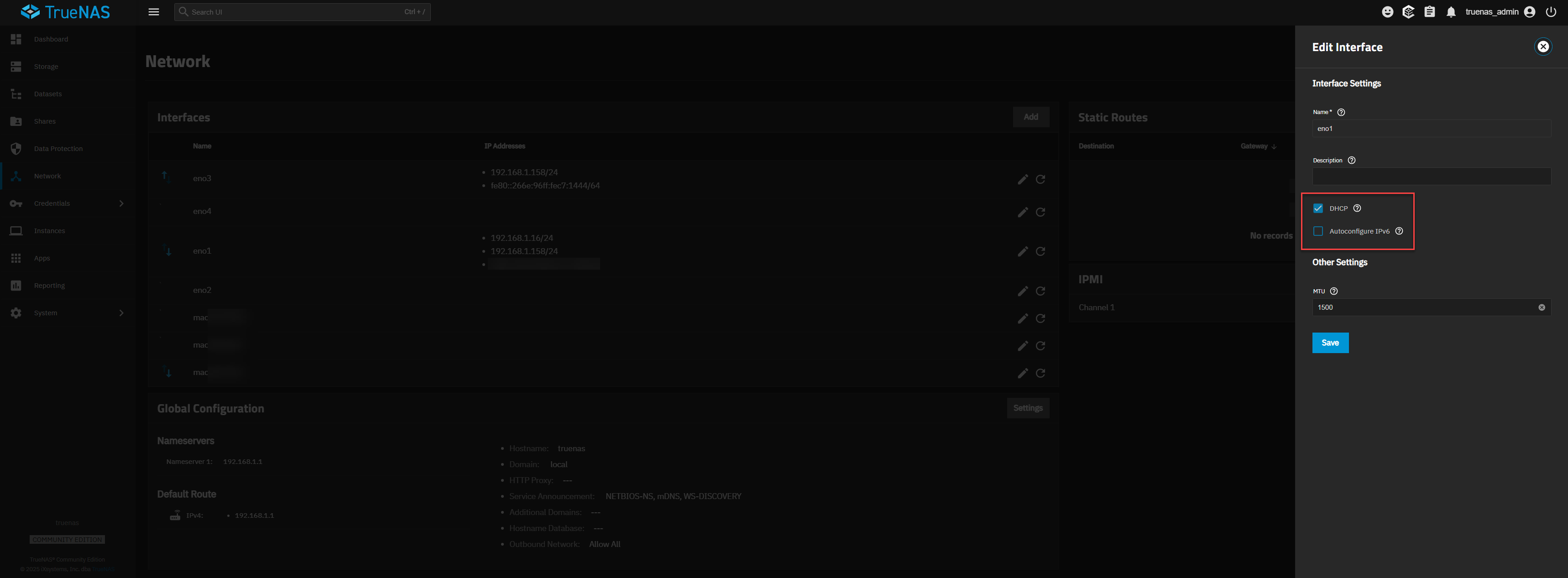
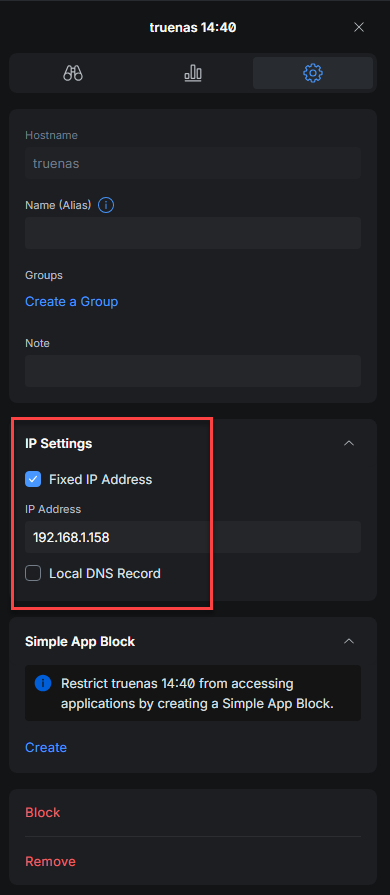
Not sure I’ve seen something like this. I have a 4 port NIC card in my TrueNAS, both en01 and en03 are plugged into my switch and live. In my Ubiquiti gateway, both are given fixed addresses 192.168.1.158 for en03 and 192.168.1.16 for en01 using Ubiquiti’s DHCP reservation. For some reason, the en01 device is pulling BOTH 192.168.1.158 and 192.168.1.16 which is of course throwing an IP address conflict on my Gateway. Since both are set to fixed addresses, I don’t know why this NIC would pull a second address. I also do not have any aliases on either of these NICs it literally should be just 2 NICs, 2 IP addresses. I have tried removing DHCP on en01 and using the alias for 192.168.1.16 but TrueNAS throws a warning that it’s already assigned because it was just assigned through DHCP.
First off, Unix does not support more than 1 IP when using DHCP. Nor does Unix support multiple NICs when using DHCP.
Second, most Unix, (Solaris is the exception), do not support more than 1 IP in the same sub-net, on different NICs. Those different NICs can be either in different sub-nets. Or, when using the same sub-net, made into a Bond / LACP group.
You can have multiple IPs from the same sub-net, on the same NIC. Those additional IPs are generally called IP aliases.
Some people argue about this… so someone wrote this up in the old forum:
Two IPs on the same subnet without declaring a link aggregation or failover will result in trouble. Try reading the manual section on LAGG. Best of luck!
Right, that’s why I said the gateway is throwing warnings about IP address conflicts. I’m not looking to do LAGG here by the way, one of these is 1Gb, the other is 10Gb. One is going to the 10Gb.
I can assure you I thought that was true as well, but I can also assure you this is set to a DHCP setting, not static AND is set to a DHCP reservation (Ubiquiti just calls it fixed IP but works the same way). So while I agree it shouldn’t be happening, IT IS. That’s why I posted, to see if I can figure out why.
That’s not what I’m trying to accomplish with this. I could do that but I want SMB traffic flowing through the 10Gb and my VMs running on 1Gb. The VM traffic doesn’t require that kind of bandwidth, but I do want that bandwidth between my desktop and TrueNAS.
It’s more of a logical separation, yes the 10Gb should be more than enough but there’s no reason to try and cram all that traffic through one interface when there’s no real reason to.
Way back in my CORE days, I unsuccessfully attempted a failover LAGG between the 10GbE and the 1GbE connections on my NAS. I did such a great job of locking myself out of my NAS and becoming way too familiar with the console CLI, that I gave up on it, just kept the 10GbE connection, and never looked back.
My Apps / VMs / NAS all use the 10GbE connection, with the apps using IP aliasing to allow me to use their regular HTTP and HTTPS interfaces. My NAS cannot saturate more than about 1/2 of the bandwidth, leaving plenty for the Apps / VMs / etc.
If you want to insist on VMs using specific hardware adaptors (vs. the bridge approach I’m using), I’m pretty sure you can assign NIC hardware directly to a VM but it’ll be 1 NIC per VM, not 1 port of a NIC per VM. Maybe they can be bridged, but I wouldn’t count on it.
I had a bridge setup previously and it bricked my server on the upgrade from 24.10 to 25.04. That’s why I went away from using it. I know that the 10 Gb wouldn’t get maxed out with what I’m handing it, I just would rather keep them separated. I think I may just have to put it on a separate network and route to and from it, I just was hoping someone has seen this and why it’s possible it pulled 2 different IP addresses from DHCP. Theoretically it shouldn’t, it should only pull 1.
My opinion is that you get undefined behavior when doing unsupported configurations. So the answer I would give, is either use a supported configuration on TrueNAS, (aka no DHCP at all and 2 different sub-nets on your 2 different NICs). Or see if someone else can help further.
I’ll just use a separate network and put a route in the gateway. I just can’t think for the life of me how it could actually pull the address without it being manually setup which it wasn’t. Very strange.
Would you [or anybody else] be able to enlighten us as to why ixSytems provisions its TrueNAS machines with multiple NICs in addition to the IPMI interface?
I bought one of their Mini series machines that came with four (4) interfaces plus the management interface. I fought to get multiple interfaces working so as to have separate addresses for various programs that expected to have their own IP addresses, but were running in VMs and sharing … I finally gave it up, but I see they are still selling machines with two (2) interfaces plus the IPMI.
If the machine is setup with Linux, and Linux doesn’t support multiple interfaces - what is the logic in providing extra capability that cannot be used? Curious minds want to know
Remember: iXsystems does not design motherboards; iX integrates general purpose motherboards.
Two interfaces (not counting management) is pretty much the minimum for use as a router; that’s a pretty good reason for Supermicro/AsRock Rack/whoever to design boards with such capabilities.
If the server is NOT used as router or gateway, it might still aggregate multiple interfaces, or, for whatever reason, plug directly into different subnets.
If, like many people, you only use one subnet and no LAGG with your NAS, you’re really supposed to plug one and ONLY ONE cable (again, not counting management), no matter how many physical interfaces there may be.
(Tip: Put all four interfaces in a bridge, set your static IP on the bridge, and never ever bother about where the single cable should be plugged.)
It’s actually quite easy (compared to other unsupported configurations) in both CORE and CE to have one NIC for “everything NAS” (including apps in the CE case) and the second one for VMs.
Configure the NAS and all services with just a single NIC. Create bridge on second NIC but do not assign an IP address to either NIC or bridge in TrueNAS.
Then simply connect the VMs to that bridge.
That even scales to creating mutiple VLANs on that NIC, then one bridge per VLAN, then connect different VMs to different bridge interfaces
All supported, configurable from the UI, no interruption of services … as long as you do not assign any layer 3 address for the NAS host to any of these interfaces!
ESXi does essentially the same. An extra vSwitch or Portgroup connects VMs, not the host.
To be clear, I was merely referring to the pass though functionality built into the goldeneye SCALE VM setup GUI itself. Just as you describe, I assigned my VM to run on a bridge that I had previously set up. That is the best approach for my use case.
No doubt; there will be instances where assigning an entire NIC may also make sense.