My EOL x20 wont boot, I can't view the BIOS

I’ve had an x20 since 2019, long enough for the service contract to go EOL. Now iXSystems tells me to go to the forum for help. Other than bad power supplies, which were quickly replaced, it’s been rock solid. Because of that, I haven’t actually learned much about how it works other than using TrueNAS and updating it and such. This is my first “datacenter” server, so I’m totally new to the world of datacenter servers.

About 2 weeks ago it sent me an email saying it rebooted and then a few hours later it went down. I went and physically disconnected it from power and reconnected it and it came back up. I foolishly thought all was good and forgot about it.

But a few days later it went down again and now I can’t get it back up. By down, I mean I can’t connect to the TrueNAS IP. Because it powers up and there’s no blinking or amber LEDs. It looks completely normal. There’s no video out so I’m restricted to serial and ethernet connectivity. I can connect to the server using the usb-to-serial cable and ipmitool via ethernet.

ipmitool sol activate gives me an “ESM” prompt. Typing “$%^0” followed by 2 returns is supposed to give me the x86 console (according to the docs) but it doesn’t. It gives no feedback until I type “$%^2”, which takes me back to the ESM prompt. I’ve done lots of debugging with ESM and ChatGPT but can’t really figure out why it wont boot. Everything looks normal (according to ChatGPT). Except ChatGPT sometimes says it’s missing a CPU board. But I’m not sure if I believe ChatGPT.

screen /dev/ttyUSB0 38400 gives me access to a Linux OS running on arm but my server is x86 and it’s TrueNAS Core, FreeBSD. ChatGPT says the Linux OS is an embedded BMC/IPMI service processor OS. It’s running. But I can’t see any way to get from that to the x86 console either. I don’t really understand how these servers are built (I’ve never built my own server). So I’m not sure how it does all this communication between the embedded processor and the main board. I’m just used to the BIOS being the thing that starts once it receives power. But I can’t view the BIOS. I’ve never had a computer that had no video out. So I’m unsure what to do next.

I have purchased an identical SAS controller canister from eBay (I retrieved the model number from ESM’s fru get). I swapped the M.2 NVMe disks and I installed it but that didn’t work either. However, I didn’t try everything when this was installed, so I should try it all again. But first I’m going to see if I can read the M.2 NVMe disk that came with new canister and see if I can install TrueNAS on it. Then I’m going to try everything all over.

Anyway, ChatGPT says the controller board or boot device might have failed. But it would be nice if I could see something to confirm that. So I’m trying the forum. Does anyone have any info they can give me to try to view the BIOS? I’ve still got all the debugging output from ipmitool, the ESM, and the serial connection and can post it if it might be useful. Well, fru get might be useful. It says ESCE B because I swapped it from the first bay to the second to see if reseating it helped. It didn’t.

ESM B => fru get
--- EL LOBO Enclosure  ---
[Product Info]
Product Name: PUMA LFF BMC NO HA
Product Manufacturer Name: CELESTICA-CSS
Product Serial Number: bla-does-it-matter
Product Part: P3217-B

[Incumbent Canister ID]
ICID = CLS     PUMA
Total 24 bytes:
43 4c 53 20 20 20 20 20 50 55 4d 41 20 20 20 20   CLS     PUMA
20 20 20 20 20 20 20 20

[Chassis]
Chassis Part Number: R0930-F0105-01
Chassis Serial Number: bla-does-it-matter
Chassis Product Name: PUMA LFF

[DriveBoard]
Drive Board Product Name: PUMA 3.5 INCH
Drive Board Serial Number: bla-does-it-matter
Drive Board Manufacturer: CELESTICA-CSS
Drive Board Part Number: R0930-G1036-01
Drive Board HW Version:
Drive Board MFG Serial Number:
Drive Board SAS Seed: 50-0E-0E-CA-06-C0-9E-00-3E-3D
--- ESCE A ---
NotIstall
--- ESCE B ---
[General]
Product Name: PUMA
Canister ID: CLS     PUMA
SAS Address: 50-0E-0E-CA-06-C0-9E-7E
Running Time: 1 day 1 hours 19 minutes 55 seconds

[Board]
Manufacture Name: CELESTICA-CSS
Part Number: R0930-G0006-01
Serial Number: bla-does-it-matter

[Revision]
FW Revision 4.0.3.3
Tamer r662 Built 2018/06/28
CFG Revision 4.0.3.3
CPLD Revision Code: 0.1.0.3
HW EC LEVEL:  03

--- Power Supply 0 ---
PS Type: 800W-JBOD-PSU
Power Capacity: 800W
PS Manufacturer: DELTA-THAILAND
PS Serial Number: bla-does-it-matter
PS Part Number: TDPS-800EB A
PS Firmware Version: 010=
--- Power Supply 1 ---
PS Type: 800W-JBOD-PSU
Power Capacity: 800W
PS Manufacturer: DELTA-THAILAND
PS Serial Number: bla-does-it-matter
PS Part Number: TDPS-800EB A
PS Firmware Version: 010=

I put the original SAS controller and M.2 NVMe in it. That’s what this fru get shows.

I was about to go to bed and I decided to just look around one more time before I disconnected from the server and I found some interesting logs. ChatGPT says this output means that I have either a failed VRM, bad PSU slot or backplane connection, or a short or failed part on the CPU board. It says to swap components while watching the logs. Then to look for swollen capacitors or other burned components and to measure voltages with a multimeter. Sigh.

ESM B => log get
------------------------------------------------ Local Event Log------------------------------------------------------------------------
No.    Time          Element                                        Event Type              Event Attribute           Event Data
0001   01:03:09:10   ESCE 1                                         Log Repository Cleared  N/A, N/A, i               Initiator: B
0002   01:03:09:10   Cooling 1                                      Fan Speed LVL Change    N/A, N/A, i               2 LVL, 5120 RPM
0003   01:03:09:12   Cooling 1                                      Fan Speed LVL Change    N/A, N/A, i               1 LVL, 5100 RPM
0004   01:03:09:15   Cooling 1                                      Fan Speed LVL Change    N/A, N/A, i               2 LVL, 5120 RPM
0005   01:03:09:16   Cooling 1                                      Fan Speed LVL Change    N/A, N/A, i               1 LVL, 5110 RPM
0006   01:03:09:20   Cooling 1                                      Fan Speed LVL Change    N/A, N/A, i               2 LVL, 5130 RPM
0007   00:00:00:00   ESCE 1                                         FW Boots Up             N/A, N/A, i               N/A
0008   00:00:00:00   Cooling 0                                      Fan Speed LVL Change    N/A, N/A, i               2 LVL, 5230 RPM
0009   00:00:00:00   Cooling 1                                      Fan Speed LVL Change    N/A, N/A, i               1 LVL, 5100 RPM
0010   00:00:00:00   Cooling 2                                      Fan Speed LVL Change    N/A, N/A, i               2 LVL, 6300 RPM
0011   00:00:00:00   Cooling 3                                      Fan Speed LVL Change    N/A, N/A, i               1 LVL, 4N/A, N/A, i     Speed LVL Change    N/A, N/A, i               1 LVL, 4300 RPM
0014   00:00:00:00   Cooling 6                                      Fan Speed LVL Change    N/A, N/A, i               2 LVL, 5900 RPM
0015   00:00:00:00   Cooling 7                                      Fan Speed LVL Change    N/A, N/A, i               1 LVL, 4400 RPM
0016   00:00:00:00   Cooling 10                                     Fan Speed LVL Change    N/A, N/A, i               2 LVL, 6000 RPM
0017   00:00:00:00   Cooling 11                                     Fan Speed LVL Change    N/A, N/A, i               1 LVL, 4100 RPM
0018   00:00:00:00   Cooling 12                                     Fan Speed LVL Change    N/A, N/A, i               2 LVL, 6100 RPM
0019   00:00:00:00   Cooling 13                                     Fan Speed LVL Change    N/A, N/A, i               1 LVL, 4100 RPM
0020   00:00:00:00   Cooling 14                                     Fan Speed LVL Change    N/A, N/A, i               2 LVL, 6200 RPM
0021   00:00:00:00   Cooling 15                                     Fan Speed LVL Change    N/A, N/A, i               1 LVL, 4100 RPM
0022   00:00:00:01   ESCE 1                                         SBB State Change        N/A, N/A, i               SBB State B
0023   00:00:00:01   ESCE 1                                         SBB State Change        N/A, N/A, i               SBB State D
0024   00:00:00:01   Cooling 8                                      Hotswap                 Insert, N/A, i            N/A
0025   00:00:00:01   Cooling 8                                      Fan Speed LVL Change    N/A, N/A, i               2 LVL, 6300 RPM
0026   00:00:00:01   Cooling 9                                      Hotswap                 Insert, N/A, i            N/A
0027   00:00:00:02   Cooling 9                                      Fan Speed LVL Change    N/A, N/A, i               2 LVL, 6300 RPM
0028   00:00:00:02   Cooling 16                                     Hotswap                 Insert, N/A, i            N/A
0029   00:00:00:02   Cooling 16                                     Fan Speed LVL Change    N/A, N/A, i               2 LVL, 6200 RPM
0030   00:00:00:02   Cooling 17                                     Hotswap                 Insert, N/A, i            N/A
0031   00:00:00:02   Cooling 17                                     Fan Speed LVL Change    N/A, N/A, i               1 LVL, 3900 RPM

...

0190   00:00:04:32   Cooling 1                                      Fan Speed LVL Change    N/A, N/A, i               2 LVL, 5130 RPM
0191   00:00:04:34   Cooling 1                                      Fan Speed LVL Change    N/A, N/A, i               1 LVL, 5110 RPM
0192   00:00:04:35   Voltage 13                                     Vol Failure             Assert, UnderThres, c     0.45 V
0193   00:00:04:35   Voltage 14                                     Vol Failure             Assert, UnderThres, c     0.00 V
0194   00:00:04:35   Voltage 15                                     Vol Failure             Assert, UnderThres, c     0.00 V
0195   00:00:04:35   Voltage 16                                     Vol Failure             Assert, UnderThres, c     0.00 V
0196   00:00:04:36   Voltage 19                                     Vol Failure             Assert, UnderThres, c     0.00 V
0197   00:00:04:36   Voltage 20                                     Vol Failure             Assert, UnderThres, c     0.00 V
0198   00:00:04:36   Voltage 21                                     Vol Failure             Assert, UnderThres, c     0.00 V
0199   00:00:04:38   Cooling 1                                      Fan Speed LVL Change    N/A, N/A, i               2 LVL, 5130 RPM
0200   00:00:04:39   Voltage 13                                     Vol Failure             De-assert, UnderThres, i  1.67 V
0201   00:00:04:39   Voltage 14                                     Vol Failure             De-assert, UnderThres, i  0.59 V
0202   00:00:04:39   Voltage 15                                     Vol Failure             De-assert, UnderThres, i  1.04 V
0203   00:00:04:39   Voltage 16                                     Vol Failure             De-assert, UnderThres, i  1.48 V
0204   00:00:04:39   Voltage 19                                     Vol Failure             De-assert, UnderThres, i  1.28 V
0205   00:00:04:39   Voltage 20                                     Vol Failure             De-assert, UnderThres, i  1.19 V
0206   00:00:04:39   Voltage 21                                     Vol Failure             De-assert, UnderThres, i  1.78 V
0207   00:00:04:40   Cooling 1                                      Fan Speed LVL Change    N/A, N/A, i               1 LVL, 5110 RPM
0208   00:00:04:46   Cooling 1                                      Fan Speed LVL Change    N/A, N/A, i               2 LVL, 5120 RPM
0209   00:00:04:51   Cooling 1                                      Fan Speed LVL Change    N/A, N/A, i               1 LVL, 5100 RPM
0210   00:00:04:53   Cooling 1                                      Fan Speed LVL Change    N/A, N/A, i               2 LVL, 5130 RPM
0211   00:00:04:55   Cooling 1                                      Fan Speed LVL Change    N/A, N/A, i               1 LVL, 5110 RPM
0212   00:00:04:58   Cooling 1                                      Fan Speed LVL Change    N/A, N/A, i               2 LVL, 5120 RPM
0213   00:00:05:03   Cooling 1                                      Fan Speed LVL Change    N/A, N/A, i               1 LVL, 5110 RPM
0214   00:00:05:04   Voltage 13                                     Vol Failure             Assert, UnderThres, c     0.73 V
0215   00:00:05:04   Voltage 14                                     Vol Failure             Assert, UnderThres, c     0.00 V
0216   00:00:05:04   Voltage 15                                     Vol Failure             Assert, UnderThres, c     0.00 V
0217   00:00:05:04   Voltage 16                                     Vol Failure             Assert, UnderThres, c     0.00 V
0218   00:00:05:04   Voltage 19                                     Vol Failure             Assert, UnderThres, c     0.00 V
0219   00:00:05:04   Voltage 20                                     Vol Failure             Assert, UnderThres, c     0.00 V
0220   00:00:05:04   Voltage 21                                     Vol Failure             Assert, UnderThres, c     0.00 V
0221   00:00:05:05   Cooling 1                                      Fan Speed LVL Change    N/A, N/A, i               2 LVL, 5120 RPM
0222   00:00:05:07   Cooling 1                                      Fan Speed LVL Change    N/A, N/A, i               1 LVL, 5100 RPM
0223   00:00:05:09   Cooling 1                                      Fan Speed LVL Change    N/A, N/A, i               2 LVL, 5120 RPM
0224   00:00:05:11   Cooling 1                                      Fan Speed LVL Change    N/A, N/A, i               1 LVL, 5110 RPM
0225   00:00:05:14   Cooling 1                                      Fan Speed LVL Change    N/A, N/A, i               2 LVL, 5130 RPM
0226   00:00:05:15   Cooling 1                                      Fan Speed LVL Change    N/A, N/A, i               1 LVL, 5110 RPM
0227   00:00:05:16   Cooling 1                                      Fan Speed LVL Change    N/A, N/A, i               2 LVL, 5130 RPM
0228   00:00:05:17   Cooling 1                                      Fan Speed LVL Change    N/A, N/A, i               1 LVL, 5100 RPM
0229   00:00:05:18   Voltage 13                                     Vol Failure             De-assert, UnderThres, i  1.67 V
0230   00:00:05:18   Voltage 14                                     Vol Failure             De-assert, UnderThres, i  0.59 V
0231   00:00:05:18   Voltage 15                                     Vol Failure             De-assert, UnderThres, i  1.04 V
0232   00:00:05:18   Voltage 16                                     Vol Failure             De-assert, UnderThres, i  1.48 V
0233   00:00:05:18   Voltage 19                                     Vol Failure             De-assert, UnderThres, i  1.28 V
0234   00:00:05:18   Voltage 20                                     Vol Failure             De-assert, UnderThres, i  1.19 V
0235   00:00:05:18   Voltage 21                                     Vol Failure             De-assert, UnderThres, i  1.78 V
0236   00:00:05:19   Cooling 1                                      Fan Speed LVL Change    N/A, N/A, i               2 LVL, 5150 RPM

...

0505   00:00:15:14   Cooling 1                                      Fan Speed LVL Change    N/A, N/A, i               1 LVL, 5100 RPM
0506   00:00:15:14   ESCE 1                                         Log Repository Full     N/A, N/A, w               N/A
0507   00:00:15:16   Cooling 1                                      Fan Speed LVL Change    N/A, N/A, i               2 LVL, 5120 RPM
0508   00:00:15:19   Cooling 1                                      Fan Speed LVL Change    N/A, N/A, i               1 LVL, 5100 RPM
0509   00:00:15:21   Cooling 1                                      Fan Speed LVL Change    N/A, N/A, i               2 LVL, 5130 RPM
0510   00:00:15:23   Cooling 1                                      Fan Speed LVL Change    N/A, N/A, i               1 LVL, 5110 RPM
----------------------------------------------------------------------------------------------------------------------------------------
Local Canister Running Time: 0 day 1 hours 31 minutes 17 seconds
Event Log: 510/510 entries
-- Critical: 14/510 --
-- Warning: 1/510 --
-- Info: 495/510 --

ESM B =>

Documentation link. X-Series | TrueNAS Documentation Hub

It looks like you were following the Basic Setup Guide. How many power supplies and controllers does your system have?

Section 2.1, are you getting the Green System Indicator LED?

Section 10 has a warning about replacing a controller and data loss.

Section 12, did you change the Cable for access to the System Console and set terminal software to 115200 baud, 8 data bits, 1 stop bit, no parity, no flow control? It’s unclear if you did that.

1 Like

I have 2 power supplies and 1 controller. I think it is showing the green system indicator LED but I need to go by and look to make sure. I saw the data loss warning but iXsystems wont give me support any more. I didn’t explicitly tell them I’m replacing a controller but I did say “my server doesn’t boot” and they answered by saying to go to the docs and forums and it seemed pretty final. I suppose I could push the point and tell them that the docs say to contact them.

I’ve tried both the 115200 baud port mentioned in section 12 and the 38400 baud port mentioned in section 13.1. The 115200 baud port gets me the working ESM prompt, but just like ipmitool sol activate, “$%^0” doesn’t do anything.

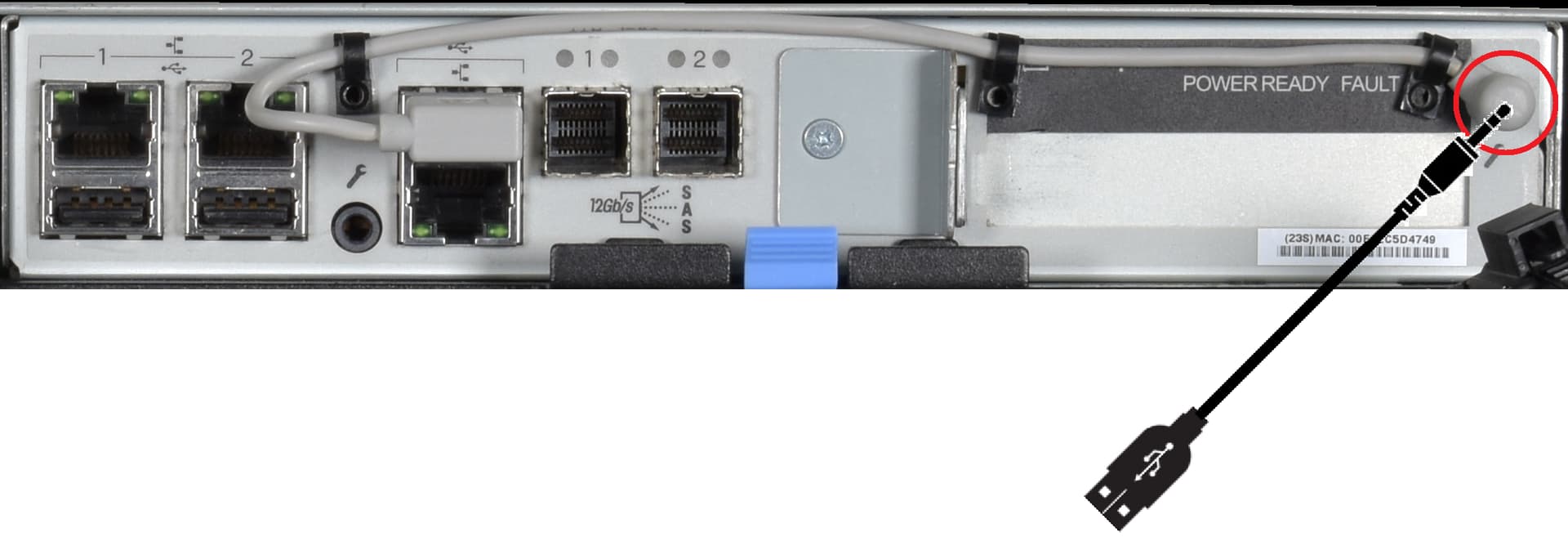
@magnusviri It sounds like the IPMI card may not be working properly, but that shouldn’t stop us from gaining access to the controller itself if you are local to the system. Do you have the black USB–>3.5mm cable that shipped with the unit?

Before digging into the IPMI access issues (the grey cable), we can directly connect to the serial console port of the motherboard. Can you unplug the grey cable from the slot that it is in now, and plug the black cable in like in this picture?

From that port, you should able to access the BIOS over serial, and see why it wasn’t booting if you put the original hardware back in. We should be able to at least determine whats causing the OS to hang up so we can figure out next steps.

115200 baud, 8 data bits, 1 stop bit, no parity, no flow control

Just a quick edit:
The grey cable on the back should not be used in place of the black cable, its straight RS232 not USB, despite the fact it terminates in a USB connector.
If you do not have the black cable that was shipped, you would need to source a proper USB to 3.5mm Serial cable. The below is the part number that should help.

2 Likes

I have the black cable and I’ve tried both ports on the back of the controller. The 115200 baud port gives me a working ESM prompt but “$%^0” doesn’t do anything. The other port, the 38400 port gives me a username/password prompt and when authenticating using the username and password from the docs I have a Linux prompt. I can use ipmitool -I lanplus -H 127.0.0.1 -U admin -P admin sol activate and that also gives me an ESM prompt but “$%^0” doesn’t do anything there either.

From the ESM prompt I typed log get and it gives me a bunch of voltage failures. I believe these happened after I ran ipmitool -I lanplus -H 127.0.0.1 -U admin -P admin mc reset cold. So I think what is happening is that after I restarted the controller it tried to start the main board and there wasn’t enough voltage and didn’t start. There’s enough voltage for the embedded BMC board to work though. I’m not entirely sure though because the 115200 port isn’t on the BMC board. I’m going by the datacenter later today to do a whole new round of tests including visually inspecting the components. (This isn’t mission critical, so I’ve been working on it slowly. But it’s really annoying so I do have to get it up.)

0192   00:00:04:35   Voltage 13                                     Vol Failure             Assert, UnderThres, c     0.45 V
0193   00:00:04:35   Voltage 14                                     Vol Failure             Assert, UnderThres, c     0.00 V
0194   00:00:04:35   Voltage 15                                     Vol Failure             Assert, UnderThres, c     0.00 V
0195   00:00:04:35   Voltage 16                                     Vol Failure             Assert, UnderThres, c     0.00 V
0196   00:00:04:36   Voltage 19                                     Vol Failure             Assert, UnderThres, c     0.00 V
0197   00:00:04:36   Voltage 20                                     Vol Failure             Assert, UnderThres, c     0.00 V
0198   00:00:04:36   Voltage 21                                     Vol Failure             Assert, UnderThres, c     0.00 V
0200   00:00:04:39   Voltage 13                                     Vol Failure             De-assert, UnderThres, i  1.67 V
0201   00:00:04:39   Voltage 14                                     Vol Failure             De-assert, UnderThres, i  0.59 V
0202   00:00:04:39   Voltage 15                                     Vol Failure             De-assert, UnderThres, i  1.04 V
0203   00:00:04:39   Voltage 16                                     Vol Failure             De-assert, UnderThres, i  1.48 V
0204   00:00:04:39   Voltage 19                                     Vol Failure             De-assert, UnderThres, i  1.28 V
0205   00:00:04:39   Voltage 20                                     Vol Failure             De-assert, UnderThres, i  1.19 V
0206   00:00:04:39   Voltage 21                                     Vol Failure             De-assert, UnderThres, i  1.78 V

I went and looked at my server again and indeed, the green light is solid.

I also submitted a ticket about the “data loss” problem when switching the controller and iXsystems didn’t give me an answer except to use the forums and docs.

I talked with a colleague and he said that if the drives are hardware raided then changing a controller would destroy the raid on them. I don’t remember how I had mine set up though. I have a saved config file and it has some entries for the storage_disk table but it doesn’t look like there’s anything in it about RAID. Does anyone know how TrueNAS does RAID on the X systems?

You may have had dual controllers for High Availability on TrueNAS Enterprise but not a card with hardware RAID.

We normally double check controller cards with sas2flash, sas3flash or storcli for the Broadcom / LSI cards.

I don’t know if you can get a hardware build list for that server from TrueNAS support but you might try. It may help to know what it has.

@NickF1227 Do you have anything else to add

Would I be able to tell if it was Broadcom / LSI by looking at the inside of the controller?

It’s all software-level RAID through ZFS - so the storage controller model won’t matter here.

I’ve never had HA dual controllers.

I got a parts list from iXsystems but it doesn’t tell me anything I didn’t already know. It has 4 RAM sticks, a BMC card, a NIC, 2 SFP+ modules, a USB Flash Drive, and the disks.

This may indicate that the board itself is not POSTing. For the sake of troubleshooting, can you pop the memory sticks out and then back in and try again?