Shutdown and Pull the drive

I inherited a truenas system and i am getting a notification that one of the drive is failing.
" Pool Tank1 state is DEGRADED: One or more devices are faulted in response to persistent errors. Sufficient replicas exist for the pool to continue functioning in a degraded state.
The following devices are not healthy:

  • Disk IBM-XIV ST6000NM0054 D5 S4D154WX0000K705JFZ7 is FAULTED"

The sas2ircu command does not show the serial number of the drive

tired@truenas1[~] # sas2ircu 0 display
LSI Corporation SAS2 IR Configuration Utility.
Version 20.00.00.00 (2014.09.18)
Copyright (c) 2008-2014 LSI Corporation. All rights reserved.

Read configuration has been initiated for controller 0

Controller information

Controller type : SAS2008
BIOS version : 7.39.02.00
Firmware version : 20.00.07.00
Channel description : 1 Serial Attached SCSI
Initiator ID : 0
Maximum physical devices : 255
Concurrent commands supported : 3432
Slot : Unknown
Segment : 0
Bus : 2
Device : 0
Function : 0
RAID Support : No

IR Volume information


Physical device information

Initiator at ID #0

Device is a Hard disk
Enclosure # : 2
Slot # : 0
SAS Address : 5000c50-0-862c-ad9d
State : Ready (RDY)
Size (in MB)/(in sectors) : 5723166/11721045160
Manufacturer : IBM-XIV
Model Number : ST6000NM0054 D5
Firmware Revision : EC68
Serial No : Z4D4S80Y1027EC68
GUID : N/A
Protocol : SAS
Drive Type : SAS_HDD

Device is a Hard disk
Enclosure # : 2
Slot # : 1
SAS Address : 5000c50-0-98ba-f5c1
State : Ready (RDY)
Size (in MB)/(in sectors) : 5723166/11721045160
Manufacturer : IBM-XIV
Model Number : ST6000NM0054 D5
Firmware Revision : EC6D
Serial No : S4D1BBHB0820EC6D
GUID : N/A
Protocol : SAS
Drive Type : SAS_HDD

Device is a Hard disk
Enclosure # : 2
Slot # : 2
SAS Address : 5000c50-0-984b-3edd
State : Ready (RDY)
Size (in MB)/(in sectors) : 5723166/11721045160
Manufacturer : IBM-XIV
Model Number : ST6000NM0054 D5
Firmware Revision : EC6D
Serial No : S4D16E110820EC6D
GUID : N/A
Protocol : SAS
Drive Type : SAS_HDD

Device is a Hard disk
Enclosure # : 2
Slot # : 3
SAS Address : 5000c50-0-98bb-1579
State : Ready (RDY)
Size (in MB)/(in sectors) : 5723166/11721045160
Manufacturer : IBM-XIV
Model Number : ST6000NM0054 D5
Firmware Revision : EC6D
Serial No : S4D1BB920820EC6D
GUID : N/A
Protocol : SAS
Drive Type : SAS_HDD

Device is a Hard disk
Enclosure # : 2
Slot # : 4
SAS Address : 5000c50-0-97ea-089d
State : Ready (RDY)
Size (in MB)/(in sectors) : 5723166/11721045167
Manufacturer : SEAGATE
Model Number : ST6000NM0034
Firmware Revision : MS2D
Serial No : S4D13HD1
GUID : N/A
Protocol : SAS
Drive Type : SAS_HDD

Device is a Hard disk
Enclosure # : 2
Slot # : 5
SAS Address : 5000c50-0-984a-2241
State : Ready (RDY)
Size (in MB)/(in sectors) : 5723166/11721045160
Manufacturer : IBM-XIV
Model Number : ST6000NM0054 D5
Firmware Revision : EC6D
Serial No : S4D154WX0820EC6D
GUID : N/A
Protocol : SAS
Drive Type : SAS_HDD

Device is a Hard disk
Enclosure # : 2
Slot # : 6
SAS Address : 5000c50-0-846b-8355
State : Ready (RDY)
Size (in MB)/(in sectors) : 5723166/11721045160
Manufacturer : IBM-XIV
Model Number : ST6000NM0054 D5
Firmware Revision : EC6D
Serial No : Z4D3A3VM0820EC6D
GUID : N/A
Protocol : SAS
Drive Type : SAS_HDD

Device is a Hard disk
Enclosure # : 2
Slot # : 7
SAS Address : 5000c50-0-98f6-b199
State : Ready (RDY)
Size (in MB)/(in sectors) : 5723166/11721045160
Manufacturer : IBM-XIV
Model Number : ST6000NM0054 D5
Firmware Revision : EC6D
Serial No : S4D1DDMV0820EC6D
GUID : N/A
Protocol : SAS
Drive Type : SAS_HDD

Device is a Hard disk
Enclosure # : 2
Slot # : 8
SAS Address : 5000c50-0-98f6-bb81
State : Ready (RDY)
Size (in MB)/(in sectors) : 5723166/11721045160
Manufacturer : IBM-XIV
Model Number : ST6000NM0054 D5
Firmware Revision : EC6D
Serial No : S4D1DDGT0820EC6D
GUID : N/A
Protocol : SAS
Drive Type : SAS_HDD

Device is a Hard disk
Enclosure # : 2
Slot # : 9
SAS Address : 5000c50-0-98f6-c24d
State : Ready (RDY)
Size (in MB)/(in sectors) : 5723166/11721045160
Manufacturer : IBM-XIV
Model Number : ST6000NM0054 D5
Firmware Revision : EC6D
Serial No : S4D1DDEE0820EC6D
GUID : N/A
Protocol : SAS
Drive Type : SAS_HDD

Device is a Hard disk
Enclosure # : 2
Slot # : 10
SAS Address : 5000c50-0-984a-e1d1
State : Ready (RDY)
Size (in MB)/(in sectors) : 5723166/11721045160
Manufacturer : IBM-XIV
Model Number : ST6000NM0054 D5
Firmware Revision : EC6D
Serial No : S4D16A6X0820EC6D
GUID : N/A
Protocol : SAS
Drive Type : SAS_HDD

Device is a Hard disk
Enclosure # : 2
Slot # : 11
SAS Address : 5000c50-0-984a-a325
State : Ready (RDY)
Size (in MB)/(in sectors) : 5723166/11721045160
Manufacturer : IBM-XIV
Model Number : ST6000NM0054 D5
Firmware Revision : EC6D
Serial No : S4D16AP10820EC6D
GUID : N/A
Protocol : SAS
Drive Type : SAS_HDD

Device is a unknown device
Enclosure # : 2
Slot # : 24
SAS Address : 500056b-3-7789-abfd
State : Standby (SBY)
Manufacturer : DP
Model Number : SAS2 EXP BP
Firmware Revision : 1.07
Serial No : x360107
GUID : N/A
Protocol : SAS
Drive Type : SAS_HDD

Enclosure information

Enclosure# : 1
Logical ID : 5b8ca3a0:f14f9700
Numslots : 8
StartSlot : 0
Enclosure# : 2
Logical ID : 500056b3:6789abff
Numslots : 38
StartSlot : 0

SAS2IRCU: Command DISPLAY Completed Successfully.
SAS2IRCU: Utility Completed Successfully.

I wanted to see if i can turn on the led on the remaining drives and do a process of elimination but that doesn’t seem to work

tired@truenas1[~]# sas2ircu 0 LOCATE 2:10 ON
LSI Corporation SAS2 IR Configuration Utility.
Version 20.00.00.00 (2014.09.18)
Copyright (c) 2008-2014 LSI Corporation. All rights reserved.

SAS2IRCU: IocStatus = 4 IocLogInfo = 824180928
SAS2IRCU: SEP write request failed. Cannot perform LOCATE.
SAS2IRCU: Error executing command LOCATE.

My question is can i power off my nas system, pop the disks and record the serial number, put all the disks back in, power on the nas and i should be good to go?

To replace the drive i know i have to…
Storage → Pool → Gear icon → Status → Select faulty disk → Offline → Wait a few minutes, pull the disk and then insert new disk. → Select same drive and replace

Thanks a lot

Do you have a spare disk slot? You can put in a new disk and select it to replace the failing or failed disk, before pulling the bad one.

The HBA should be in ā€˜IT Mode’ for TrueNAS. It looks like it is IR Mode above. We can work on looking at that after replacement of the drive

You can run the following in the CLI / Shell and it should assist in figuring out the serial
sudo ZPOOL_SCRIPTS_AS_ROOT=1 zpool status -vLtsc lsblk,serial,smartx,smart

You can post CLI results, etc. using Preformatted Text </> or Ctrl+e. It makes it easier to read.

Nope. Theres no spare disk

pool: Tank1
 state: DEGRADED
status: One or more devices are faulted in response to persistent errors.
        Sufficient replicas exist for the pool to continue functioning in a
        degraded state.
action: Replace the faulted device, or use 'zpool clear' to mark the device
        repaired.
  scan: resilvered 3.96M in 00:00:13 with 0 errors on Sat Mar 29 15:39:00 2025
config:

        NAME                                            STATE     READ WRITE CKSUM  SLOW  size  vendor  model  serial  hours_on  pwr_cyc  temp  health  ata_err  realloc  rep_ucor  cmd_to  pend_sec  off_ucor
        Tank1                                           DEGRADED     0     0     0     -
          raidz3-0                                      DEGRADED     0     0     0     -
            gptid/a980e29d-3d83-11ec-8aeb-246e962dd6b0  ONLINE       0     0     0     0     -       -      -       -         -        -     -       -        -        -         -       -         -         -  (trim unsupported)
            gptid/aa322e75-3d83-11ec-8aeb-246e962dd6b0  ONLINE       0     0     0     0     -       -      -       -         -        -     -       -        -        -         -       -         -         -  (trim unsupported)
            gptid/7a7cb10b-6720-11ec-9fc6-246e962dd6b0  ONLINE       0     0     0     0     -       -      -       -         -        -     -       -        -        -         -       -         -         -  (trim unsupported)
            gptid/ab23c2bf-3d83-11ec-8aeb-246e962dd6b0  ONLINE       0     0     0     0     -       -      -       -         -        -     -       -        -        -         -       -         -         -  (trim unsupported)
            gptid/aba1bae8-3d83-11ec-8aeb-246e962dd6b0  ONLINE       1     0     0     0     -       -      -       -         -        -     -       -        -        -         -       -         -         -  (trim unsupported)
            gptid/ad2f9f83-3d83-11ec-8aeb-246e962dd6b0  ONLINE       0     0     0     0     -       -      -       -         -        -     -       -        -        -         -       -         -         -  (trim unsupported)
            gptid/acf3256f-3d83-11ec-8aeb-246e962dd6b0  ONLINE       0     0     0     0     -       -      -       -         -        -     -       -        -        -         -       -         -         -  (trim unsupported)
            gptid/ae202d16-3d83-11ec-8aeb-246e962dd6b0  ONLINE       0     0     0     0     -       -      -       -         -        -     -       -        -        -         -       -         -         -  (trim unsupported)
            gptid/adcee7d1-3d83-11ec-8aeb-246e962dd6b0  ONLINE       0     0     0     4     -       -      -       -         -        -     -       -        -        -         -       -         -         -  (trim unsupported)
            gptid/ad9e9258-3d83-11ec-8aeb-246e962dd6b0  ONLINE       0     0     0     0     -       -      -       -         -        -     -       -        -        -         -       -         -         -  (trim unsupported)
            gptid/addb8a6e-3d83-11ec-8aeb-246e962dd6b0  ONLINE       0     0     0     0     -       -      -       -         -        -     -       -        -        -         -       -         -         -  (trim unsupported)
            gptid/ae4b430b-3d83-11ec-8aeb-246e962dd6b0  FAULTED    134     0     0     0  too many errors     -       -      -       -         -        -     -       -        -        -         -       -         -         -  (trim unsupported)
        cache
          gptid/ae4aff35-3d83-11ec-8aeb-246e962dd6b0    ONLINE       0     0     0     0     -       -      -       -         -        -     -       -        -        -         -       -         -         -  (untrimmed)

errors: No known data errors

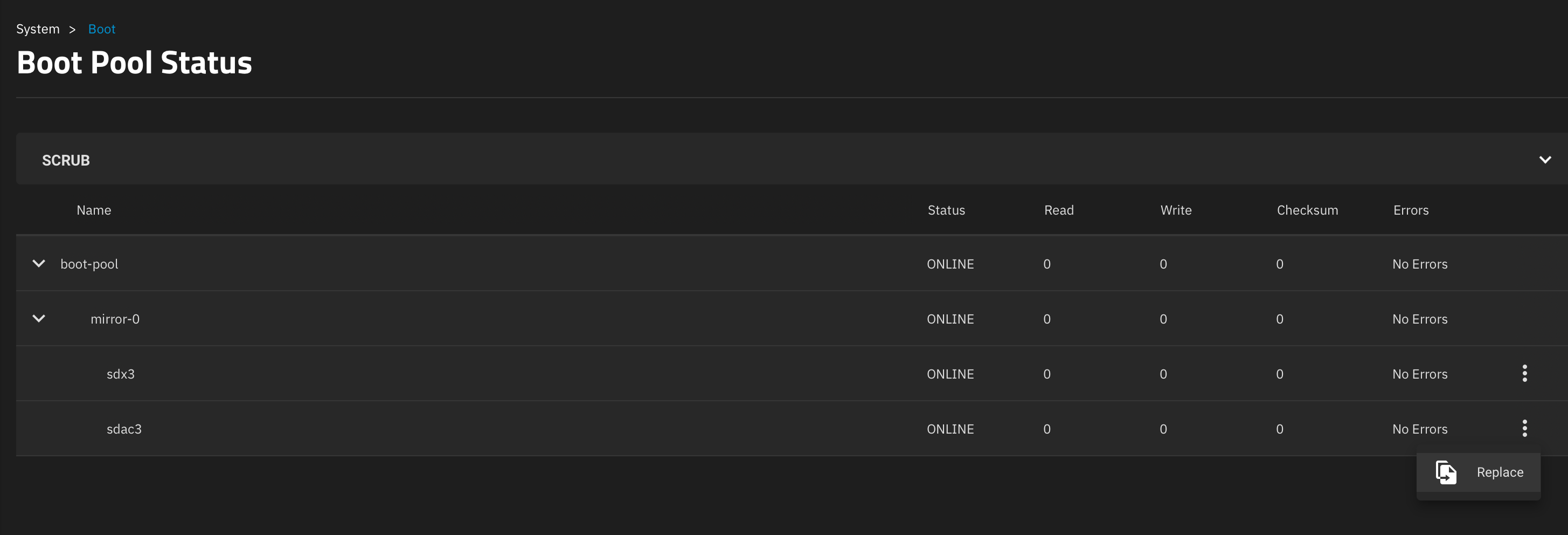
  pool: boot-pool
 state: DEGRADED
status: One or more devices are faulted in response to persistent errors.
        Sufficient replicas exist for the pool to continue functioning in a
        degraded state.
action: Replace the faulted device, or use 'zpool clear' to mark the device
        repaired.
  scan: scrub repaired 0B in 00:02:52 with 0 errors on Wed Jul 16 03:47:53 2025
config:

        NAME        STATE     READ WRITE CKSUM  SLOW  size  vendor  model  serial  hours_on  pwr_cyc  temp  health  ata_err  realloc  rep_ucor  cmd_to  pend_sec  off_ucor
        boot-pool   DEGRADED     0     0     0     -
          mirror-0  DEGRADED     0     0     0     -
            da13p2  FAULTED     73     0  122K     0  too many errors     -       -      -       -         -        -     -       -        -        -         -       -         -         -  (trim unsupported)
            da12p2  ONLINE       0     0     0     0     -       -      -       -         -        -     -       -        -        -         -       -         -         -  (trim unsupported)

errors: No known data errors

You appear to have two broken disks.

One in the main pool and one in the boot pool

1 Like

I think the controller is interfering.

Did you notice the boot pool is also degraded, DA13p2 is faulted. I would make a backup of your configuration file, if you don’t have a current one.

On Fangtooth 25.04, I had to go to the System, Update and then click on Install Manual Update File. That brought up the menu box to save a Configuration. I couldn’t see where else to call it up.

My server is a PowerEdge r720xd

i just saw the boot pool error.

So can i poweroff the entire storage, pull out the drive to map the serial number to the corresponding slot?

Yes. ZFS does not care about slots, drives can go anywhere.
So you would offline the faulty drive (and this is actually optional), power down, take out the bad drive (check serial!), put a new one, power on and select ā€œReplaceā€ in GUI. (Same for da13 in the boot pool. Or do with a single boot device…)
When it’s done, have a loot at the drive with one READ error.

1 Like

@etorix I got a question about da13

Geom name: da13
Providers:
1. Name: da13
   Mediasize: 30765219840 (29G)
   Sectorsize: 512
   Mode: r0w0e0
   descr: USB SanDisk 3.2Gen1
   lunname: USB     SanDisk 3.2Gen10401eb8a25efd21ccd74
   lunid: USB     SanDisk 3.2Gen10401eb8a25efd21ccd74
   ident: 0401eb8a25efd21ccd74f5472e8f3806b3ee0ffc9f56c12bb218db7bdcd0c7eb936400000000000000000000daecb668009e941881558107a8a86536
   rotationrate: unknown
   fwsectors: 63
   fwheads: 255

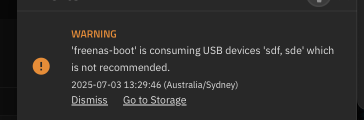
If i am reading the output of geom disk list correctly, then device da13 is a usb device??

usb drive or a usb attached SSD. Do you see them plugged in externally? They may be internally on motherboard too.

I asked about a current configuration download in case the boot devices failed. You can do a fresh TrueNAS install on new boot devices and then reload the configuration file real easily. I just wanted you to have one on hand if the boot pool died

I don’t see a usb attached externally to the drive So it must be internally on the motherboard. I have downloaded several copies on the config file
system → general → save config

I was thinking. Can i just clone this failing usb onto another usb and plug it in?

It is better to do the ā€˜drive replacement’ under TrueNAS. You would do it the same way you do for normal drives. Big catch is the replacement needs to be same size or larger. We have had a few instances of replacement devices being slightly smaller even though the models claim the same size.

You tell me! It’s your server after all…
I’d suggest powering down, and opening the case to inspect and make an inventory.
While you’re at it, clean and dedust. :wink:

There’s no need to. The general procedure to replace a boot device is: Save the configuration file (you should alaways have a recent copy at hand). Install new boot drive. Install TrueNAS (on the right drive…). Load the configuration file. Done.
Since you have a mirror, you can just replace a boot drive like you would for a data drive: Replace/resilver is the ā€œcloneā€ operation.

But using USB thumbdrives for boot is advised against. And ashift=9 (ā€œsectorsize: 512ā€) on your current boot device will be a nuisance when replacing.
Find out what port may be available for a boot device (SATA, M.2, PCIe slot…) and get a cheap SSD for it. At worst, a genuine SSD on USB adapter, plugged to the internal USB port your current boot device is. Then install anew and load your configuration file.

1 Like

pretty easy to replace a failing boot disk…

…

just gotta figure out which disk to replace!

One trick is to use dd to read from each disk… assuming you have drive activity lights, then the one you are reading from will light up.

This is true, but it does work just fine, the two major issues are

  1. lags the system because they’re slow, and modern TrueNAS writes much more to the boot disk than it used too
  2. propensity to fail over time, as witnessed above… and exacerbated by 1), and can be worked around with mirroring.

So, fix the data disk… fix the boot disk… then lets look at the IR/IT issue… and perhaps fix the boot disk situation.

1 Like

Thanks for the advice. tomorrow is dday for fixing the data disk issue. I noticed that one of the disk doesn’t have any activity light on it. i am positive that is the defective disk however i rather be safe than sorry so i will shut everything down

Well… if the chassis supports hot swap… I wouldn’t.

Would actually put more load/pressure on the remaining disks turning everything off and on again.

The good news is that i was able to swap out the drive and it started resilvering. The bad news is that truenas aint coming on

What do you mean by TrueNAS isn’t coming on? You said it was resilvering and you were posting from CLI commands earlier. Raid-Z3 was shown so it should be pretty resilient

Do you mean it isn’t booting? You had mirrored boot. You may just have to point it to the ā€˜good’ boot disk, if it was booting from the ā€˜bad’ boot disk previously…