
I’m trying to create a Windows VM as the last part of staging/testing before I rebuild that server.
I’ve exported the Windows system drive using Starwinds P2V and Disk2VHD, mostly relying on VHDX containers (in case I need to give up on getting it running via TrueNAS and add them to Hyper-V on my desktop[1]). The files seem to copy to my TN pool ok over the network, and a validation check shows no issues (qemu-img check $file / No errors were found on the image).
When I go to create the new VM in TN - sometimes it will let me create new a new zvol from the selected disk image, sometimes it’s really unhappy until I manually create a zvol and then use exisitng. Sometimes - like tonight - it doesn’t matter which way I try, I get the same error:
Image conversion failed: One path must be a disk image and the other must be a ZFS volume
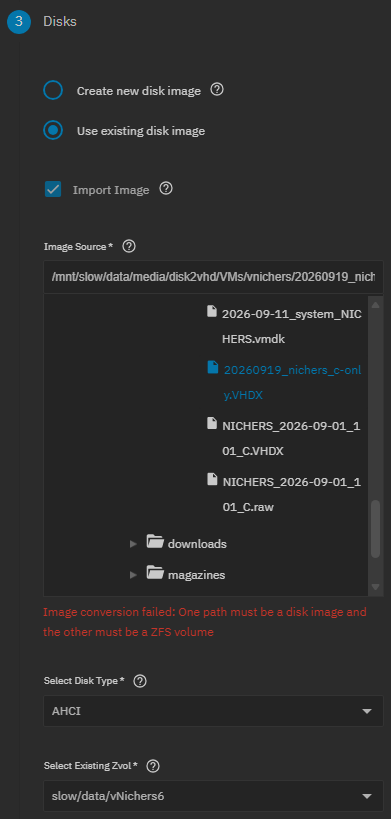

Sometimes I get lucky and I can run the import/conversion via SSH - but not today, where it gives the same error:
% midclt call vm.device.convert '{"source": "/mnt/slow/data/media/disk2vhd/VMs/vnichers/20260919_nichers_c-only.VHDX", "destination": "/dev/zvol/slow/data/vNichers6"}'
[EINVAL] vm.device.convert: One path must be a disk image and the other must be a ZFS volume

- apart from trash path naming (because my /slow pool is just a temporary mirror vdev), I don’t feel like I’m doing anything outlandish here
FWIW:
- TrueNAS 26b3
- running as a VM under Hyper-V on Win11 Pro
- TN is running on a 250GB Samsung SSD, not a virtual disk image/file
- when I’m happy with some migration stuff, I’ll change my boot order and boot TN natively
- Host hardware:
- AMD 3700x, 64GB RAM
- VM hardware passed through:
- 1x 250GB SATA SSD (pool: boot)
- 3x 100GB SAS SSD RaidZ1 (pool: fast)
- 2x 14TB HDD mirror vdev (pool: slow)
- 16GB RAM
- 8 vCPUs
- running as a VM under Hyper-V on Win11 Pro
Not really sure if this is a bug or if I’m fundamentally misunderstanding the TN process for this 
I saw Divad had some luck converting to qcow2 first. I’m setting up a vhdx->qcow2 conversion overnight, but I’d like to think that if the TN UI is explicitly stating it can work with vhdx images, then I shouldn’t need to be manually holding it’s hand by doing intermediate steps like this ↩︎
