VM from .vhdx?

While I have successfully created a VM running Windows 10, from a .iso installation download, I’m having trouble creating a(nother) VM from a .vhdx.

Under ‘Disks’, I have selected ‘Use existing disk image’, ‘Import Image’, and set the image source as a .vhdx I have previously saved (sent) to an existing dataset / share.

Under ‘Select Existing zvol’, I have selected a zvol created under my ‘RAIDZ1’ pool, and sized appropriately (120 GiB).

But I don’t understand what is required at the ‘Installation Media’ / ‘Choose installation media image’ step.

Whatever I do here (including not entering anything at all; it’s ‘optional’), and under ‘Disks’, I get the error “Image conversion failed: One path must be a disk image and the other must be a ZFS volume”.

Why do I need an ‘installation media image’, if I’ve already told it to use a .vhdx? And what should I enter here? I’ve also tried selecting a Windows 10 .iso, thinking that maybe it requires an OS installation as reference, for some weird reason (this seems unlikely, but I’ll try anything).

I have read, and tried to follow, “Creating and Managing Virtual Machines”, but it doesn’t help, doesn’t really explain what’s going on. I’m confused.

What must I do, to create a VM from a .vhdx? (or, have a VM use a .vhdx?).

TIA

TrueNAS 25.10.2.1
No installation media should be required if you’re importing a disk image.

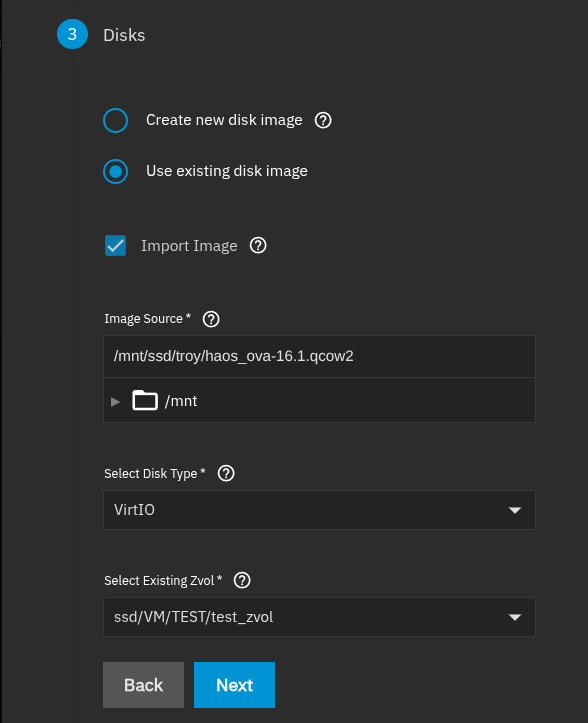
I don’t think the error has anything to do with installation media. Would you share a screenshot of the disk section after you have entered the necessary information? I don’t have any .vhdx images, but I tested a .qcow2 image, and it works as expected.

Screenshot of Disks setup

That’s what I thought.

I just tried using a .qcow2 image (export from the working VM I made using .iso), instead of a .vhdx, and it worked; I left the installation media blank.

I think I will try converting the .vhdx into a .qcow2 (once I’ve found out how).

My Disks setup looks (looked) just like that you’ve posted (one of the many variations I tried), with the exception that I was trying to use a .vhdx.

You may also be able to write the image to your zvol manually. In the following command, replace path/to/image.vhdx and /dev/zvol/pool_name/path/to/zvol with the correct paths on your system. NOTE: the path to your zvol must begin with /dev/zvol for the command to work correctly

sudo qemu-img convert -p -O raw image.vhdx /dev/zvol/pool_name/path/to/zvol

Can I do this from within the TrueNAS shell; does it have the qemu converter thing?

Yes! to both (It’s basically the same command run by the middleware when done from the TrueNAS UI)

This will not allow me to specify an output filename, so I assume it’s creating image.qcow2 within the target zvol?

If I do attempt to add a filename, it fails with ‘Is not a directory’.

So, with just the target zvol specified, I can see that it’s dumped about 40GB of ‘something’ in there, but I can’t find a .qcow2 file, either via the Shell, or via the VM-making dialogue.

Meanwhile, running this on my Linux Mint desktop, I am allowed to specify a filename (it’s a lot slower, though, so I’m still waiting for it to finish).

Edit: Oddly, a .qcow2 that I sent to the ‘root’ of my ‘RAIDZ1’ pool, has now appeared (maybe some background stuff was still going on), but the VM-making dialogue can’t see it.

Also, the zvol that I’ve created, and which has within it (I believe) the first attempt at creating a .qcow2 file, doesn’t appear in the dialogue (never has).

The dialogue can see SMB shares, though. But I can’t create a SMB share for this zvol.

I suspect there’s something(s) I’m not understanding, about zvols vs. datasets. Do I need to (somehow) format the zvol, before use?

The command (should) write the .vhdx image directly to an existing zvol. The command converts the image to raw format, so I believe it should be ready to use with a VM on TrueNAS. There is no conversion to .qcow2 using the provided command.

If the command was successful, you should be able to create your VM. On the Disks section, you would “Use existing disk image” and “Select Existing Zvol” (Do not need to “Import Image” )

I think it needs to be inside a dataset for the wizard to see it

I’m not sure which dialogue you’re looking at, but I can’t think of any place in the VM wizard where you see or add SMB shares. I don’t think you need to format the zvol ahead of time. (It’s not something I’ve ever done) It should be formatted when the image is written to it, or during OS installation if you are installing from installation media.

Doing this enabled the VM to be created.

I was, previously, able to create a VM by importing the .qcow2 from a SMB share but, in both cases, I can’t tell if the VM is actually running Windows, because it won’t acquire an IP address.

The first VM I previously made (and am still using), by installing a .iso, works fine (i.e. it acquires an IP), as did another VM I made by exporting the image from the first, as a .qcow2).

I wondered if turning off the other VM, while building a new one, would help with the allocation and use of the Ethernet port (my server has two, the first is used by TrueNAS itself), but this doesn’t seem to make any difference [and, at one point, I had two VMs running on two different IP addresses on the same interface (but.. surely not; this shouldn’t be possible?)].

Why shouldn’t it? You can assign multiple IPs to a single interface. And in bridged mode it is almost a must.

1 Like

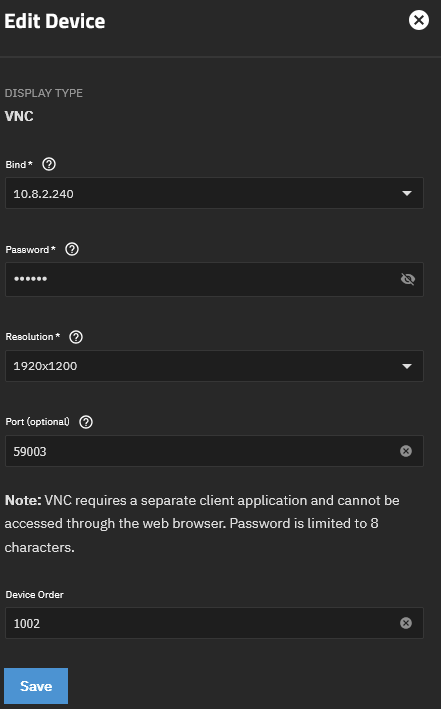
To see what the VM is actually doing while starting up you could use the Console session using either vnc or spice. This requires you to have set up a Display device using either spice or vnc. That will open a port on your truenas you can connect to via a spice or vnc client and this also lets you enter the Bios of your VM to e.g. set the correct boot order.

Bind IP in this case is the truenas ip:

There are quite a bunch of VNC clients for different OS’es out there RealVNC, UltraVNC etc.
Pick one of your taste and connect to bindip:port. Sidenote: although Truenas comes with Spice support, which might sound appealing, that one is pretty unreliable (at least if used via the built in proxy) and i would highly suggest using VNC instead.

I had been leaving the bind address at 0.0.0.0, because setting it to anything else isn’t allowed when creating the VM (or editing the device later). How have you managed to set it there?

I had also been trying to VNC with the address (eventually) allocated to the VM (previous, successful additional VM creations), because that’s the address I’ve been able use for RDP once the Windows VM was up and running.

For some time, this IP allocation hasn’t been happening; my router just shows a client with a MAC address but no IP allocated, I suppose because no OS has been managing to boot (see following).

What I hadn’t tried was using the TrueNAS’s own address, with the VNC port number allocated, in this case 5902 (5900 is taken by another VM).

That worked, and I was able to see that while the VM is starting, it’s not booting from the image within the zvol.

I’ve just tried .vhdx again (which I believed should be bootable), and I suspect the qcow2 I converted from .vhdx had the same problem.

I’ve tried setting for both Legacy BIOS (boot failed; not a bootable disk) and UEFI (I get a yellow Shell> prompt that I don’t know what to do with).

So, it seems the image(s) I’m creating have a problem. Whereas the .qcow2 I made as an export from a working VM (installed from .iso), did boot ok.

I’ve been using Remmina VNC (and for RDP). It’s ok, but does time out (don’t know why).

This is the response when VM set to UEFI:

Edit: apparently (after a bit of searching) disk2vhd (which I’ve been using) tends to produce un-bootable .vhdx, and doesn’t do UEFI.

I gave up, and decided to clone the working VM, then install the wanted app on it in the ‘traditional’ way; I had wanted to avoid doing that (and the extensive app configuration), and instead use a disk image from a PC.