Nginx Proxy Manager: Host Paths?

I have installed the some apps (traccar, Immich…) on my TrueNAS Scale 25.04.2.6.

I have also installed NPM, and obtained a Lets Encrypt non-wildcard certificate for my domain. TrueNAS Web UI is on ports other than 80 and 443, so that NPM can use those (although I switched off port forwarding for 80, once the certificate had been installed via the HTTP method; I assume that port 80 isn’t needed unless/until more HTTP-method certificate obtaining/renewal is necessary?).

I can successfully set up a proxy host for any one of the other apps on TrueNAS, e.g. Immich, or for another app running on a different host on my LAN. But I haven’t found a way, via NPM, to set this up to work with more than one target app / host.

I realise that using subdomain.domain.tld would be possible, if I were to use a wildcard certificate (*.domain…), and if I were to obtain the certificate via the DNS method (e.g. via Cloudflare).

But: can I use host paths instead, via NPM, e.g. domain.tld/path?

The app I run on another host on the network (on IIS, on Windows 10) actually does need me to enter a /path in the URL, and NPM ‘routes’ this successfully to the correct host:port (e.g. 192.168.x.x:80).

I have tried using the ‘custom locations’ settings in NPM, entering a /path and host IP and port (in addition to the ‘main’ host under ‘Details’), for additional ‘targets’, but cannot get this to work. Is this even possible, using NPM (or, this version of NPM?). It’s very possible that I’m misunderstanding how this (custom locations) is supposed to work, as this reverse proxy stuff is new to me.

I’ve searched this forum, and wider, and haven’t found an answer (or one that I can understand, or could implement) yet, hence this post.

I’m wondering if maybe there’s some stuff that I would need to enter into an ‘Advanced’ box within NPM?

Edit(1): setting ‘custom locations’ for an (additional) app, e.g. Immich (or traccar), it ‘almost works’; I get the spinning Immich logo (or the spinning traccar logo), but it doesn’t complete the page load to get to the login screen.

Edit(2): I’ve found a comment, on another forum, from 10 months ago, referring to the custom locations feature in NPM being broken; I wonder if this is (still) the case.

TIA.
If you obtained your cert via HTTP validation, you’ll need to have port 80 open whenever that cert needs to renew (about every 60 days). Better would be to use DNS validation, then you wouldn’t need to open port 80 at all.

I’d assume so. Consult the NPM docs, or their support channels, for details. Apps will often require a “base URL” setting to match the path you’ve chosen.

Thanks.

The NPM docs appear to refer only to Docker NPM use, with text configs, rather than the TrueNAS GUI app (which I’m using), but I’ll keep searching.

By “Base URL”, do you mean only using one host / IP, and only additional ports to that host, within the custom locations?

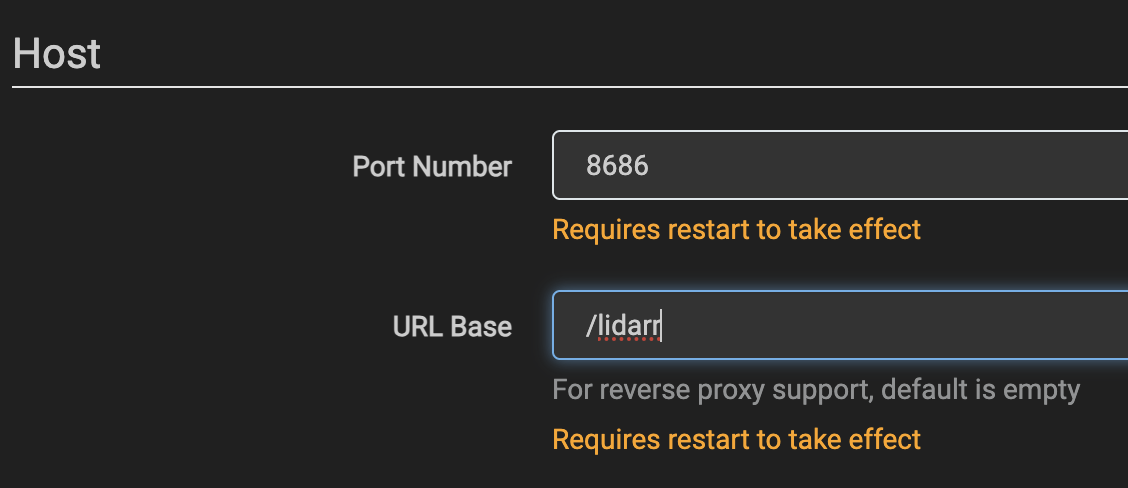
It’s always just one IP; that’s why you have a reverse proxy. The “Base URL” setting tells the app in question that there’s a path prefix (and it goes by a variety of different names). Here’s how it would look for Lidarr:

Or Ombi:

Some software doesn’t support this, and needs to be hosted at the base directory–that isn’t a limitation of NPM, but of the software itself–Duplicati is one such piece of software I ran across.

Well, I’ve tried sticking to just one IP / URL (the TrueNAS itself), in the NPM GUI, and just using additional ports for other apps (as I’ve said above), but it still won’t route to more than one TrueNAS app.

I’m not sure if the “Base URL” thing applies, here; there isn’t anything of that name/description to be found in the NPM GUI. But I may not be understanding what’s meant by this.

It looks like the support channel for NPM is on Reddit:

IMO, both the simplest and safest way to use NPM (or any other reverse proxy) is with one hostname per backend app. That’s the way I document in my guide:

1 Like

Thanks for your help.

I realised / discovered (and it dawned on me as a result of what you’ve posted above) that it is possible to obtain subdomain.domain.tld certificates from Lets Encrypt via the NPM GUI, in ‘HTTP mode’.

Also that I can add a CNAME record at my existing DNS provider, for that subdomain. Then create a proxy host for each subdomain.

And it works, now for 2 apps in addition to the other host on my network which is using the non-wildcard certificate with no subdomain.

Thanks again.