[Not Accepted] Add "Bind IP Addresses" option to SSH Service

Problem/Justification

SSH Service (sshd) can only currently be confiugured to bind to a specific interfaces.

This means that the sshd instance will bind to all IP Aliases/Addresses configured on that interface.

Thus there is no way to vacate port 22 on an IP Alias, which means the IP Alias can not be used for binding port 22 in an app or docker-compose.

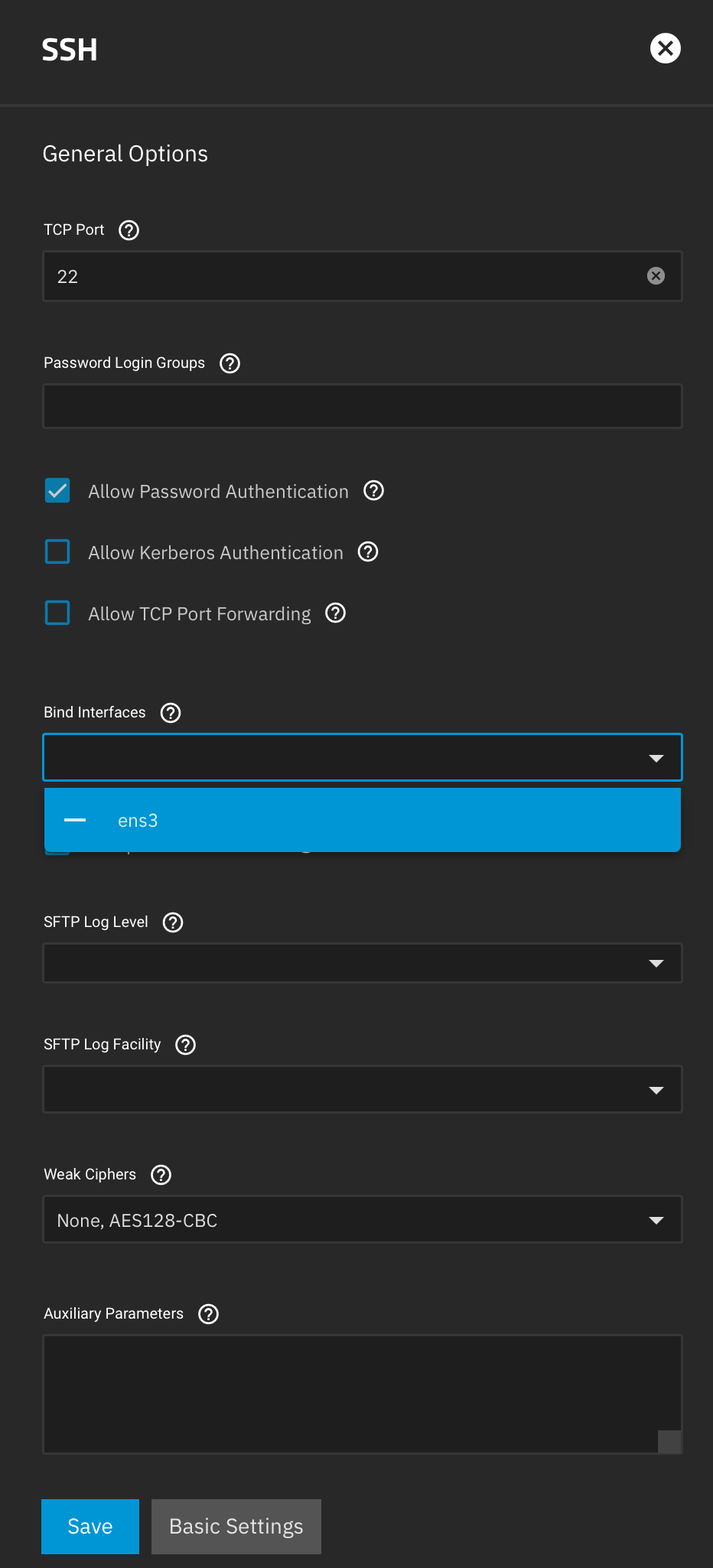
This is the current adanced settings for ssh service
This is the bind IP address UI from SMB service
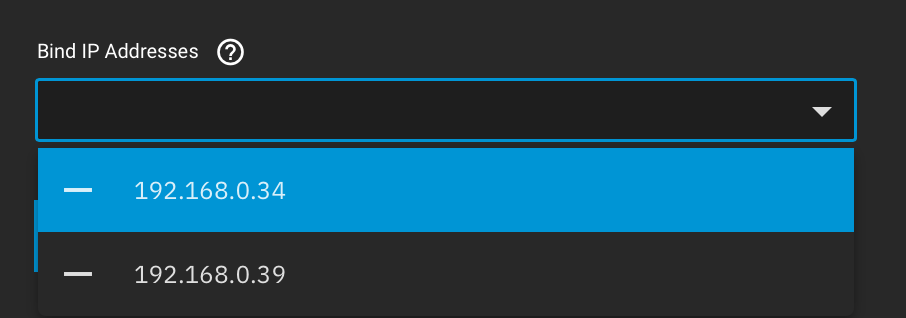
This is what needs to be added to SSH so that apps and docker containers can bind 22 on unused IP aliases.

sshd_config can be configured to bind to specific IP like so:

Port 22
AddressFamily any
ListenAddress 192.168.0.34
ListenAddress ::

Which then allow the other IP to be utilized.

Which would then means that docker-compose could be used to bind port 22 to a specific IP.

1 Like

@Stux can you share a bit more on your network config?
Its typically a bad practice for the TrueNAS to have multiple IPs in the same broadcast domain anyway.

Electric Eel has native docker support.

If one wishes to bind port 22 in a docker container to a host IP alias, one needs to disable ssh on that IP alias.

For example, a local gitlab implementation

services:
  web:
    image: gitlab/gitlab-ce:16.11.6-ce.0
    logging:
      options:
        max-size: "1g"
        max-file: "3"
    restart: always
    stop_grace_period: 5m
    ports:
      # bind to specific IP or all IPs... which will most likely fail since SSH already exists.
      - '${GITLAB_IP:-0.0.0.0}:80:80'
      - '${GITLAB_IP:-0.0.0.0}:443:443'
      - '${GITLAB_IP:-0.0.0.0}:22:22'

An alternative is to use macvlan/ipvlan networking, but that will force you to burn an IP address per container, and requires a host to container route to be created if you desire host<->container networking.

The feature request is related to this:

I cannot seem to find the reasoning to behind this statement. I have seen it regurgitated in many forum posts, but I have not come accross any technical reasons why it is bad practice. Similar to Stux, I am looking to have multiple services on different IP addresses and it seems quite silly to create a new subnet for each service.

It can result in a service getting data on one IP and sending it out on another, which can lead to undefined states.

That seems like a very niche issue to happen, if it even ever caused an issue. If I negotiate and open a tcp connection to the server, I don’t see how or why the software would then open a new connection back to the client from a different IP. As a software engineer, I don’t even understand why client/server software would be written that way.

I vote for allowing the distribution of foot guns. If I shoot myself in the foot, that’s my problem.

You are free to do as you wish, no one here will stop you from configuring more than a single interface on the same network.

I cannot paste a screen shot, but I’ll leave this right here…

Validation Error
[EINVAL] interface_update.aliases.0: The network 172.23.4.0/24 is already in use by another interface.

I am quite literally prevented by the UI to assign IP addresses from the same subnet on two separate network interfaces.

1 Like

Just want to clarify something,

Associating multiple IPs or even multiple MACs (ie using a macvlan) to a single network interface is not the same thing as having multiple network interfaces in the same subnet. It’s also not related to this specific feature request.

Binding services like SSH to only listen on a single network interface exists. TrueNAS already provides this configuration option for many services. Binding it to specific IPs can be different than binding it to a specific interface, and the end solution can be implemented in several ways.

Continuing the discussion, My opinons follow.
This disussion is not really a specifically TrueNAS thing in my opinion. It is the default behavior of many, if not most, OS’s to associate a subnet to an interface. For routing purposes, e.g. your default route, there are implications to this. To solve this problem and to reduce complexity, most OS’s (Like TrueNAS) don’t even allow you to have multiple interfaces in the same subnet. Linux can be more flexible, but that does not necessarily mean TrueNAS should be.

Similar situation:
You can do all sorts of crazy things with networking. It is absolutely technically possible to have multiple subnets in the same broadcast domain on an unmanaged switch. I have literally, profesionally, leveraged this “undocumented feature” of how Ethernet works to facilitate migrating devices from one network/VLAN to another.

But that does not mean you should do it long term, thats literally why VLANs exist. Same situation with this discussion, if you need multiple IPs for differant things, this is a problem to solve at L3 not L2.

2 Likes

That’s interesting becuase the macbook that I’m on right now has a wifi adapter and ethernet adapter on the same network and subnet right now.

My windows workstation has 2 nics on it and can indeed be on the same network. You can bind IIS sites to whatever IP address you want on whatever nic that you want.

So clearly I’m misunderstang what you are trying to communicate.

I agree this went off topic, I’ll go away now. Sorry for my confustion.

PS, I’ve watched your post live update like 15 times now. :slight_smile:

MacOS is doing some shenanigans behind your back. I specifically turn the WiFi off on my Mac for this exact reason.

Notice how some devices in the subnet are talking to en0 while others are talking to en1? This behavior is fine on a client, but it causes problems for me…and I def wouldnt want my server to do this.

If I have Ethernet I don’t want my Mac talking to devices over WiFi wasting airtime for no reason. Try copying a large file to SMB only to find it randomly going over the WiFi instead of Ethernet. No thanks.

nickf@Nicks-Mac-mini ~ % netstat -rn | awk 'BEGIN {print "Destination        Gateway               Interface"} NR>2 && $1 ~ /^[0-9.\/]+$/ {g=$2; if(g ~ /^([0-9a-f]{1,2}:){5}[0-9a-f]{1,2}$/i) {split(g,p,":"); g=p[1] ":" p[2] ":" p[3] ":xx:xx:xx"}; printf "%-18s %-21s %s\n", $1, g, $4}'

Destination        Gateway               Interface
10.69.10/24        link#4:::xx:xx:xx     en0
10.69.10/24        link#7:::xx:xx:xx     en1
10.69.10.1/32      link#4:::xx:xx:xx     en0
10.69.10.1         3c:fd:fe:xx:xx:xx     en0
10.69.10.1         3c:fd:fe:xx:xx:xx     en1
10.69.10.1/32      link#7:::xx:xx:xx     en1
10.69.10.19        24:8a:7:xx:xx:xx      en0
10.69.10.25        0:16:3e:xx:xx:xx      en0
10.69.10.25        0:16:3e:xx:xx:xx      en1
10.69.10.26        10:66:6a:xx:xx:xx     en0
10.69.10.30        0:16:3e:xx:xx:xx      en0
10.69.10.53        a4:cf:99:xx:xx:xx     en0
10.69.10.55        94:54:c5:xx:xx:xx     en0
10.69.10.71        a4:cf:99:xx:xx:xx     en0
10.69.10.85        74:4d:bd:xx:xx:xx     en0
10.69.10.92        74:4d:bd:xx:xx:xx     en0
10.69.10.108/32    link#7:::xx:xx:xx     en1
10.69.10.117       a8:51:ab:xx:xx:xx     en0
10.69.10.132       ec:d:51:xx:xx:xx      en0
10.69.10.133       24:59:e5:xx:xx:xx     en0
10.69.10.136       5c:50:d9:xx:xx:xx     en0
10.69.10.136       5c:50:d9:xx:xx:xx     en1
10.69.10.137       ac:bc:32:xx:xx:xx     en0
10.69.10.140       24:59:e5:xx:xx:xx     en0
10.69.10.235/32    link#4:::xx:xx:xx     en0
10.69.10.255       ff:ff:ff:xx:xx:xx     en0
127                127.0.0.1:::xx:xx:xx  lo0
127.0.0.1          127.0.0.1:::xx:xx:xx  lo0
169.254            link#4:::xx:xx:xx     en0
169.254            link#7:::xx:xx:xx     en1
169.254.245.217    2c:9e:0:xx:xx:xx      en0
224.0.0/4          link#4:::xx:xx:xx     en0
224.0.0/4          link#7:::xx:xx:xx     en1
224.0.0.251        1:0:5e:xx:xx:xx       en0
224.0.0.251        1:0:5e:xx:xx:xx       en1
239.255.255.250    1:0:5e:xx:xx:xx       en0
255.255.255.255/32 link#4:::xx:xx:xx     en0
255.255.255.255/32 link#7:::xx:xx:xx     en1
nickf@Nicks-Mac-mini ~ %

Also note at the top part,

Destination        Gateway               Interface
10.69.10/24        link#4:::xx:xx:xx     en0
10.69.10/24        link#7:::xx:xx:xx     en1
10.69.10.1/32      link#4:::xx:xx:xx     en0
10.69.10.1         3c:fd:fe:xx:xx:xx     en0
10.69.10.1         3c:fd:fe:xx:xx:xx     en1
10.69.10.1/32      link#7:::xx:xx:xx     en1

MacOS is making this same assumption for L3, so its doing this weird non deterministic thing where it will send some traffic out one interface and other traffic out of the other (just never to the same destination from multiple interfaces).

2 Likes

Okay I think of the live post edits are done. Thank you for taking the time to try to clarify.

I now understand and thank you for confirming my suspicions. “bad practice” of having multiple NICs on the same subnet is an opinion of “you shall” and “you shall not” do x, y, an z. It is not a technical reason. It is the programming equivalents of shunning those who use GOTO statements and global variables.

I still vote 100% in favor of giving users foot guns. If I shoot myself in the foot, it’s my problem not yours.

Anything wrong with just doing it through cli with ifconfig instead of gui?

Not accusatory, I’m actually not certain (though I suspect it) it would let you do whatever you want in terms of (mis)configuring your interfaces to your heart’s delight.

If it does work, is that not a reasonable compromise of “gui won’t let you because dev has specific reasons”, but users that understands & disagrees with (alledged) risks can still implement at their own risk?

Nope. That would be a fine solution. Assuming it doesn’t break the UI. I have broken other web GUI based distros (cough proxmox cough) on accident.

I literally just installed TrueNAS and this was the first thing I ran into when trying to configure it the same/similar way I had proxmox setup. Whether or not it’s the “correct” way, is up to the reader.

That is a very reasonable compromise. I am kind of taken-aback on the opinionated nature of the GUI given that it had to be programmed in to NOT allow a particular configuration.

As I was typing this response, I see you edited your response as well. This same thing happened to me (quite a few times, way more than the 2 edits indicated) when I was responding to Nick. If I came off harsh, I sincerely apologize. I was probably trying to address things that he had in the draft version of his post.
The examples Nick illustrated for me (and future readers) were phenomenal for explaining what was going on. Those were not added until after I had composed my response.

1 Like

Yeah, I reread the posts & realized that I likely misunderstood the first time I read them. Sorry about that from my end.

Don’t use the “Bind Interfaces” option. Leave it with nothing selected.
Instead, add your desired interfaces as ListenAddress lines in the Auxiliary Parameters box of the SSH Service Advanced Options.

E.g.:
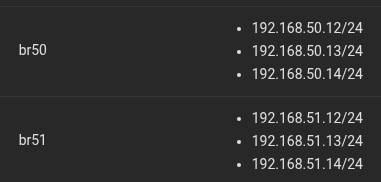
My (24.10.2.2) System has multiple bridges with multiple aliases:

Using “Bind Interfaces” to those bridges, it opens up the SSH ports for all addresses there:

root@TrueNAS02[~]# netstat -atnp |grep LIST |grep :22
tcp        0      0 192.168.51.12:22        0.0.0.0:*               LISTEN      3553/sshd: /usr/sbi 
tcp        0      0 192.168.51.13:22        0.0.0.0:*               LISTEN      3553/sshd: /usr/sbi 
tcp        0      0 192.168.50.14:22        0.0.0.0:*               LISTEN      3553/sshd: /usr/sbi 
tcp        0      0 192.168.50.12:22        0.0.0.0:*               LISTEN      3553/sshd: /usr/sbi 
tcp        0      0 192.168.51.14:22        0.0.0.0:*               LISTEN      3553/sshd: /usr/sbi 
tcp        0      0 192.168.50.13:22        0.0.0.0:*               LISTEN      3553/sshd: /usr/sbi 
tcp        0      0 127.0.0.1:22            0.0.0.0:*               LISTEN      3553/sshd: /usr/sbi 
tcp6       0      0 fe80::8c9:2aff:fe19::22 :::*                    LISTEN      3553/sshd: /usr/sbi 
tcp6       0      0 fe80::1493:41ff:fea5:22 :::*                    LISTEN      3553/sshd: /usr/sbi 

Deselect the “Bind Interface” options, and add these “Auxiliary Parameters”:

ListenAddress 192.168.50.12
ListenAddress 192.168.51.12

Restart service, and the listening SSH ports is limited to the desired addresses:

root@TrueNAS02[~]# netstat -atnp |grep LIST |grep :22
tcp        0      0 192.168.51.12:22        0.0.0.0:*               LISTEN      3057886/sshd: /usr/ 
tcp        0      0 192.168.50.12:22        0.0.0.0:*               LISTEN      3057886/sshd: /usr/
3 Likes

Could be related to details of SMB Multi-Channel, from the docs:

Do not configure multiple SMB multichannel interfaces on the same subnet. To ensure reliable multichannel performance, TrueNAS recommends placing each interface on a different subnet.

If interfaces share a subnet, the system could fail to initialize multichannel, experience several connectivity issues, and accept inbound traffic inconsistently.
– Setting Up SMB Multichannel | TrueNAS Documentation Hub

Although, curiously, that’s not repeated in the 25.04 or 24.10 variants of the documentation:

https://www.truenas.com/docs/scale/25.04/scaletutorials/shares/smb/smbmultichannel/
https://www.truenas.com/docs/scale/24.10/scaletutorials/shares/smb/smbmultichannel/

There’s probably also some concerns related to the SMB browser service, where the same host might be broadcasting for Browse Master multiple times in the same broadcast domain, (although, this might be a bygone problem.)

Hah.

So used to iX removing “aux parameters” fields, I didn’t even see it :slight_smile:

1 Like

This is interesting.

I added “ListenAddress 172.16.20.11” and verified that SSH only listens on this address.

root@pollux:~# netstat -atnp | grep LIST | grep :22
tcp        0      0 172.16.20.11:22         0.0.0.0:*               LISTEN      3892/sshd: /usr/sbi

However, when installing Gitea app using an IP alias different from 172.16.20.11, the application throws an error indicating that port 0.0.0.0:22 is in use by the SSH service:

...
File "/mnt/.ix-apps/app_configs/gitea/versions/1.3.20/templates/library/base_v2_1_53/client.py", line 68, in validate_ip_port_combo raise RenderError(err_str) from None base_v2_1_53.error.RenderError: [EINVAL] render.gitea.schema: The port is being used by following services:
"0.0.0.0:22" used by SSH Service

I looked at the Gitea app code, and found that the validate_port function call does not specify a bind_ip. This causes the function to default to 0.0.0.0.

/mnt/.ix-apps/app_configs/gitea/versions/1.3.20/templates/library/base_v2_1_53/client.py

self.client.call("port.validate_port", f"render.{self._app_name}.schema", port, ip, None, True) **<---- No bind_ip**

middlewared/async_validators.py:

async def validate_port(middleware, schema, port, whitelist_namespace=None, bind_ip='0.0.0.0'):
    return await middleware.call('port.validate_port', schema, port, bind_ip, whitelist_namespace)

I added ip to the function call, and now I can run Gitea on port 22 :+1:

self.client.call("port.validate_port", f"render.{self._app_name}.schema", port, ip, None, True, ip)

Thank you for submitting this feature request. After evaluating it against our technical strategy, we’ve decided not to pursue this at this time.