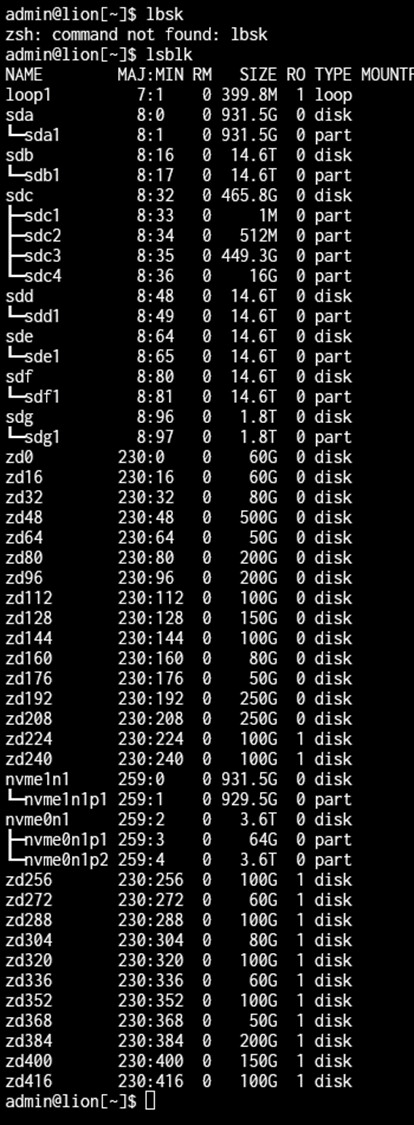
One disk from a special vdev mirror not seen by TrueNas :(

I did migrate my NAS to new hardware. One of the issues I am facing is that half my special vdev mirror as related to my RAIDZ1 array is gone.

The special vdev mirror are two identical 1TB NVME-SSDs. In the old situation one of the two SSD’s was connected as NVME to the motherboard the other was connected via an NVME to USB controller. In the new situation both drives are directly connected as NVME drives.

Actually the BIOS does see both drives, however TrueNAS only sees one (the one which was originally connected via USB).

This is very tricky of course. So I have to restore the mirror as soon as possible. Hopefully someone knows how to fix this !!

I consider temporarily adding a third device to the mirror, since even for me as private person it would be a disaster loosing the Z1 array !! :frowning:

Below a situation with probably another course but same effect.

Mind sharing output of:

lsblk

dmesg | grep -i nvme

zpool status

Any other details on what kind of motherboard, what nvme drives, how they are connected, etc. etc. etc. could also be of use.

Edit: apply sudo as needed to get outputs.

The NVME’s are both Samsung 980 1TB

The Motherboard is an ASUS ROG_STRIX_X570-E_GAMING as said both Samsung NVME drives are directly connected to the motherboard.

The RaidZ1 is working, however ‘degraded’ because the special vdev mirror is ‘broken’

lsblk shows other things, as far as I can see not related (for those problems see my previous two posts)

admin@lion[~]$ sudo dmesg | grep -i nvme
[sudo] password for admin:
[ 0.000000] Command line: BOOT_IMAGE=/ROOT/25.10.1@/boot/vmlinuz-6.12.33-production+truenas root=ZFS=boot-pool/ROOT/25.10.1 ro libata.allow_tpm=1 amd_iommu=on iommu=pt kvm_amd.npt=1 kvm_amd.avic=1 intel_iommu=on zfsforce=1 nvme_core.multipath=N
[ 0.012596] Kernel command line: BOOT_IMAGE=/ROOT/25.10.1@/boot/vmlinuz-6.12.33-production+truenas root=ZFS=boot-pool/ROOT/25.10.1 ro libata.allow_tpm=1 amd_iommu=on iommu=pt kvm_amd.npt=1 kvm_amd.avic=1 intel_iommu=on zfsforce=1 nvme_core.multipath=N
[ 2.236488] nvme nvme1: pci function 0000:0c:00.0
[ 2.236496] nvme nvme0: pci function 0000:04:00.0
[ 2.248618] nvme nvme0: D3 entry latency set to 10 seconds
[ 2.312960] nvme nvme1: 32/0/0 default/read/poll queues
[ 2.316534] nvme nvme0: 32/0/0 default/read/poll queues
[ 2.319525] nvme1n1: p1 p2
[ 2.320053] nvme0n1: p1
[ 54.648054] nvme nvme0: using unchecked data buffer

My actual feeling is that zfs does actually think that the two NVME’s are thye same device, which is of course not true

Note that there is a third NVME (4TB) used for another pool.

Edit: Wait there are three NVMEs total?

Yeah, TrueNAS is only seeing two since boot.

You sure that both of the 980s are seen in bios?…

Dare I suggest re-attaching the NVMe via USB. If the device is seen then try and remove it, place it in the NVMe slot and add it back in.

Also, a thought, is the second NVMe slot shared with a PCIe slot that you are using for something else?

1 Like

That was my next thought after I finished reading that there are meant to be THREE nvmes in the system total. Motherboard model & specifying which slots you’ve connected to will go a long way here.

If you could confirm a full hardware list (see my signature or NugentS’ for an example), it’d really help.

I realize that:

  • I am sure both devices are seen in the bios
  • however also not on OS level … I think …

See picture below

The mother board does have two NVME positions used in favor of the mirror. I did add a PCIE-card in PCIE-2 X16 (in x8 mode / 8 lanes) which hold the third NVME. Which is working properly.

I do have a PCIE-card on order which can hold two NVME-cards and also on order an extra 1TB NVME which I intent to place on the card. As third mirror card. Before I have done that I do not dare to use the NAS or trying to do any thing thing the actual mirror NVME’s

Alright, that is making more sense because I was looking through this manual & trying to figure out where you put the third NVME :stuck_out_tongue:

Did you manually enable the Pcie x16_2 slot to be enabled in x8 mode? Because currently TrueNAS isn’t seeing that third nvme. What kind of PCIE-Card is in the slot? I’m wondering if it has multiple slots for NVMes & the drive has to be in a specific one for the motherboard to detect that pciex16_1 & pciex16_2 have to both be in x8

Yep, I did set 2x PCI-E x16 as x8. And that is OK otherwise the third NVME-device would not work :slight_smile: