This is my very first foray into TrueNAS and ZFS, so forgive me if I sound really stupid.
I installed TrueNAS SCALE 25.04.1 onto a new Beelink ME mini PC with a 64GB eMMC for the OS and a pair of 4TB NVMe SSDs for data last week, and have been playing around with it for a few days in a mirror configuration. Then a third 4TB stick arrived in the mail, and I decided to switch to a RAIDZ1 configuration instead. Since I haven’t actually migrated any data to the device, I would like to delete the existing pool and start over.
However, when I deleted my toy datasets from the pool and then tried to remove the pool, I got the following error message: “[EZFS_NOSPC] cannot remove /dev/disk/by-partuuid/(ID deleted): out of space”. Upon closer inspection, the root dataset on the device appears to be hosting about 32MB of system data. This could be the reason I can’t delete the pool anymore, but I can’t seem to find a way to get around it. Googling uncovered advices to turn off snapshot, replication, tasks, apps, instances, etc., but this is clearly not the right advice since I haven’t tried to run any of those on this server yet.
How can I revert this system to just the OS volume plus three free SSDs, short of reinstalling from scratch?
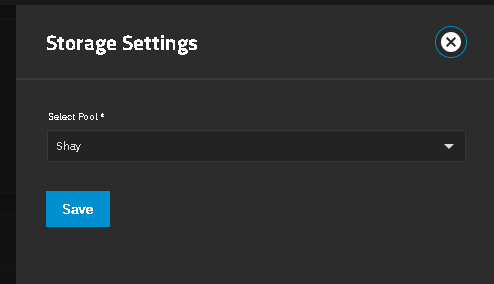
I checked System->Boot, and the boot pool appears to be already on the eMMC drive. Nevertheless, when I go back to the Datasets screen, the sole dataset remaining, which is associated with the disk I’m trying to reclaim, has a mark under “Roles” that says it is being used as the “System Dataset.” I cannot find any way to move the System Dataset in the manuals for 25.04. (I do see a relevant page for 13.0, but the screen being referenced does not seem to exist in 25.04.)
Thank you! This did the trick. I don’t know how the system dataset got moved to the data pool–I wouldn’t put it past myself to have done it without understanding what I was doing–but in any case, this was what I was looking for. I’ve managed to delete the old pool, set up a new pool, and am now starting to populate a share volume.
Hi, I’m pretty new here and try to find solution to my issues.
Recently I’ve been playing with my TrueNAS and added an external drive to it (didn’t needed but wanted to try). I’ve added 1TB external drive to the pool and everything looked fine. Then I wanted to disconnect this drive (wasn’t used at all) but got this ‘out of space’ error. Of cource I’ve done all what Google AI said (deleted snapshots, restart…) with no result.
Now I found this solution here but in my case I cannot find this Storage Settings field. I use TrueNAS Core, maybe this is the case. How to do this in Core? Maybe you could help me with this.
That may depend on the version of CORE you have, but according to the docs you will find the equivalent setting under System → System Dataset, at least in 13.0.
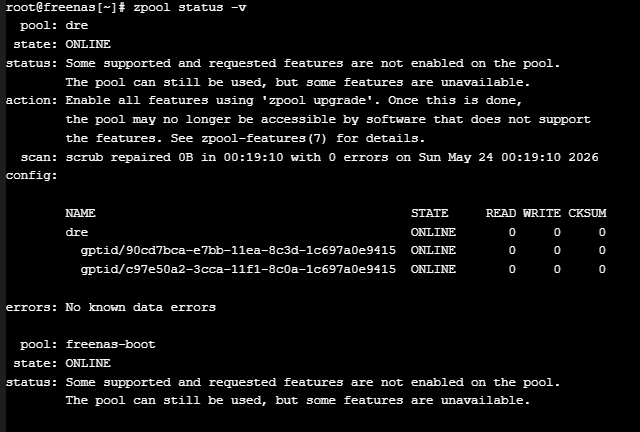
We are going to need more details on your system and the pools. In the GUI Shell, run zpool status -v and post the result back using (</>) Preformatted text mode from the tool bar. That should give us the layout of your current pools
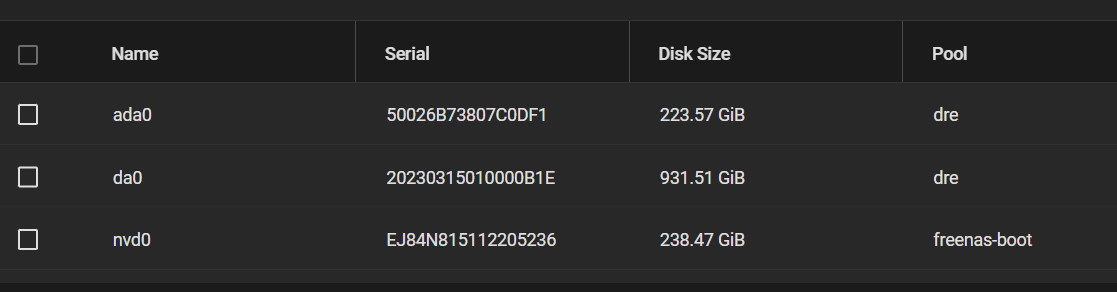
DRE, is that a mirror VDEV with two drive members? One is an internal disk and the other is external, like USB?
If you are trying to remove a single drive from a mirror pair, you just use zpool detatch command
But you’re showing shell output. Do not attempt to copy from the webshell in CORE, open a SSH session.
You will NEED SSH sessions for any kind of troubleshooting.
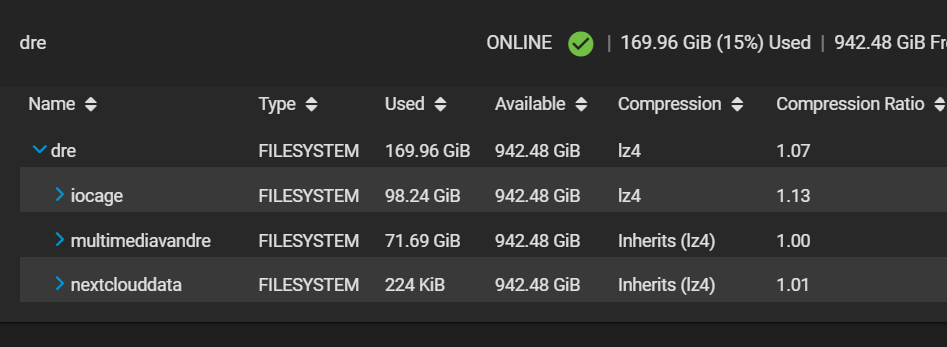
How full is DRE pool? To remove da0, you need enough space on ada0. If your DRE pool is over, about 200 GiB, I can see why it fails. The command should give us an idea of usage, free space, etc.
I am not having trouble with a VM and an empty data pool. I am able to remove a drive from a 2 wide stripe VDEV and I can remove the pool by Export / Delete. My system moves the System Dataset to the boot-pool when I do that.