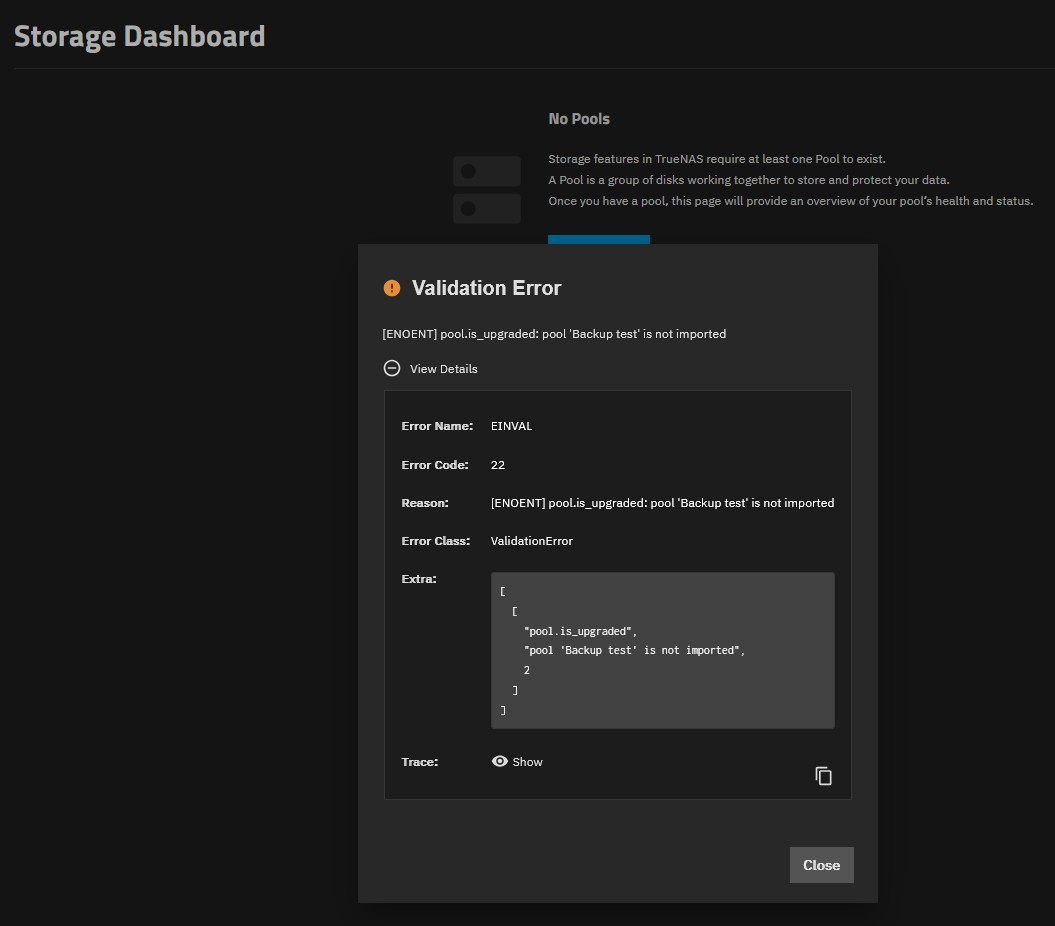
Validation error: [ENOENT] pool.is_upgraded: pool 'Backup test' is not imported

I have my second truenas running 26.0.0-BETA.1

I have created Storage pool “Backup test” which I wanted to rename to something else and I tried to use CLI and ZFS commands which obviously failed.

Now, when I go to CLI i can see my boot and one production pool, the third one “Backup test”, which I tried to remove is not listed or seen anymore, but when I go to storage in my GUI i get following error:

I can see the disk which belongs to the pool (I have wiped it in the meantime and tried to create new pool), but this screen simply does not show my other pools. When I go to datasets, I see my storage pool correctly.

Now, my thinking is that somewhere within truenas GUI there is separate record of my old and now non-existent pool “Backup test”, it was first in the sequence to be drawn on the screen and because it fails to show up, nothing is listed in my pool list.

The question is: how to remove reference to the old pool and/or how to recreate list of pools?

if this helps, here is full trace info:

Error Name: EINVAL
Error Code: 22
Reason: [ENOENT] pool.is_upgraded: pool ‘Backup test’ is not imported
Error Class: ValidationError
Extra: [
[
“pool.is_upgraded”,
“pool ‘Backup test’ is not imported”,
2
]
]
Trace: Traceback (most recent call last):
File “/usr/lib/python3/dist-packages/middlewared/plugins/pool_/info.py”, line 163, in is_upgraded
for feat, info in get_zpool_features_impl(tls.lzh, pname).items():
~~~~~~~~~~~~~~~~~~~~~~~^^^^^^^^^^^^^^^^
File “/usr/lib/python3/dist-packages/middlewared/plugins/zpool/get_zpool_features_impl.py”, line 21, in get_zpool_features_impl
return lzh.open_pool(name=pool_name).get_features()
~~~~~~~~~~~~~^^^^^^^^^^^^^^^^
truenas_pylibzfs.ZFSException: [EZFS_NOENT]: zfs_open() failed - cannot open ‘Backup test’: no such pool

During handling of the above exception, another exception occurred:

Traceback (most recent call last):
File “/usr/lib/python3/dist-packages/middlewared/api/base/server/ws_handler/rpc.py”, line 387, in process_method_call
result = await method.call(app, id_, params)
^^^^^^^^^^^^^^^^^^^^^^^^^^^^^^^^^^^
File “/usr/lib/python3/dist-packages/middlewared/api/base/server/method.py”, line 57, in call
result = await self.middleware.call_with_audit(self.name, self.serviceobj, methodobj, params, app,
^^^^^^^^^^^^^^^^^^^^^^^^^^^^^^^^^^^^^^^^^^^^^^^^^^^^^^^^^^^^^^^^^^^^^^^^^^^^^^^^^^^^^^^^^
message_id=id_)
^^^^^^^^^^^^^^^
File “/usr/lib/python3/dist-packages/middlewared/main.py”, line 1118, in call_with_audit
result = await self._call(method, serviceobj, methodobj, params, app=app,
^^^^^^^^^^^^^^^^^^^^^^^^^^^^^^^^^^^^^^^^^^^^^^^^^^^^^^^^^^^^^^^^
audit_callback=audit_callback_messages.append, **kwargs)
^^^^^^^^^^^^^^^^^^^^^^^^^^^^^^^^^^^^^^^^^^^^^^^^^^^^^^^^
File “/usr/lib/python3/dist-packages/middlewared/main.py”, line 934, in _call
return await methodobj(*prepared_call.args)
^^^^^^^^^^^^^^^^^^^^^^^^^^^^^^^^^^^^
File “/usr/lib/python3/dist-packages/middlewared/api/base/decorator.py”, line 209, in wrapped
result = await func(*args)
^^^^^^^^^^^^^^^^^
File “/usr/lib/python3/dist-packages/middlewared/service/crud_service.py”, line 160, in query
result = await self.middleware.call(
^^^^^^^^^^^^^^^^^^^^^^^^^^^
‘datastore.query’, self._config.datastore, , datastore_options
^^^^^^^^^^^^^^^^^^^^^^^^^^^^^^^^^^^^^^^^^^^^^^^^^^^^^^^^^^^^^^^^
)
^
File “/usr/lib/python3/dist-packages/middlewared/main.py”, line 1266, in call
return await self._call(
^^^^^^^^^^^^^^^^^
…<2 lines>…
)
^
File “/usr/lib/python3/dist-packages/middlewared/main.py”, line 934, in _call
return await methodobj(*prepared_call.args)
^^^^^^^^^^^^^^^^^^^^^^^^^^^^^^^^^^^^
File “/usr/lib/python3/dist-packages/middlewared/plugins/datastore/read.py”, line 157, in query
result = await self._queryset_serialize(
^^^^^^^^^^^^^^^^^^^^^^^^^^^^^^^
…<3 lines>…
)
^
File “/usr/lib/python3/dist-packages/middlewared/plugins/datastore/read.py”, line 214, in _queryset_serialize
await self._extend(data, extend, extend_context, extend_context_value, select)
File “/usr/lib/python3/dist-packages/middlewared/plugins/datastore/read.py”, line 250, in _extend
data = await self.middleware.call(extend, data, extend_context_value)
^^^^^^^^^^^^^^^^^^^^^^^^^^^^^^^^^^^^^^^^^^^^^^^^^^^^^^^^^^^^^^
File “/usr/lib/python3/dist-packages/middlewared/main.py”, line 1266, in call
return await self.call(
^^^^^^^^^^^^^^^^^
…<2 lines>…
)
^
File “/usr/lib/python3/dist-packages/middlewared/main.py”, line 945, in call
return await self.run_in_executor(
^^^^^^^^^^^^^^^^^^^^^^^^^^^
…<4 lines>…
)
^
File “/usr/lib/python3/dist-packages/middlewared/main.py”, line 798, in run_in_executor
return await loop.run_in_executor(pool, functools.partial(method, *args, **kwargs))
^^^^^^^^^^^^^^^^^^^^^^^^^^^^^^^^^^^^^^^^^^^^^^^^^^^^^^^^^^^^^^^^^^^^^^^^^^^^
File “/usr/lib/python3.13/concurrent/futures/thread.py”, line 59, in run
result = self.fn(*self.args, **self.kwargs)
File "/usr/lib/python3/dist-packages/middlewared/plugins/pool
/pool.py", line 176, in pool_extend
pool[‘is_upgraded’] = self.middleware.call_sync(‘pool.is_upgraded’, pool[‘id’])
~~~~~~~~~~~~~~~~~~~~~~~~~^^^^^^^^^^^^^^^^^^^^^^^^^^^^^^^^
File “/usr/lib/python3/dist-packages/middlewared/main.py”, line 1307, in call_sync
return methodobj(*prepared_call.args)
File “/usr/lib/python3/dist-packages/middlewared/api/base/decorator.py”, line 217, in wrapped
result = func(*args)
File “/usr/lib/python3/dist-packages/middlewared/plugins/pool/info.py”, line 169, in is_upgraded
raise ValidationError(
…<3 lines>…
)
middlewared.service_exception.ValidationError: [ENOENT] pool.is_upgraded: pool ‘Backup test’ is not imported

It sounds like you have created the pool with a later version of TrueNAS and ZFS, then tried to import the pool with an earlier version of TrueNAS, (which has less features of ZFS).

It is also possible that the rename worked. However, all work done outside of the Middleware, (GUI, TUI or CLI), is not recognized by the Middleware.

For less common errors, we almost always go to the *nix shell command line, and gather information from the following commands. Then post in in CODE tags.

zpool status
zpool import
lsblk -o NAME,MODEL,SERIAL,LABEL,UUID,PARTUUID,TYPE

Others may have additional commands they want to see the output from, or different options for lsblk. But, you can start with these.

1 Like

Thanks, here is the thing:

  • Pool was created on my spare/test truenas which is running 26.0.0-beta 1, so everything happened on single system, I have not moved pool to another nas or downgraded nas to previous version
  • My “Backup test” pool WAS created while running beta version and is (likely, I do not see you have a choice while creating pools) latest ZFS version, my other pools on the same machine (boot and one more test pool) were not upgraded from ZFS running on 25.10.3.1
  • Disk (it was a single disk) for “Backup test” was after all failures, among other things, wiped so there is no records of “Bacup test” on it anymore
  • What I do not understand is, if there is no record of the “Backup test” on the drive itselff, from where this information comes from, how GUI knows that there shuld be “Backup test” pool in the first place.
  • I am thinking that there is separate configuration file/record for GUI and this creates my problem and since it fails on very first pool, it will not show me other avaliable pools at all (and that is a problem in itself, again - I see datasets and my “Test” pool in datasets menu correctly)
  • Also, if I have (somehow) managed to create orphan record for my now non-existent “Backup test” pool, I am wondering how can I (safely) fix this discrepancy in order to continute normal use of my truenas - what I basically need to do is to “simulate” pool export from GUI
  • Ah, worth mentioning is that if I disregard the pool import error message, I can choose wizard to create new pool, and I tried that again to make new pool with the same drive used in “Backup test”, but this fails too, I am unable to create new pool.
  • My current ideas are to try to physicaly remove drive from the machine and see if the error will go away or wiill continue to show pool import failure in GUI (my guess that the error should go away), I also plan to insert new drive inside to see if I can create pool with completely different drive and then see what happens if I re-introduce original drive back into the system on the same port

I understand that you have plenty of thoughts and ideas yourself, but if you hope to get assistance on this issue from someone else, please post the full output of the three commands Arwen posted, inside </> formatted blocks.

1 Like

here is output:

zpool status -v

pool: Test
state: ONLINE
status: Some supported and requested features are not enabled on the pool.
The pool can still be used, but some features are unavailable.
action: Enable all features using ‘zpool upgrade’. Once this is done,
the pool may no longer be accessible by software that does not support
the features. See zpool-features(7) for details.
scan: scrub repaired 0B in 00:03:54 with 0 errors on Sun May 24 00:03:55 2026
config:

NAME                                    STATE     READ WRITE CKSUM
Test                                    ONLINE       0     0     0
  758c78de-86da-4b26-bc82-5034df76ba3c  ONLINE       0     0     0

errors: No known data errors

pool: boot-pool
state: ONLINE
status: One or more devices has experienced an error resulting in data
corruption.  Applications may be affected.
action: Restore the file in question if possible.  Otherwise restore the
entire pool from backup.
see:

scan: scrub repaired 0B in 00:00:37 with 1 errors on Tue May 26 03:45:39 2026
config:

NAME         STATE     READ WRITE CKSUM
boot-pool    ONLINE       0     0     0
  nvme1n1p3  ONLINE       0     0     0

errors: Permanent errors have been detected in the following files:

boot-pool/ROOT/25.04.0/var/lib:/smartmontools/attrlog.GIGABYTE_G325E1TB-SN234808900229-n1.nvme.csv

zpool import
no pools available to import

sudo lsblk -o NAME,MODEL,SERIAL,LABEL,UUID,PARTUUID,TYPE
NAME MODEL SERIAL LABEL UUID PARTUUID TYPE
sda ST8000VN0022-2EL112 ZA1FN5TZ disk
zd0 disk
nvme1n1 KINGSTON SNV3S1000G 50026B73839BC155 disk
├─nvme1n1p1 d339055c-ab8a-4b15-8836-f5e1b4d3df5c part
├─nvme1n1p2 EFI 2380-7839 86eef9bc-2f3d-442c-b6c6-ccbdaa619c97 part
└─nvme1n1p3 boot-pool 546949689228133535 ad760068-51e2-4353-b919-48556b4be3ca part
nvme0n1 GIGABYTE G325E1TB SN234808900229 disk
└─nvme0n1p1 Test 12361157196916597816 758c78de-86da-4b26-bc82-5034df76ba3c part

Disk which is a part of my problematic “Backup test” is what you see above as sda device (note: it was wiped after I removed the pool).

I understand that you have plenty of thoughts and ideas yourself, but if you hope to get assistance on this issue from someone else, please post the full output of the three commands Arwen posted, inside </> formatted blocks.

Thank you for your response @neofusion, I wrote above from home (without access to my truenas install) while trying to provide as much information and context asked by @Arwen

ZFS attempts to be robust, to the point of having multiple labels across each storage device. If you wiped the partition table of sda, but not the backup partition table, and not the ZFS labels, then their can be problems trying to re-use the disk with ZFS.

If you really want to start over, then completely wipe sda. Nothing fancy, I would use something like;

dd if=/dev/zero bs=64k of=/dev/sda

It will take a long time for an 8TByte disk. You probably want to use the command in a TMux window, as loss of network connect can abort the clearing. (Use of TMux is a bit beyond me, as I use the prior standard, screen.)

Be certain you want all the data gone, and you have selected the correct disk. That dd command is very destructive.

1 Like

Thanks, started the process, it takes about 30 hours for this drive in my setup (I did quick wipe, not full wipe after I renamed/removed the problematic pool).

I will get back with results tomorrow.

p.s. I just figured out that tmux comes preinstalled with truenas :slight_smile:

Sorry, I should have said that TMux was included with TrueNAS CE / SCALE.

The only things I have learned about TMux are below. For the previous 25 years or so, I used screen, which some Linux distros have deprecated because it does not get much updates. Here is what help I have:

Starting:
---------
tmux

Dis-connect:
------------
Cntl-Bd

List existing sessions:
-----------------------
tmux list-sessions

Re-connect to existing session:
-------------------------------
tmux attach-session -t SESSION_NUM

One neat thing about screen, is that it can have multiple clients. This means under specific setups, you can “share” your command line session. For example to teach someone how you are going to fix a problem. Not sure if TMux has that ability, as again, I don’t use it.

Zeroing of my SDA finished but the problem remains the same, there is (somewhere) still info about my (now surely) deleted pool.

p.s. I know about tmux, it is just that I was surprised to find it included in the install (just like this modified/zfs friendly htop)

Then I don’t know how to remove the deleted pool’s reference.

1 Like

Thanks for the asistance @Arwen!

What I did today is following:

  • I removed problematic disk from the device and replaced it with a new one - nothing happened, problem remained
  • then I did a manual/shell text search to find where this information is stored and it ended up being in file called freenas-v1.db which is binary and I can not edit it
  • I have found reddit thread (see Reddit - Please wait for verification ) which explained that there is a (daily) backup held on /var/db/system/configs-* folder (within that you have all of the config files from all versions which were run on nas
  • I have simply copied/overwrote /data/freenas-v1.db with the content of one of the backup files and now everything appears to work again

Now, all of this is obviously not by the book and is filed under (not so) quick and dirty solution.

This is my backup and test system so no harm done even if I reinstall it, I do feel it will work now correctly.

The question remains on how/why my renamed pool remained in freenas-v1.db and whether there was a better/proper way to fix this error. Obvious one would be that I have been smart enough to make configuration backup before doing anything - so let that be a lesson, backup config before doing anything major with your pools (particulary if you resort to CLI).