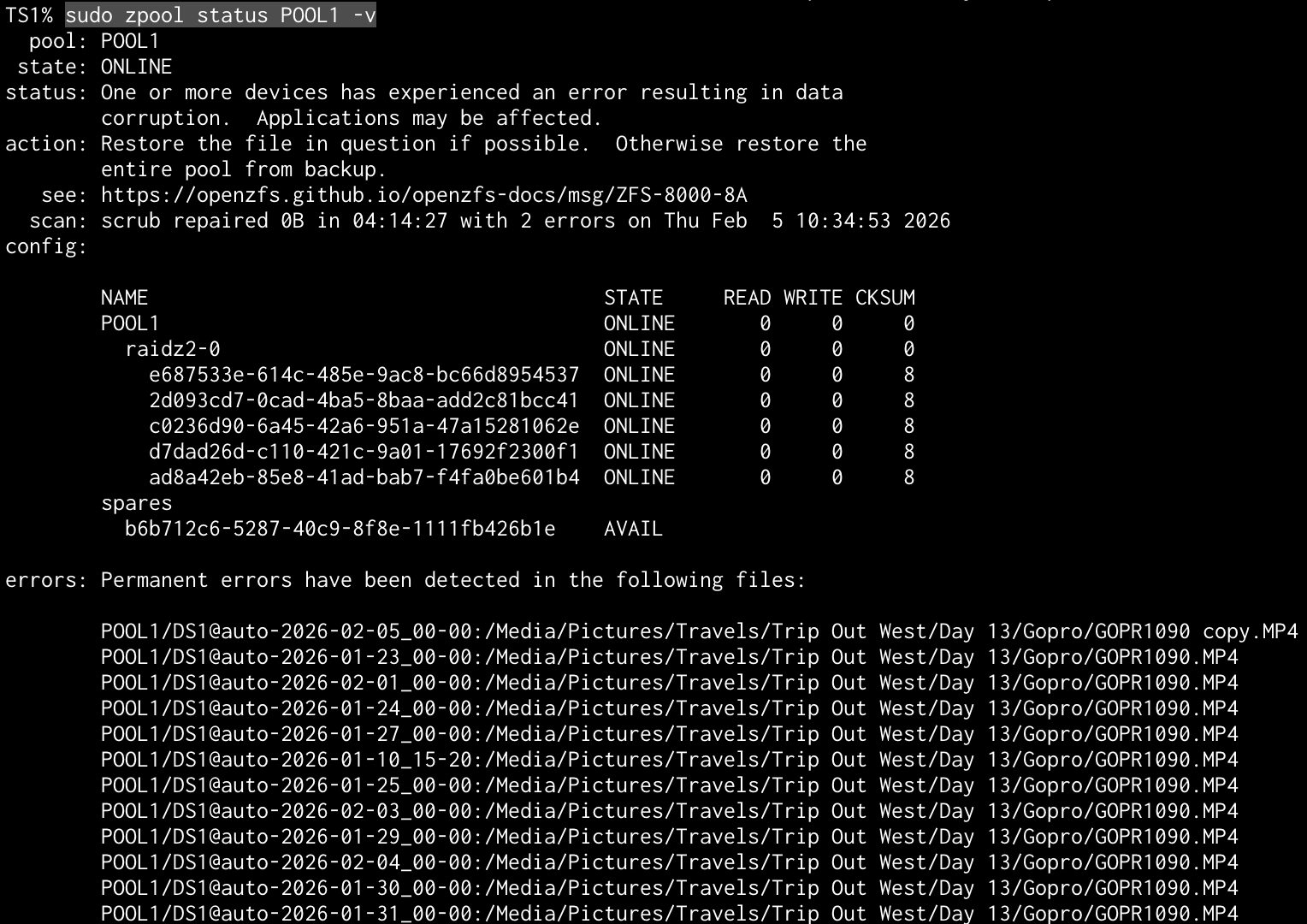
I’ve researched and found many threads closely aligned to my issue. Unfortunately, the issue seems to persist and I’d like to solve it since I had just cutover to TrueNas for production use in my workflow.
Facts:
TrueNas v 25.10.1
RAIDZ2 - 5x4TB Seagate Ironwolf
CPU: 12400
RAM: 64gb
MOBO: AS Rock M670H ITX
PSU: EVGA 500watt gold
I started testing TrueNas about one month ago and it was eye opening coming from Window Storages Spaces, especially the visibility into the SMART status through Scrutiny. An original 4 of my 5 drives were marked as failed, 3 due to ‘Uncorrectable Errors’ and one just being over the threshold of command timeout. I replaced/ resilverd the 3 drives marked ‘Uncorrectable Errors’ with a newer version of the same drive one by one, and life seemed great for a few weeks with scrubs reporting no errors. The only issues I encoutnered were due to my owner tinkering/ understanding.
Yesterday, I received an alert out of the blue:
· “Pool state is ONLINE: One or more devices has experienced an error resulting in data corruption. Applications may be affected.”
The GUI reported 1 uncorrectable error. I ran a scrub to no effect and then began my research, leading me to the following command as the SMART status was unchanged: sudo zpool status -v
The results are a little odd since the real path is: POOL1/DS1/Media/Pictures/Travels/Trip Out West/Day 13/Gopro/GOPR1090.mp4.
I navigated to the location and saw the media file still worked perfectly. Further research showed that function didn’t matter and ZSF always alerts a difference in the checksum, even if the file seems okay. Not wanting to lose the file, I created a copy that again played back okay and deleted the original. After running another scrub, I then had 2 errors.
Finally, I decided to delete both files and re-run the scrub. Despite deleting both files and completing a full scrub, the system is still reporting 2 errors. I am suspicious that maybe these errors are present in snapshots and that is what the system is reporting, but I am hesitant to delete the snapshots incase they become relevant to resolving this situation. I am happy to gather further information and any points to clear this error correctly are deeply appreciated. I currently have the pool exported to avoid further potential damage from reads /writes.
Yes, any file path with @ in the text, is a snapshot. You can also see this in the naming convention, which includes @auto-DATE-TIME:. So, unless you destroy the snapshots, the issue will remain. Or, you can ignore it for the moment and let the snapshots age out all on their own.
Non-fatal checksum errors can be caused by SATA cables, or LSI HBA over-heating. But, since this calls out a specific file, (well 2), over multiple snapshots, it is likely just the TWO files that got corrupted. The snapshots likely point to the same file, (except for the “copy” one).
As for the cause of the corruption, I can’t say in your case. Other known causes of corruption are running TrueNAS as a VM, using hardware RAID controller and bad memory.
Thank you for the information! I appreciate you taking the time for elementary facts such confirming @ is a snapshot. To be the grasshopper again is humbling
I understand your explanation and the logic is sound but it leaves me wondering…
Why was this error not reported earlier since it seems to have exist since the 1/10 snapshot? There have been several scrubs since that time and the alert was first triggered on 02/04, in-between the weekly scrubs and seemingly at random.
I’m going ahead and deleting the snapshots. Again, I find it odd that there are a few snapshots that ‘should’ contain the error but do not. Maybe since snapshots only track changes from snapshot to snapshot, and if there was no change, it was not included? But I’ve not accessed that file in a few years…..
Regardless, the snapshots are deleted, zpool clear <poolname> was ran, and I am now doing yet another scrub. We’ll see if this clears the error!
Regarding HBA’s and SATA cables…. On 02/01, I did replace a PCI 3.0x1 A/E Key JMB582 controller with a PCI 3.0x1 A/E Key ASM1064 controller for the native 4 SATA port support. I’ve heard multipliers are more trouble than they are worth and I’m okay trying non-standard solutions given the JMB582 had been going strong since 2022. I could see a fault with the new controller effecting snapshots from 02/01 forward but I don’t understand how it could affect older snapshots…. I apply the same logic about the 2 new SATA cables I added, which go to different drives completely (2 new SSD’s for a mirrored project pool). I just don’t see how that could affect previous snapshots.
I’ll circle back and update if this is the end or if there are further issues with the ASM1064 that may necessitate a change. Regardless, I am thankful for my monthly replication that ran before I started messing around with the ASM1064.
I wanted to update that @Arwen, your solution worked! For others:
Deleted the bad file and copy I had made
Deleted ONLY the bad snapshots (leaving 3 inbetween all the effected dates)
Ran zpool clear <poolname>
Finally, I ran a scrub and all was well upon completion
Thank you again for helping me learn today. Now I know for next time and I didn’t have to deal with the time/ hassle of restoring from a replication. Be well!
Good stuff, a problem and a working solution all in one thread. I had some corruption on an older array occasionally and it would hose the files, so I’d have to delete the files, zpool clear and rescrub. It always did the trick and the errors were so few and so far apart I never dug into it. But it made me remember the sequence.
If you have a clean copy of the file, you can restore it now.
As for why some snapshots were affected and not others, I don’t know. Nor do I know why you had corruption on a pool with 2 columns of parity, (RAID-Z2). Though the fact that all the disks had exactly 8 checksum errors does show unstable disk connections.
In general, I don’t see this kind of thing in an Enterprise Data Center environment, (I work as a Unix SysAdmin, including on Solaris 11 which uses ZFS exclusively). Most of the times we see this here in the TrueNAS forums, it is with end user / consumer grade hardware. Though, to be fair, most of the corrupt has a likely cause: Hardware RAID; USB enclosure; Using TrueNAS as a VM; Bad memory.
Thank you for the follow up and explanation! I am an engineer by trade and appreciate when professionals take the time to explain and expand further.
I totally agree that somewhere along the line, it’s likely my consumer grade equipment dropped the ball. I’m using non-EEC ram, on a consumer ITX board, where I removed the Wi-Fi card to commandeer the tiny 3.0x1 A/E key slot to eek in a few more HDD’s, all in that tiny Jonsbo N1 case. While the specs all line up where things shouuuuuld place nicely, I can see where it’s reasonable a bit was flipped. Like they say in finance, past performance is not indicative of future returns
Finally, I will admit it could even be user error… There have been a few times I turned the system on and not realized I had failed to connect all disks after tinkering, causing the pool to operate in a degraded state. It’s happened 3ish times so maybe I had a false sense of security and thought there were no side effects. Picking up used enterprise gear is on my list once I return to home ownership with a barn.
Thanks again and maybe we’ll cross threads in the future as my projects get more and more complex. Be well!
Just wanted to add my two cents in here. I also had corrupted snapshots on my apps pool from when I did a migration from my HDDs to SSDs. After short research, I swapped the SATA data cable first to no avail. I noticed the snapshots checksum errors when I ran zpool status -v <mypool>. Next, I had cleared snapshots from the datasets tab. No luck. But the key thing here is I didn’t notice the “Snapshots” button under “Periodic Snapshot Tasks” in “Data Protection”. I honestly just deleted them all and started fresh. After pruning docker images for extra measure and a re-scrub, I am back to a healthy pool with no errors!
Just a small blunder on my end. Figured someone could find it helpful.