Hi,
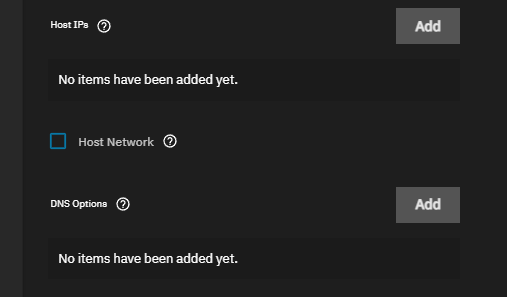
I’m new to TrueNAS and I tried running DHCP under PiHole but the DHCP requests don’t seem to be flowing through. I’ve read that I may need enable network_mode:host? Can someone point me in the right direction? TIA
Hi,
I’m new to TrueNAS and I tried running DHCP under PiHole but the DHCP requests don’t seem to be flowing through. I’ve read that I may need enable network_mode:host? Can someone point me in the right direction? TIA
Hello all
same request.
I installed Pi-Hole through the “Disccover App” of Truenas Scale, but I do not know how to exactly point my internet access to Pi-Hole in this configuration.
Should I point my interface?
Thanks for your help
Go to your router’s settings and look where you can change the DNS. It’s probably somewhere under LAN or DHCP. Use PiHole’s IP as your DNS. if you have a bridged network, your PiHole will have the same IP as your TrueNAS.
Thanks but that does not work.
I try putting the same IP as my Truenas (because yes, it is my TruenasIP:20720 to log in Pi-Hole) but that does not work. And just to precise, I cannot put :20720 in my routeur config.
Sorry, I forgot to precise, I went to the GitHub of Truenas App and someone told me I must Host my network in the config of Pi-Hole but I can not find a guide on how to exactly do it, which option I must choose.
It’s asking for the DHCP rules when I click on Host Network… so I assume I just repeat what I intend to make inside Pi-Hole? Wouldn’t that make 2 DHCP running?
But thanks… I’ll try it tomorrow when there’s less people using the net 
you don’t need to put in the port number, just the IP.
Also, create a new thread so people can properly assist you (not trying to be rude)
Not rude, but we have the same problem.
ok… so was able to spend more time on this today and finally got it working. Thanks @StevenMcE !
I went back to that screenshot from Steven, filled in the DHCP start/end IP, gateway (my ISP router’s local address), hit save.
This changed the interfaces shown inside pihole from the bridged/virtual if to the physical if of my motherboard
Then in PiHole I went to the DHCP section and basically repeated all the DHCP parameters I made in TrueNAS.
I can now see the hostnames of everyone accessing our home-network… which is mighty helpful in tracking which devices are sending a particular traffic.