I have a virtualized TrueNAS on proxmox. The pool consists of 5 disks which are in good state. But today the disk containing the cache drive crashed. So now the pool shows offline in the frontend, but is not discoverable by zpool status. Any chance I can get the data back by somehow removing the cache drive in the TrueNAS config?
How do you have TrueNAS set up on Proxmox? You have to pass through the entire controller and, maybe, blacklist it in Proxmox.
Please post details of your entire setup. We can only go off what is posted. You can expand the ‘Details’ section under my posts to get an idea of info. Details on how TrueNAS is setup in Proxmox is important.
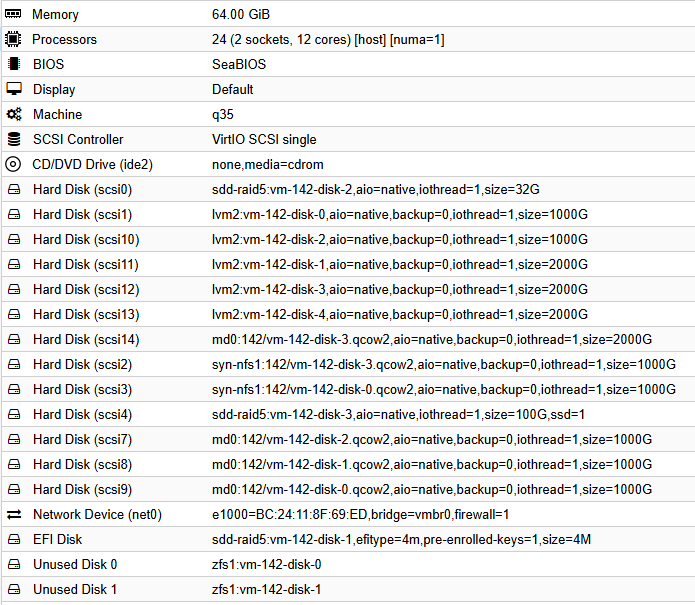
64 GB RAM
24 cores
SeaBios
q35
VirtIO SCSI Single Controller
scsi0: (boot disk) 32gb ssd
scsi1…7: lvm2:…aio=native,backup=0,iothread=1,size=1000G
Unused Disk 0: zfs1:vm-142-disk-0
Unused Disk 1: zfs1: vm-142-disk-1
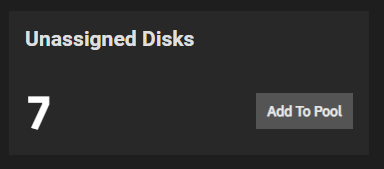
You see the last two disks (cache disks) were on the faulty proxmox ZFS. I am trying to get a new drive tomorrow to hopefully restore it. But if this is not possible, is there a way to let TrueNAS simply forget about the cache drives and get hold of the pool again? Currently it is showing me 7 available drives, on which the pool has been.
What do you mean by ‘cache disk’? L2ARC, SLOG or Special VDEVs? L2ARC and SLOG are not required for a pool and can be removed. I am guessing you had set up an sVDEV or a mirror of them to the pool.
Special VDEV (sVDEV) Planning, Sizing, and Considerations
yes it was a Special VDEV. I replaced the drive now but I fear I am unable to restore the RAID from MegaRAID storage manager / Supermicro. So the only way would be to make TrueNAS forget about the Special VDEV or intoduce new ones as a replacement, if possible
If I am reading the output of your zpool import, you have a 6 disk RAID-Z1 vDev AND a single disk stripe that is UNAVAIL.
This is BAD.
Without that single disk, you’ve lost your pool. Find it if you can, and restore it to your server.
To be clear, I could be wrong about the indenting of that last disk. Which would change your pool to a 7 disk RAID-Z1.
Further, other things are potentially just as bad:
Not passing through TrueNAS data disk’s controller, (though sometimes people use a TrueNAS boot disk as a virtual from the hypervisor successfully).
Using hardware RAID, (aka MegaRAID). ZFS is not designed to work with hardware RAID, just plain disks.
TrueNAS and ZFS are not perfect. They were not intended to work with every possible combination of hardware, or in the case of ZFS, every combination of software.
Originally, ZFS was built for Enterprise Data Center hardware and software. The fact that it works for home users and small businesses is great. Just that ZFS is not perfect for all uses.
I will happily be corrected but, if that’s indeed your only Special device then your pool has gone the way of the dodo, basically you’re SOL. Edit: Equally bad if it’s a single device VDEV striped as @Arwen suggests…
If you can somehow manage to make it available again you can salvage this. So check for reasons for the fault. Ideally you find something else causing the drive to be unavailable (that you can fix) instead of the actual drive being at fault.
OK I see what yo uare saying, the risk of being f***** is high. But please, 2 szenarios:
Szenario 1:
I am sure I had exported the pool1 some time ago. How would I import it again if possible?
Szenario 2:
I took a snapshot of the pool1 some time ago to migrate it to a bigger pool. But it seems cumbersome to find where to import a snapshot into the new pool. Could this be a possibility?
I think you are fundamentally misunderstanding some things here. Neither export nor snapshot is a backup. Snapshots aren’t backups and are still part of the pool and if your pool is unreadable, so are the snapshots.
Snapshots are just a convenient lightweight way to “freeze” a portion of your pool in time so that any mutations done to it are done so relative to that point in time to make them space-efficient. They are not magic backups that defy space requirements.
ZFS does everything online. If the pool is exported as shown in your screen capture, then you have to “fix” it so that it can be imported, (and made online). Otherwise, it’s potentially data recovery service time.
As others have said, if your snapshot is inside “pool1”, then it is worthless for recovery to import “pool1”.
If, on the other hand, you have used ZFS replication to send that “pool1” snapshot to a different, “bigger pool”, then that is one way forward. Your “bigger pool” has a backup.
One of the faults of ZFS is the inability to remove stripes or Mirrors from a pool that has RAID-Zx vDevs. Some people in years past assumed that they could "expand" their RAID-Zx vDev(s) by adding a disk. But, ended up adding a stripe disk that basically put their entire pool at risk of single disk failure.
Today, there is usable RAID-Zx expansion that does what people thought should be available. It’s not perfect, free space calculations are not perfect after adding a disk.
My point is, while ZFS is used by MANY people, either with TrueNAS, Proxmox or others, it still requires planning and some knowledge if not using a plain vanilla configuration all from the GUI. (Even then, it is always helpful to know somethings about ZFS…)