hello everyone
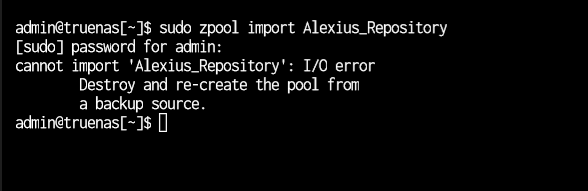
I was watching movies from my plex server where the movie paused and started loading then it said no connection to server. when i looked the pool had dropped vdevs. then i exported the pool and tried importing see if that helps but i get an error.
Error: concurrent.futures.process._RemoteTraceback:
"""
Traceback (most recent call last):
  File "/usr/lib/python3/dist-packages/middlewared/plugins/zfs_/pool_actions.py", line 227, in import_pool
    zfs.import_pool(found, pool_name, properties, missing_log=missing_log, any_host=any_host)
  File "libzfs.pyx", line 1369, in libzfs.ZFS.import_pool
  File "libzfs.pyx", line 1397, in libzfs.ZFS.__import_pool
libzfs.ZFSException: cannot import 'Alexius_Repository' as 'Alexius_Repository': I/O error

During handling of the above exception, another exception occurred:

Traceback (most recent call last):
  File "/usr/lib/python3.11/concurrent/futures/process.py", line 256, in _process_worker
    r = call_item.fn(*call_item.args, **call_item.kwargs)
        ^^^^^^^^^^^^^^^^^^^^^^^^^^^^^^^^^^^^^^^^^^^^^^^^^
  File "/usr/lib/python3/dist-packages/middlewared/worker.py", line 112, in main_worker
    res = MIDDLEWARE._run(*call_args)
          ^^^^^^^^^^^^^^^^^^^^^^^^^^^
  File "/usr/lib/python3/dist-packages/middlewared/worker.py", line 46, in _run
    return self._call(name, serviceobj, methodobj, args, job=job)
           ^^^^^^^^^^^^^^^^^^^^^^^^^^^^^^^^^^^^^^^^^^^^^^^^^^^^^^
  File "/usr/lib/python3/dist-packages/middlewared/worker.py", line 34, in _call
    with Client(f'ws+unix://{MIDDLEWARE_RUN_DIR}/middlewared-internal.sock', py_exceptions=True) as c:
  File "/usr/lib/python3/dist-packages/middlewared/worker.py", line 40, in _call
    return methodobj(*params)
           ^^^^^^^^^^^^^^^^^^
  File "/usr/lib/python3/dist-packages/middlewared/schema/processor.py", line 191, in nf
    return func(*args, **kwargs)
           ^^^^^^^^^^^^^^^^^^^^^
  File "/usr/lib/python3/dist-packages/middlewared/plugins/zfs_/pool_actions.py", line 207, in import_pool
    with libzfs.ZFS() as zfs:
  File "libzfs.pyx", line 529, in libzfs.ZFS.__exit__
  File "/usr/lib/python3/dist-packages/middlewared/plugins/zfs_/pool_actions.py", line 231, in import_pool
    raise CallError(f'Failed to import {pool_name!r} pool: {e}', e.code)
middlewared.service_exception.CallError: [EZFS_IO] Failed to import 'Alexius_Repository' pool: cannot import 'Alexius_Repository' as 'Alexius_Repository': I/O error
"""

The above exception was the direct cause of the following exception:

Traceback (most recent call last):
  File "/usr/lib/python3/dist-packages/middlewared/job.py", line 469, in run
    await self.future
  File "/usr/lib/python3/dist-packages/middlewared/job.py", line 511, in __run_body
    rv = await self.method(*args)
         ^^^^^^^^^^^^^^^^^^^^^^^^
  File "/usr/lib/python3/dist-packages/middlewared/schema/processor.py", line 187, in nf
    return await func(*args, **kwargs)
           ^^^^^^^^^^^^^^^^^^^^^^^^^^^
  File "/usr/lib/python3/dist-packages/middlewared/schema/processor.py", line 47, in nf
    res = await f(*args, **kwargs)
          ^^^^^^^^^^^^^^^^^^^^^^^^
  File "/usr/lib/python3/dist-packages/middlewared/plugins/pool_/import_pool.py", line 113, in import_pool
    await self.middleware.call('zfs.pool.import_pool', guid, opts, any_host, use_cachefile, new_name)
  File "/usr/lib/python3/dist-packages/middlewared/main.py", line 1564, in call
    return await self._call(
           ^^^^^^^^^^^^^^^^^
  File "/usr/lib/python3/dist-packages/middlewared/main.py", line 1425, in _call
    return await self._call_worker(name, *prepared_call.args)
           ^^^^^^^^^^^^^^^^^^^^^^^^^^^^^^^^^^^^^^^^^^^^^^^^^^
  File "/usr/lib/python3/dist-packages/middlewared/main.py", line 1431, in _call_worker
    return await self.run_in_proc(main_worker, name, args, job)
           ^^^^^^^^^^^^^^^^^^^^^^^^^^^^^^^^^^^^^^^^^^^^^^^^^^^^
  File "/usr/lib/python3/dist-packages/middlewared/main.py", line 1337, in run_in_proc
    return await self.run_in_executor(self.__procpool, method, *args, **kwargs)
           ^^^^^^^^^^^^^^^^^^^^^^^^^^^^^^^^^^^^^^^^^^^^^^^^^^^^^^^^^^^^^^^^^^^^
  File "/usr/lib/python3/dist-packages/middlewared/main.py", line 1321, in run_in_executor
    return await loop.run_in_executor(pool, functools.partial(method, *args, **kwargs))
           ^^^^^^^^^^^^^^^^^^^^^^^^^^^^^^^^^^^^^^^^^^^^^^^^^^^^^^^^^^^^^^^^^^^^^^^^^^^^
middlewared.service_exception.CallError: [EZFS_IO] Failed to import 'Alexius_Repository' pool: cannot import 'Alexius_Repository' as 'Alexius_Repository': I/O error
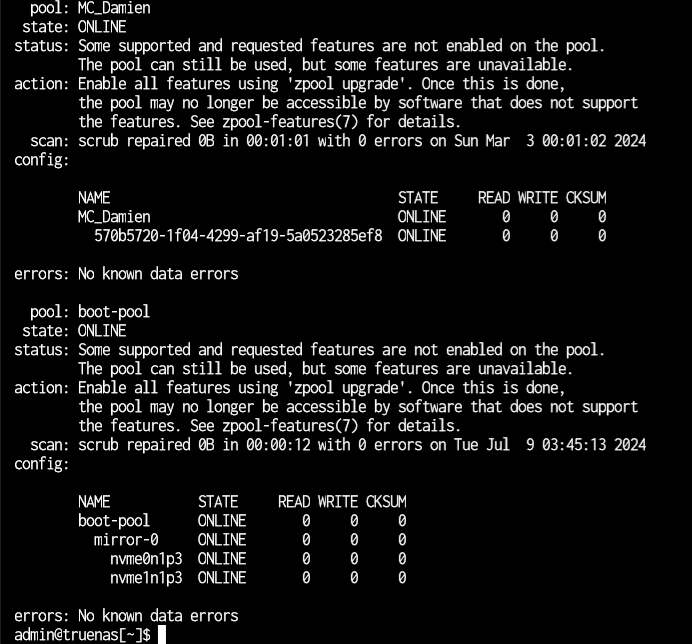
i had another pool that had problems that I could import read-only but it also spits out similar errors like processor.py, main.py etc.(i have some Minecraft world here that i would copy the maps from)
Error: Traceback (most recent call last):
  File "/usr/lib/python3/dist-packages/middlewared/main.py", line 198, in call_method
    result = await self.middleware.call_with_audit(message['method'], serviceobj, methodobj, params, self)
             ^^^^^^^^^^^^^^^^^^^^^^^^^^^^^^^^^^^^^^^^^^^^^^^^^^^^^^^^^^^^^^^^^^^^^^^^^^^^^^^^^^^^^^^^^^^^^
  File "/usr/lib/python3/dist-packages/middlewared/main.py", line 1466, in call_with_audit
    result = await self._call(method, serviceobj, methodobj, params, app=app,
             ^^^^^^^^^^^^^^^^^^^^^^^^^^^^^^^^^^^^^^^^^^^^^^^^^^^^^^^^^^^^^^^^
  File "/usr/lib/python3/dist-packages/middlewared/main.py", line 1428, in _call
    return await self.run_in_executor(prepared_call.executor, methodobj, *prepared_call.args)
           ^^^^^^^^^^^^^^^^^^^^^^^^^^^^^^^^^^^^^^^^^^^^^^^^^^^^^^^^^^^^^^^^^^^^^^^^^^^^^^^^^^
  File "/usr/lib/python3/dist-packages/middlewared/main.py", line 1321, in run_in_executor
    return await loop.run_in_executor(pool, functools.partial(method, *args, **kwargs))
           ^^^^^^^^^^^^^^^^^^^^^^^^^^^^^^^^^^^^^^^^^^^^^^^^^^^^^^^^^^^^^^^^^^^^^^^^^^^^
  File "/usr/lib/python3.11/concurrent/futures/thread.py", line 58, in run
    result = self.fn(*self.args, **self.kwargs)
             ^^^^^^^^^^^^^^^^^^^^^^^^^^^^^^^^^^
  File "/usr/lib/python3/dist-packages/middlewared/schema/processor.py", line 191, in nf
    return func(*args, **kwargs)
           ^^^^^^^^^^^^^^^^^^^^^
  File "/usr/lib/python3/dist-packages/middlewared/schema/processor.py", line 53, in nf
    res = f(*args, **kwargs)
          ^^^^^^^^^^^^^^^^^^
  File "/usr/lib/python3/dist-packages/middlewared/plugins/filesystem.py", line 430, in stat
    raise CallError(f'Path {_path} not found', errno.ENOENT)
middlewared.service_exception.CallError: [ENOENT] Path /MC_Damien not found
running Truenas scale dragonfish 24.04 (the pools were not upgraded to use the zfs tags)
My NAS has commodity hardware
CPU: i9900k
RAM:16GB 3200Mhz corsair
MB: ASUS
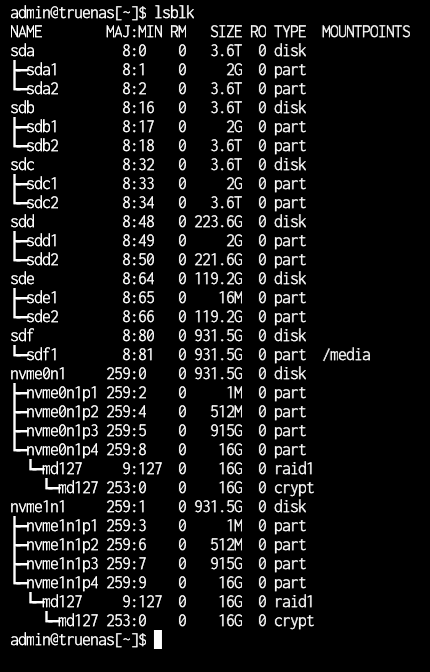
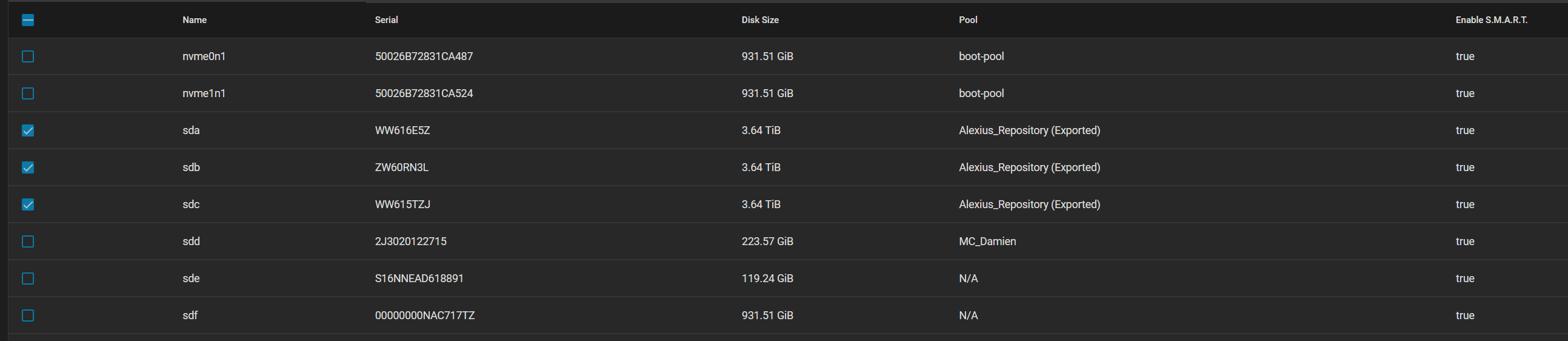
BOOT: 2 * 1TB M.2
HDD: 3 * 4TBs in raidz1
I have a feeling that it’s not the pools that have a problem. I even changed the sata cables and tried different ports. I ran tests on the HDDs and never had a problem. the pools just dropped randomly. is there a way to fix it? I’m not that experienced with TrueNAS and linux