
I was working on readying my TrueNAS 13.0 for the upgrade to 24.04 (100% backup of my pool) and found some files in my pool that I can’t delete as one of my users on TrueNAS 13.0. Tried my username logged into MacOS, Windows or LINUX and they won’t delete but are binary accurate to my backup. I log in as root and looked at the owner of the files and the bad files have the same permissions (my username, my group) as good files so I don’t know what’s going on. Now these files have been on the server since FreeNAS 9(ish) days so maybe there’s something to that. Luckily the root user can clean up these files. Is there something I need to do before leaving TrueNAS 13.0 to clean up this issue? How can I find the bad files since viewing the permissions doesn’t reveal the bad ones. I only find out they’re bad when I try to overwrite or delete one of these bad files. I guess they’re not “bad” since they’re binary correct to my backups but they won’t delete or be overwritten. When upgrading 13.0 to 24.04 will these files be a problem?
While I can’t tell you how to spot that files without a weird workaround, I am quite sure that whatever your files and the states of them are, they should not prevent or influence the upgrade since the upgrade mostly concerns the boot pool. But I am willing to be corrected by someone more knowledgable here regarding upgrades.
My weird workaround - if you have a backup of your data - would be to make a snapshot and then delete all files with your user. The ones that can’t be deleted you note. Then you restore from the snapshot and take care of the files manually. I want to stress that this is a workaround and you should only do it if you have a backup. The snapshot should work and save your data but it is explicitly not a backup.
The backup is how I’m recovering “bad” files as I find them. I have 16TB drive that is my backup but since I’ve been burned by drives randomly losing sectors (the backup) I’m afraid of completely trashing the TrueNAS files. What’s the probability of that happening? With my luck it’ll fail right as i erase the server.  I guess I’ll just keep randomly logging in as root and brute force erasing (generally this is when I’m editing one of these “bad” files which doesn’t really happen all that often. If I’m just reading them there’s no issue.
Oh, I am very accustomed to Finagle’s law myself. So, better to leave it then 
What is acl on file nfs4xdr_getfacl <path>? What is the exact error if you’re in shell and try to delete them as the user? If this is over SMB protocol only, there was an old bug in vfs_zfsacl in samba (fixed in TrueNAS 12) where it would grant delete permissions even when you didn’t technically have them.
There were some youtube videos / howtos that were basically malpractice if such a thing existed for influencers that had some crazy suggestions back in the day. So sometimes with older setups it can take a bit of poking around to figure out what happened and why.
I had a similar problem in TrueNAS 12 (I couldn’t even delete the files as root user) but that was solved by upgrading to 13.3; Thanks once again to @awalkerix advice:
Looking at the vfs objects’ settings may help provide a clue.
If you’re on 13.0 then going to 13.3 first might help?
Sorry guys, I haven’t gotten lost. I am trying to find one of the failing files. @awalkerix asked about the “acl on file” but I haven’t got a clue how to read the acl.
Here is some background on this pool. This server started (I can’t remember when) on a D975XBX motherboard with 8GB ECC RAM and an Intel Xeon 2.66GHz in Pentium clothing (pinned to replace a pentium chip aound 2005ish). Originally running Win7 (yes not really a server) and was used for a storage server for family pix, videos, etc. Converting to 4TB drives on Win7 was not working so I then found FreeNAS. It was FreeNAS using two 4TB WD Reds and a 8GB Sandisk as the boot when FreeNAS was version 9.2ish (to the best of my memory). I had added 4TB drives up to 8TB total space. It was running on the Intel mobo until 2020 and was randomly getting bit errors as I’d transfer files to/from it in the last 2 years before 2020. I looked at network switches and the mobo/processor (using MEMTEST86) but these errors were too far between to catch any of them. I then would get what looked like failing drives that led to replacing SATA cables and drives. A general nightmare every 3 to 6 months. I’m guessing old age on the mobo was showing up (power caps in the time near the capacitor fiasco). There were 3 recoveries of the pool during this time due to fails in the USB boot drive (probably the mobo fail). Then decided to build a server from something more appropriate and power efficient using the ASRock C3758D4I-4L, 32GB ECC RAM, a 120GB SSD boot drive and a sweet new enclosure (good for 8 hdds). Wow…. All the issues seem to end. I also could move on with FreeNAS versions since I couldn’t exceed 8GB RAM in the old system.
Some of the files that have these odd permission isues could date back to Win7 days, though I’m thinking the USB boot drive failures and recovery of the pools may be more related. The files come from many external machines running Windows, LINUX and MacOS talking to FreeNAS. The Windows machines have had strange issues when copying certain files off the server that was fixed by logging into the server and copying folders within the server and deleting the old folder (this was around FreeNAS, or maybe TrueNAS 12). This new problem, being unable to delete files on any external machine logged in as a user, just showed up while trying to clean up old files that I didn’t want anymore before Xmas 2025 and I was already on TrueNAS 13.0. To be honest the issue probably occurred earlier I just found it just before Xmas, and the workaround (though painful) was getting me by. Now I’ve hit my threshold of how far behind my updates have gotten and here I am looking the update to TrueNAS Scale 24.04 and beyond.
Sorry for the server life story…
Rick
I found a file that is “bad”. It is a file copied from a home movie DVD. This is the ls -l output.
-rwxrwxr-x+ 1 rick rick 6052937732 Aug 26 2020 VTS_01.VOB.mpg
I didn’t try to delete it. I dentified the “bad” file by trying to rename it in Windows10. I get the error:

So then I tested LINUX, again renaming it:
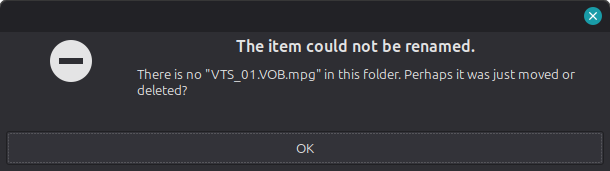
And finally, MacOS:
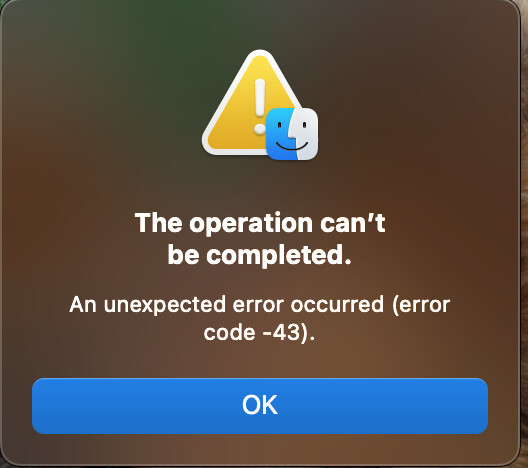
Turns out error -43 can mean many things but one of them is “missing file.” Yet the file clearly shows up in all OSs.
So I ssh into the server to copy the file, which it allows, and then I attempt a delete and it deletes the file (WTF). I guess I never tried shelling in as “rick” and attempting a delete. Now I will have to wait to find another file.
I’ve typically only seen that kind of behaviour (Error -43 and the like) with files that have illegal file names that weren’t properly handled over SMB.
It’s been a while since I had such a case though and your example does not appear to have weird characters in the file name, at least based on the screenshots.