Hi, I’m running TrueNAS Community 25.04.1. I’ve set up replication tasks to another 25.04.1 system off-site and the replications follow my normal snapshot schedule. I’m testing the restoration process and I have a couple questions:
1 - When setting up the restore, I can drill down in a dataset and choose a specific folder within the dataset from the source, but when I run the restore, it just restores the entire dataset, regardless. So, why allow me to choose something if I’m not really choosing it?
2 - There are multiple snapshots being retained on the other system that follow the source of the backup, but I see no way to choose a specific snapshot from which to restore. Is there something I’m missing? Because if I can’t choose a snapshot, then what’s the point in supposedly retaining the snapshots to match the backup source?
It sounds like the terminology is being confused. What is it that you’re doing? “Setting up the restore” means what? Navigating the snapshots that are presented as folders? Are you trying to restore (recover) a single folder within a snapshot?
Restore where? Do you mean you want to rollback the destination to an earlier snapshot? This will be undone the next time your replication task runs and can risk breaking incremental replications.
If you mean you want to replicate a particular snapshot back to the source, then you would need to use the command-line to specify exactly which snapshot you want to send back to the source. This will require you to destroy more recent snapshots on the destination, since they will be removed in the next incremental replication.
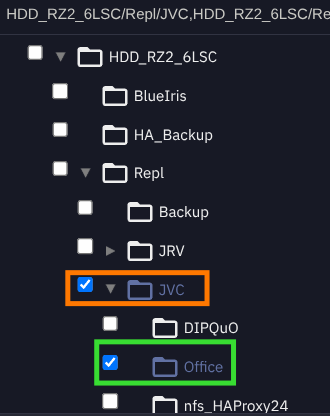
In this instance, “Setting up the restore” means I’m clicking the ‘Restore’ button on one of the replication tasks and then editing it. I’m trying to recover a sub-dataset within the parent dataset of the original replication task back to the original TrueNAS and I’m sending it to a new location for testing purposes and so as to not mess with the original replication task. The selection is presented in tree view and are individually selectable within the parent dataset as indicated below - parent dataset (orange box) of the original replication task, done recursively, and the selected sub-dataset (green box).
This is how I set up the restoration selection to replicate back to the source TrueNAS, yet when I perform the job it restores the parent dataset and all sub-datasets and ignores the selection. So, I’m confused as to why I have the ability to navigate and select if I can’t effectively do that. I guess, looking again at the interface, it looks like I could just manually list all the datasets I don’t want to restore in the “Exclude Child Datasets” box, but if I can put a check mark in a box for selection, I would think the UI would be programmed to put the exclusions in based on the selection.
Restore where?
To a new location on the original TrueNAS - not restoring to the original location.
If you mean you want to replicate a particular snapshot back to the source…
I thought since I’m sending over snapshots as they occur on the source machine, I would be able to choose the snapshot to restore from. It seems I cannot just choose from the available snapshots that exist and were sent over to the secondary machine. Having to do this via command line seems like an odd omission of feature since the snapshots being sent are known to the system as they are replicated based on their existing schedules.
I can confirm that if I enter all the sub-datasets I don’t want restored in the exclusions box, I get only the sub-dataset I thought I would get by checking the box for it. So, the question remains about the selection of snapshots. If the command line is the only way to select one other than the latest snapshot available, it would be nice if any of the restore side of the replication process were included in the TrueNAS documentation.
I believe your only choice is to use the command-line to specify the specific snapshot you want to restore, since you’re not interested in the latest snapshot or all snapshots that match a naming schema.
The GUI does not have that feature. It would have to be a one-time use “backup recovery” tool. The replication task that you get in the TrueNAS GUI is meant for automation and schedules, not one-time restorations.
Though I feel a little stupid not having realized that all the snapshots come back with the replication restore, I’m glad we had this conversation, as I probably would not have otherwise figured that out. So, between specifying the exclusions and then choosing the snapshot from which to revert post-replication, I’m all set and comfortable using this as my secondary off-site backup solution. Thank you very much.
That’s odd, because I just tested it and I don’t have the “Full Filesystem Replication” option checked on the original replication task or the restore replication task, but I was able to clone one of the earlier snapshots on the restored dataset and it worked. I can go check that option as a precaution, but being as a replication task is supposed to fully replicate the data, what would the reason be in not choosing that option and why would it not be on by default?
I took “all the snapshots” to mean all snapshots that exist on the dataset, no matter their naming schema or pattern.
Yes, as long as the Replication Task is tied to a Snapshot Task (or one or more naming schema), then those matching snapshots will all be transferred. What will not be transferred, if “Full Filesystem Replication” is not checked, are any snapshots that do not match any of the patterns.