Yeah I found your old reply from June 2024 where you mentioned “class” drives, because I know I have seen some externals, shucks, refurbs that are way bigger than 6tb. That’s when I hit the “class” rabbit hole.
Leave it to marketing to muddy up the water. For true spindle speed, you are 100% correct.
I suspect (obviously can’t be sure) that this is a TrueNAS / Linux issue. The system is hardly tickling the CPU and RAM/LARC, yet on the activities report visible gaps can be seen between R/W I/O, the drives are doing nothing but wait for much of the time.
Well, for all those following this thread, the resilver completed without error.
Now I have one more disk to install for the upgrade. I’ll try to install the replacement drive while keeping the Raidz1 in place (on a USB drive), but I’m unclear how that is going to work in practice.
root@truenas-pve-5[~]# zpool status storage
pool: storage
state: ONLINE
scan: resilvered 5.38T in 2 days 11:19:41 with 0 errors on Wed Dec 10 08:48:14 2025
config:
Are you unclear about how to carry this out, or are you unclear how it will turn out ?
You select the drive you want to replace, choose Replace, and then select the new drive.
When the system is finished, it should automatically detach the old drive.
EDIT:
Realized that you wrote exactly what I was thinking. I just didn’t understand it at first…
I’ve started the upgrade process on the final drive, with the 8TB to be removed attached via USB.
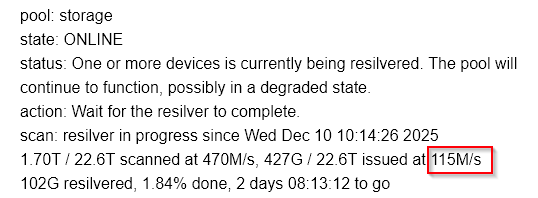
About 1 hours into the resilver and I don’t think it’s made much of a difference, 2 days 8 hours to complete.
I did run a quick performance test before starting the process and that seems fine, so it doesn’t seem that the slow resilver has effected the pool performance overall.
Here is the current status page:
pool: storage
state: ONLINE
status: One or more devices is currently being resilvered. The pool will
continue to function, possibly in a degraded state.
action: Wait for the resilver to complete.
scan: resilver in progress since Wed Dec 10 10:14:26 2025
1.70T / 22.6T scanned at 470M/s, 427G / 22.6T issued at 115M/s
102G resilvered, 1.84% done, 2 days 08:13:12 to go
config:
The silver lining from this process is that all the new drives will have had a really good workout, and I have no concerns about trusting my data to the storage.
It is not expected to make a difference for speed, but at least it makes a difference with respect to safety as you still have redundancy while resilvering.
uups, the fact that your TrueNAS setup is virtualized is an important piece of information…
you didn’t mention it, and nobody asked about it either…
This kind of thing can really go wrong if you get advice that is only safe for bare-metal systems.
Unfortunately, I know very little about running TrueNAS as a VM in Proxmox environments, except that you can easily mess things up if something is not passed through correctly.
For example, I don’t even know whether it’s actually possible to pass the entire (motherboard ? -) SATA controller dedicated to a VM, because i believe in that case, there must be no Proxmox system disks or any other VM disks attached to that controller at all…, idk…
Or is it a different SATA controller you passed through?
Like a PCIe-to-SATA card (ASM1166 or something similar)?
In that case, it might also be related to PCIe bandwidth…
Your write speed still looks suspiciously low to me… it almost resembles 1 GbE , or maybe PCIe x1 speed.
Sorry, I could have detailed the virtualisation, but I really don’t think it’s relevant in this case.
I have enough experience to understand when the virtualisation stack is causing an issue, I have now been running Proxmox for 4 years, with multiple virtualised TrueNAS, Windows, Ubuntu and even MacOS.
Proxmox is booting off a separate NVMe drive, and only TrueNAS uses SATA in the machine, so yes the entire main board SATA controller can be passed through without issue.
I do have an ASM controller, but none of these drives are connected to that, it’s used on a completely separate pool.
Yeah, that’s what I thought, but that is the average write speed, taking into account all the time that the system seems to be doing nothing, i.e. the writes are being pulsed as opposed to the steady stream which was the case on the first 2 drives.
All drives are on the same M/B SATA controller, so I would not expect to see any difference between them. It doesn’t seem to be a throughput bottleneck as there is as much time waiting as there is writing actual data to the drive. The Proxmox CPU is at less than 10% utilisation, no I/O waits, no swap disk used and the TrueNAS has access to 4 Intel cores. If I saw some stressing of any resources I could understand, but the system is mostly ideal.
What you don’t know can kill you. And what we don’t know could be harmful.
My advice about using a USB adapter was meant for bare metal, as I do not know how to cleanly pass a USB-attached drive to a VM, short of passing through the whole USB controller.
I appreciate all the advice offered on this case, the USB drive passthrough to VM has been rock solid so no worries there.
In general I’ve been running TrueNAS in VM for the best part of 3 years now, I’ve never come across an issue with a passthrough device which wouldn’t have been the same had it been on on bare metal, and when the issue is due to the hypervisor it’s normally catastrophic i.e. the guest fails to boot, so I tend to consider the fact that it’s running in Proxmox to be a none factor.
Having said that, I only use TrueNAS for data storage, the couple of apps which I do have running, were just for evaluation / testing only.
The 4 replacement drives have now full resilvered and the Raidz capacity has been expanded without error. During the process I was also utilising the removed 8TB drives to replace an array of 4TB drives, That process went through without any issues or slowdowns.
Both installations are VM’s with the 2nd having 32GB as apposed to the original with 24GB RAM. The only other difference is the original unit on ver. 25.04.2.5 while the 2nd is on 25.04.2.6
Only today I came to the conclusion that the Resilver/Scub priority is the likely cause of the slowdown, although the default setting worked on the 2nd unit, and I tried setting high priority on the original TN but it didn’t change the resilver speed, by that time I was only hours to completion, so it wasn’t really worth investigating further. Anyone else running into this issue might want to check that out.
Thanks again to all for the assistance, I learnt how to resync while maintaining the pool in a normal state, so there was a silver lining to my wows.