
I recently replaced a failing hard drive, and I’m starting the process of increasing my storage pool from 4x4 in RaidZ1 to 4x10 in RaidZ1. I’m wildly unfamiliar with the internal bits of ZFS, so I’m not sure how long this process should take; however it looks like the process stalled last night, and it has just been increasing the amount of time left since. The new hard drive passed its SMART Tests, and none of other hard drives seem to be failing. Where should I start looking to correct this issue?
This is not important.
Brand and model of all the drives?
This is not important either.
More information about your server?
4 Likes
Time estimates are widely off the mark initially, and only improve slowly.
If SMR drives are involved, the solution is to replace them, as you’re doing.
1 Like
Sorry abt that
Toshiba MG06 MG06ACA10TE 10TB 7.2K RPM SATA 6Gb/s 512e Enterprise
13th Gen i3
32GB DDR5
Intel Arc A310
Boot Drive is a Samsung Evo 870 500gb
This Hard Drive is replacing a Hitachi_HUS724040ALE641, which is a CMR
No motherboard? 
Are all 4 TB CMR? It only takes one SMR drive to slow resilver to a crawl.
1 Like
Also how are they connected?
Asrock Z790
Yes, all drives are CMR
All drives are connected directly to the motherboard with sata data cables.
Also, the PSU is a 500w 80 Gold unit.
I’d start with iostat on the command line to see what drive is bogged down.
iostat -x 5
let that run a few times and look for the drive that’s at 100%…or at least a much higher percentage than the rest.
Also, question for you, did you add the 10TB drive and start a replace operation, or remove one of the running 4TB drives to install the 10TB?
If you did the latter, that’s not great…
1 Like
All three of the hard drives hit about 95% at one point, then they would drop back down to about 75-80%
Also, I fully removed the failed hard drive, and replaced it with the 10tb
Right, you did say that one failed. How much data is in your pool? It sounds like you’re just waiting on the existing drives.
10tb of data total
How is it looking today?
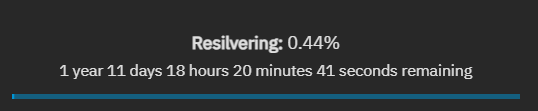
Are you sure the new Toshiba drive is not SMR? Just want to double check, I googled it yesterday and didn’t find a conclusive answer in the 15 minutes or so I spent looking.
However, I’ve resilvered with SMR drives before and while they take a few days sure, they don’t take years. Something seems really fundamentally wrong here and I’m not sure what.
How’s your CPU usage? Is this thing thermal throttling? Are you doing something odd like have the drives setup through a RAID controller? I see you have DDR5, are you running at JEDEC speeds or overclocked speeds?
Do you have easy access to the machine console? Linux will throw hardware errors to the screen, or use journalctl in the CLI.
Did you reboot after the drive failed before installing the new drive?
Oh, and what version of TrueNAS Scale are you running?
EDIT: Are you running any apps, containers, or VMs right now?
Based on an old thread, the reseller at this site claims that it is CMR. I didn’t see anything on Toshiba’s own site, either.
CMR seems reasonable given the other attributes of that drive (persistent write cache, et al).
I don’t think that Toshiba has SMR drives in the MG series, or even 3.5" SMR drives in any series.
As for the time estimate, before 20-30% it is completely off the mark, so “5 months” or “1 year” is meaningless. But if it took one day to reach 0.44% there’s something fishy…
What’s in this pool? A gazillion small files? Block storage zvols? (on raidz1?  )
)
- Yes, I’m sure all of the hard drives are CMR.
- CPU Usage is hovering around 5-10%, and it’s sitting around 40C
- Unfortunately, no, nothing funky in terms of hardware setup. The drives are connected directly to the motherboard.
- I’m running at JEDEC speeds, as I haven’t enabled XMP
- Connected my spare monitor, and I haven’t seen any errors on this end of things
- No, I haven’t rebooted since the drive failed
- 25.04.0
- Not running anything at the moment
I’m going to suggest reboot the box now. Something is off, maybe the motherboard is not handling the hot swap correctly. I don’t know.
EDIT: to be clear a reboot during a resilver is safe. It will just restart the resilver on next boot. Since you haven’t made much progress, I don’t think there’s much to lose.
3 Likes