Rotating Cold Spares Every 6 Months

Hi all,

I’m planning to run a 3-way mirror pool on TrueNAS Scale v24.10 with one offline cold spare disk. Rather than let the spare sit idle for months (or years), risking undetected failure after warranty ends, I’m planning to rotate it proactively, every 6 months by replacing a healthy disk with the spare.

Key benefits I anticipate from this approach:

  • Maximizes warranty value: The spare gets powered on, spins up, and undergoes routine read/write cycles while still under warranty, allowing potential defects to surface before coverage expires.

  • Faster resilver times: Since the spare is out of sync only by around 6 months, ZFS only needs to copy recently modified blocks significantly reducing resilver duration compared to a full rebuild from a blank disk.

  • Pool remains fully redundant: Because the swap is performed while the pool is healthy (not degraded), no data is at risk during the process.

  • Proactive health validation: Each rotation acts as a real-world test of the spare, verifying SMART status, power-on hours, and resilver success - before an actual failure occurs.

  • Long-term spare reliability: Regular rotation helps prevent issues like stuck heads in HDDs due to lubricant settling (or charge loss in SSD NAND cells - on ssd pools)

Also please note: I do not have another slot to keep the spare disk as hot spare. So looking at this option.

I would like to know your thoughts on this plan.

Thanks for your insights in advance — greatly appreciated.
Warranty is based on years and for SSDs also on TBW. If you don’t have to completely wrong disk for the job, even TBW is not a factor for warranty.

I mean, I guess, but why should that matter? You have a 3 way mirror, that is pretty save already. And even faster than your speed up resilver would be to need a resilver at all; use a 4 way mirror to begin with.

Even less risk if you use a 4way mirror instead.

That is what scrubs are for IMHO.

IMHO this is way too complicated without any real benefit.
Instead simply use 3 disk in a 3 way mirror. If possible not from the same vendor.
Don’t worry about drive failures, if one fails, order a new one and resilver.
If you want to gamble on future price hikes, buy one now and put it on a shelf and watch it collecting dust and losing warranty.

2 Likes

Will this data be backed up elsewhere?

If so then personally I’d do a 4 disk Z2 and forget about it.

If not then I’d seriously consider doing this.

2 Likes

I don’t get what you are thinking either. If you don’t have space for 4 drives at once, you are going to have to remove a drive from your 3 way mirror and put in your ‘spare’. It will erase everything on the ‘spare’ and make a 3 way mirror again. There is no speeding up resilver times with a partial.

Keep it simple. Do you have a backup, off site even, of your data? What if you lose the entire mirror VDEV?

1 Like

Thank you for taking time to go through this and the additional points mentioned. Based on the first 3 responses, I think I owe some clarifications.

  • Yes, I do have backup on another local pool and also to a remote for the key datasets. (due to space limit)
  • I have multiple pools and 1 extra slot, which I am planning to use for this rotation plan for other pools also from time to time. So I can not dedicate this 1 slot for 1 pool alone as a hotspare or 4th mirror.
  • I fully agree on the point, ‘Don’t put at shelf, buy only when needed plan’ - I have been following this only until now. But the recent events on hdd availability has made me think hard. I could get 4 disks, and then the stock has been empty for last 2 weeks with my vendor. The risk I am worried more is about the unavailability in time. Hope this clarifies.

The one disk (per pool) that sits in shelf for 6 months, is not connected to the power supply and so it will be protected from any possible power issues that could put all the connected disks in trouble - including my backup pool.

Please let me know if this changes the perspective, or if I am still missing something.

The disk is not going to be fully stressed during resilvering. ZFS will only write what is required.

No matter what, the warranty will expire.

Doing diskwide stress test would be more practical, though you don’t want the spare to undergo the test if a disk in the pool fails.

I don’t think this is true. I believe the entire content of the spare drive will be lost prior to resilvering.

I believe, on a mirror setup, resilvering is quite fast, much faster than what a RAIDZx can achieve.

A pool is thought healthy only as long as ZFS hasn’t detected a fault.

With 2 mirror drives, that shouldn’t be an issue. Though, I think a mirror is less resilient than a RAIDZ2 setup.

Not really (I think).

SMART status is usually done outside of the scrubing or resilvering process.

Not sure. Maybe.

However, what you might gain from swapping drive is actually making clean write to the HD magnetic cells on the platter.

I don’t think scrubing a pool forces a refresh of the magnetics fild on the platter, so bit rot can still occur. However, scrubing or reading a block will force a rewrite (in a different section of the disk) if a fault is detected.

My personal thought on the idea:

While there may be a benefit in replacing a healthy disk with a spare one, I think there is still an increase risk of compromising the health of the pool.

If you want to be technical, you will need to replace each disk one after the other during the lifetime of the pool. You will need to keep track of the disk rotation based on the serial number (for instance). I don’t think it is very practical. The older the drive become, higher is the risk of encountering faults on multiple disk.

Thanks @Apollo for the detailed review, appreciate your time and clarifications on this.

  • Regarding the disk that is going back to shelf : It has been in the pool for last 6 months, undergoing weekly scrubs and schedules SMART tests 4 times every day. I am planning to make this offline/detach and then remove it, if no free slots are present. OR use the free slot and do a replace option directly.
  • Similarly the new disk coming in (after 6 months with old data) as replacement - This will continue to be part of the pool for next 6 months undergoing weekly scrubs and SMART tests as mentioned before.
  • Rotation - yes, not the easiest approach, but I can do it. (have managed backup rotations at IT scenarios before)

Apart from that, I will be interested to know more on your thoughts about the bit rot and bad sector scenarios. As per my understanding the scrub would identify bad sectors, mark as bad, allocate a new sector and copy the actual contents from a good copy in the mirror, and remap it. So now the bad sector becomes untouched by any new data. One thing I want to know is does it reflect in the relocated clusters in SMART or is it internally manged by ZFS only?

I think our friend @KBB has explained a similar scenario here, that I am referring to encounter in the future.

Once again; all please consider this as a brainstorming session on the idea that I mentioned.

My intention is to evaluate, reconfirm and share this idea for any one that may be useful (if it makes sense).

(I am repeating this, as many a times my odd ideas get questioned a lot, when shared and explanations get misunderstood as trying to prove. Not at all…my intention is to be open to the feedback, have multiple set of eyes evaluating it and we all share the technical benefits; if any.)

Let’s all put our thoughts together on this, learn from it and come up with something better. Especially before its too late to get spares, if needed.

1 Like

He could not remove the drive in the GUI and simply pull it out so it gets offlined. This would trigger my inner Monk, since the pool would be shown as degraded all the time. But when he reinserts the drive, I think resilver should be faster?!

Either way, a stupid idea.

I think it would be reflected in checksum errors. I personally don’t care about SMART and think it is almost useless in a ZFS context.

What is your goal you are trying to achieve?
If it is just about availability, 3 way mirror is more than enough. And what you proposed offers no benefits, is unnecessary labor and a waste of hardware.
If it is about gambling on HDD prices, you do you.

1 Like

@smione You should give us the details on your current system(s) and what you are doing for backup. Quit making us guess or just feeding us breadcrumbs of information.

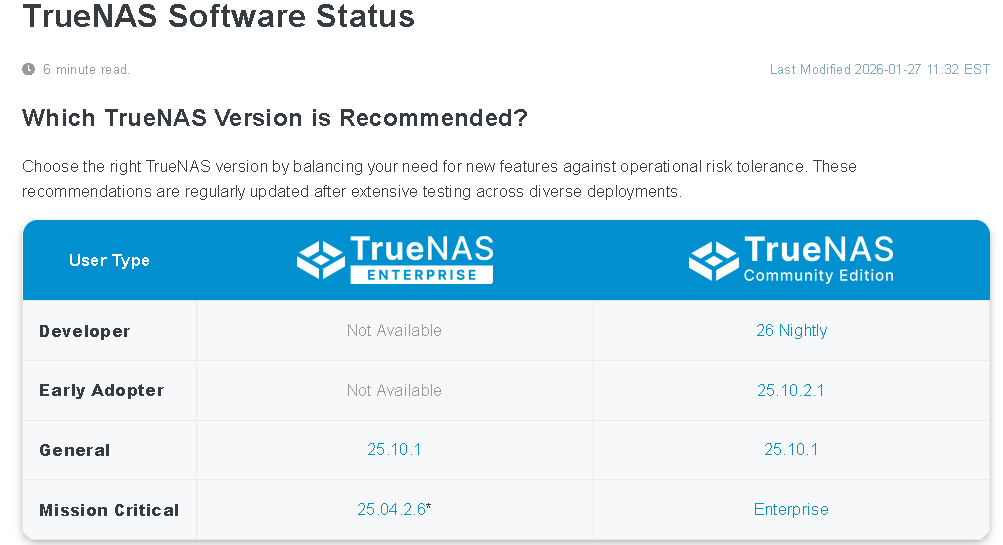
Is there a reason for sticking with 24.10 version of Scale? I would expect 25.04.2.6 or 25.10.1 just for the updates, etc. General or Mission Critical.

The plan would make more sense if you were splitting the mirror pool, so that the drive that comes off is a valid ZFS pool on its own, to be used as offsite/offline backup.

As said by @SmallBarky, upon being rotated back in the spare will NOT be recognised as an older member to be updated, it will be treated like any replacement: Formatted anew and filled with all data.
If you’re concerned about the cold spare degrading while sitting unused, plug it every 6 months to run a long SMART test and be happy with that.

1 Like

This is more of a design query.
my version is 24.10, and I do not see any compelling reason to upgrade my prod NAS yet at the moment.

1 Like

Yes, this is the part I am not very sure yet. I am still trying to figure this out.

I had checked with TrueNAS AI on this point and it mentioned as given below:

Question to TrueNAS AI : now after 6 months, if I bring back that sdb disk that I removed physically now, and ask to replace sdp with sdb, will the resilvering do it from scratch or will be only the diff between last 6 months

Answer : When you replace a disk in a TrueNAS pool, the system treats the replacement disk as a new disk and automatically triggers a resilver process. This process copies the necessary data to restore full redundancy. However, the resilvering process is optimized to copy only the differences (changed or missing data) rather than copying all data from scratch. So, even if the disk sdb still contains old pool data, TrueNAS will update it by copying only the differences accumulated over the last 6 months to bring it back in sync with the pool.

“Fast resilvers” do exist, but only for an accidental removal of a drive from a vdev. If you physically remove the wrong hot-swappable drive, realize your mistake, and then quickly reinsert it, ZFS will be able to “sync” the drive with the vdev without requiring a full resilver. We’re talking seconds and possibly minutes at most, not 6 months.

The AI is hallucinating.


This is the most sane approach. Keep it simple. It’ll detect any hardware defects and keep the bearings evenly lubricated.

An even better idea, which will reduce stress in your life, is to send me your cold spares.

2 Likes

Yes, this is what I too suspect.

Yes, that is plan-B

This is the best part I liked, in fact I already uploaded them… DM me your email ID to send them :grinning:

2 Likes

Agreed and it’s a frustrating one since I looked at the logs for @smione’s chat and none of the sources the bot was citing say anything at all about the specifics of the resilvering process.

I believe in the situation OP is describing as soon as you promoted the disk that was being rotated into the pool, zfs would treat the pool as whole and essentially forget about the hot spare containing pool data. Then 6 months later when you rotate the hot spare back in, zfs would again treat the disk as new and perform a full resilver. It might behave differently if you didn’t fully promote the member disk and just ran the pool as degraded with the rotated out hot spare, but that doesn’t seem like a reasonable practice to get into.

Hmm.., that sounds more realistic.

Any way, not planning to run a degraded pool with hot spare pulled out.

Rather, I think I would go for a single disk pool, and do a zfs replication of the datasets to that pool (to keep an offline copy and not waste the spare disk)

This would give it enough time in the NAS to complete periodic SMART tests as well. (short ones.. Or do I need to do a dedicated full smart test?)

Aren’t LLMs designed to basically “please the user” and answer back what he wants to hear? So, if the question was sufficiently precise the Artificial Intriguer will manage to give the “right” answer—even while stating the opposite at the same time, as in this case.

The short test only does a quick (and small) sample, so if you’re concerned you really want the full long test, going through every sector.
If you take this opportunity to make a backup, you may extend the pool into a 4-way mirror and then use zpool split POOL NEWPOOL on the CLI. (Default will cut out the last added device; man zpool-split is your friend to know how to arrange otherwise.)

3 Likes

Yeah and I suspect that’s part of what happened there. The frustrating part is that our AI Search instance is supposed to be really locked down against things like that i.e. we give it a bounded list of vetted source materials, we have training rules that instruct it to stop and inform the user if available sources do not reliably answer the question, we specifically run it on the RAG and not agentic model to prevent it from being too creative in trying to answer the questions, and yet it still seems to have gone fully sycophantic here. The user wanted X and it either completely fabricated an answer or misinterpreted some source (that it didn’t cite in its list of sources for the reply) to give them X.

Have seen similar behavior with LLMs especially when they are given an expected “example answer” (may be as part of training or the prompts). This may be the reason it tried to provide some docs as reference - because the good example told it to do so.