I’m still relatively new to all this, but have been running my server on an old desktop build for about a year with just a couple minor issues that I attributed to using old hardware.
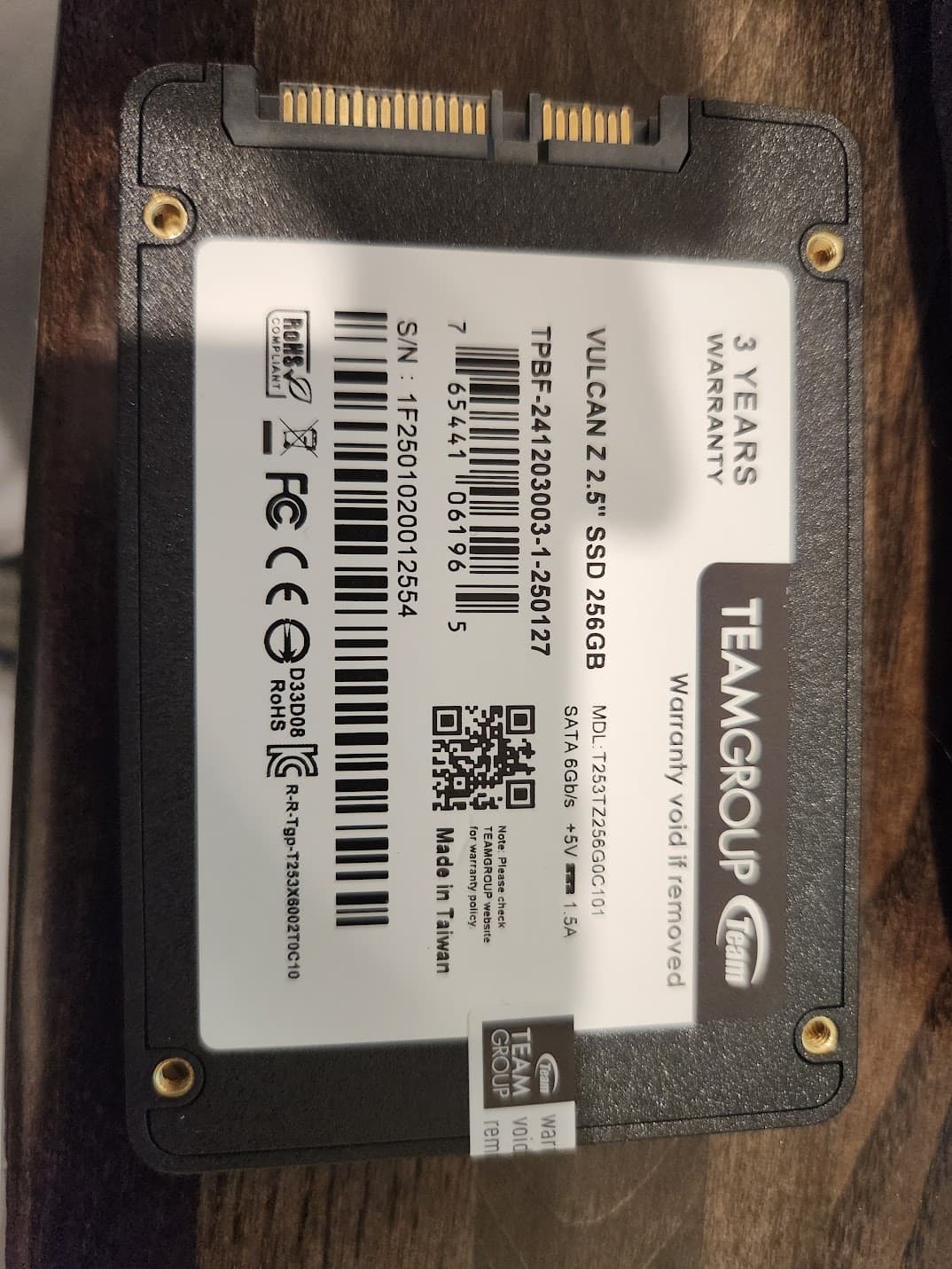
Recently, I’ve been running into issues with a SATA SSD pool. It is 2 T-Force Vulcan Z 256GB SATA ssds in a mirror purchased back in March from Newegg (Sold by Newegg, not a marketplace seller so should be legit) as they had a great deal going on. Earlier this summer, I was getting a ton of read and write errors on one of the drives. I was able to identify the problem drive and swapped it with the spare I (thankfully) purchased. The bad drive went back to Teamgroup for warranty, and they sent a replacement.
Now, I’m dealing with another drive that is having issues. Storage>Pool>Manage Devices shows the one vdev in the Pool as degraded with one disk marked as “Unavailable”
“Ok, cool, let’s just check which physical disk is bad and replace it then jump through warranty again”
I go to check the serial number of the one still good (process of elimination says it’s the other one that would be bad), and the serial number showing in Disks and when running smartctl in the shell does not appear anywhere on the physical drive. The number matches a pattern shown above the UPC instead of the pattern of the s/n line printed on the disk, but it doesn’t match anything on either of the disks I have installed.
Even weirder is that the Storage>Disks view shows both drives in the Pool and I can grab SMART details from both disks just fine.
Even more things I don’t understand is that it looks like the bad disk is now showing as an unused disk, but I can’t use it to replace itself (I get an error about “One or more CRCs don’t match” indicating that the Replace functionality expects the replacement disk to be empty).
So I’m looking for help in how to proceed.
- How do I find the bad drive with the S/N’s being incorrect?
- While the disk may be at fault, I don’t see any actual errors noted in the detailed SMART test results so is there something else going on and I can save this disk?
Note: Both of the disks in this pool are connected to SATA ports on the motherboard. They don’t go through my HBA.
Thank you!
Bad disk SMART details
admin@truenas[~]$ sudo smartctl -x /dev/sdf
smartctl 7.4 2023-08-01 r5530 [x86_64-linux-6.12.15-production+truenas] (local build)
Copyright (C) 2002-23, Bruce Allen, Christian Franke, www.smartmontools.org

=== START OF INFORMATION SECTION ===
Device Model:     T-FORCE 256GB
Serial Number:    TPBF2412030030104579
Firmware Version: X0219B0
User Capacity:    256,060,514,304 bytes [256 GB]
Sector Size:      512 bytes logical/physical
Rotation Rate:    Solid State Device
Form Factor:      2.5 inches
TRIM Command:     Available
Device is:        Not in smartctl database 7.3/5804
ATA Version is:   ACS-2 T13/2015-D revision 3
SATA Version is:  SATA 3.2, 6.0 Gb/s (current: 6.0 Gb/s)
Local Time is:    Sun Aug 24 15:00:48 2025 CDT
SMART support is: Available - device has SMART capability.
SMART support is: Enabled
AAM feature is:   Unavailable
APM feature is:   Disabled
Rd look-ahead is: Enabled
Write cache is:   Enabled
DSN feature is:   Unavailable
ATA Security is:  Disabled, frozen [SEC2]
Wt Cache Reorder: Unavailable

=== START OF READ SMART DATA SECTION ===
SMART overall-health self-assessment test result: FAILED!
Drive failure expected in less than 24 hours. SAVE ALL DATA.
No failed Attributes found.

General SMART Values:
Offline data collection status:  (0x02) Offline data collection activity
                                        was completed without error.
                                        Auto Offline Data Collection: Disabled.
Self-test execution status:      (   0) The previous self-test routine completed
                                        without error or no self-test has ever
                                        been run.
Total time to complete Offline
data collection:                (  120) seconds.
Offline data collection
capabilities:                    (0x11) SMART execute Offline immediate.
                                        No Auto Offline data collection support.
                                        Suspend Offline collection upon new
                                        command.
                                        No Offline surface scan supported.
                                        Self-test supported.
                                        No Conveyance Self-test supported.
                                        No Selective Self-test supported.
SMART capabilities:            (0x0002) Does not save SMART data before
                                        entering power-saving mode.
                                        Supports SMART auto save timer.
Error logging capability:        (0x01) Error logging supported.
                                        General Purpose Logging supported.
Short self-test routine
recommended polling time:        (   2) minutes.
Extended self-test routine
recommended polling time:        (  10) minutes.
SCT capabilities:              (0x0001) SCT Status supported.

SMART Attributes Data Structure revision number: 1
Vendor Specific SMART Attributes with Thresholds:
ID# ATTRIBUTE_NAME          FLAGS    VALUE WORST THRESH FAIL RAW_VALUE
  1 Raw_Read_Error_Rate     -O--CK   100   100   050    -    0
  5 Reallocated_Sector_Ct   -O--CK   100   100   050    -    0
  9 Power_On_Hours          -O--CK   100   100   050    -    2542
 12 Power_Cycle_Count       -O--CK   100   100   050    -    18
160 Unknown_Attribute       -O--CK   100   100   050    -    0
161 Unknown_Attribute       PO--CK   100   100   050    -    100
163 Unknown_Attribute       -O--CK   100   100   050    -    7
164 Unknown_Attribute       -O--CK   100   100   050    -    32911
165 Unknown_Attribute       -O--CK   100   100   050    -    109
166 Unknown_Attribute       -O--CK   100   100   050    -    1
167 Unknown_Attribute       -O--CK   100   100   050    -    20
168 Unknown_Attribute       -O--CK   100   100   050    -    5050
169 Unknown_Attribute       -O--CK   100   100   050    -    100
175 Program_Fail_Count_Chip -O--CK   100   100   050    -    0
176 Erase_Fail_Count_Chip   -O--CK   100   100   050    -    0
177 Wear_Leveling_Count     -O--CK   100   100   050    -    0
178 Used_Rsvd_Blk_Cnt_Chip  -O--CK   100   100   050    -    0
181 Program_Fail_Cnt_Total  -O--CK   100   100   050    -    0
182 Erase_Fail_Count_Total  -O--CK   100   100   050    -    0
192 Power-Off_Retract_Count -O--CK   100   100   050    -    16
194 Temperature_Celsius     -O---K   100   100   050    -    24
195 Hardware_ECC_Recovered  -O--CK   100   100   050    -    0
196 Reallocated_Event_Count -O--CK   100   100   050    -    0
197 Current_Pending_Sector  -O--CK   100   100   050    -    0
198 Offline_Uncorrectable   -O--CK   100   100   050    -    0
199 UDMA_CRC_Error_Count    -O--CK   100   100   050    -    0
232 Available_Reservd_Space -O--CK   100   100   050    -    100
241 Total_LBAs_Written      ----CK   100   100   050    -    44187
242 Total_LBAs_Read         ----CK   100   100   050    -    5269
245 Unknown_Attribute       -O--CK   100   100   050    -    84609
                            ||||||_ K auto-keep
                            |||||__ C event count
                            ||||___ R error rate
                            |||____ S speed/performance
                            ||_____ O updated online
                            |______ P prefailure warning

General Purpose Log Directory Version 1
SMART           Log Directory Version 1 [multi-sector log support]
Address    Access  R/W   Size  Description
0x00       GPL,SL  R/O      1  Log Directory
0x01           SL  R/O      1  Summary SMART error log
0x02           SL  R/O      1  Comprehensive SMART error log
0x03       GPL     R/O      1  Ext. Comprehensive SMART error log
0x04       GPL,SL  R/O      8  Device Statistics log
0x06           SL  R/O      1  SMART self-test log
0x07       GPL     R/O      1  Extended self-test log
0x10       GPL     R/O      1  NCQ Command Error log
0x11       GPL     R/O      1  SATA Phy Event Counters log
0x24       GPL     R/O     88  Current Device Internal Status Data log
0x25       GPL     R/O     32  Saved Device Internal Status Data log
0x30       GPL,SL  R/O      9  IDENTIFY DEVICE data log
0x80-0x9f  GPL,SL  R/W     16  Host vendor specific log

SMART Extended Comprehensive Error Log Version: 1 (1 sectors)
No Errors Logged

SMART Extended Self-test Log Version: 1 (1 sectors)
Num  Test_Description    Status                  Remaining  LifeTime(hours)  LBA_of_first_error
# 1  Short offline       Completed without error       00%      2541         -
# 2  Short offline       Completed without error       00%      2517         -
# 3  Short offline       Completed without error       00%      2493         -
# 4  Short offline       Completed without error       00%      2469         -
# 5  Short offline       Completed without error       00%      2445         -
# 6  Short offline       Completed without error       00%      2421         -
# 7  Short offline       Completed without error       00%      2397         -
# 8  Extended offline    Completed without error       00%      2375         -
# 9  Short offline       Completed without error       00%      2373         -
#10  Short offline       Completed without error       00%      2349         -
#11  Short offline       Completed without error       00%      2325         -
#12  Short offline       Completed without error       00%      2301         -
#13  Short offline       Completed without error       00%      2276         -
#14  Short offline       Completed without error       00%      2252         -
#15  Short offline       Completed without error       00%      2228         -
#16  Extended offline    Completed without error       00%      2207         -
#17  Short offline       Completed without error       00%      2204         -
#18  Short offline       Completed without error       00%      2180         -
#19  Short offline       Completed without error       00%      2156         -

Selective Self-tests/Logging not supported

SCT Status Version:                  3
SCT Version (vendor specific):       0 (0x0000)
Device State:                        Active (0)
Current Temperature:                    24 Celsius
Power Cycle Min/Max Temperature:     24/24 Celsius
Lifetime    Min/Max Temperature:     19/33 Celsius
Specified Max Operating Temperature:   100 Celsius
Under/Over Temperature Limit Count:   0/0

SCT Data Table command not supported

SCT Error Recovery Control command not supported

Device Statistics (GP Log 0x04)
Page  Offset Size        Value Flags Description
0x01  =====  =               =  ===  == General Statistics (rev 1) ==
0x01  0x008  4              18  ---  Lifetime Power-On Resets
0x01  0x010  4            2542  ---  Power-on Hours
0x01  0x018  6      2895876526  ---  Logical Sectors Written
0x01  0x020  6       132382095  ---  Number of Write Commands
0x01  0x028  6       345348757  ---  Logical Sectors Read
0x01  0x030  6         2367632  ---  Number of Read Commands
0x07  =====  =               =  ===  == Solid State Device Statistics (rev 1) ==
0x07  0x008  1               0  ---  Percentage Used Endurance Indicator
                                |||_ C monitored condition met
                                ||__ D supports DSN
                                |___ N normalized value

Pending Defects log (GP Log 0x0c) not supported

SATA Phy Event Counters (GP Log 0x11)
ID      Size     Value  Description
0x0001  4            1  Command failed due to ICRC error
0x0002  4            1  R_ERR response for data FIS
0x0005  4            1  R_ERR response for non-data FIS
0x000a  4            4  Device-to-host register FISes sent due to a COMRESET
System Info
TrueNAS SCALE: 25.04.0
Motherboard: ASROCK X370 Killer SLI/ac
Bios: P7.10
CPU: Ryzen 5 1600
RAM: G-Skill TridentZ 16GB (2x8) DDR4-3200
HBA: LSI 9207-8i
Network: Generic Intel I226-V 2.5Gb ethernet