2 days ago my server suddenly went “poof” in the middle of the night. a nice christmas present while i was away from home with family. When i came back home is started troubleshooting but my linux/zfs knowledge is limited and i would love some advice before blindly following whatever gemini tells me to and probably screwing stuff up more instead of fixing it.
I was running 25.10.1 when the server crashed. When i started it, it would boot up to middleware “applying kernel variables” and then shut off and reboot, over and over.
When selecting an old install to boot (25.04.2.6) i dot greeted by this kernel panic:
apps (mirror of a sata SSD and an external USB SSD for my apps)
Things i tried:
Memtest 6 passes all tests: Passed
Booting with only the boot-pool attached. unplugged everything else: Failed at the same point
Booting a fresh installation on a brand new boot nvme: worked!
Uploading my previous config to that fresh install: same boot loop (even with all the cables unattached)
Importing pool “apps” on a fresh install without previously restoring old config file: system crashed, rebooted and showed my 2 unimported pools again.
Importing pool “Klemmers” on a fresh install without previously restoring old config file: Pool was successfully imported.
Importing my configuration after the successful import of the Klemmers pool while the apps pool is disconnected: also worked. (why the hell didn’t this work on a clean install with all cables disconnected?)
So im guesing that something with the apps pool is screwed up. I have a daily rsync backup of my apps pool on the Klemmers pool (and the whole Klemmers pool is backed up daily to backblaze excluding all my media). but now i’m unsure on how to proceed. I’m not looking forward to having to reconfigure all my apps, users, folder structures, ect so i was wondering if there was a way to salvage the apps pool.
Skipped over this. Seeing as you have backups you can see what happens.
As I mentioned, this “removing nonexistent segment from range tree” panic comes up here every so often. It is usually a pretty simple fix.
Try this:
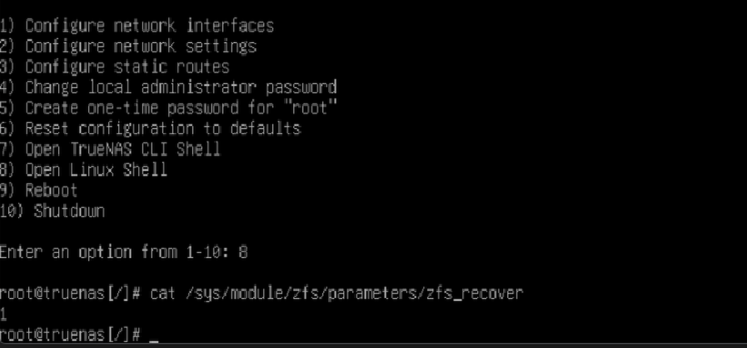
echo 1 | sudo tee /sys/module/zfs/parameters/zfs_recover
Then import via the WebUI, then run a scrub.
I would let this run, and then leave it for some time to allow metaslab condensing to occur (probably worth leaving it to the next day). You can then try rebooting and see if it imports normally. You should be okay to continue using the pool during this time.
thanks for the advice, but i may have a silly question: i cant plug in the drives while the server is running (well…. technically i could with the USB SSD), and when i power down the server, plug in the drives, it does not boot any longer. should i export or remove the offline apps pool using the webUI first, or is there a CLI command to use for that?
i might do the readonly thing anyway and make a second more recent backup. might be paranoid, but can’t hurt.
This totally did the trick. pool got imported, some errors were corrected at first boot, and everything popped right back up and all my apps were running again. Thanks a lot for your help!
Do you have any idea what could have caused this? is this a common problem that can be prevented?
I’ve only ever seen this on systems running Non-ECC memory. I’ve never seen it reported by the same person twice.
removing nonexistent segment means that as ZFS was replaying the spacemap to build the in-memory tree of free space, it tried to process an instruction to “remove” a segment of space that the tree didn’t have a record of. Perhaps you had a bit flip for the offset value
sorry to bother you again, but this error just popped up:
root@truenas[/home/admin]# zpool status apps -v
  pool: apps
 state: ONLINE
status: One or more devices has experienced an error resulting in data
        corruption.  Applications may be affected.
action: Restore the file in question if possible.  Otherwise restore the
        entire pool from backup.
   see: https://openzfs.github.io/openzfs-docs/msg/ZFS-8000-8A
  scan: scrub in progress since Tue Dec 30 17:40:42 2025
        149G / 148G scanned, 4.57G / 148G issued at 103M/s
        0B repaired, 3.09% done, 00:23:46 to go
config:

        NAME                                      STATE     READ WRITE CKSUM
        apps                                      ONLINE       0     0     0
          mirror-0                                ONLINE       0     1     0
            1acc454d-fce4-4ed1-842b-b792957ff6e1  ONLINE       0     1     0
            cef98fd0-12ef-4c21-8942-a717cdc593e5  ONLINE       0     1     0

errors: Permanent errors have been detected in the following files:

        <metadata>:<0x449>
does this have anything to do with the previous problem? the scrub yesterday returned 0 errors, and now this kind of worries me.
After a scrub it disappeared… I feel like I’m chasing ghosts. My first course of action will be to get rid of the USB SSD and replace it with an nvme drive.
Sorry I completely forgot to respond to this.
Afaik <metadata> indicates it’s not a user file, so most likely corruption of something used for internal state. Considering the panics you were hitting were due to spacemap corruption, if I had to guess, the scrub picked that bit of corruption up before it was rewritten (metaslab condense operation) which would also explain why the new scrub is ok.