Jumping in, but for offline offsite backup, I use an USB drive (single disk, stripe), which I leave at work, and bring once a week for a backup.
I did a script which imports the pool, unlock the single dataset, and starts copying using rsync.
I have multiple datasets on my main pools, but only one on the usb disk. However, directories are reflecting the datasets. This allows me also to mount it inside a Debian VM I created on my Mac, just in case truenas is really not working anymore.
just yesterday, I updated my script so I can use multiple usb drives, and each drive will get specific elements only. This way, I can have 2 disks of 2TB, one is saving a specific dataset, and the other another set, but both have a third dataset. (I am planing to put the script on GitHub at some point)
USB is a bit finicky because of the micro B connectors, but with USB C connectors, the transfer is working fine, and I managed multiple scrubs flawlessly until now.
I have several Linux servers, but they only do some specific tasks/software.
They do work fine, but now you need to keep them updated, backed up and resolve issues (like update errors and issues).
TN has a nice GUI to take care of all of that. It has great error/alerts/notifications to whatever notification service you want and many other niceties that a bare Linux system doesn’t have.
Bottom line: Bare Linux if you want to learn/thinker. Proper NAS OS if you just need your data safe, with the least effort/risk.
Main bulk storage is in (multiple) 2 HDD Mirrors. Gets replicated either to a local single HDD, or remote TN (with 2 HDD mirror, or single HDD for old/non-critical data).
Apps are on single SSD/nvme. Replicated to local 2nd SSD/nvme, plus local HDD, plus remote TN.
I only use good quality/brand SSDs/nvmes and I have yet to have a failure (5 to 10 years), but I do monitor and send alerts to a notification service, so I know immediately if something failed.
Do monitor the TN servers as well, in case the boot/OS SSD/nvme dies suddenly, which has never happened, except in recent TN updates where the update did something wrong and wouldn’t boot until reinstalled.
Bottom line: Single drive storage is ok, as long as you have (trusted/monitored) backups, and a plan/experience in case of failure.
Yes to USB drives. I do replicate 100% of my main data either to local or remote HDD mirror, plus local big USB drive (for emergencies, take that 1 drive and all main data is with you).
Regardless of what other techies say, there is no reason to not use/trust USB drives.
How come they do work well under OTHER OSes, eh!?
True, Linux seems to have a bit more USB disconnect issues, but those rarely happen in my experience, even when putting TN to sleep, the USB drive works fine.
I do have push alerts configured in case it does disconnect (once, twice a year?), and it takes me a minute to export, import.
Now that I think about it. I will simply automate that with a script.
Those disconnects DO NOT happen in Windows, so can only hope that someday, Linux USB can be as reliable as in “garbage“ Windows!
As long as you run a memtest on the USB bridge, you should be okay. Most chipsets on external USB drives should be able to pass a few memtests with no problems.
Agreed…. an offline backup image of your TN data isn’t any good if your building burns down.
After having experienced online storage system losses in the past, I backup all my TN data for offline storage on a regular basis by using rsync to send the data to a spinning rust drive of appropriate capacity inserted into an HDD dock. I then power down the HDD dock, remove the drive, and take it to another building (i.e. sneaker net) for offline storage.
I have three of these drives which I rsync and rotate on a regular basis. I store each in a separate offsite location. Not a perfect solution… but cheap insurance for my irreplaceable data.
Still working with dummy hard drives i have around so that i don”t destroy any data.
Added a 500GB drive. Created a pool, added an SMB share… tested it”s acessability. Al good!
Copied some data to run some speed test and i”m happy.
Added a second 320GB disk in an external case. Also added it to the pool and created a dataset.
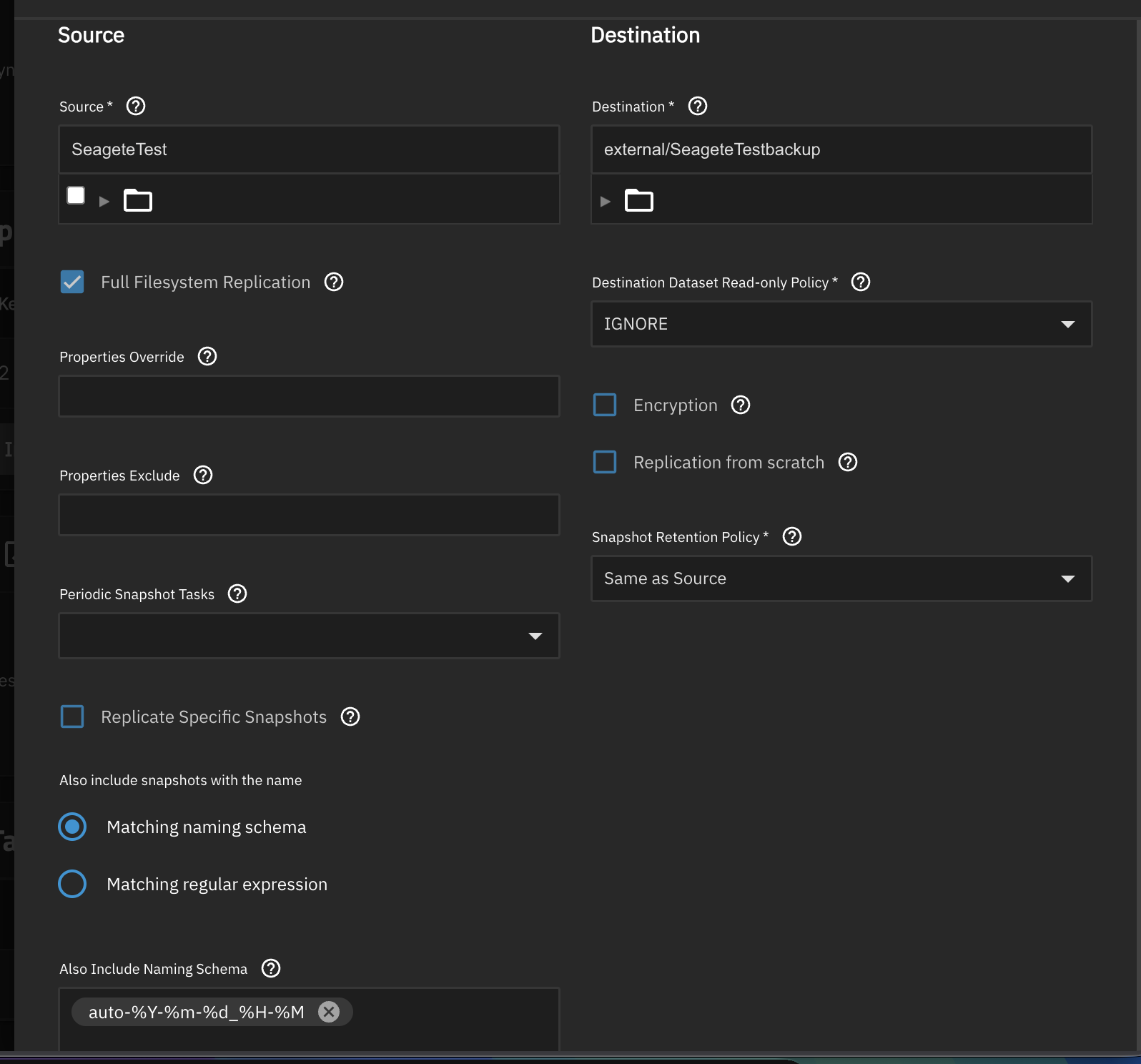
Took the initial snapshot on the first 500GB hard drive and tried creating a replication task to manually replicate the data. Clicked the Replication from scratch option…
Did the replication (the task finished fast and there is no data copied to the backup).
I clicked the “full filesystem” replication which should copy everything… but still there is nothing being copied and the task finishes in like a second…
I created a new pool and dataset for the external drive.
Regarding single external USB disks for offline backups and the question whether to use ZFS on them: Yes, it is important for such backups to by easily accessible, but this doesn’t necessarily exclude ZFS. Just prepare a bootable USB stick with SystemRescue+ZFS, a fork of SystemRescue (formerly SystemRescueCd) with ZFS built-in, and any PC will do, or if you got a Mac there’s OpenZFS on OS X which works well, too.
You’re trying to replicate from one root dataset to another.
You have 2 different options that you can try:
The destination needs to be at least one level down. In the Destination text field, you can type in external/SeageteTestBackup or external/SeageteTest. (Don’t create this new dataset. Just type it in. The replication will create it for you on the first run.)
Select all children one level down on the Source selection and choose external as the destination. It will replicate each child from the source as a separate task and match them into respective names under external in the destination.
You can uncheck “Replication from scratch”. It’s a destructive option.
Replication Tasks are meant to be tethered to a Periodic Snapshot Task. You’re supposed to pick one from the down-down menu. According to the screenshot, you did not select any.
If you don’t create a Periodic Snapshot Task to tether to your Replication Task, then you’ll need to use a consistent naming schema. My guess is that your manual snapshots have the word “manual” in the name.
A snapshot is a complete file-system. Two snapshots are two complete file-systems. When replicating incrementally, you’re only sending the unique blocks of the newer snapshot (file-system), which is why it happens quickly and does not take up much extra space.
This is why having 2 complete file-systems, each one being 1 TB, will only consume 1 TB of space. The reason it won’t consume 2 TB of space is because they share almost all their blocks together. Each snapshot individually references 1 TB of space. To send either of them to a destination that does not have this particular dataset will require sending 1 TB of blocks. It won’t matter which one you choose to send.
Quick comment I haven’t seen mentioned. What are you looking on accomplish by leaving the backup machine turned off? Your risk goes up in magnitudes with this approach. The number one time hardware fails is at startup and shutdown. Leave the server running, if you want it isolated disable network, enable firewall, whatever but leave it running.
Well logic to this is the same as to “why raid 1 isn”t a backup”.
In case of an electric shock or PSU faliure, both drives can die at the same time.
An offline drive staying well protected in the basement, being turned on twice a year for scrubbing and backup is very unlikely to die from staying turned off or starting up twice a year.
So if i don”t have the money to have 3x18TB drives (2 in raid 1) and then the third one for offline backup. I consider it”s better to have one online + one offline drive then to have ONLY raid 1.
Having an online drive that i manually back up to, which stays inside of the NAS. Makes no sense at all, i could have just created a raid 1 field if i wanted that.
I have a simple periodic snapshot task. But before i replicate to my secondary, mostly offline, system, i take a manual snapshot in the same naming scheme as the task. Then i start the replication task manually.

 Most chipsets on external USB drives should be able to pass a few memtests with no problems.