
Hi experts,
First the abstract:
- After nearly 3 years of operation the Log VDEV device in my TrueNAS 25.04.2.5 silently stopped working. The NAS continued to work without any recognizable issues, the pool was in state DEGRADED and smartctl could not longer find the the device.
- When I had time to fix the NAS (after 2 weeks and a scrub run of the pool), I tried to remove the defective Log device of the pool via GUI. This operation failed with an error message, the pool and all datasets disappeared from the GUI and became unreachable via SMB. In addition, the complete GUI stopped to respond to inputs.
- After a reboot the pool/SMB shares/data/GUI/etc. came back. The GUI showed the Log VDEV as “removed” and zpool status reported “permanent errors” with a file name <0x0> in each dataset.
- Then I shut down the NAS and physically removed the defective SSD from the motherboard. After boot the LOG VDEV did not disappear from GUI but keeps be listed in the pool in status “removed”.
- As I intended to skip any SLOG deployment from now, I intentionally did not “replace” but “offline” and “remove”. Both actions suspended the pool, but could not remove the Log VDEV from GUI. The zpool status still shows permanent errors. A subsequent scrub did not clear them.
I had a detailed look on this document:
https://forums.truenas.com/t/truenas-core-slog-failure-testing-rms-200/
My questions are now:
- How can I finally remove the Log device from the pool? Is this case (dead device) just not supported by the GUI?
I tried to do it from CLI: No way, it push one of the CPU core, probably the one which executes the zpool command, to 100%. No idea whether it does anything or just hangs:
root@Kwackl-NAS[~]# **zpool remove ZFS6x3T nvme0n1p1**

2025 Oct 27 15:02:33 Kwackl-NAS watchdog: BUG: soft lockup - CPU#4 stuck for 157s! [txg_sync:2106]

2025 Oct 27 15:05:21 Kwackl-NAS watchdog: BUG: soft lockup - CPU#4 stuck for 313s! [txg_sync:2106]

2025 Oct 27 15:08:09 Kwackl-NAS watchdog: BUG: soft lockup - CPU#4 stuck for 470s! [txg_sync:2106]

2025 Oct 27 15:10:57 Kwackl-NAS watchdog: BUG: soft lockup - CPU#4 stuck for 626s! [txg_sync:2106]

2025 Oct 27 15:13:45 Kwackl-NAS watchdog: BUG: soft lockup - CPU#4 stuck for 783s! [txg_sync:2106]

2025 Oct 27 15:16:33 Kwackl-NAS watchdog: BUG: soft lockup - CPU#4 stuck for 939s! [txg_sync:2106]

2025 Oct 27 15:19:21 Kwackl-NAS watchdog: BUG: soft lockup - CPU#4 stuck for 1095s! [txg_sync:2106]
-
By a zpool command? (e.g. zpool export + a command to remove the Log device + zpool import)
(Physically it was just dead (similar to a “hot” remove in the document referred above), but logically ZFS still thinks it should be here. But I want to get rid of it finally without replacement.) -
Is there a zpool command to clear the error? (e.g. zpool clear)
-
Is a single, nonredundant Log VDEV device more or less a nonsupported configuration (besides the doubtful choice of the hardware, see my system specs below)?
VG
erwin
Details:
Alert message which pointed to the defective SLOG device:
Critical
Device: /dev/nvme0n1, failed to read NVMe SMART/Health Information.
2025-10-10 13:25:08 (Europe/Berlin)
Dismiss Go to Disks
It was not reachable any longer by smartctl, so I could not longer verify the meanwhile used portion of the theoretical TBW of 4.3PB, but based on the experienced usage intensity in the past years it propably reached only a few percents of the lifetime. But obviousls it was a bad idea to go without redundancy…
After the scheduled scrub job was finisched, I tried to remove the SLOG device via GUI from the degraded pool and I got the warning that data could be corrupted:
Critical
Pool ZFS6x3T state is DEGRADED: One or more devices has experienced an error resulting in data corruption. Applications may be affected.
The following devices are not healthy:
- Disk 11748031188119911083 is REMOVED
2025-10-26 17:05:22 (Europe/Berlin)
Dismiss Go to Storage
To find more details about the affected data corruption I had a look on the Pool status:
All data raidz2 disks are healthy (this explains why I still miss no data) but the SLOG device still sticks at the pool…
root@Kwackl-NAS[~]# root@Kwackl-NAS[~]# zpool status -v
  pool: ZFS6x3T
 state: DEGRADED
status: One or more devices has experienced an error resulting in data
        corruption.  Applications may be affected.
action: Restore the file in question if possible.  Otherwise restore the
        entire pool from backup.
   see: https://openzfs.github.io/openzfs-docs/msg/ZFS-8000-8A
  scan: scrub in progress since Sun Oct 26 17:17:01 2025
        6.37T / 38.4T scanned at 997M/s, 5.81T / 38.4T issued at 910M/s
        0B repaired, 15.13% done, 10:25:53 to go
config:

        NAME                                          STATE     READ WRITE CKSUM
        ZFS6x3T                                       DEGRADED     0     0     0
          raidz2-0                                    ONLINE       0     0     0
            sda2                                      ONLINE       0     0     0
            ata-ST12000VN0008-2JH101_ZHZ0EV7L-part2   ONLINE       0     0     0
            sde2                                      ONLINE       0     0     0
            3941b019-194d-4d62-94a9-06362f151f6c      ONLINE       0     0     0
            a1a33b04-e212-4a6d-8855-f68eb82cc108      ONLINE       0     0     0
            ata-WDC_WD121KRYZ-01W0RB0_8DH8ZKBH-part2  ONLINE       0     0     0
        logs
          nvme0n1p1                                   REMOVED      0     0     0

errors: Permanent errors have been detected in the following files:

        ZFS6x3T/Erwin_2:<0x0>
        ZFS6x3T/ix-apps/app_mounts/metube/downloads:<0x0>
        ZFS6x3T/Elisabeth_TimeMachine:<0x0>
        ZFS6x3T/immich/pgData:<0x0>
        ZFS6x3T/Katzenklo:<0x0>
        ZFS6x3T/.system/netdata-13347107cb554059b4babd5b1a5d3dd4:<0x0>
        ZFS6x3T/ix-apps/app_mounts/nginx-proxy-manager/data:<0x0>
        ZFS6x3T/ix-apps/truenas_catalog:<0x0>
        ZFS6x3T/Erwin:<0x0>
        ZFS6x3T/Erwin_3:<0x0>
        ZFS6x3T/ix-apps/app_mounts/pihole/config:<0x0>
        ZFS6x3T/F5_Austausch_neu:<0x0>
        ZFS6x3T/Nextcloud_Testshare:<0x0>
        ZFS6x3T/testshare:<0x0>
        ZFS6x3T/Nextcloud_Testshare_2:<0x0>
        ZFS6x3T/Erwin_TimeMachine:<0x0>
        ZFS6x3T/ix-apps/app_configs:<0x0>
        ZFS6x3T/ix-apps/docker:<0x0>
        ZFS6x3T/Nextcloud/Nextcloud_Postgres_Data_Storage:<0x0>
        ZFS6x3T/vSphere_iSCSI_Speicher_2:<0x0>

  pool: boot-pool
 state: ONLINE
  scan: scrub repaired 0B in 00:44:00 with 0 errors on Thu Oct 23 04:29:02 2025
config:

        NAME        STATE     READ WRITE CKSUM
        boot-pool   ONLINE       0     0     0
          mirror-0  ONLINE       0     0     0
            sdd3    ONLINE       0     0     0
            sdg3    ONLINE       0     0     0

errors: No known data errors
root@Kwackl-NAS[~]#
The GUI just reflects the zpool status command output but fails when attempting to remove the Log device:
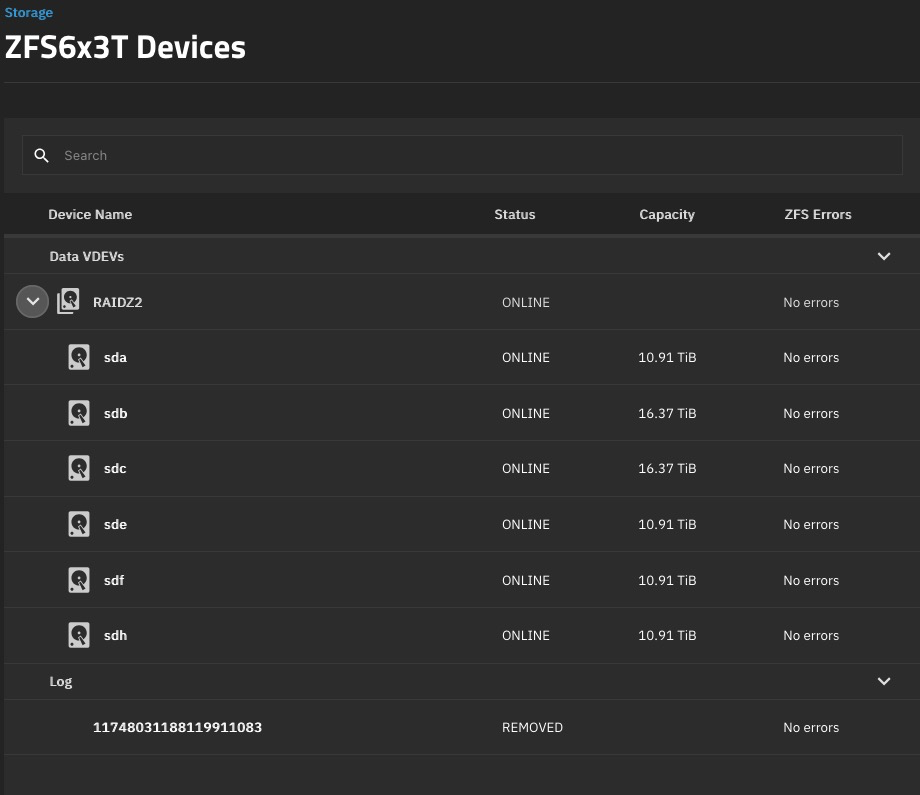
The attempt to set the Log device “offline” or “removed” from the GUI suspends the complete pool:
Oct 26 21:35:10 Kwackl-NAS kernel: WARNING: Pool 'ZFS6x3T' has encountered an uncorrectable I/O failure and has been suspended.
This looks like an I/O problem during access attempt ot the dead and physically removed SSD. It just should not try it longer because it will be removed.