NOBODY mentioned Windows in this post, and I’m using linux with ‘mount -t cifs’ and did not use windows for decades.
It’s M$’s bulls**t and I don’t understand why opensource developer decide to follow it!
NOBODY mentioned Windows in this post, and I’m using linux with ‘mount -t cifs’ and did not use windows for decades.
It’s M$’s bulls**t and I don’t understand why opensource developer decide to follow it!
That’s nice.
Do you speak for everyone, is everyone in this thread a Linux client smb user?
You don’t need to answer that, admittedly I am being facetious.
In the end the Windows part is an integral part of the SMB identity, and interoperability with Windows is an important aspect, that includes following best practices on the Windows side.
Are you suggesting everyone in this thread is the ‘newest and greatest windows 11’ user? and other (include old version windows) users should be ignored?
Don’t get me wrong, I’m NOT talking about off-topics like boring ‘lin vs win’. My point is real word needs should be considered. It’s clear that not me alone needs a reasonable ‘smb guest access’ function that was missing in the latest 25.10 release.
You can stay on 25.04 or you can see if any of the workarounds mentioned in this thread do it for you. Presumably, finding a way to set guest ok = yes would circumvent it in an unsupported manner. Although it would be much more prudent to update your workflow and avoid using guest access altogether.
I don’t foresee TrueNAS changing this back to allowing guest access, it’s a security risk.
Do you have the legacy share preset option? I copied this from the 25.10 release notes.
SMB Shares: In 25.10, SMB share configuration only displays options relevant to each purpose-based preset. Existing shares that previously used the No Preset option are automatically migrated to the Legacy Share preset during upgrade. New shares cannot access legacy configuration options.
Legacy Share options include enabling SMB guest access, the SMB recycle bin, home directory export, AFP compatibility shares, and disabling shadow copies. The SMB recycle bin feature is no longer available for new shares due to security and usability concerns. For file recovery and versioning, use ZFS snapshots, which provide more reliable and predictable data protection. For more information, see Legacy Share Settings and the TrueNAS API documentation sharing.smb.create return values for options LegacyOpt.
Update 1
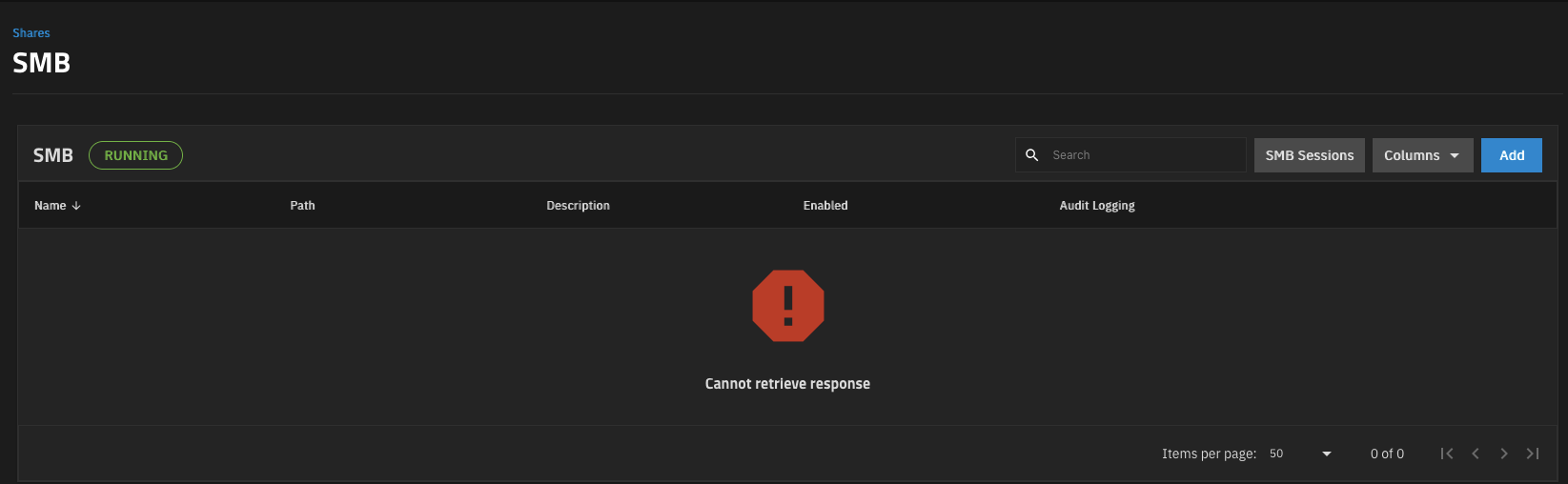
I upgraded to 25.10.0.1 and my guess access to shares still works from my Macbook (macOS 15.7.2) . However, the SMB Panel shows SMB service is running, but doesn’t show any shares. So there is more work to do.
Whoever came up with this is wrong!
Disabling guest is sabotage! This is catastrophe!
What is so bad allowing user to decide how to use a system?
I hope truenas team change their mind about this devastating idea.
And while they do, here is my workaround.
Download config through System - Advanced settings - Manage configuration.
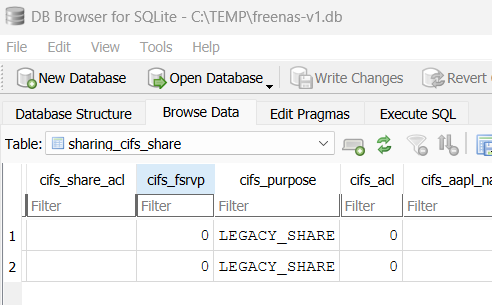
Open it in sqlite DB Browser and find “sharing_cifs_share” table.
Open it and edit share purpose from “DEFAULT_SHARE” to “LEGACY_SHARE”
Save it and upload back to truenas. After that, you can enable guest in shares.
That is a lifesaver, thank you. On the latest edition of SQLite DB Browser, you have to open the sharing_cifs_share table via the Browse Data tab to be able to find and edit the cifs_purpose data.
This works perfectly
Wanted to clean up my response. This is what I did and worked for me based around @kasak workaround. Lets see how long it last.
nobody, Group: nobodymidclt call smb.update '{"smb_options": "restrict anonymous = 0\nmap to guest = Bad User"}'
Get share ID:
midclt call sharing.smb.query
Update share (replace 1 with your share ID):
midclt call sharing.smb.update 1 '{"purpose": "LEGACY_SHARE", "options": {"guestok": true}}'
systemctl restart smbd
Connect from Windows: \\<IP>\<share-name>
You should really only be using LEGACY_SHARE for systems that can’t use passwords, like old awful network-enabled MFPs or similar.
But here you go.
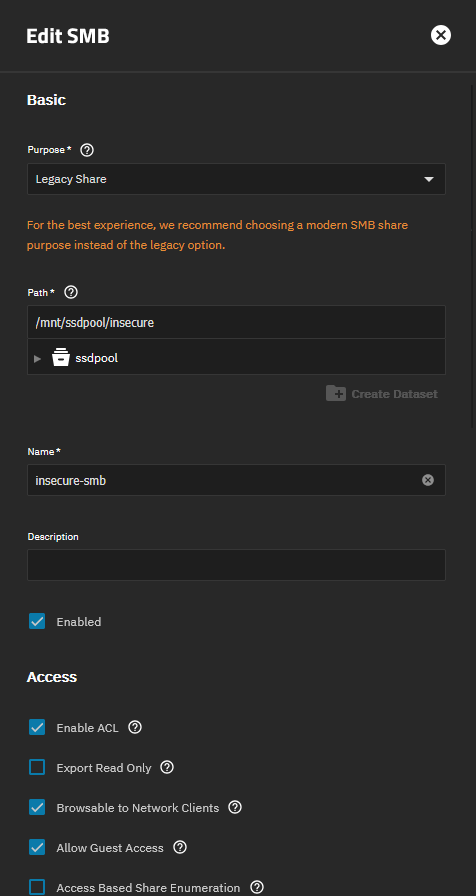
midclt call sharing.smb.create '{"path": "/mnt/tank/insecure", "purpose": "LEGACY_SHARE", "options": {}, "name": "insecure-smb"}'
Modify your path and name as desired, edit in the UI afterwards. No ugly DB modifications needed.
All solutions proposed include creation commands. What for shares that have existed for years?
@HoneyBadger for what I see you are part of TrueNAS staff? Can I therefore take your answer as an implicit acknowledgment this change was done deliberately, as well as the decision of not mentioning it on the changelog or anywhere?
This passage from the release notes implies that ONLY legacy shares can allo guest access. Very deliberate.
Legacy Share options include enabling SMB guest access, the SMB recycle bin, home directory export, AFP compatibility shares, and disabling shadow copies. The SMB recycle bin feature is no longer available for new shares due to security and usability concerns.
Given that me and others in the thread didn’t find anything about this back in the day, I suppose this was added later. Good it has been added, but the way it is written:
“New shares cannot access legacy configuration options.”
makes it sound like existing shares are not affected.
Existing shares that had the legacy-only settings (eg: Allow Guest Access) should have been migrated to the LEGACY_SHARE type with those checkboxes intact on upgrade - if they switched to a Default/Standard or were missing the Guest_Access checkbox, that’s likely a bug.
New or existing LEGACY_SHARE types should have the option to toggle it within the UI.
Removing the creation of these shares through the UI was deliberate - breaking things on upgrade wouldn’t be.
Shares that were set to the “No Preset” option before upgrade to 25.10 (which allowed for editing advanced options) are converted to Legacy Shares in 25.10
This to me implies that things other than guest access could be impacted; any chance for a short list or is it basically just guest access?
In my case everything works in 25.10.0.1. Even guest access. But everything breaks in 25.10.1. No SMB access. I get an error in the console about “nmbd service not started”, and restarting the SMB service produces “[EFAULT] string indices must be integers, not ‘str’”.
Going back to 25.10.0.1 fixes these problems.
Regards.
It’s a great product you have with TrueNAS. However, just because Microsoft considers SMB Guest Access a security concern doesn’t necessarily mean it isn’t still used in certain environments. Many of us carefully evaluate what works best for our own production or home servers and make those decisions based on our specific needs and risk assessments.
In the end: What is the best move for 25.10.1 to create SMB with Guest Access ?
The one that @HoneyBadger wrote: