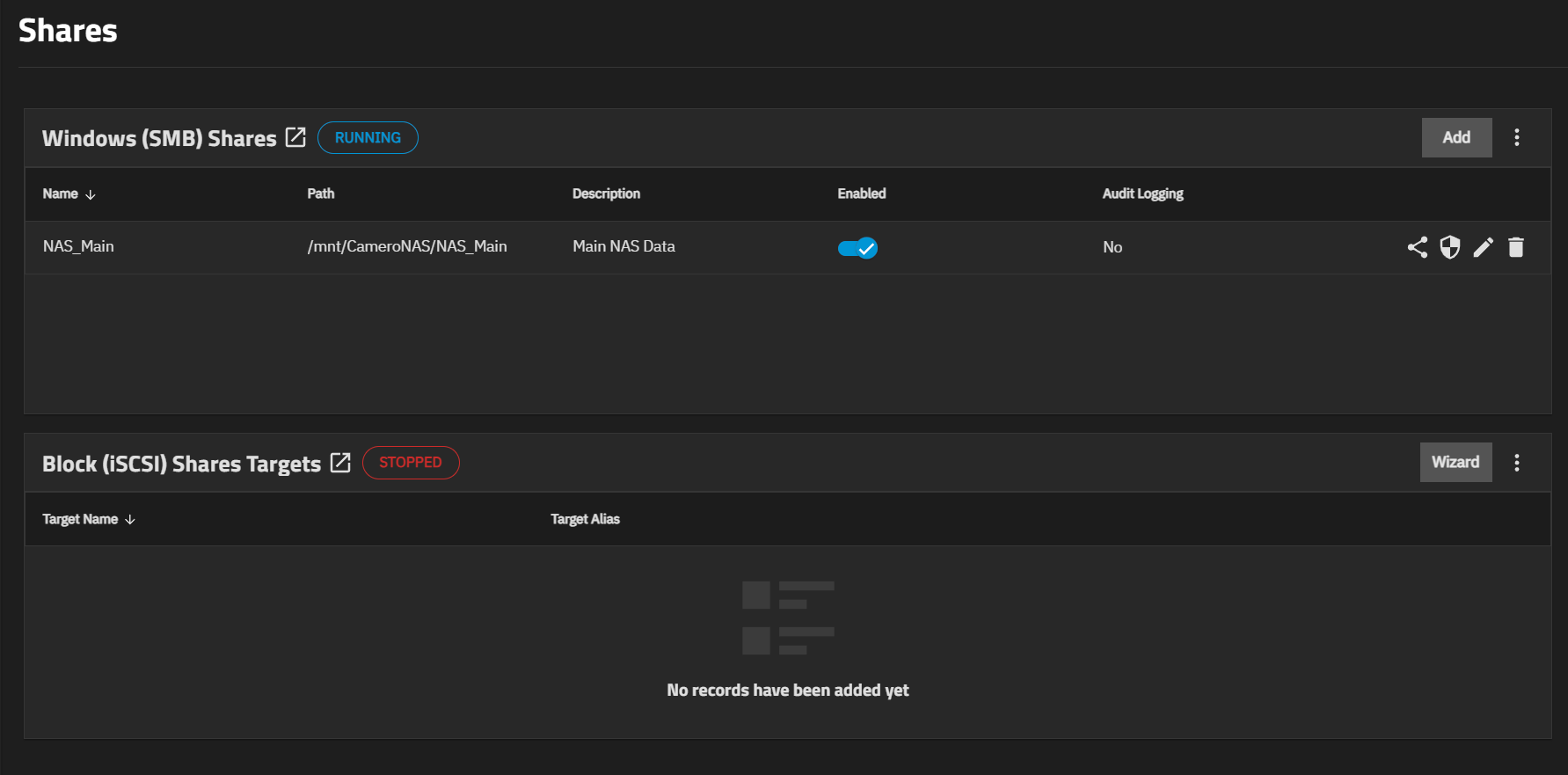
How do you have your SMB sharing set up. It looks like you are sharing the root dataset, NAS_Main. The SMB share should have been a child of the root dataset.
What does your Shares GUI window look like?
Do you have separate users set up for basement, slaptop, playroom and mainuser?
Windows file explorer can lie from time to time about the size . It struck me once (or mb twice). Not by TBs, though. IIRC, “reconnecting” the share fixed the issue for me.
Just in case, post the output of sudo zfs list -t snapshot CameroNAS/NAS_Main.
Yeah, you are right. I didn’t pay enough attention. OTOH, OP already has a major discrepancy – 4-wide 12TB RAIDZ1 is showing a usable capacity of 49TB. So who knows what else we could see?
Also, how did you setup your pool? From the smart output, I could suggest that initially it was 2 drives raidz1, and then you extended it with another two drives. Is that so?
Raidz extension is notorious for reporting the wrong space. However, afaik, it shows lower than actual, not higher than actual (your case).
@BraveSirRobin Can you post a detailed hardware listing, like in my Details under my post? Was this a complete new install or did you do upgrades from previous TrueNAS versions?
There is quite a bit of data (I assume videos) in here after 1 week.
How are you adding the video content? is there a machine with content that is writing the data? Can you describe the content source and the writing process?
When a system starts to get full, it will thrash a bit trying to find free space.
I am new to all of this stuff, so I hope that I am interpreting your question correctly. I was under the impression that the root of the dataset was ‘CameroNAS’, and the child “NAS_Main” is what is being shared.
There are 4 drives, all the same model. Two were in use in my workstation but I reformatted them prior to building my NAS. The other two were bought new days before I began assembly. But all four drives were present when I first installed TrueNAS.
What leaps out to me is 18T used by mainuser & 17T used by playroom. Those are two users that I’ve set up that should really have any media or large files within their folders. Any idea why so much space is used up by user directories?
The video content was written to the NAS from my workstation, and I have a few other users set up so other computers in the house can acces the stored media. All of the other systems were off when the NAS filled itself up to the brim though, it was the only computer on at the time.
Anything jump out at you that looks like it shouldn’t be there? I guess if you’re not at 100% full, and aren’t enjoying browsing via CLI, then you could give access to SMB & check out what is in there using windows file explorer.
FWIW, if there are nested datasets within a share, Windows explorer must not be used for determining used space. The SMB operations it uses are only for the currently mounted filesystem and it has no concept of child datasets. Even in Windows it doesn’t account for space used by filesystems mounted within the SMB share.
The important number here is the available space. When it hits zero, you’re in problem. The reason why you have no space is because one or more applications or clients have written until the pool was 100% full. You can use zfs userspace command to figure out which users have written the most to the datasets in the pool, or you can use du (as root) to figure this out.
Well, I wouldn’t have any reason why the space was used, not my system! But clearly it is, you need to investigate what files are stored there and who did it.
So I’m still unsure as to why this happened to begin with, but for now I am happy to just manually delete unwanted folders in the mainuser and playroom user folders using the sudo rm -rf /mnt/CameroNAS/NAS_Main/user/folder command. One quick question though, what is the best way to keep track of the progress of the command to see when it has completed to I can then begin deleting the next folder? Do I just keep an ear out for when I don’t hear disk activity anymore or is the a better way to keep track?
Also, just wanted to say thank you to everyone that has posted here. I really appreciate you guys, it has made what was initially a pretty stressful situation much more manageable, just knowing there’s people like you guy willing and able to help a green user like myself. Thank you!
Silly question adn sorry if already brought up… do you have snapshots set up? Or backups from your workstation to the NAS?
Early in my process… I did both! And the snap shot kept writing new ones… and that was taking space… and my back up program on my PC was writing new backups each time ( my error) so my NAS was filled up with backups!
Just a thought

 . It struck me once (or mb twice). Not by TBs, though. IIRC, “reconnecting” the share fixed the issue for me.