Just finished building my first nas a little while ago and finally got all my data on it and I wanted to set up tailscale to access my data when im at work/school ect, after setting it up be skipping around a video I realized I was in a new folder created by tailscale, so I set the type to host path instead and set it to my main dataset, gave myself permissions and realized I no longer can connect to the server. I pannicked and uninstalled tailscale hoping it would solve it but it did not and wont let me change permissions on my files as it says it needs permission from the main dataset which also wont let me change permissions. any help would be greatly appreciated
(I posted this on reddit 3 weeks ago and Ive gotten zero help and I need the data I have stored on this machine asap)
Solutions I’ve tried:
Uninstall Tailscale
Reinstalling Tailscale
Restarting Server
Error: path
Filesystem permissions on path /mnt/DataStore prevent access for user “Duckey” to the path /mnt/DataStore/share. This may be fixed by granting the aforementioned user execute permissions on the path: /mnt/DataStore.
Traceback (most recent call last):
File “/usr/lib/python3/dist-packages/middlewared/job.py”, line 515, in run
await self.future
File “/usr/lib/python3/dist-packages/middlewared/job.py”, line 562, in run_body
rv = await self.middleware.run_in_thread(self.method, *args)
^^^^^^^^^^^^^^^^^^^^^^^^^^^^^^^^^^^^^^^^^^^^^^^^^^^^^^^
File “/usr/lib/python3/dist-packages/middlewared/main.py”, line 627, in run_in_thread
return await self.run_in_executor(io_thread_pool_executor, method, *args, **kwargs)
^^^^^^^^^^^^^^^^^^^^^^^^^^^^^^^^^^^^^^^^^^^^^^^^^^^^^^^^^^^^^^^^^^^^^^^^^^^^
File “/usr/lib/python3/dist-packages/middlewared/main.py”, line 624, in run_in_executor
return await loop.run_in_executor(pool, functools.partial(method, *args, **kwargs))
^^^^^^^^^^^^^^^^^^^^^^^^^^^^^^^^^^^^^^^^^^^^^^^^^^^^^^^^^^^^^^^^^^^^^^^^^^^^
File “/usr/lib/python3.11/concurrent/futures/thread.py”, line 58, in run
result = self.fn(*self.args, **self.kwargs)
^^^^^^^^^^^^^^^^^^^^^^^^^^^^^^^^^^
File “/usr/lib/python3/dist-packages/middlewared/api/base/decorator.py”, line 101, in wrapped
result = func(*args)
^^^^^^^^^^^
File "/usr/lib/python3/dist-packages/middlewared/plugins/filesystem/acl.py", line 805, in setacl
self.setacl_posix1e(job, current_acl, data)
File "/usr/lib/python3/dist-packages/middlewared/plugins/filesystem/acl.py", line 610, in setacl_posix1e
verrors.check()
File “/usr/lib/python3/dist-packages/middlewared/service_exception.py”, line 72, in check
raise self
middlewared.service_exception.ValidationErrors: [EINVAL] filesystem_acl.path: Filesystem permissions on path /mnt/DataStore prevent access for user “Duckey” to the path /mnt/DataStore/share. This may be fixed by granting the aforementioned user execute permissions on the path: /mnt/DataStore.
Since writing this post I’ve tried to strip the ACL which did work, but wouldn’t allow me to make a new ACL. For some reason the second command you sent didn’t work
For posix ACL the commands are different (second command still shoudn’t have worked).
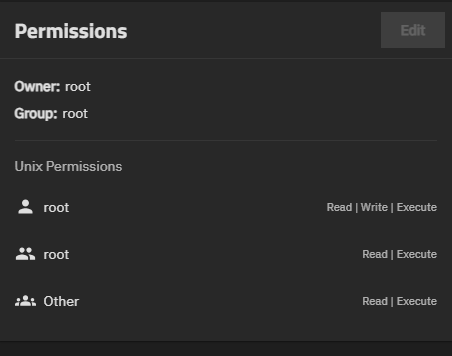
With Posix ACL the command is just sudo getfacl /mnt/DataStore. But you can also see the ACL in the dataset GUI. Look at the bottom right while the root dataset (DataStore) is selected:
When I enter the sudo command into the shell the shared folders are accessible. But if I have a power outage or I restart the NAS I have to enter the command into the shell again.
Is there a way that I can avoid having to enter the command after every start up?