
I was having the same problem myself too. I’ve created a bug report for it, hopefully it’ll help it get somewhat closer to a resolution:
I’m seeing the same issue but with non-duplicate short serials, reported as serial ‘none’ and conflicting when I try to add a new VDEV to any pool (not just the pool containing these drives). Both drives are SanDisk usb keys, attached of course via USB, and make up a mirrored boot pool.
Currently on 25.10.1. Happy to provide any additional information that would be helpful!
root@nas[~]# udevadm info --query=all --name=/dev/sd{l,m} | grep -i serial
E: ID_SERIAL=SanDisk__Cruzer_Fit_4C530000091002109050-0:0
E: ID_SERIAL_SHORT=4C530000091002109050
E: ID_USB_SERIAL=SanDisk__Cruzer_Fit_4C530000091002109050-0:0
E: ID_USB_SERIAL_SHORT=4C530000091002109050

E: ID_SERIAL=USB_SanDisk_3.2Gen1_010190fa7f1cb7e4dc6c3ff2bbe3e4872a1afd10dfef2ac0a429acd64f487496cbd700000000000000000000fa7fdc25009c0b008355810741b0d9da-0:0
E: ID_SERIAL_SHORT=010190fa7f1cb7e4dc6c3ff2bbe3e4872a1afd10dfef2ac0a429acd64f487496cbd700000000000000000000fa7fdc25009c0b008355810741b0d9da
E: ID_USB_SERIAL=USB_SanDisk_3.2Gen1_010190fa7f1cb7e4dc6c3ff2bbe3e4872a1afd10dfef2ac0a429acd64f487496cbd700000000000000000000fa7fdc25009c0b008355810741b0d9da-0:0
E: ID_USB_SERIAL_SHORT=010190fa7f1cb7e4dc6c3ff2bbe3e4872a1afd10dfef2ac0a429acd64f487496cbd700000000000000000000fa7fdc25009c0b008355810741b0d9da
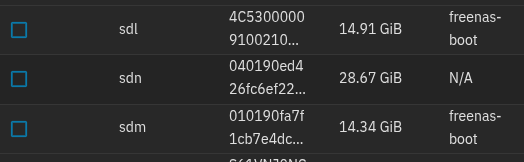
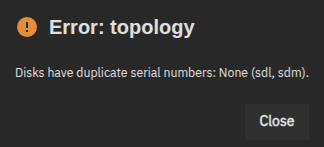
I’m running in to the same problem here.
I have a few 1 TB drives connected via usb that were in a pool under Fangtooth (latest version) working fine, today after updating to Goldeye I Exported/Disconnected that pool to make a new encrypted pool with the same drives and was running in to the same serial number error.
I imported the same drives as the old pool again, and it is working fine.
Seams to be a Goldeye bug?!.
@bayindirh Did you create a Jira bug ticket for this? If so, could you link it in this thread? This ticket got closed but your was a bit different. Topology: Disks have duplicate serial numbers: None (sdb, sdc) - #21 by purplefox
I tried searching Jira and it looks like all the tickets are currently closed for issues like this.
Sorry, life happened and I didn’t manage the complete the process, yet.
I want to lift the function from the codebase and wrap it as a small utility to test some scenarios, and write a report with possible remedies as the bug report. I’ll copy the tech report, the code and link here. I’m planning to do it ASAP (this weekend if I can manage to do it).
Since it’s pretty low-level, I don’t want to give it half an effort and let it go waste. I want to provide a feasible solution, as well.
2 Likes
I am seeing the same issue with 2 Sabrent USB enclosures. I can verify that the disks have different data in this output…
sudo udevadm info --query=all --name=/dev/sd{j,w} | grep -i serial
E: ID_SERIAL=WDC_WDS100T2B0C-00PXH0_194688900123
E: ID_SERIAL_SHORT=194688900123
E: ID_USB_SERIAL=Sabrent_SSD_830720240913000A-0:0
E: ID_USB_SERIAL_SHORT=830720240913000A
E: ID_SERIAL=WDC_WDS100T2B0C-00PXH0_194688900303
E: ID_SERIAL_SHORT=194688900303
E: ID_USB_SERIAL=Sabrent_Sabrent_123400000012-0:0
E: ID_USB_SERIAL_SHORT=123400000012
The error when trying to create the pool:
Error: topology
Disks have duplicate serial numbers: ‘0000000000000000’ (sdj, sdw).
USB enclosures are ‘not supported’
AVOID USB
2 Likes
Just to keep you and everyone updated: I have started working on the tool I’m talking about. It can be reached from here.
Currently it mirrors exactly how TrueNAS is getting disk serial numbers. Next step is to improve the process, and write the bug report.
The code is easy to run, is currently very simple. I’ll update the README.md tomorrow about how to run it and what to expect.
I can spend ~30 minutes/day on this, but I’m committed to finish what I promised.
Again, I’m not trying to change the sentiment that USB is dangerous, but I only want TrueNAS to behave consistently. i.e.: If I can see the disk serial numbers in the UI, it should be available to every function, everywhere, so the UI can behave consistently.
3 Likes