Topology: Disks have duplicate serial numbers: None (sdb, sdc)

Hello all,

I’m experiencing a familiar problem while creating a pool from USB enclosure. However, my situation is a bit different than others. Namely:

  • TrueNAS is not warning me about these disks having non-unique serial numbers.
    • During pool creation and disk selection, disk serial numbers are present and unique.
  • Moreover, the pool creation screen and disk edit screen (power saving, spindown and description area) shows the same, per disk, unique serial numbers.
  • smartctlshows the disks are directly accessible as-is. No data mangling or drive masking is done by the enclosure. Also, smartctl reports the same serial numbers seen by the UI.

Yet, TrueNAS still reports that disks have a serial number of None. Did anyone happened to solve this?

In short, disks serial numbers are present, can be read by TrueNAS, yet it doesn’t allow me to create a pool out of them.

Any help is greatly appreciated. Pool is intended to sleep most of the time to store cold data and backups mostly.

2 Likes

This won’t be a helpful response - just the standard “USB enclosures are not recommended/supported”. I’m sorry man, there is a reason for it :frowning:

Since this is a cold storage backup, any chance that you can connect the drives one at a time & copy data instead of making a pool? It honestly might be a better option if that works at all as you’d not need all (minus redundancy) drives present if you ever need to import that data.

USB enclosures are generally discouraged - can you post the make, model, and lsblk -o NAME,SERIAL as well as the version of TrueNAS you’re using?

Sight unseen, if it’s a multi-bay enclosure and some bays are empty, it might be returning 0000000000000000 instead of a null character.

Hey, no worries about the answer. I understand the reasons and risks involved with USB enclosures. There are a couple of reasons for the path I have taken. First one is space, power and noise constraints. I’m trying to setup the most compact system I can. My TrueNAS is running on a GMKTec G9 NUC, and the primary pool is an all SSD ZRAID1 array. The second and main reason to have the external (USB) pool was to backup my whole digital presence on it (e-mails, cloud storage, whatnot) in an automated manner.

For that matter, considering that many machines will be backing up to it occasionally but automatically, and the TrueNAS system is not at my home, I can’t tend to it 24/7 and connect disks, take backups and remove the disks.

I have opened the topic mainly because it looked like a bona-fide bug. If this problem doesn’t get fixed or work at the end of the day, it’s not end of the world for me. I can find another solution, I assume.

1 Like

Thanks for the answer. I’ll be able to access to the system on Saturday, and will give a detailed rundown about the specs then. The system is remote to me, and I turned the enclosure off the prevent disks from spinning unnecessarily (I set their power saving features, but didn’t have time to test them whether it really worked).

Another probability is the disks I have installed are probably from the “remanufactured/non-genuine” batch flooded the market during 2024/2025, and they might be causing problems, too.

In either case, I’ll do my tests and give you a detailed report during weekend.

As I said above, I reported this mainly because it looked like a bug to me. If it’s not and it won’t be fixed at the end of the day, there’ll be no hard feelings about it.

Cheers,

H.

I have seen actual duplicate SNs from counterfeit drives during this period, but you mentioned yours are showing unique ones, so I’m hoping that isn’t the case.

There’s an additional command IIRC that should show more of the SCSI page information that we use to call out uniqueness, I’ll try to get that for you.

1 Like

I am having the same issue as the OP with a QNAP TR-004. I am brand new to TrueNAS and NAS/DAS in general. I know DAS isn’t recommended for use with TrueNAS but it’s what I can afford at the moment.

When I set up my storage pool and try to attach my 4 drives to it, I get the Duplicate Serial Numbers: NONE error. I checked all my disks under the storage tab and they are all showing as different SNs in the GUI. I have all the drives currently setup to be seen individually, no RAID because I wanted all 16TBs of storage utilized. I think TrueNAS lets me setup a storage pool if I have RAID setup since it only shows one 7.6TB drive when im setting up a storage pool and I don’t get the error again

so I’m hoping that isn’t the case.

No it’s not. I checked them thrice, but will include it in the details when I write the report.

There’s an additional command IIRC that should show more of the SCSI page information that we use to call out uniqueness, I’ll try to get that for you.

Thanks! I’d be grateful.

Hello Again,

The Saturday is here, and so my promised report. With my sysadmin hat on, this is what I see on my TrueNAS Community 25.10.1 - Goldeye:

First the USB bridge we’re dealing with via lsusb:

Bus 002 Device 008: ID 174c:55aa ASMedia Technology Inc. ASM1051E SATA 6Gb/s bridge, ASM1053E SATA 6Gb/s bridge, ASM1153 SATA 3Gb/s bridge, ASM1153E SATA 6Gb/s bridge

This is in fact an Orico M435 Mini Tower which provides two SATA ports for disks and one NVMe/SATA port for an M2/NGFF drive. I run the box with 2x (Allegedly) IronWolf Pro 16TB drives and a cheap 512GB NVMe for cache.

This brings us to the primary question, serial numbers. So what we have is rather interesting via lsblk -o NAME,SERIAL:

NAME         SERIAL
sda          QBF186W017291P110W # SSD on the enclosure.
sdb          ZL2PR3AS           # First Ironwolf Pro drive.
sdc          ZL2PR3B1           # Second Ironwolf Pro drive.
mmc blk0      0x4610b605
├─mmcblk0p1  
├─mmcblk0p2  
└─mmcblk0p3  
nvme1n1      25111N800414
└─nvme1n1p1  
nvme0n1      234170403124
└─nvme0n1p1  
nvme3n1      25111N800013
└─nvme3n1p1  
nvme2n1      234170402234
└─nvme2n1p1  
mmcblk0boot0 
mmcblk0boot1 

So, drives show different serial numbers. How about S.M.A.R.T. data? Let’s see smartctl -a /dev/sd{b,c} (will only post relevant data for brevity):

=== START OF INFORMATION SECTION (sdb) ===
Model Family:     Seagate IronWolf Pro
Device Model:     ST16000NE000-2RW103
Serial Number:    ZL2PR3AS
LU WWN Device Id: 5 000c50 0cb156024
Firmware Version: SN03
User Capacity:    16,000,900,661,248 bytes [16.0 TB]
Sector Sizes:     512 bytes logical, 4096 bytes physical
Rotation Rate:    7200 rpm
Form Factor:      3.5 inches
Device is:        In smartctl database 7.3/5528
ATA Version is:   ACS-4 (minor revision not indicated)
SATA Version is:  SATA 3.3, 6.0 Gb/s (current: 6.0 Gb/s)
Local Time is:    Sat Jan 10 12:28:35 2026 +03
SMART support is: Available - device has SMART capability.
SMART support is: Enabled

---

=== START OF INFORMATION SECTION (sdc) ===
Model Family:     Seagate IronWolf Pro
Device Model:     ST16000NE000-2RW103
Serial Number:    ZL2PR3B1
LU WWN Device Id: 5 000c50 0cbcdf35c
Firmware Version: SN03
User Capacity:    16,000,900,661,248 bytes [16.0 TB]
Sector Sizes:     512 bytes logical, 4096 bytes physical
Rotation Rate:    7200 rpm
Form Factor:      3.5 inches
Device is:        In smartctl database 7.3/5528
ATA Version is:   ACS-4 (minor revision not indicated)
SATA Version is:  SATA 3.3, 6.0 Gb/s (current: 6.0 Gb/s)
Local Time is:    Sat Jan 10 12:29:35 2026 +03
SMART support is: Available - device has SMART capability.
SMART support is: Enabled

Serial numbers and WWN are different, again. No problems here either.

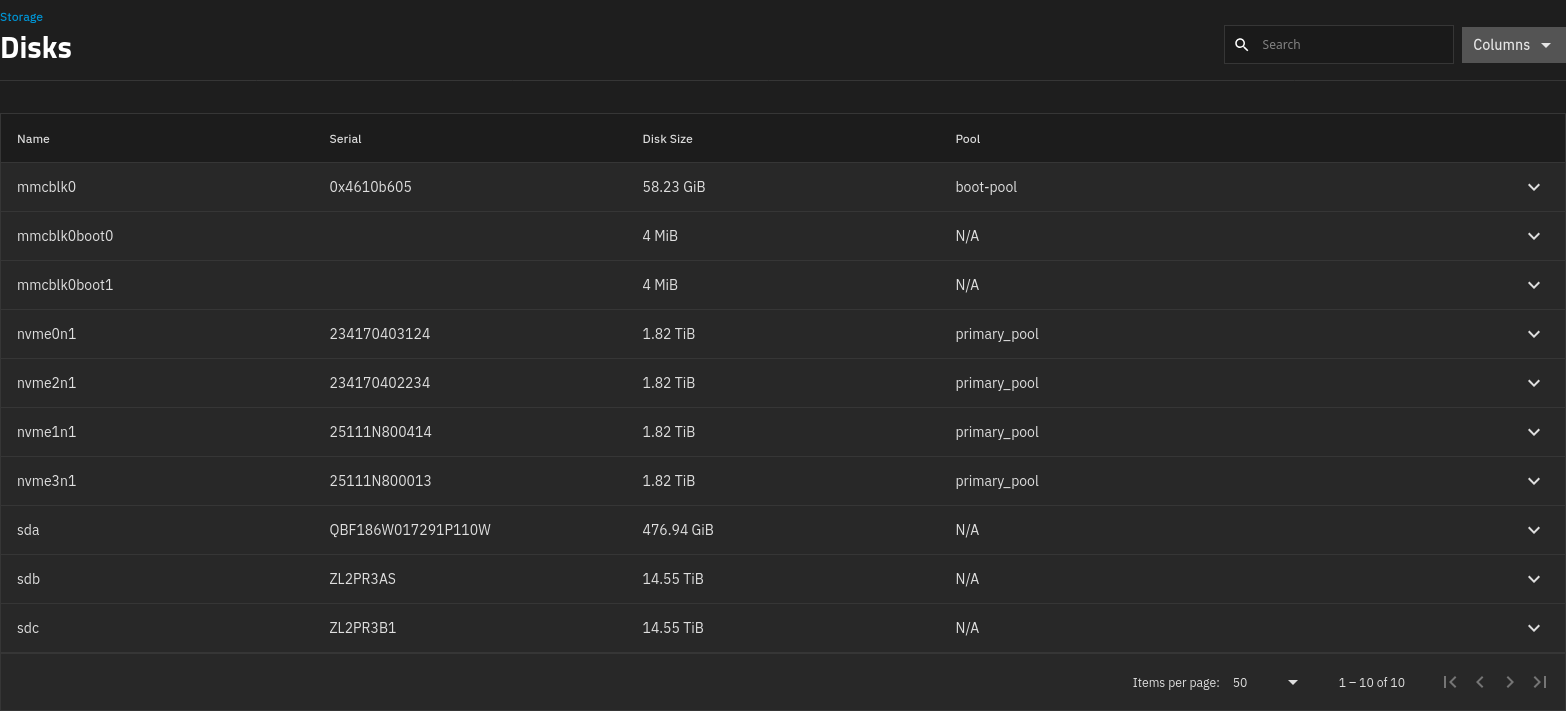
How it looks in UI, then? Perfectly fine. See last three drives sda, sdb and sdc:

It’s possible to wipe the disks from this screen. I have wiped the SSD and new HDDs. Works fine.

Lastly, what does disk selection screen says? Let’s take a look:

Three disks, different serial numbers, all properties detected as they should be.

Yet, when I try to create a mirror (with or without an SSD cache), the review screen look like this:

Yet, when I click Create Pool and confirm:

Hope this helps. Do you need anything else?

One more thing:

After pool creation failure, /var/log/netdata/error.log shows that system tries to get partition information for I/O monitoring but fails repeatedly, every second. This grows the log file fast, and creates unnecessary load on the system. I can file an independent ticket for that, if you want.

File a bug report.

174c:55aa

Googling the device id led me to this older thread. Apparantly it was possible to create the pool via cli, but it is not properly shown in the ui.

Just vor testing, maybe put just one hdd into the enclosure and see if it is possible to create a pool via gui.

what serials / IDs show up, when you query your drives with:

udevadm info --query=all --name=/dev/sdb | grep -i serial

EDIT:
I also came across this thread:

If I understand it correctly, the user found that the udev output showed unique serial numbers, but other values were identical, which apparently caused problems for TrueNAS.

In the end, the user seems to have found an enclosure that worked for him.

Hi,

Thanks for your answer, for the output of udevadm info --query=all --name=/dev/sd{b,c} | grep -i serial, I see the following:

For sdb:

E: ID_SERIAL=ST16000NE000-2RW103_ZL2PR3AS
E: ID_SERIAL_SHORT=ZL2PR3AS
E: ID_USB_SERIAL=ASMT_ASM1352R-PM_AAAABBBB0003-0:0
E: ID_USB_SERIAL_SHORT=AAAABBBB0003

For sdc:

E: ID_SERIAL=ST16000NE000-2RW103_ZL2PR3B1
E: ID_SERIAL_SHORT=ZL2PR3B1
E: ID_USB_SERIAL=ASMT_ASM1352R-PM_AAAABBBB0003-0:1
E: ID_USB_SERIAL_SHORT=AAAABBBB0003

The only conflict is ID_USB_SERIAL_SHORT. Also, when I look to the other values, esp disk-* ones, they are all enumerated correctly. So the devices are enumerated and created correctly by the kernel.

With my programmer hat on, I’d argue that, if the device has ID_USB strings, it can be used to understand that the disks are coming from an external enclosure, and if the long serial numbers address the devices sufficiently, short can be ignored or used for another reasons.

Also, having an ID_USB* string can be used to warn user about the dangerous thing they are going to do.

At the end of the day, I’m digging this, with the help of the experts here, to arrive to the correct & desirable behavior, even if it’s TrueNAS saying “This is dangerous, and I’m not doing this”, instead of giving weird errors and triggering runaway logging in some logs.

Thanks again!

2 Likes

This might also be a contributing factor, I’ve seen people reporting that these multiple mmcblk0boot devices with null S/N’s can throw up this warning.

TrueNAS is already giving me warning about these disks having no serial number, and disables them during pool creation. Under the warning it asks whether I want to allow these disks to be selected and I choose “Don’t allow” all the time.

Moreover, primary_pool is created on this TrueNAS installation while these mmcblkboot{0,1} devices present in the system already. In other words, I installed TrueNAS on this server first, then created the primary_pool when these mmcblkboot{0,1} devices were already present. So, I believe TrueNAS is handling these disks correctly.

I plan to dig into middleware source code to see whether I can find the relevant section handling these uniqueness checks and look whether there’s something I’m missing or is there anything which can be improved.

If you have any other suggestions, I’d be more than happy to try and report the results.

Cheers,
H.

I dug the middlewared source code a bit. I found what I was looking for in src/middlewared/utils/disk_/disk_class.py. There’s a function called serial (which is on Github):

 def serial(self) -> str | None:
        """The disk's serial number as reported by sysfs"""
        # nvme devices
        serial = self.__opener(relative_path="device/serial")
        if not serial:
            # virtio-blk devices (vd)
            serial = self.__opener(relative_path="serial")

        if not serial:
            if raw := self.__opener(relative_path="device/vpd_pg80", mode="rb"):
                # VPD page 0x80 (Unit Serial Number) structure:
                #   Byte 0: Peripheral qualifier & device type
                #   Byte 1: Page code (0x80)
                #   Bytes 2-3: Page length (16-bit big-endian)
                #   Bytes 4+: ASCII serial-number data
                #
                # Reference: SCSI Primary Commands (SPC-7 rev 1) — Unit Serial Number VPD page 0x80, Table 599
                if len(raw) >= 4:
                    # unit serial page (vpd_pg80) command can never be > 255 characters
                    # So we will grab page length from 3
                    # Guard against devices that report a length larger than the buffer
                    page_len = min(raw[3], len(raw) - 4)

                    # Extract only the serial number data, skipping the 4-byte header
                    serial_txt = raw[4:4 + page_len].decode('ascii', errors='ignore')
                    serial = serial_txt.rstrip('\x00').strip()
                else:
                    serial = ""

        if not serial:
            # pmem devices have a uuid attribute that we use as serial
            serial = self.__opener(relative_path="uuid")

        # strip is required because we see these cases otherwise
        # >>> d.serial reported as '        3FJ1U1HT'
        return serial.strip() if serial else None

This is its entirety, and pretty neat and well-written. Let’s trace it. Our example is nvme0n1, which is my first NVMe drive for this installation.

  1. Let’s go to /sys/block/nvme0n1/device and look for file named serial. Here it’s. Let’s cat it. It returns 234170402234, which checks out.

This works. So, let’s look at something different, maybe sda on a different Debian system (the enclosure is turned off to prevent spinning and log spamming). For sda.

  1. /sys/block/sda/device/serial file doesn’t exist.
  2. /sys/block/sda/serial file doesn’t exist, either.
  3. So, let’s check what sys/block/sda/device/vpd_pg80, which is present. Looking it with an hex editor gives M2NGFF..., which is the serial number of my TwinMOS NGFF SATA drive on this system, so the code effectively works.
  4. If this didn’t work, then we’d have looked at the uuid file, which again is not present for SATA disks.
  5. Then, if all fails, we return the magic thing we see in our error message: None.

So, what happens is, when there’s an enclosure, I believe all the checks fail, and function returns None. In this case, we have another way to look at a unique identifier for the device, which is wwid file, which contains the serial number as the third field.

So, we have a bona-fide bug in the low-level code of middlewared. I can write a proper bug report to this if you want, @HoneyBadger.

Edit: As a last, step, I’ll turn on the enclosure ASAP, and report what I see under its sysfs entries.

5 Likes

Absolutely! Feel free to log this one directly into our Jira instance via the “Report a Bug” link at the very top bar of the forums (or that link there)

Thanks! Consider it done. I’ll collect more evidence from the enclosure, and write a proper one.

Cheers,

H.

1 Like

If it’s helpful, I’m having the same issue. Thanks for the thread - this was extremely helpful in figuring out what was going on!

1 Like

Full details on your system would help to see if it was the same. Hardware details, OS version, pool setup. Other recent post had mirrored boot drives with similar issue. Report a Bug may be a good idea either through the TrueNAS GUI or at the top of the forum. Please link created ticket in forum, if so