I have been here before! After upgrading from 25.04.2.6 to 25.10.2.1 I worked through the resolution of deleting 25.10.2.1 boot environment, re-applying the upgrade and I thought that worked. However when I decided to upgrade to 25.10.2.1-1 I found that I was back on 25.04.2.6. Evidently I had not not set the active boot pool (environment?) correctly and had rebooted back to 25.04. Just to be safe, I removed 25.10.2, re-applied the 25.10.2 update, rebooted OK, made sure the active boot pool was 25.10.2.
I then applied the 25.10.2.1 and that failed with the error
Begin: Importing ZFS root pool ‘boot-pool’ … Begin: importing pool ‘boot-pool’ using defaults Failure:1”
Command: /sbin/zpool import -N -f ‘boot-pool’
Message: cannot import ‘boot-pool’: no such pool available Error: 1
Failed to import pool ‘boot-pool’|
Manually import the pool and exit.
Now I am unable to boot to 25.10.2 (no boot-pool found) and am back to 25.04.
In trying to go through the documentation, none of the commands I am reading of are working for me.
From the CLI doing a sudo zpool import I get ‘no pools available to import’ once I rebooted back to 25.04.2.6.
From the dashboard when I got o Storage → Import Pool → nothing is listed in the drop-down
I deleted all my backup boot environment (20), just keeping 25.10.2.1 and 25.04.2.6; performed a scrub on the boot pool. Still unable to boot to 25.10.2.1 from 25.04.2.6
Boot Pool Condition: Online
Size 220 GiB
Used 6.1 GiB
Boot Pool Status:
Boot-pool nvme0n1p3 no errors
I am obviously missing something. When I use the boot cli how do I refer to the boot-pool to select it for a manual update? Is it the boot environment name?
Of course, thanks in advance! And I appreciate your patience. I am actually usually pretty good about figuring this stuff out. Just tired of going in circles ;-).
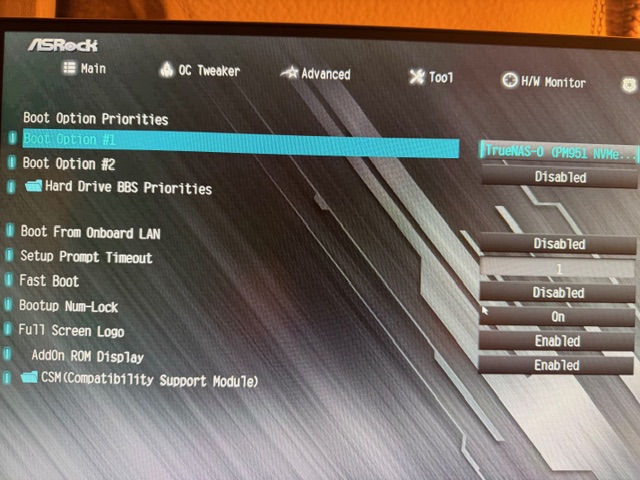
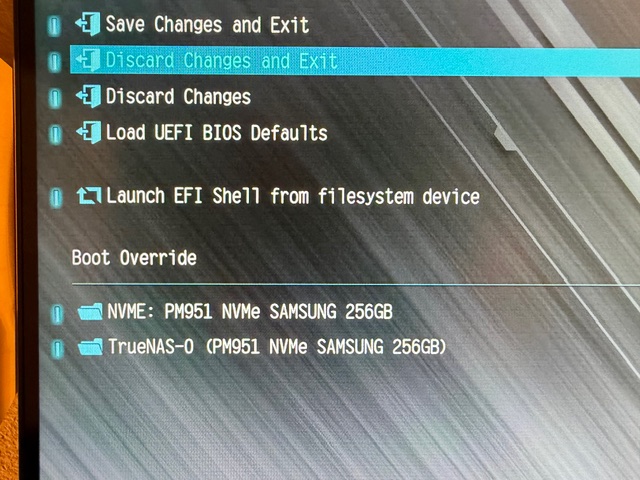
Thanks @SmallBarky . It’s been years since I had to mess around in the bios. I only see 1 entry, and that is for the boot drive; unless I am missing something. Looks clean to me.
Hi @Arwen . Regardless of whether the error was ‘stupid’, fortunately I have been able to roll back to 25.04.2.6. Sooner or later I would like to upgrade to the current Truenas version. I was certainly confused when the upgrade instructed me to manually import the pool and exit and what I found searching seemed to lead me down a rabbit hole. It’s a pretty clean install.
Sorry, that is so bizarre that I don’t have an idea why.
The only thing I can suggest, is:
Get a USB flash drive, (for testing only)
Backup your configuration
Install the newer version to that USB flash drive
Boot to the USB flash drive, (probably using the BIOS to select boot device)
If it boots cleanly, then restore the backed up configuration. This will probably require a reboot, so be prepared to again use BIOS to select this USB flash drive
If everything is good, I guess you could Mirror your USB flash drive to the existing boot-pool. Then remove the USB flash drive from the Mirror. But, that would of course over-write the existing boot environments.
Or you could use a better quality new boot device, leaving your existing boot pool alone.