The TrueNAS team is pleased to release TrueNAS 25.10.4!
This release updates the Linux kernel and Samba to address multiple security vulnerabilities and includes data integrity, NFS, iSCSI, networking, and Active Directory fixes.
Notable changes:
Updates the Linux kernel to the latest 6.12 LTS release (v6.12.91). This update mitigates several kernel vulnerabilities, including the Dirty-Frag local privilege escalation (CVE-2026-43284 and CVE-2026-43500), the CIFSwitch local privilege escalation in the CIFS client (CVE-2026-46243), a ptrace privilege issue (CVE-2026-46333), and the related Fragnesia privilege escalation in the ESP-in-TCP path (CVE-2026-46300). It also enables additional CPU side-channel mitigations.
Updates Samba to version 4.22.10 to address multiple security vulnerabilities.
This Samba maintenance release resolves several CVEs, including a missing access check that let read-only users set or delete reparse point attributes (CVE-2026-1933) and a flaw in the WORM (Write Once, Read Many) module that allowed protected files to be overwritten by renaming a new file over them (CVE-2026-2340). See the Samba 2026 security release impact statement for the TrueNAS-specific impact assessment, or the Samba 4.22.10 release notes for the complete upstream list.
Fixes a potential double free when freeing blocks cloned after deduplication table pruning.
Blocks created through block cloning could be freed more than once if their deduplication table (DDT) entries had already been pruned, because the free path did not check the block reference table (BRT) first.
Fixes virtual machines stored on NFSv4.1 datasets failing to power on.
A change introduced in 25.10.2.1 could cause the NFSv4 change cookie to move backward after a file left the cache due to memory pressure, a remount, or a reboot. NFSv4.1 clients that depend on a monotonic change cookie, notably VMware ESXi, rejected the affected files. A virtual machine stored on an NFSv4.1-exported ZFS dataset then failed to power on with the error “The file specified is not a virtual disk.” This release reverts that change while a complete fix is finalized upstream.
Fixes a kernel crash in the iSCSI target layer during SCSI bus or LUN resets.
A use-after-free in the clustered locking path of the iSCSI target could crash the system during a SCSI reset, most often on Enterprise High Availability (HA) systems while a peer controller was leaving the cluster. The target layer now waits for lock teardown to complete before releasing the associated memory.
Improves iSCSI LUN replacement during High Availability failover.
On Enterprise HA systems, cleanup of a replaced LUN could stall during failover while a peer controller was being evicted from the cluster, which blocked later LUN replacements. Cleanup is now held until the cluster coordination it depends on has finished.
Fixes a validation error that blocked static network configuration on some High Availability systems.
On HA-capable systems, saving a static network configuration could incorrectly fail with “Enabling DHCPv4/v6 on HA systems is unsupported” even when DHCP was not being enabled. This affected fresh installs before any interface had a saved configuration. The check now triggers only when DHCP or IPv6 autoconfiguration is explicitly enabled.
Improves Active Directory rejoin, reset, and recovery handling.
This release hardens the Active Directory rejoin and directory services reset operations, improves domain controller selection on systems with more than one available controller, and produces clearer diagnostics when a join or authentication problem occurs.
Fixes ZFS automatic snapshots not being created after a Time Machine backup until the Mac reconnects.
When a Time Machine SMB share has automatic snapshots enabled, recent macOS versions (Tahoe and later) sometimes keep the SMB session open after a backup completes instead of disconnecting, which prevented the post-backup ZFS snapshot from being taken until the client reconnected or restarted. The snapshot logic is updated to handle these persistent Time Machine sessions.
Reduces excessive winbind log messages for failed user and group lookups.
When Active Directory is enabled, looking up a user or group that does not exist (for example through getpwnam or getgrnam) generated a warning for every failed lookup, which could rapidly fill the winbind log. These messages are now logged at informational level instead of as warnings.
Alright FINE - I finally updated. SMART tests did move over as crons; I appreciated that. VMs & Apps still seem to be functional; nice.
I still have to run a post-init script due to my stupid NIC otherwise I can’t connect to LAN; this was a problem before the update, I don’t blame TrueNAS for this, & I have a workaround in place.
The storage widgets on the landing Dashboard were broken, clearing cache did not resolve. Had to delete them & re-add them to fix.
Transcoding & GPU passthrough all work without issues on relevant apps.
Shares are all working fine.
Looks like I have to update my signature as I’m sad to say that the new version looks good. I don’t like the network tab moving to settings, but I’ll get used to it in 15 minutes & will just grumble until then.
Edit: Updated directly from 24.10.2.2 in case it is relevant to anyone.
TrueNAS is a full appliance OS.. includes kernel + many additional modules, + ZFS + drivers + protocols + middleware. They all have to be tested together on a very diverse set of hardware before there is any confidence that all changes will play nicely with each other. Quality is critical.
Sometimes, we can release a hot patch with only 1 or 2 very constrained fixes. This requires less test time.
We’re also mindful that users would prefer fewer updates and less update risk and complexity. Particularly, once a version is General and/or Mission critical, there is a desire for fewer updates, less admin effort, and more uptime. TrueNAS is built for Enterprise deployment.
I think it’s fair to say users would prefer, when possible, updates that don’t require system downtime. There was talk of this way back when 9.3 released–since the boot device was moving to a live ZFS pool, you’d be able to update packages and services on-the-fly, requiring a reboot only for a new kernel (as is present in this update). It’d be nice to see this idea get some traction.
.04 had something or other that I wanted to avoid, so decided to take a leap due to the security updates. Otherwise I was plenty happy on 24.
Was thinking of doing a clean install, frankly, to see if maybe this version does actually fix my NIC or not. Sometimes had driver issues resolved that way.
A “clean install” will not fix issues like that…this is not windows!
But it’s the same with those people that say “sometimes”, as they either lack the observation and logic capabilities, or lack true technical understanding of the subject.
Computers never do “sometimes”. They are 100% deterministic!
Fair criticism; I’ve had it work before when experiencing some nvidia driver faults several versions back.
I’m not going to claim I have the observation and logic capability to give a detailed explination on why it had previously worked or why I’d hope it could work again.
Deterministically, I can guess that I skipped over versions & a clean install & config import fixed it in the past & it could be a similar situation. But my technical understanding of the subject may be lacking as you say.
Agreed.. one of the reasons is that TrueNAS may add code to help a specific migration issue.
Testing all potential combinations is also challenging. Please do it the safe way.
Going from 25.04.x to 25.10.4 is fine. If you want to be very conservative then yes, you start from the latest 25.04, here 25.04.2.6.
If things go sideways, there is always the option to roll back the boot.
In future that’ll mean 25.10 → 26 → 27 → 28, not 25.10 → 28.
TrueNAS doesn’t enforce upgrades “one major release at a time”, but it’s the only supported path and so the only tested path.
Side note that probably fits here: On a past TTT, it was mentioned that a CE major release stops getting attention and updates when the next major release reaches General, broadly speaking. Enterprise is a different beast entirely, but for CE, assume that 25.04 will not receive bug fixes and security fixes, those go into 25.10. And then 25.10 will stop receiving fixes when 26 goes General.
Make sure you have a download copy of your System Configuration with secret seeds, if necessary.
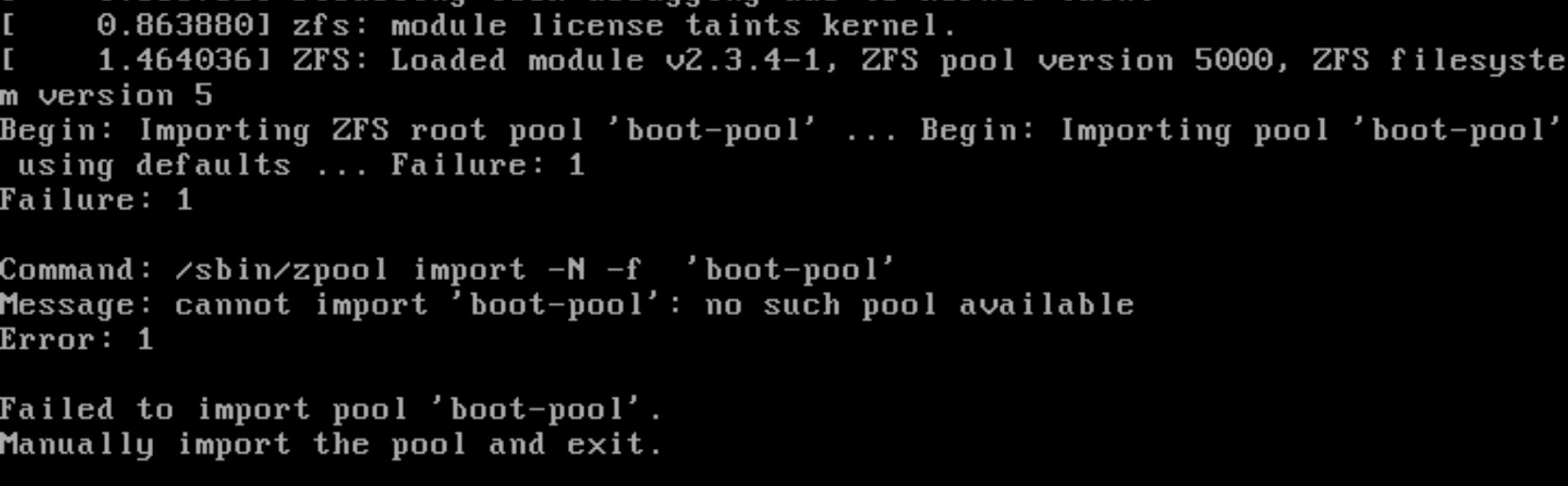
You can try deleting the 25.10.4 boot environment and trying to update again. Another option may be do a fresh install of 25.10.4 over the boot-pool and upload your saved system configuration.
I had the same problem. Apparently, it was no longer recognizing the PCIe device that had been passed through.
(In my case, it’s a “Serial Attached SCSI controller: Broadcom / LSI Fusion-MPT 12GSAS/PCIe Secure SAS38xx”)
It worked (again) for me when I set vIOMMU to “Intel (AMD Compatible)” under “Machine → Advanced.” It had been set to VirtIO before, and that had always worked for me up until then. (Machine is set to q35.)