TrueNAS 25.04.2.4 Community
CPU: AMD Ryzen 9 7900X 12-cord
Motherboard: Gigabyte Aorus B650 Elite AX
HBA: LSI 9300-16i
Pool 1: 5x14TB RAIDZ1
Pool 2: 5x8TB RAIDZ1
I’m completely baffled. I acquired 2x 14TB SATA hard drives and attempted to add them to my TrueNAS server. I first tried hot-plugging them but TrueNAS didn’t recognize the new drives. Then I tried inserting them into different bays/connectors, still nothing. I tried shutting down the server and starting it back up. Nothing.
I tried hot-plugging an older 4TB drive, and TrueNAS recognized it right away. I repeated this in all the bays I tried the new hard drives in and TrueNAS recognized the hard drive every time. So at this point I suspected the issue was with the hard drive.
I plugged the new hard drives into a SATA to USB dock on a Win11 PC, and Windows recognized the drives and asked me to initalize them, which I did with GPT partition table. I thought maybe the drives just needed to be initialized to work, so I plugged them back into my TrueNAS server and it’s still not recognizing them.
So I know the hard drives are fine, I know the bays/connectors are fine (work with the older hard drive) – so why won’t TrueNAS recognize the new hard drives? The only thing different I can think of at this point is the difference in capacity (4TB vs 14TB) – does TrueNAS have a harder time recognizing larger capacity drives?
Any thoughts on what I might try to troubleshoot/fix this issue? I’m out of ideas!
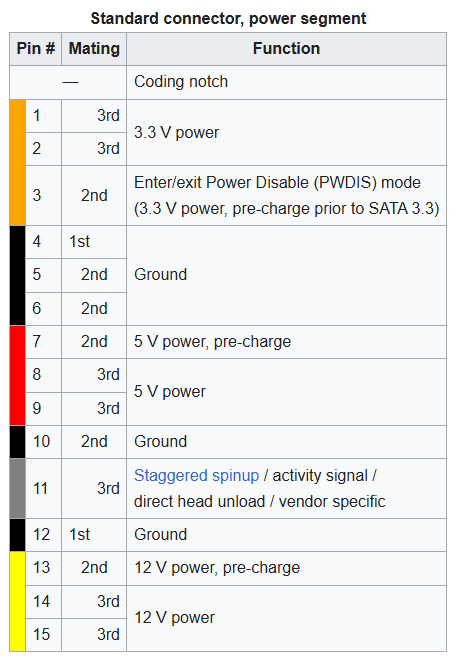
Ah! This explains why “older” hard drives work fine and newer drive (with PWDIS) don’t.
So, I’m guessing the easiest way to address this would be to use some kapton tape on Pin 3 to prevent the voltage/connection? Or is there a better solution (short of replacing the backplane)?
Check your drives if you do this. Nearly all drives use 5V and 12V only, but some (rare) ones, usually tiny SSDs, have demanded 3.3v power - but it’s probably been a decade since I’ve seen one, and IIRC it was a 1.8" “micro-SATA” drive which wouldn’t have fit.
And to think, if they’d found a way to make the spec “PWDIS on 3.3V LOW” this problem wouldn’t exist …
I applied some tape and it worked perfectly! Both new hard drives are now working properly. Huge thanks for everyone’s help!
So I extended an existing vdev via the UI and it immediately started the expansion job and won’t let me attach the second drive until that finishes? It’s going to take ~32 hours for the first rebalance to finish, then when I expand the vdev again with the second drive it’s going to have to do that all over again? Yuck.
A while ago, I bought some larger capacity eSATA drives (14TB, IIRC). I plugged them into my 2009 MacPro and nothing. But plug them into the SATA cradle, and Disk Utility could see them and initialize them. But plugging them into the backplane of the MacPro, nothing. I thought perhaps it was because the drives were eSATA 3.2 and I could only plug in older drives. 8TB WD seems to be the largest.
This entire discussion tells me that perhaps PIN 3 was the problem in the MacPro but not in the eSATA cradle.