Hi all,
I recently had some interesting activity happen on my TrueNAS SCALE (24.04.2) system regarding snapshots, and I was hoping to get an answer as to what is going on and why. There is no issue (that I can see) with data loss or anything, but I would like to put an end to my wondering.
Timeline of events:
Day 1: I decide to change my TrueNAS system from CORE to SCALE . I download the CORE config file, make an external, cold backup of my pool (ZFS replication), and shut down the system. (CORE was most recent version, 13.0-U6.2). I remove the boot drive, set it aside, and insert a new boot drive to do a fresh install of SCALE (no migration utility).
Day 3: I am finally into the SCALE web interface (had some unrelated network issues). I import my pool without issue and configure some network settings. I do not set up any snapshot tasks, and the interface is as snappy as CORE was. I leave the system to idle for a day to ensure it’s stable.
Day 4: I set up 3 recursive snapshot tasks encompassing the entire pool. 1: every 15 min, keep for 24 hr. 2: every 24 hr, keep for one month; 3: every week, keep for one year. I also set up SMART scans and scub tasks.
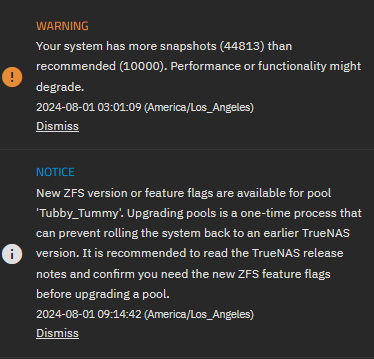
About 30 min later, I come back and notice the interface is very slow. I cannot load the dashboard at all, and other tabs are slow to load. I notice the posted screenshot warning about having many snapshots. While I do not remember exactly when the snapshot message appeared relative to me creating the snapshot tasks, it was definitely not present after hours of having access to the web interface before creating snapshot tasks.
I restart the machine to hopefully fix the slow interface issue. It doesn’t seem to help, but the number of snapshots in the new warning (identical to the one pictured) has decreased by about 10,000. It is at this point that I hypothesized that the system was going through old snapshots and deleting them, as the tasks are set up to only keep 1 per week after 1 month. I don’t remember all the settings of my CORE snapshot tasks, but I am pretty sure snapshots were taken every hour and kept for a year. The system is only 11 months old, so there are definitely no snapshots over a year old, but there was probably a large backlog of hourly snapshots that are several months old.
I set up a different naming scheme for the snapshot tasks in SCALE compared to my CORE installation, and my understanding was that individual snapshot tasks were in change of deleting snapshots they created, so having my old snapshots deleted by these new snapshot tasks seems illogical by my understanding. However, the lack of responsiveness of my machine after enabling the new snapshot tasks and the different numbers in the warning after rebooting seem to suggest the machine was working furiously to delete old snapshots.
Any thoughts about this?
[Edit: forgot the screenshot]