I searched quite a while here, and the Internet, on a similar problem like my one.
I got a UPS (man. AdPos) with ethernet module which can command several hosts by command line (like by a shell).
The goal is (as is usually the case) for the UPS to send the shutdown command to TrueNAS.
Unfortunately, TrueNAS ignores all commands. (24.04 community edition, NEW installation, 2FA disabled, hardware tower case, corei7-3440, 64GB SSD, 16GB RAM, 4x WD red).
Even via the web UI shell with sudo, no command is executed.
A putty connection worked once, but currently it is not working again.
I know a few Linux basics, but unfortunately I am not an advanced user…
Various users have been created who also have admin rights.
I am now somewhat desperate, not knowing what else to check or do.
Shutting down via the web UI works, of course, but it requires a second confirmation to shut down, as well as a reason why I want to shut down! How do I disable this behavior? There is no MFA/2FA enabled at all… What have I overlooked?
“interactive authentication required” is IMHO an error by ssh - passwordless authentication with a key pair does not work.
Before we go into debugging the ssh problem, @Ramarkus if the UPS has got an Ethernet adapter, doesn’t it support SNMP? If yes, you could configure the UPS using the builtin TrueNAS service and have TrueNAS shut down as intended.
AdPoS is not on the NUT hardware list best I can tell for being supported, but the site mentions a generic SMNP driver should work. The add-on network interface cards shown on the AdPoS website do support SNMP so selecting a generic SNMP type driver in Truenas System → UPS setup would likely work. I did not find any reference to anyone using this brand of UPS with Truenas anywhere.
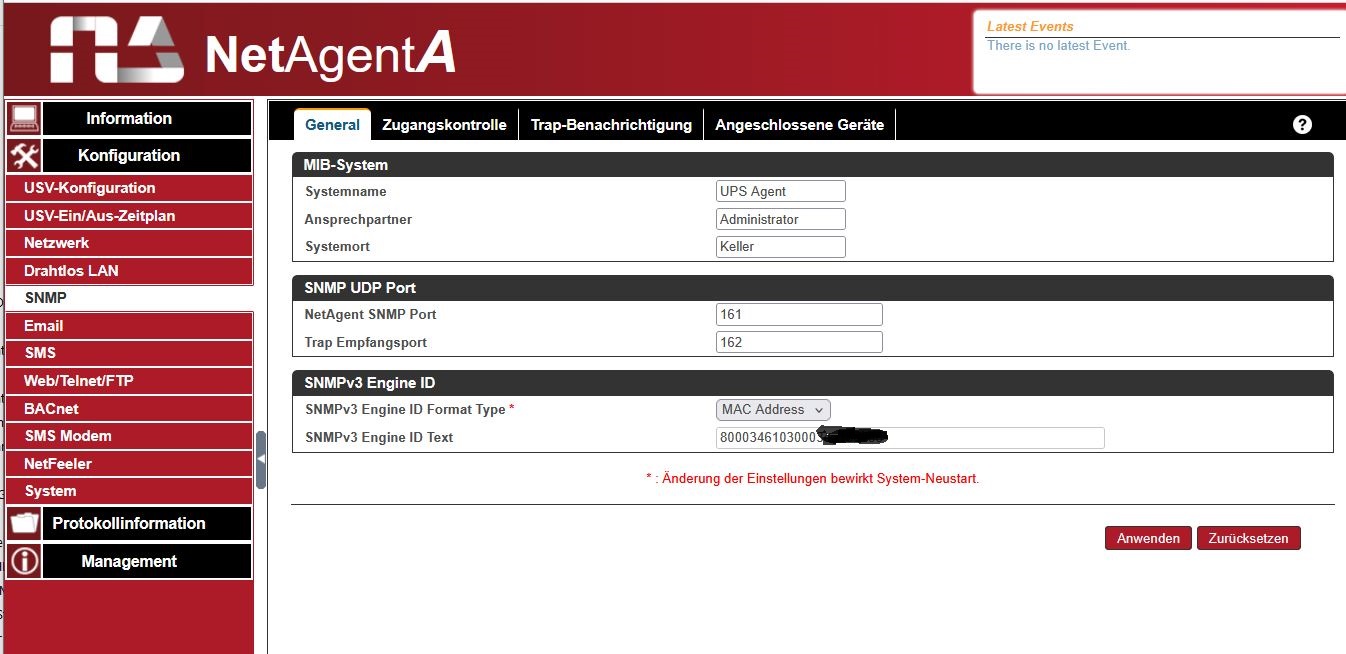
Hi PhilD13, thanks for feedback. (Originally I tried to post a screenshoot of my network adaptor…) but yes, it supports SNMP. But I never dealt with SNMP, so, I will give it a try…
The shell in the web UI is running with the web UI credentials, e.g. truenas_admin. But you need to be root to shut down the system.
So either generate an SSH key pair in the UI of your UPS and add the public key to the user root. In the SSH service settings permit root login. Then from the UPS UI configure the equivalent of
This is what Kris had to say about shutdown on truenas.
Below is an example of the call and can be done over ssh, from a script, or probably from cron on a schedule. I think you can also use the TrueNAS API directly over WebSocket if desired. If you wish to go that route then the API documentation is available within your TrueNAS GUI under Credentials > Users > API Keys > API Docs button
Using the Command Line (`midclt`) to shutdown
The simplest method is to SSH into the TrueNAS system and execute the `midclt` command with the `system.shutdown` argument. This can be automated.

* **Command:** `/usr/bin/midclt call system.shutdown [reason]`
* **Example:** `/usr/bin/midclt call system.shutdown "scheduled_nightly_shutdown"`

Recent versions of TrueNAS (e.g., TrueNAS Scale 25.04 and later) require a `reason` argument for the command to work.
Meanwhile I was foreced to update to 25.10.1 - Goldeye, anyway. (I am just at the begin of my setup).
But I still get it not worked that while my NetAgent UPS send a Trap (SNMPv1, community name, port 161 or 162) the TrueNas is shutting down. No matter which configuration, no matter which kind of driver… I’ve got ethernet, as well as USB connection. command: /usr/bin/midclt call system.shutdown “UPS-batt_shutdown” will not work…
I read, that truenas is a “special” peace of software, but this no-behaviour I really can NOT understand…
As I am not a “freak” in those things , and the documentation overwhelms you because of the sheer volume.
I also tried a SNMP monitoring software from PAESSLER, but this doesn’t show me anything usefull…
Well, generally an UPS does not trigger servers to shut down actively but the servers monitor the UPS either by proprietary protocols (APC and friends) or an open source tool like NUT.
And then when the UPS state changes from “OL” (online) to anything different the server itself initiates a shutdown.
Did you get NUT to work with your particular UPS?
I would be very surprised if SNMP trap support was present in TrueNAS. TrueNAS in SNMP terms is a managed system - it sends traps to an NMS like Observium.
nothings works with this “Netagent” SNMP-adapter (as it lost configuration because of ram failure).
So I changed to a more quality (german supportet) adaptor : generex CS141 .
I am still struggling with configuration and driver on TrueNAS. Anything I do/change : TrueNAS does not shut down in event of UPS AC-failure or “is-on-battery”.
In TruNAS documentation I cannot see how to install or use NUT driver or cannot see specific commands… (I am not a specialist…)
And I do not understand how you can pick pone of two different brands of SNMP adapters? Network management cards come from the UPS manufacturer and are specific to the UPS in question. E.g. something like this for Cyberpower:
Did you use the “AdPos” SNMP adapter from your UPS vendor? That’s the right one.
Then install the “PeaNUT” app on your TrueNAS to check if the UPS and SNMP is working correctly. All you should need to enter is the IP address of your UPS and the SNMP community - for read only commonly “public”. You can check the community in the proprietary interface of that SNMP card.
Then check the settings in the UI of the SNMP card:
is SNMP v2 enabled?
is there a read community named “public”?
is access not limited to specific IP addresses?
Install the PeaNUT app and check general function of SNMP. Then continue to setting up NUT in System: Services: UPS.
Sorry, I forgot PeaNUT does not speak SNMP itself, but only with a working NUT server. So forget PeaNUT for now.
So for checking basic function of your SNMP card use this:
snmpwalk -v2c -cpublic <ip of your UPS management card>
snmpwalk is included in TrueNAS CE, I just tried it on my own system.
That should produce a heck of a lot of output which is not relevant at the moment. But if you get the entire SNMP values and no error message, we can continue to configure the UPS service on TrueNAS.

 Thank you so far…