Truenas X20 dual controller - SAS controller firmware?

Tldr; larger SAS drives are not being detected by both controllers.

Hi guys, I’ve got an EOL ixsystems dual controller Truenas X20 12 bay unit.

I have revived this unit with fresh SLC SSD boot m2 drives, running 25.10 and applied its enterprise HA license file. I have some 14TB Exos SAS drives that I tested the unit with, I can create pools, enable HA, everything is working beautifully with zero errors… UNTIL:

I loaded the unit with 22TB HC570 Ultrastar SAS disks and while the caddy lights turn blue with confidence, the GUI gives me:
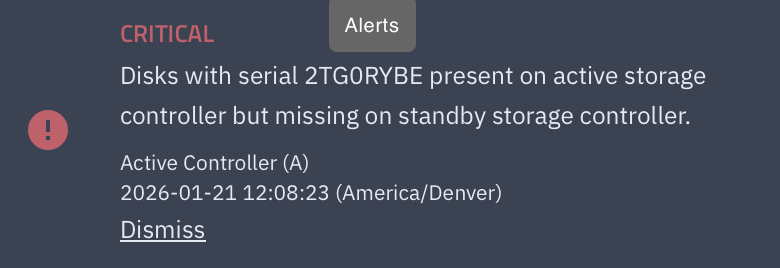
These drives are ONLY able to be seen by controller slot 1. If I swap controller positions, only the controller in slot 1 can communicate with these drives.

I attempted to rule out PWDIS and blocked pin 3 of a few drives but the behavior is identical.

As long as I set the controller that’s in slot1 to primary, only talking to that specific controller, I can create pools and utilize those disks but overall, the main management portal of the system is unhappy and HA cannot be utilized because the disks cannot be seen by both controllers.

Being that these disks have a datasheet that shows compatibility should be 100% and I am failing to find others with similar issues in other dual controller systems, and these HDD’s do not have any manufacturer notices or firmware updates, I’m of the opinion that the LSI controllers may need a firmware upgrade.

When running $ sudo sas3flash -list

it is spitting out:

Avago Technologies SAS3 Flash Utility

Version 16.00.00.00 (2017.05.02)

Copyright 2008-2017 Avago Technologies. All rights reserved.

Adapter Selected is a Avago SAS: SAS3008(C0)

Controller Number : 0

Controller : SAS3008(C0)

PCI Address : 00:04:00:00

SAS Address : 500e0ec-a-094f-fb40

NVDATA Version (Default) : 0e.00.00.00

NVDATA Version (Persistent) : 0e.00.00.00

Firmware Product ID : 0x2221 (IT)

Firmware Version : 14.00.00.00

NVDATA Vendor : LSI

NVDATA Product ID : Undefined

BIOS Version : N/A

UEFI BSD Version : N/A

FCODE Version : N/A

Board Name : Eval Board

Board Assembly : N/A

Board Tracer Number : N/A

Finished Processing Commands Successfully.

Exiting SAS3Flash.

I am finding that firmware version 16.00.12.00 is available BUT I am concerned with even attempting to flash any of the available versions of the firmware as the board name says “Eval board” and leaves me with no clue which firmware model # to even attempt to flash to these controllers.

Anyone have any suggestions, tips, tricks etc to get this EOL but otherwise still beautiful unit up and running with these 22tb SAS disks?

-Steve

I have little to no experience with TrueNAS HA units so take what I say with a large pinch of salt.

The firmware on your controller is very old so personally this appears to be the issue. Flashing to 16.00.12.00 seems to be the correct action to me. Naturally you could reach out to TrueNAS support and ask the question perhaps. I appreciate it’s out of warranty but it’s not like you’re asking them to fix it for you. I’d like to hope they would tell you if your idea to flash the firmware is sound or for some unknown reason would result in bricking the entire system.

Good luck and report back for others please.

Are these dual port drives?

Yes, they are.

Is there one or two SAS cables going from controller 1?
Is there one or two SAS cables going from controller 2?

This, I do not know. It’d be a chassis teardown. I would assume there’s two integrated backplane lanes of SAS connections per controller making it a total of 4 inside of the chassis. Each controller also has 2 SAS ports for jbod box expansion.

Edit: To add: the connections themselves on the controllers are highly proprietary and don’t signify any obvious numbers/lanes of SAS connections between the controllers and the backplane/chassis.

Hmm, I am not familar with the motherboard in that system, but when you said “swap controller positions”, what did you actually do? Didn’t you move SAS cables around? If you did, those are the cables I mean.

If your controllers are soldered directly to the motherboard and there are no cables going from the controllers to the backplane then I am out of ideas.

My thought was that you had double SAS cables going from controller 2 to the backplane, that setup (can be) invalid since multipath setups are no longer supported.

Gotcha, nah, this iXsystems X20 system is an enterprise dual-controller unit. There are no cables. Two slots for controllers (motherboards with integrated SAS controllers with modular memory dimms, m2 sata boot slot, pcie network, and IPMI). Each controller has proprietary connectors that slot into the HDD drive backplane circuit board.

I think ‘swap controllers’ means by software for the HA feature. Promote one controller over the other. Master / Slave or Parent / Child. Whatever terms you use today.

Thank you both for the elaboration.

My cable idea obviously doesn’t apply then, but there may still be a setting related to multipathing that you can try tinkering with. Maybe look for one the BIOS?

Update for ya’ll.

I went ahead and updated the LSI 9300 chipsets of both controllers with the newest 16.00.12.00 from 14.00.00.00.

I flashed the SAS9300-4i4e_IT.bin after making nv and flash rom backups. It seemed like the obvious model/version to flash considering how these controllers work (two SAS3 external expansion ports but supporting 12 internal drives as well, per controller). The flash process took successfully and LSI command line tools shows that the newest firmware is actually applied.

The unit still boots up normally, UI behaves as it should, still works perfectly with satisfied HA with the 14TB Exos SAS drives. The 22tb HC570 WD SAS drives still cannot be seen by both controllers at the same time.

I have opened a case with WD to see if they have any insight on the issue.