Hmm, stats are showing for the drives now. Even temperature. When I moved the server to the garage and everything booted back up there was a database error for statistics so cleared it. Didn’t show anything before that. Interesting. I might have it run a smart test just for giggles.
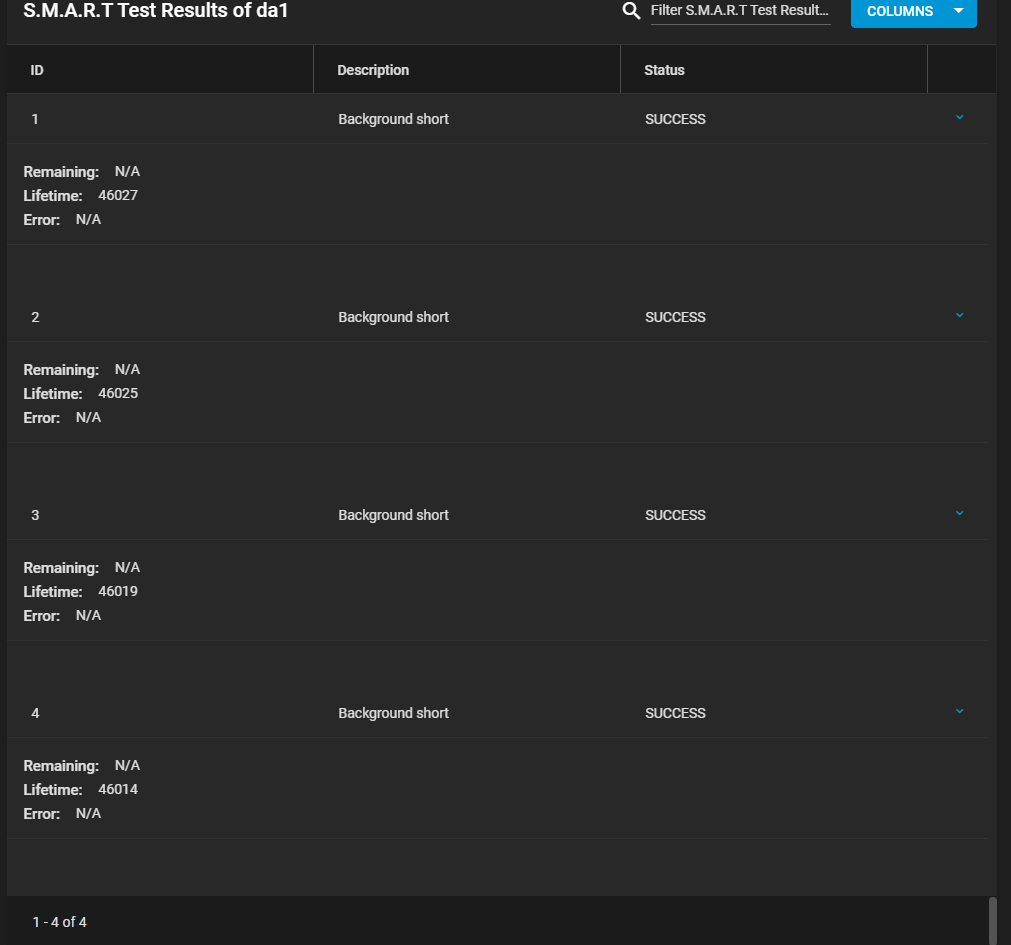
I see some of the drives have tests already and they say:
Does that mean it can access SMART? I did a manual short on that one and no error. Not sure what lifetime means? If that’s online hours then these drives are about 5ish years old. Hope they hold up for another 5.
Had to zoom out to get them all. Same drive as above
Forgot to thank everyone again for all the help. Very welcoming community and glad to be a part of it. I hope I can eventually return the favor and help others once I learn more and become acquainted with TrueNAS.
PS.
Cloud Sync is freaking AWESOME! So easy to use and can now pull down selectively from my 30TB of data from gdrive all in the background. I’ve been over their new 5TB enterprise policy for some time and now have to pull what I want before it’s deleted.
That doesn’t make any sense. If the controller is passed through, that’s it, the VM controls it, just like the host could if it were not passed through.
I read somewhere in this forum that if a drive is passed through you don’t get smart data… but was sceptical, hence the apparently. I could have been clearer.
Passing through a disk != passing through a disk controller. Passing through a disk is fraught with traps and gotchas. Passing through a controller is pretty safe and well-understood. One edge case is with NVMe drives, doing PCIe passthrough of the drive is akin to passing through a SAS controller with disks attached; passing through a block device hosted on the drive has all the same problems that would exist with SATA or SAS disks doing the same thing.
I was wondering about the 80% rule. Considering you lose drives to parity adding another 20% loss is quite a punch to the stomach. How much performance loss are we talking the closer you get to 100% capacity? This being a pool that doesn’t do much writing besides one time (media mostly) will it be that noticeable? I don’t see myself quite hitting 80%+ for a little while but it will happen.
I just added back in my 1tb samsung pro ssd to the flexbay. I plan on using it for emby metadata and other things I change a lot. No sense scattering all that across the sas plates. TN is telling me a single drive pool isn’t a great idea, and I get that. But as it’s connected through the HBA then it’s only available to TN. Is that an ok idea? None of the data is critical if it decided to die.
I miss spoke earlier. It’s an 860 Pro, so a sata drive.
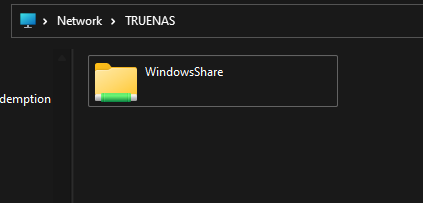
I created a pool, then a dataset as SMB. Gave the Windows Group access like the SAS “WindowsShare” but ti doesn’t show up as an option when you open SMB only the Windows Share folder. Maybe it just takes some time to update or I need to restart the service.
Performance loss will come with fragmentation, which can be expected to grow as the pool fills but there’s no strict relation between the two. If the pool accumulates writes without ever deleting or rewriting files, fragmentation may remain low.
Performance, however, is the wrong concern. The main issue is that as you go over 99.9% and into 100% the pool will lock itself with no easy way out. A CoW file system has to record new metadata before it can “delete” anything; so, unlike FAT/NTFS/HFS/APFS/ext#, ZFS needs free space to recover free space… You can add a new vdev to have free space again, but with raidz this operation is irreversible.
So the guidance is to always keep the pool below 80% (50% for block storage!) and expand well before you hit the wall at 100% full.
I see. I had been reading about fragmentation and the like. Never saw any data about performance numbers so was curious. I doubt I will keep it at 80% so accept that risk but will keep it from being full. I have no room for expansion to mitigate this and doubt I will be building another server anytime soon so want to maximize data availability. I suppose I should have considered this before using TN, or ZFS.
What I’m going to do to prevent a bunch or writes and changes is adjust my workflow for writing to the pool. Grabbed a 2TB ssd for torrents so nothing will be written to the pool like I did with my OMV pool on my other server. Since I have to seed, I can’t just rename media and have it read by emby. So then I will copy media needing processed for proper naming using filebot to my 1tb ssd. From there moved to the zpool on my sas drives. This way I limit to mostly single writes and all reads from the pool. Try to limit deletions.
I could probably fill to 90% Rather quickly if I brought down 30TB from the cloud plus the 10TB from my OMV pool on the other server. I’m going to be skipping a lot of media from the cloud because I don’t use it. I really don’t want to move away from TN as I’m rather enjoying the ease of use and the WebUI.
Can the drives be upgraded in a pool? So let’s say I eventually can afford larger capacity drive. I know the larger size won’t be reflected as it will take on the smallest drive capacity in the pool. So eventually if they all are upgraded would the new size be reflected or is that not something ZFS can do?
I should have gone with 8-12TB drives but they weren’t in the budget and couldn’t pass up $300 for 12x 6TB enterprise SAS drives.
EDIT:
I suppose I could use an external drive bay enclosure setup to a PCIe HBA and pass through to TN to expand the pool down the line if not?
Can I restart my router while doing that gdrive cloud sync task? Will it just time out till connection is re-established? I did it as a sync task and not a copy. I figured it would only pull down stuff not already on the destination if I had to rerun it. Reason is the edgelite CPU is pegged at 100% and causing issues. It should not be at 100% for what the network is doing.
EDIT:
I think I want to try hardware offloading on the router to see if that helps but don’t want to wait for 5 more days to try it till the cloud sync is done.
My internet has come to a crawl since really using TN and the new server. I have no idea what it is. I did run a flat cat 6 cable to the AP replacing the cable I made to clean up the run where it is. Thing is I can download a torrent and max out my gbit connection but anything else we are talking 50kbps. Thats direct connected with a same flat cable. Guess I have to hope the gdrive sync doesn’t force me to run start all over I’m restarting this router.