
Intel i210 or i350 are safe bets.
Thank you etorix for this buying advice.
Without waiting for my network card to be replaced before relaunching TrueNAS Core, I set about installing TrueNAS Scale (on test USB sticks).
The installation went well and I finally got access to my NAS via the web interface.
The problem now is that when I try to import my old pool, I get a kernel panic and the NAS reboots:
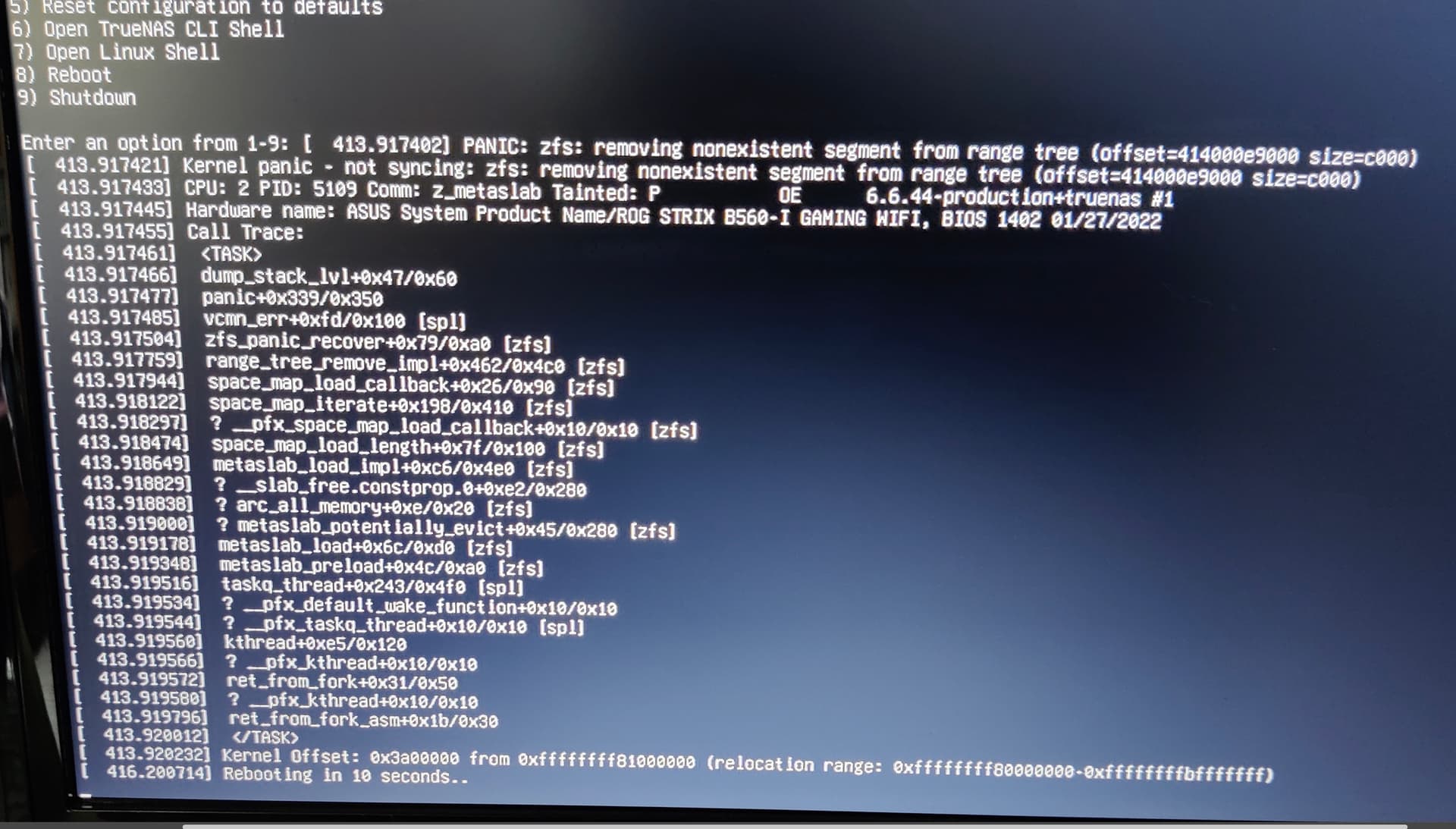
Hi all
I’m still with Scale 25.04 and despite some settings I’ve found on the net :

… I can’t manage to import my pool.
I would like to try the operation in ‘read only’ mode but I don’t know how to do it.
Does anyone have any ideas?
Thanks in advance
Hi all,
I’m making progress…
Via the ‘Linux shell’ and the command :
zpool import -o readonly=on -R /mnt Volume Volume2
(the initial pool name is Volume)
…I managed to mount my pool without causing a kernel panic.
Now my datasets appear in TrueNAS and that’s a big improvement and a great hope for my data:
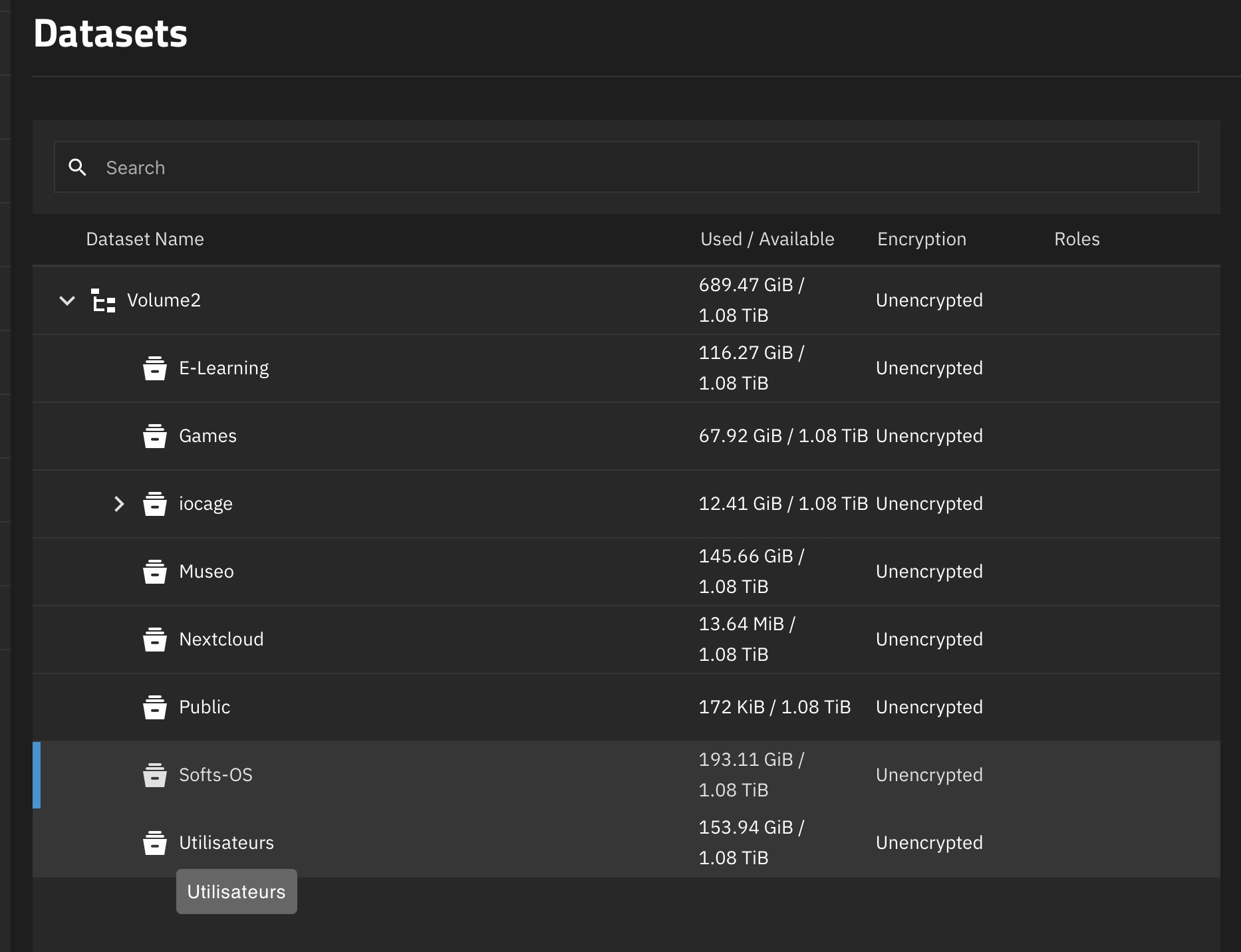
I can see my files in the Linux console, but how can I make them visible in TrueNAS and directly in the Finder (I’m on macOS) to make a backup on external media.
I imagine that it should be possible to do this directly from the Linux console, but I don’t know anything about it and I don’t even know how to access a USB disk.
And will the copied files be readable directly under macOS?
Thanks for your help
Hi all,
I just saw on the net that macOS can natively recognize the zfs format.
So I installed one of the two data disks (they are mirrored, so identical) in an external box, and imported my pool from my Mac (with the appropriate command: sudo pool import -f -o readonly=on -R /Volumes Volume Nas )
I was able to recover some of my data, but one of the Datasets (‘Utilisateurs’) is recalcitrant and is only truly visible by an ‘import’ from TrueNAS.
My question therefore remains the same: how to make a Dataset visible in TrueNAS appear in the Finder without any pool being created in TrueNAS?
Thank you for the slightest clue
(PS: the Dataset in question is indeed ‘imported’ into TrueNAS but the copies on a Fat32 external disk - so that it remains compatible with macOS - are not done correctly and a large part of the data cannot be copied)
Permission issues?
mecOS specific resource branches not being copied correctly?
We do not have much information to work with.
Hi etorix,
Thank you for your support.
-
macOS side
As you suggest, there may be an access permission problem to some ‘Datasets’ under macOS because the dataset concerned is that of the ‘users’ which is probably more protected by TrueNAS than the others!?
But how then to make it treated like everyone else?
On the macOS desktop it appears -as others- as a mounted disk but with a small ‘forbidden sense’ panel… (I will make a screenshot so useful) -
TrueNAS side
Under TrueNAS (in Linux console) all datasets are apparently accessible after mounting the pool.
But when I want to copy the ‘users’ folder on an externe USB drive, the copy is very partial, stops quite quickly, and finally Scale reboot -
To test?
As a final solution I could maybe add two additional disks to my NAS to create a pool, but I don’t know how I can transfer the data from the datasets visible under TrueNAS (the 2 initial disks of the imported initial pool) to the created pool (with the 2 disks added).
I hope I have been a little clearer, but I can of course give precisions and answer all questions (but in my little area of expertise  )
)
Read-only prevents changing ownership/permissions.
If you’ve reinstalled anew, have you recreated users with the same user IDs as before on the NAS?
Why, oh why FAT32??? Use HFS or APFS: No size limit. Then copy all data, and reassign ownership on the copy.
sudo cp -a /Volumes/Nas/* /Volumes/MY_BIG_USB_DRIVE/ &
I didn’t know that Linux could write to an external drive formatted in HFS or APFS…
I’ll try that, thanks!
Linux can’t (not without further add-ons at least), but I thought you had the pool on macOS.
Yes, the pool can be directly imported under macOS, but one of the important datasets (‘Utilisateurs’) is not accessible.
Hence the need for me to also work on the TrueNAS mounted pool, and try to save the data to an external USB disk.
I’ve looked for a file system natively supported by Linux and macOS, and at this stage I’ve only found Fat32 with the limitations we know about.
Is there a more interesting alternative?
Hi all,
I’ve finally got most of my data back:
Under TrueNAS, in Linux console, I first imported my pool in read-only mode, as already mentioned above.
Then I copied my data in SSH using the ‘scp’ command, repeating the process several times in case of errors.
SSH proved to be the only effective way of exchanging my data between Linux and macOS.
What’s more, it’s faster than a conventional copy.
As I still don’t know what happened to the original pool, I think I’m going to abandon TrueNAS, at least temporarily, and make do with backups on external removable media…
And thanks again to everyone here who took the time to help me 