About 10 years ago, I built a FreeNas server. About three years ago, I upgraded (let’s just say unwillingly) to TrueNas. Over the years, I upgraded the pool as the messages popped up; these are one-way upgrades. Last month, the boot disk died and it took the TrueNas server with it. The system did not have a proper shutdown. I fixed/replaced the boot disk, installed the latest TrueNas and imported the configuration file (TAR). At this point, I cannot import the pools.
hardware details:
home made PC
processor: Intel Core i7-8700K
motherboard: MSI Z370 Gaming Pro Carbon
memory: Patriot Viper PE000429-PV432G300C6K, 16GB X 2=32GB
hard disks: Western Digital WD40EFRX, 4TB X 6
TrueNas: Generic - Community - 25.10.0.1 - Goldeye
RAID-Z3
boot disk: Samsung 32GB FIT USB 3.0 Flash Drive
When I go to Storage→Import Pool, there is no selection under Pool.
When I go to Storage→Disks, I see the seven disks: the six plus the boot.
zpool status
NAME STATE READ WRITE CKSUM
boot-pool ONLINE 0 0 0
sdg3 ONLINE 0 0 0
zpool import
no pools available to import
lsblk
NAME MAJ:MIN RM SIZE RO TYPE MOUNTPOINTS
sda 8:0 0 3.6T 0 disk
├─sda1 8:1 0 2G 0 part
└─sda2 8:2 0 3.6T 0 part
sdb 8:16 0 3.6T 0 disk
├─sdb1 8:17 0 2G 0 part
└─sdb2 8:18 0 3.6T 0 part
sdc 8:32 0 3.6T 0 disk
├─sdc1 8:33 0 2G 0 part
└─sdc2 8:34 0 3.6T 0 part
sdd 8:48 0 3.6T 0 disk
├─sdd1 8:49 0 2G 0 part
└─sdd2 8:50 0 3.6T 0 part
sde 8:64 0 3.6T 0 disk
├─sde1 8:65 0 2G 0 part
└─sde2 8:66 0 3.6T 0 part
sdf 8:80 0 3.6T 0 disk
├─sdf1 8:81 0 2G 0 part
└─sdf2 8:82 0 3.6T 0 part
sdg 8:96 1 28.7G 0 disk
├─sdg1 8:97 1 1M 0 part
├─sdg2 8:98 1 512M 0 part
└─sdg3 8:99 1 28.1G 0 part
Before anyone complains: yes, I am aware of the problem of using a USB memory drive for a boot disk. It was “recommended” 10 years ago under FreeNas. Anyway, I already had one USB memory drive failure about five years ago. I rebuilt the USB memory drive with no problem. Right now, I am trying to get the pool up and running. Afterwards, I will rebuild the file server with the newer hardware, including a NVMe drive as the boot.
Any assistance is greatly appreciated. I think I am missing a step somewhere because the pool was originally created under FreeNas with GELI. Thanks!
I guess that is the problem! I found the latest version: TrueNAS CORE 13.0-U6.8. I will download it and install it. Many thanks for the quick response.
I have TrueNAS-13.0-U6.8 up and running. When I go to Storage→Pools, I see the pool. It says it is LOCKED - This geli-encrypted pool failed to decrypt. I cannot find the option to decrypt the pool (i.e. upload the GELI key).
I have two files: the TAR file for the configuration and a GELI file for the encryption. I don’t think the GELI content is inside the TAR file. According to the timestamps, the TAR file was saved in August 2024 and the GELI file was saved in June 2019. I remember I had to upload the TAR file first and then upload the GELI file as a separate step several years ago.
I uploaded the TAR file already. The group and user info, among other things, are correct. Now, I just have to figure how to upload the GELI file.
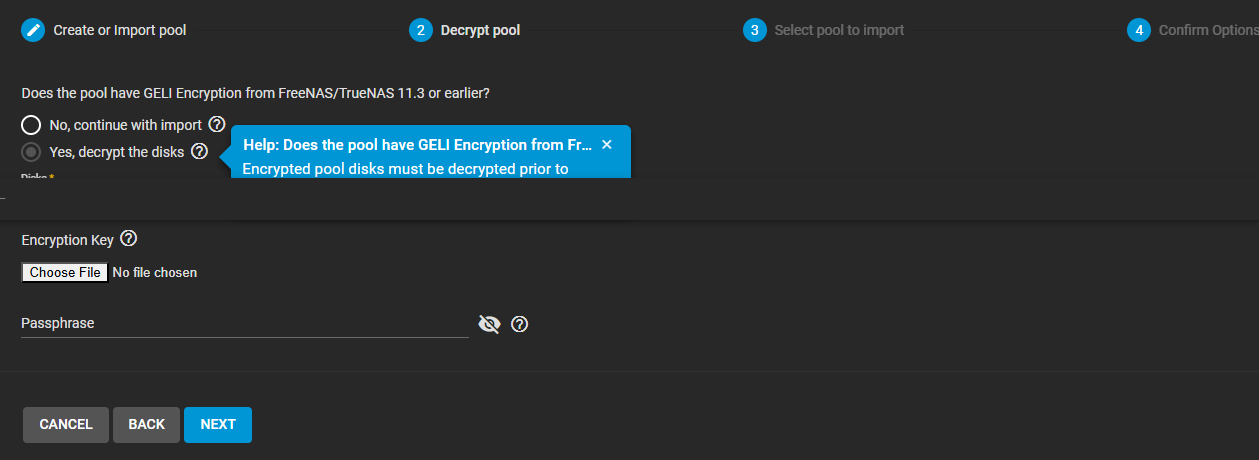
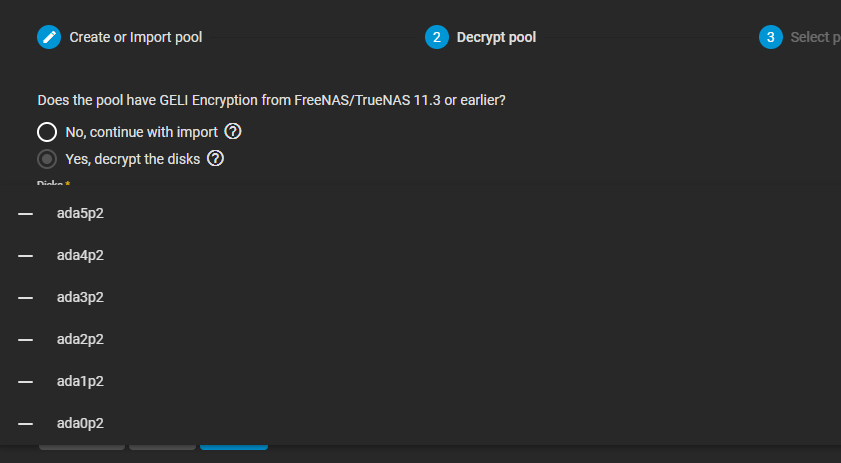
In Storage→Pools (the screenshot above), I used the ADD option, “Import an existing pool” and “Yes, decrypt the disk”. The prompt message mentions GELI Encryption. When I go to select Disks, there is no disk or pool to select.
As I mentioned in my initial post, the system did not have a proper shutdown; it crashed. Therefore, I did not export or disconnect the pool. I rebuilt the NAS system, first with TrueNas CE and now with TrueNas Core. I have been using the TAR file that I save several years ago when I rebuilt FreeNas. The volume is already imported probably because of the TAR file; it was imported when the TAR file was created.
I wonder if the crash “disconnected” the individual drives from the pool.
You might have to reboot. The middleware is probably confused when you used the config file to restore everything, including the active pools. The problem is that the underlying GELI devices were not unlocked when it made the middleware “aware” of the pool.
I rebooted. I tried to Export/Disconnect. Same error message.
On a different path, I also used System→General “RESET CONFIG” to wipe the configuration. It automatically rebooted. At the Storage→Pools, no pool was listed. When I tried ADD, I found the six disks.
I see what you mean. In the screen above, I selected the six individual disks. After several menus, including the one asking for the GELI file, I was able to add the pools.
MANY THANKS! I thought I lost all my data.
Next step: Copy the data to a new non-encrypted disk. Rebuild the server with TrueNas CE and the new hardware. Copy the data onto new server.