
Problem/Justification
While TrueNAS original audience is in the data center, at the latest since the TrueNAS Mini series, homelab, SoHo and even home users are part of the equation, too.
Many older homes are not wired for networking, and can at best use unreliable and slow ethernet over power line adapters to wire the home.
Futhermore, there are ISPs that provide in some country WiFi-only routers with 5G as last mile medium, and the routers that have ethernet ports generally are limited to 1Gbps ports.
Modern WiFi, particularly 3-band WiFi7 mesh setups, by far outperform in a typical apartment the slow poke ethernet over power line alternative and even 1Gbps ethernet, being competitive in many cases with 2.5Gbps or faster wired setups.
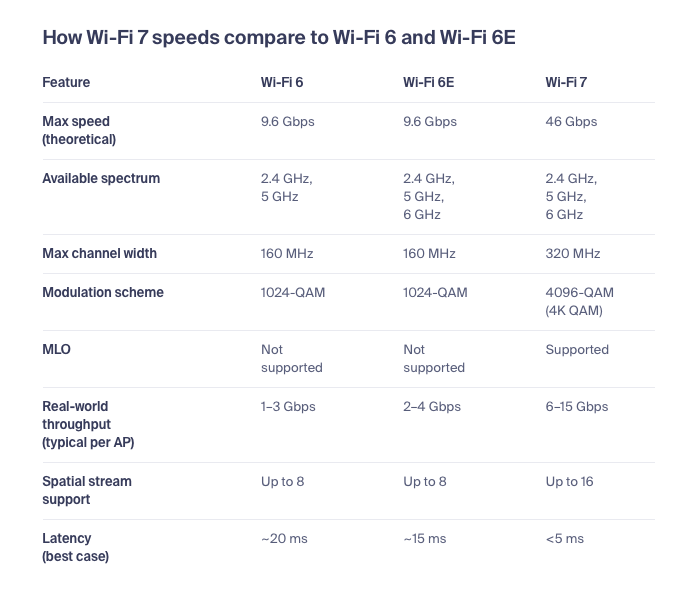
Source: Wi-Fi 7 speeds: What enterprises can expect
Given that the OS underlying TrueNAS supports WiFi out of the box, all that’s needed is that TrueNAS not go out of its way to disable that support, and allow the user to enter SSID, encryption standard, and WiFi password in the UI.
Impact
Those who don’t need WiFi will not impacted negatively, it’s just a feature like many others they may not use in their setup.
However, those who are stuck with unreliable slow-poke wired home networks will breathe a sigh of relief to finally have decent speeds, and in particularly being rid of the nightmare of having to power cycle ethernet over power line adapters that hang themselves due to interference or high data traffic.
User Story
Should be pretty obvious: place the NAS where it’s out of the way and where the noise doesn’t bother you, rather than where the most reliable ethernet port might be. A NAS humming next to the TV where the WiFi router sits isn’t exactly welcomed by family members who want to enjoy movies without hum, rattles and gurgles from disk access and fans.
Alternatively, the user in the home office will enjoy faster speeds than what can squeze over a few hundred mbps ethernet over power-line, if the NAS is placed elsewhere.
Seeing that the underlying OS already supports WiFi, the presence of the feature doesn’t impact those who don’t need it negatively, but that it constitutes a signifcant upgrade for those who actually could need it, there speaks little against implementing this, especially since in the larger context, it’s a relatively trivial to implement feature.


 the few bytes a WiFi driver requires, which gets loaded on demand anyway. Linux had WiFi drivers when main memory was measured in megabytes and single core CPUs were standard. Talking about bloat in the context of modern hardware is just ludicrous. Even a RasPi the size of a chewing gum stick runs the Linux WiFi stack with ease.

